
Introduction
This manual provides instructions for the safe and efficient use of your Kastar BL-5C AC Wall Battery Charger. This charger is designed to provide a reliable power source for compatible BL-5C type batteries and offers a convenient USB charging port for other devices. Please read this manual thoroughly before use and retain it for future reference.
Safety Information
To reduce the risk of electric shock, fire, or injury, always follow these basic safety precautions:
- Do not open or disassemble the charger. There are no user-serviceable parts inside. Refer servicing to qualified service personnel.
- Do not expose the charger to rain or moisture.
- Do not use the charger if it has been damaged in any way.
- Keep the charger away from heat sources and direct sunlight.
- Ensure the charger is used within the specified input voltage range (100-240V).
- Unplug the charger from the power outlet when not in use.
- This charger is intended for charging compatible BL-5C type batteries only. Do not attempt to charge other battery types.
Package Contents
The Kastar BL-5C AC Wall Battery Charger package includes:
- 1 x Kastar BL-5C AC Wall Battery Charger
Setup
Follow these steps to prepare your charger for use:
1. Extend the AC Plug
Gently pull out the foldable US plug from the charger body until it locks into place. This allows the charger to be plugged directly into a wall outlet.

Image: The Kastar BL-5C charger with its foldable US plug extended, ready for insertion into a wall socket.
2. Insert the Battery
Identify the positive (+) and negative (-) terminals on your BL-5C battery. The Kastar intelligent charger automatically recognizes the polarity, so you do not need to worry about which contact on the charger aligns with positive or negative on the battery. Simply slide the battery into the adjustable slot on the charger, ensuring the battery contacts align with the charger's pins.

Image: A BL-5C battery being inserted into the Kastar charger, demonstrating the alignment of battery contacts with the charger pins. The text on the image indicates automatic positive and negative recognition.
The adjustable slot accommodates batteries with a height between approximately 1.25 inches (1 inch 1/4) and 2.375 inches (2 inches 3/8).
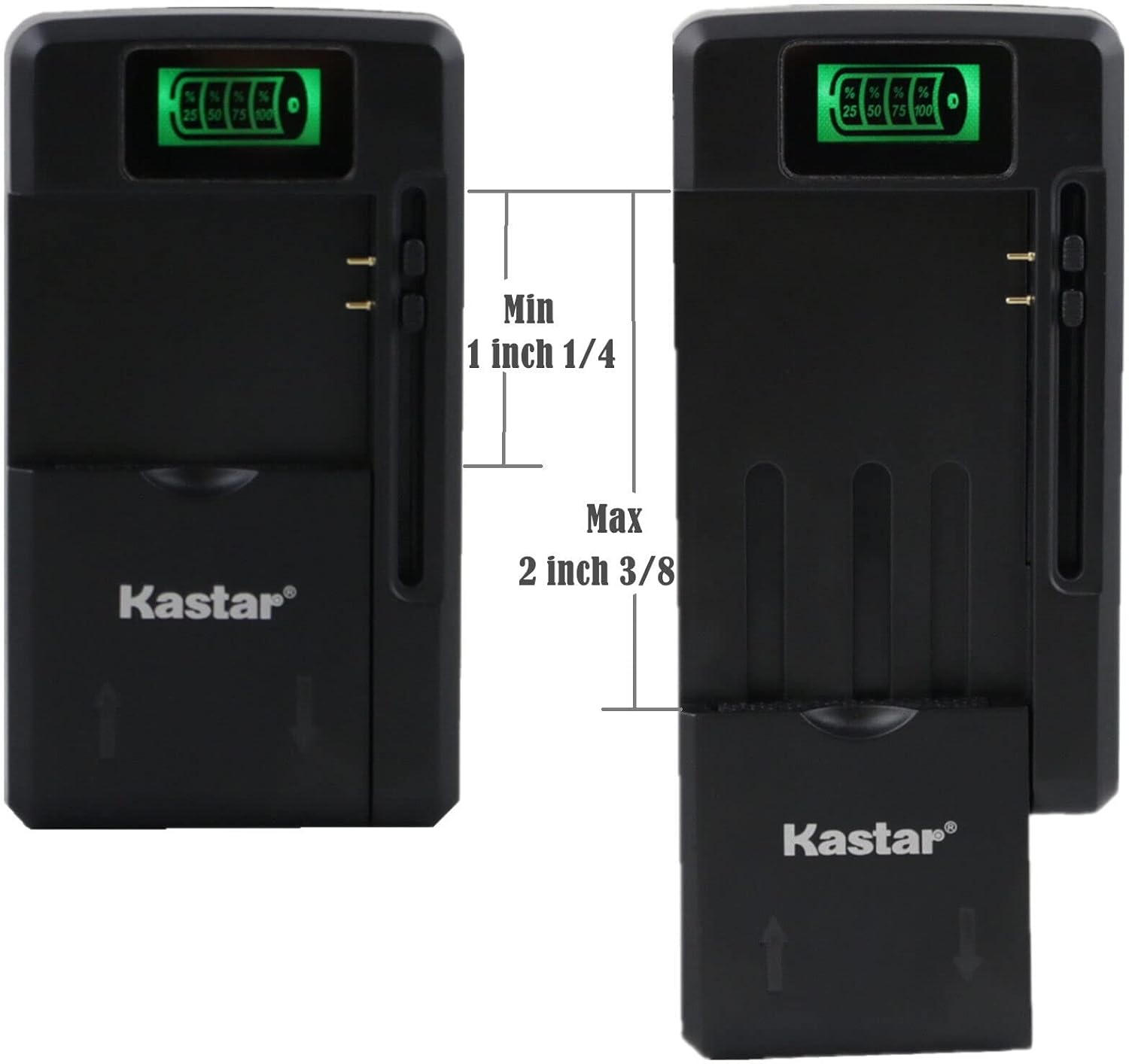
Image: The Kastar charger illustrating the minimum and maximum dimensions for battery insertion, showing the adjustable slot.
3. Connect to Power
Plug the charger directly into a standard AC wall outlet (100-240V). The LCD display on the charger will illuminate, indicating that charging has begun.
Operating Instructions
Battery Charging
Once the battery is correctly inserted and the charger is plugged into a power outlet, the charging process will start automatically. The built-in protection circuit prevents overcharging and excessive heat.
LCD Display Indicator
The LCD screen on the charger provides real-time feedback on the battery's charging status. The indicator will show progress in increments of 25%, 50%, 75%, and 100%. When the LCD screen displays 100%, the battery is fully charged.
USB Charging Function
The charger also features a high-speed USB output port, allowing you to charge almost any smartphone or other USB-powered device simultaneously while charging a battery, or independently.

Image: The Kastar charger plugged into a wall outlet, with a smartphone connected to its USB port via a white charging cable, demonstrating the USB charging capability.
Maintenance
- Cleaning: Disconnect the charger from the power outlet before cleaning. Use a soft, dry cloth to wipe the exterior of the charger. Do not use liquid cleaners or solvents.
- Storage: When not in use, store the charger in a cool, dry place, away from direct sunlight and extreme temperatures. Ensure the AC plug is folded into the charger body for compact storage.
- Inspection: Periodically inspect the charger for any signs of damage, such as frayed cables or cracked casing. If damage is found, discontinue use and contact customer support.
Troubleshooting
| Problem | Possible Cause | Solution |
|---|---|---|
| Charger not powering on / LCD not illuminating. |
|
|
| Battery not charging. |
|
|
| USB device not charging. |
|
|
Specifications
| Model Number | MCH-0B-BL5C-C |
| Input Voltage | AC 100-240V |
| Output (Battery) | DC 4.2V = 800mA |
| Output (USB) | DC 5.2V = 1300mA |
| Product Dimensions | 2 x 1.5 x 3 inches |
| Item Weight | 2.4 ounces |
| Certifications | CE, FCC |
| Manufacturer | Kastar |
Warranty and Support
For warranty information or technical support, please contact Kastar customer service. Refer to the product packaging or the official Kastar website for contact details.
You can visit the Kastar Store for more information: Kastar Official Store