
Kastar MCH-2B-BL5C-I
Kastar BL-5C Battery and Smart LCD Charger User Manual
Model: MCH-2B-BL5C-I | Brand: Kastar
Product Overview
This manual provides instructions for the Kastar BL-5C Battery and Smart LCD Charger. This product is designed to provide reliable power for compatible devices and offers an intelligent charging solution with an LCD display for monitoring battery status.
- Battery Type: Lithium-Ion; Battery Voltage: 3.7V; Battery Capacity: 1150mAh.
- Intelligent Charger: Features a fold-out US plug, 100-240V worldwide input voltage, and a high-speed USB charge function.
- LCD Display: Provides real-time battery charging status (25%, 50%, 75%, 100%).
- Multi-Protection: Built-in circuit protection against overcharging and overheating.
- Versatile Charging: Charges not only the included batteries but also compatible smartphone batteries via the universal slot, and other devices via USB.

Figure 1: The Kastar Smart LCD Charger alongside two BL-5C Lithium-Ion batteries.

Figure 2: Front view of a single Kastar BL-5C Lithium-Ion battery, highlighting its capacity and branding.
Setup
1. Unpacking and Inspection
Carefully remove all components from the packaging. Verify that all items listed in the package contents are present and undamaged. The package includes one smart LCD charger and two BL-5C batteries.
2. Charger Overview

Figure 3: The Kastar Smart LCD Charger with its integrated fold-out US plug extended for power connection.
The charger features a fold-out US plug for direct wall outlet connection, a universal battery slot, an LCD display, and a USB output port for charging other devices.
3. Battery Insertion
To charge a BL-5C battery, align the battery's contacts with the adjustable pins in the charger's universal slot. The charger automatically recognizes the positive and negative terminals, so the orientation of the battery within the slot does not matter as long as the contacts align with the pins.

Figure 4: Proper insertion of a BL-5C battery into the universal charging slot of the Kastar charger. The charger automatically detects polarity.
Ensure the battery is securely seated in the slot. The adjustable pins can accommodate various battery sizes, from a minimum of 1 1/4 inches to a maximum of 2 3/8 inches in length.
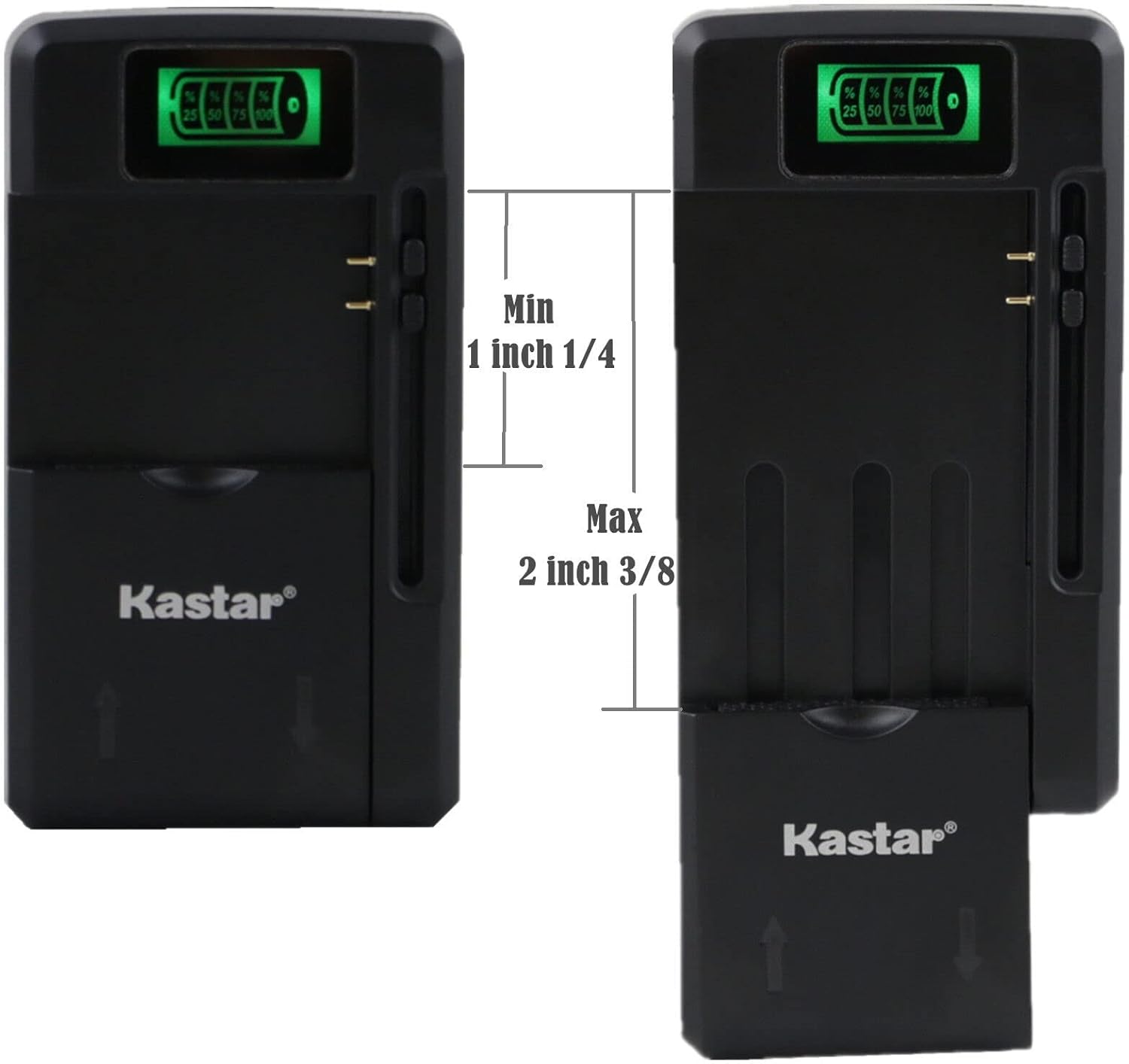
Figure 5: Diagram illustrating the adjustable range of the universal battery charging slot on the Kastar charger.
Operating Instructions
1. Charging Batteries
- Insert the battery into the charger's universal slot as described in the Setup section.
- Plug the charger directly into a standard AC wall outlet (100-240V).
- The LCD display on the charger will illuminate and show the charging status in increments of 25%, 50%, 75%, and 100%.
- When the LCD display shows 100%, the battery is fully charged. Remove the battery from the charger and unplug the charger from the wall outlet.
The charger is equipped with intelligent circuitry to prevent overcharging and overheating, ensuring safe and efficient charging.
2. Using the USB Charging Function
The Kastar Smart LCD Charger also features a high-speed USB output port, allowing you to charge other USB-powered devices such as smartphones, tablets, or other small electronics.
- Plug the charger into a standard AC wall outlet.
- Connect your USB charging cable to the USB output port on the side of the charger.
- Connect the other end of the USB cable to your device.
- The charger will begin supplying power to your device. Note that the USB charging function operates independently of the battery charging slot.

Figure 6: The Kastar Smart LCD Charger providing power to a smartphone via its integrated USB output port.
Maintenance
Cleaning
To maintain optimal performance, keep the charger and batteries clean. Use a soft, dry cloth to wipe down the surfaces. Do not use liquid cleaners or solvents, as these can damage the electronic components.
Storage
Store the charger and batteries in a cool, dry place away from direct sunlight and extreme temperatures. For long-term storage, it is recommended to charge the batteries to approximately 50% capacity before storing them to preserve their lifespan.
Troubleshooting
| Problem | Possible Cause | Solution |
|---|---|---|
| Charger LCD does not light up. | No power supply; charger not plugged in correctly; faulty outlet. | Ensure the charger is securely plugged into a working wall outlet. Try a different outlet. |
| Battery not charging (LCD not progressing). | Battery not inserted correctly; battery contacts are dirty; battery is faulty. | Re-insert the battery, ensuring contacts align with charger pins. Clean battery contacts with a dry cloth. If problem persists, the battery may be faulty. |
| USB charging not working. | USB cable is faulty; device not compatible; charger not receiving power. | Try a different USB cable. Ensure the charger is plugged into a live power outlet. Verify your device is compatible with standard USB charging. |
| Charger feels warm during operation. | Normal operation; excessive load. | It is normal for the charger to feel slightly warm during charging. If it becomes excessively hot or emits smoke/odor, unplug immediately and discontinue use. |
Specifications
| Feature | Detail |
|---|---|
| Product Dimensions | 2.5 x 2 x 3 inches (Charger) |
| Item Weight | 4.4 ounces (Total package) |
| Model Number | MCH-2B-BL5C-I |
| Battery Type | Lithium Ion |
| Battery Voltage | 3.7V |
| Battery Capacity | 1150mAh |
| Charger Input | AC 100-240V |
| Charger Output (Battery) | DC 4.2V = 800mA |
| Charger Output (USB) | DC 5.2V = 1300mA |
| Manufacturer | Kastar |
| Country of Origin | China |
Safety Information
Please read and follow these safety guidelines to prevent injury or damage to the product:
- Do not disassemble or modify the charger or batteries.
- Keep the product away from water, moisture, and high humidity.
- Avoid exposing the product to extreme temperatures (above 60°C / 140°F) or direct sunlight.
- Do not short-circuit the battery terminals.
- Dispose of batteries responsibly according to local regulations. Do not dispose of batteries in fire.
- Keep out of reach of children.
- If the product is damaged or malfunctions, discontinue use immediately and contact support.

Figure 7: Rear view of the BL-5C battery showing important warning labels and compliance markings.

Figure 8: Rear view of the Kastar charger displaying electrical specifications and safety warnings.
Warranty and Support
Warranty Information
Kastar products are manufactured to high-quality standards. For specific warranty details regarding your Kastar BL-5C Battery and Smart LCD Charger, please refer to the warranty card included with your purchase or visit the official Kastar website.
Customer Support
If you encounter any issues or have questions about your Kastar product, please contact Kastar customer support. You can typically find contact information on the product packaging, the Kastar official website, or through your point of purchase.
For more information, visit the Kastar Store on Amazon.
Ask a question about this manual
Ask about setup, troubleshooting, compatibility, parts, safety, or missing instructions. Manuals+ will review the question and use this page’s manual context to help answer it.