
AJAZZ K3
AJAZZ K3 Wired Mechanical Gaming Keyboard User Manual
Model: K3
Introduction
Thank you for choosing the AJAZZ K3 Wired Mechanical Gaming Keyboard. This 98-key (96% layout) keyboard is designed for an optimal gaming and typing experience, featuring clicky blue switches, customizable RGB illumination, and an ergonomic design. This manual provides detailed instructions for setup, operation, maintenance, and troubleshooting to ensure you get the most out of your new keyboard.

Image: The AJAZZ K3 Wired Mechanical Gaming Keyboard, showcasing its 98-key layout and green/white color scheme.
Setup
The AJAZZ K3 keyboard is designed for simple plug-and-play functionality. Follow these steps to set up your keyboard:
- Unpack the Keyboard: Carefully remove the keyboard and its accessories from the packaging.
- Connect the USB-C Cable: Locate the detachable USB-C cable. Plug the USB-C end into the port on the keyboard and the standard USB-A end into an available USB port on your computer (PC, PS5, PS4, Xbox One, Mac).
- System Recognition: Your operating system should automatically detect and install the necessary drivers. No additional software installation is required.
- Adjust Ergonomics: The keyboard features 2-level (4°/7°) adjustable stands. Flip out the stands on the underside of the keyboard to achieve your preferred typing angle.

Image: Diagram illustrating the wired Type-C connection, U-shaped keys for better finger touch, high and low keys layout for comfort, and the adjustable stand of the AJAZZ K3 keyboard.
Operating Instructions
Basic Functions
- Standard Typing: All standard alphanumeric and symbol keys function as expected.
- Numeric Keypad: The dedicated numeric keypad on the right provides quick data entry.
- Anti-Ghosting: All keys feature anti-ghosting technology, ensuring accurate input even during rapid, simultaneous key presses.
RGB Illumination Control
The AJAZZ K3 keyboard features 10-zone RGB illumination with preset backlight modes.
- Change Backlight Modes: Press the FN key simultaneously with the INS key (located in the upper left corner) to cycle through the 10 preset backlight modes.
- Adjust Brightness: To change the RGB brightness, press the FN key simultaneously with the Up Arrow (↑) or Down Arrow (↓) keys.

Image: Illustration showing how to activate number pad backlight and change light models by pressing the Fn and Ins keys.

Image: Visual representation of the 10 RGB rainbow lighting modes available on the AJAZZ K3 keyboard, demonstrating various color patterns.
Indicator Lights
The keyboard features indicator lights for various statuses:
- Numeric Keypad Lock: Indicates if the numeric keypad is active.
- Letter Case: Indicates Caps Lock status.
- Low Battery Voltage Alarm: (Applicable if a wireless variant exists, though this model is wired. This might be a general feature for the product line.)
- Charging Status Prompt: (Applicable if a wireless variant exists.)

Image: Diagram showing the location and function of indicator lights for numeric keypad lock, letter case, low battery voltage, and charging status.
Maintenance
Proper maintenance will extend the lifespan of your AJAZZ K3 keyboard.
- Cleaning Keycaps: Use a soft, damp cloth to wipe down the keycaps. For deeper cleaning, you can carefully remove keycaps using a keycap puller (not included) and clean underneath. The ABS keycaps are made with a two-color injection molding process, ensuring the letters will not fade.
- Dust Removal: Use compressed air to remove dust and debris from between the keys.
- Avoid Liquids: Do not spill liquids on the keyboard. If a spill occurs, immediately disconnect the keyboard and allow it to dry completely before reconnecting.
- Storage: Store the keyboard in a cool, dry place away from direct sunlight when not in use for extended periods.
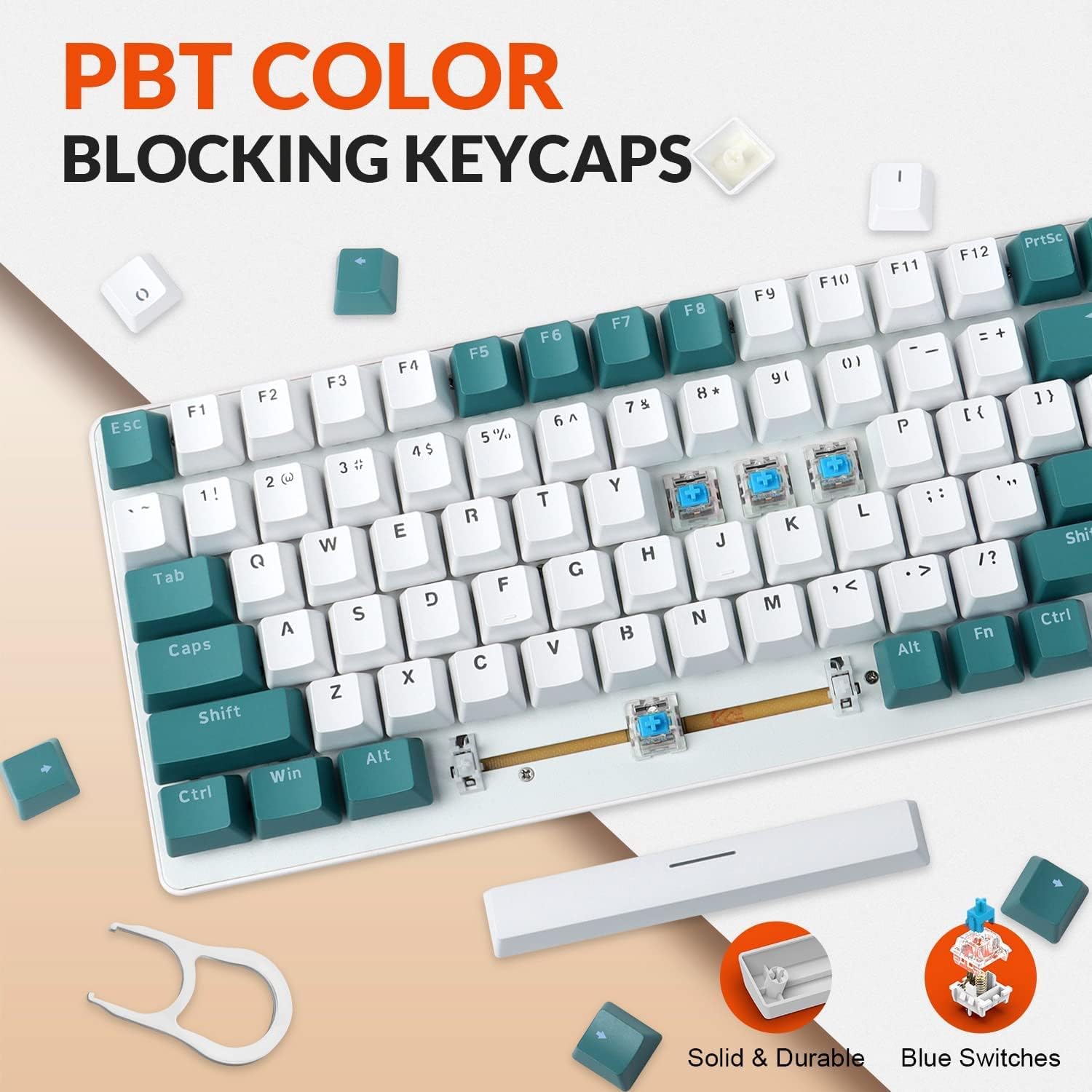
Image: Close-up view of the AJAZZ K3 keyboard highlighting the PBT color blocking keycaps and the blue mechanical switches, indicating their solid and durable construction.
Troubleshooting
If you encounter issues with your AJAZZ K3 keyboard, refer to the following common problems and solutions:
| Problem | Possible Cause | Solution |
|---|---|---|
| Keyboard not responding. | Loose USB connection, incorrect USB port, system driver issue. | Ensure the USB-C cable is securely connected to both the keyboard and the computer. Try a different USB port on your computer. Restart your computer. |
| Keys are not registering or are ghosting. | Debris under keycaps, software conflict. | Clean under the affected keycaps using compressed air. Ensure no background applications are interfering with keyboard input. |
| RGB lighting is not working or stuck. | Incorrect lighting mode, power issue. | Press FN + INS to cycle through lighting modes. Ensure the keyboard is properly powered via the USB connection. |
| Keyboard feels unstable or slides. | Adjustable stands not deployed or uneven surface. | Ensure the adjustable stands are fully deployed and placed on a flat, stable surface. The ripples on the back are designed to prevent sliding. |
Specifications
| Feature | Detail |
|---|---|
| Model | K3 |
| Layout | 98-Key (96% Layout) |
| Switch Type | Clicky Blue Mechanical Switches |
| Connectivity | Wired USB-C (Detachable Cable) |
| Keycap Material | ABS (Two-color injection molding) |
| Backlight | 10-Zone RGB Illumination (10 preset modes) |
| Ergonomics | 2-level (4°/7°) Adjustable Stand |
| Anti-Ghosting | All Keys Anti-Ghosting |
| Compatibility | Windows 2000/XP/VISTA/ME/7/10, MAC OS, PS5, PS4, Xbox One |
| Dimensions (Approx.) | 39.7 x 16 x 4.8 cm |
| Weight (Approx.) | 971 g |

Image: Overview of the AJAZZ K3 Mechanical Keyboard highlighting key features such as mechanical shaft body, function keys, plug & play, lighting effects, and two-color injection molding.
Warranty and Support
AJAZZ products are designed for reliability and performance. For specific warranty information, please refer to the warranty card included with your product or visit the official AJAZZ website. If you require technical assistance or have questions not covered in this manual, please contact AJAZZ customer support through their official channels.
For the latest drivers, firmware updates, and support resources, please visit the official AJAZZ support page.
Related documentsK3


Ask a question about this manual
Ask about setup, troubleshooting, compatibility, parts, safety, or missing instructions. Manuals+ will review the question and use this page’s manual context to help answer it.