
DEERC 9500E
DEERC 9500E RC Truck User Manual
Model: 9500E | Brand: DEERC
Introduction
Thank you for choosing the DEERC 9500E 1:16 Scale High-Speed All-Terrain RC Truck. This manual provides essential information for setting up, operating, maintaining, and troubleshooting your new remote control vehicle. Please read this manual thoroughly before use to ensure safe operation and optimal performance. This truck is designed for both adults and children, offering a thrilling off-road experience with its powerful 4x4 capabilities and durable construction.
Package Contents
Upon unboxing, please verify that all the following items are included in your package:
- DEERC 9500E RC Truck (1)
- 2.4 GHz Remote Controller (1)
- High-Capacity Rechargeable Batteries for Truck (2)
- USB Charging Cable (1)
- AA Batteries for Remote Controller (2)
- Screwdriver (1)
- User Manual (1)
- Additional accessories (e.g., spare parts, cleaning brush)

Image: Contents of the DEERC 9500E RC Truck package, showing the truck, remote, batteries, and tools.
Specifications
| Feature | Detail |
|---|---|
| Model Number | 9500E |
| Scale | 1:16 |
| Dimensions (L x W x H) | 32 x 24 x 15 cm |
| Weight | 1.34 kg |
| Max Speed | Up to 35 km/h (40+ km/h with optimal conditions) |
| Run Time | Up to 40 minutes (with 2 batteries) |
| Control Frequency | 2.4 GHz |
| Drive System | 4-Wheel Drive (4WD) with Independent Suspension |
| Motors | Dual Powerful Motors with Fully Covered Metal Heat Sink |
| Differentials | Dual Alloy Differentials |
| Steering Servo | 1.8 KG.CM Torque Steering Servo |
| Chassis Material | High-Quality Nylon |
| Car Shell Material | Reinforced PVC |
| Tires | Anti-slip, Wider All-Terrain Tires |
| Climbing Ability | Up to 50 degrees |
| Recommended Age | Adults and Children |

Image: Key features and specifications of the DEERC 9500E RC Truck.
Setup Guide
1. Charging the Vehicle Batteries
The DEERC 9500E comes with two high-capacity rechargeable batteries. Before first use, fully charge both batteries. Connect the USB charging cable to a USB power adapter (not included) and then to the battery. The indicator light on the charger will show the charging status (e.g., red for charging, green for fully charged). Charging typically takes 3-4 hours per battery. Always supervise charging and disconnect once complete.
2. Installing Batteries in the Vehicle
- Carefully remove the body shell of the RC truck by detaching the four body clips.
- Locate the battery compartment.
- Insert one or both fully charged batteries into the compartment, ensuring correct polarity.
- Connect the battery connector to the vehicle's power port.
- Secure the battery compartment cover and reattach the body shell with the clips.

Image: Installation of the high-capacity batteries within the RC truck chassis.
3. Installing Batteries in the Remote Control
- Open the battery compartment on the back of the remote controller.
- Insert two AA batteries, observing the correct polarity (+/-).
- Close the battery compartment cover securely.
4. Pairing the Remote Control with the Vehicle
- Ensure both the vehicle and the remote control are turned off.
- Turn on the RC truck first. The indicator light on the truck will blink.
- Immediately turn on the remote controller. The indicator light on the remote will also blink.
- Wait a few seconds for the lights on both the truck and the remote to become solid, indicating a successful pairing.
- If pairing fails, turn off both devices and repeat the steps.
Operating Instructions
Basic Controls
Familiarize yourself with the remote control's functions:
- Trigger: Pull the trigger to move forward, push to brake or reverse.
- Steering Wheel: Turn the wheel left or right to steer the vehicle.
- Steering Trim Dial: Adjusts the steering to ensure the vehicle drives straight when the steering wheel is centered.
- Speed Switch: Adjusts the maximum speed of the vehicle (useful for beginners or indoor use).

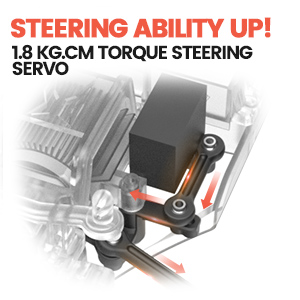
Image: Illustrations of the remote control's steering mechanism and the reinforced PVC car shell.
Driving Tips
The DEERC 9500E is designed for all-terrain performance. For the best experience:
- Outdoor Use: Ideal for dirt, gravel, grass, and light sand. Avoid deep water or extremely muddy conditions.
- Indoor Use: Use the speed switch to reduce speed for better control in smaller spaces.
- Battery Life: To maximize run time, avoid continuous full-throttle driving. Allow the motors to cool down between intense runs.
- Control Range: Maintain a clear line of sight between the remote and the truck to prevent signal loss.

Image: The DEERC 9500E RC truck performing on various challenging terrains.

Image: Children enjoying the DEERC 9500E RC truck outdoors.
Advanced Features
The DEERC 9500E is equipped with advanced features for superior performance:
- 4WD Independent Suspension: Provides excellent stability and handling over rough terrain, absorbing shocks effectively.
- Dual Alloy Differentials: Enhances traction and control by distributing power efficiently to all four wheels, especially during turns or on uneven surfaces.
- Dual Powerful Motors with Metal Heat Sink: Delivers high speed and torque while the heat sinks prevent overheating during extended use.
- 1.8 KG.CM Torque Steering Servo: Ensures precise and responsive steering control.
- High-Quality Nylon Car Chassis: Offers durability and resilience against impacts, contributing to the truck's overall robustness.

Image: Internal components highlighting the 4WD independent suspension system.
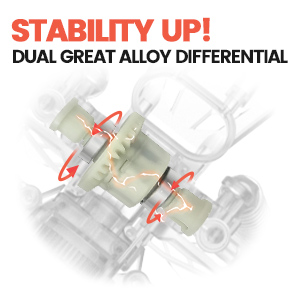
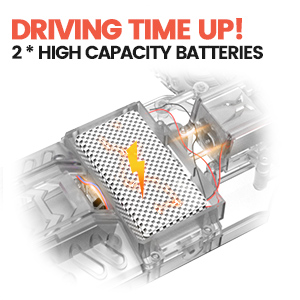
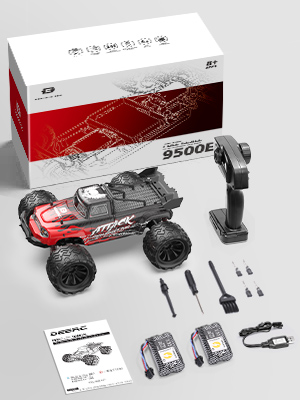
Image: Detailed views of the truck's motors, differentials, and shock absorption system.
Maintenance
Proper maintenance will extend the life and performance of your DEERC 9500E RC Truck:
- Cleaning: After each use, especially in dusty or dirty conditions, clean the truck. Use a soft brush or compressed air to remove dirt from the chassis, wheels, and suspension components. A damp cloth can be used for the body shell. Do not use water directly on electronic components.
- Battery Care: Always disconnect the battery from the vehicle when not in use to prevent deep discharge. Store batteries in a cool, dry place. Do not overcharge or over-discharge batteries.
- Lubrication: Periodically check moving parts like gears and bearings. Apply a small amount of RC-specific lubricant if needed.
- Inspection: Regularly inspect for loose screws, damaged parts, or worn tires. Replace any damaged components promptly to maintain performance and safety.
- Storage: When storing the truck for extended periods, remove all batteries from both the vehicle and the remote control. Store in a dry, cool environment away from direct sunlight.

Image: The durable nylon chassis, a key component for maintenance and longevity.
Troubleshooting
If you encounter issues with your DEERC 9500E RC Truck, refer to the table below for common problems and solutions:
| Problem | Possible Cause | Solution |
|---|---|---|
| Truck does not respond to remote. | Batteries low/dead in truck or remote; Not paired; Power switch off. | Charge/replace batteries; Re-pair truck and remote; Ensure power switches are ON. |
| Short run time. | Batteries not fully charged; Old/damaged batteries; Continuous high-speed driving. | Fully charge batteries; Replace old batteries; Drive at varying speeds. |
| Truck pulls to one side. | Steering trim needs adjustment; Damaged steering components. | Adjust steering trim dial on remote; Inspect and replace damaged parts. |
| Loss of control/signal interference. | Out of range; Other 2.4 GHz devices nearby; Obstructions. | Operate within range; Move to an area with less interference; Ensure clear line of sight. |
| Motors feel hot. | Extended high-speed use; Obstruction in drivetrain. | Allow motors to cool down; Check for debris in gears/wheels. |
Safety Precautions
To ensure safe operation and prevent injury or damage, please observe the following precautions:
- This product is not suitable for children under 8 years old without adult supervision.
- Always operate the RC truck in open areas, away from people, pets, and obstacles.
- Do not operate near roads, busy streets, or in wet conditions (rain, puddles, snow).
- Never touch the moving parts of the truck (wheels, motors) while it is in operation.
- Use only the original charging cable and batteries provided or recommended by DEERC.
- Do not disassemble or modify the truck or remote control. This may cause malfunction and void the warranty.
- If the truck becomes stuck or entangled, turn it off immediately before attempting to free it.
- Avoid prolonged exposure to direct sunlight or extreme temperatures.
Warranty and Support
DEERC products are manufactured to high-quality standards. For any questions, technical support, or warranty claims, please contact DEERC customer service. Keep your purchase receipt as proof of purchase. Specific warranty terms and conditions may vary by region and retailer.
For further assistance, please visit the official DEERC website or contact their support team through the retailer where you purchased the product.
Related documents9500E


Ask a question about this manual
Ask about setup, troubleshooting, compatibility, parts, safety, or missing instructions. Manuals+ will review the question and use this page’s manual context to help answer it.