Bellemave Full Size Bed Frame User Manual
Model: FST00226-F2-AB1
Introduction
Thank you for choosing the Bellemave Full Size Bed Frame. This manual provides essential information for the safe assembly, operation, and maintenance of your new bed frame. Please read all instructions carefully before beginning assembly and retain this manual for future reference.
Safety Information
- Always follow assembly instructions carefully.
- Use caution around sharp edges and when handling metal components.
- Ensure all screws and bolts are securely tightened before use. Periodically check and re-tighten as necessary.
- Do not exceed the recommended weight capacity of the bed frame.
- Keep small parts away from children during assembly to prevent choking hazards.
- Ensure the bed frame is placed on a level surface.
Package Contents
Before assembly, verify that all parts are present and undamaged. Refer to the parts list provided in your physical instruction manual. Typical components include:
- Headboard components (with integrated charging station and LED light channel)
- Side rails and support beams
- Bed slats
- Underbed storage drawers (2 units)
- LED light strip and power adapter
- Assembly hardware (screws, bolts, Allen wrench)
If any parts are missing or damaged, please contact customer support before proceeding with assembly.
Assembly Instructions
Assembly typically requires two people and can be completed in under an hour. Follow the detailed steps below and refer to the diagrams in your physical manual for visual guidance.
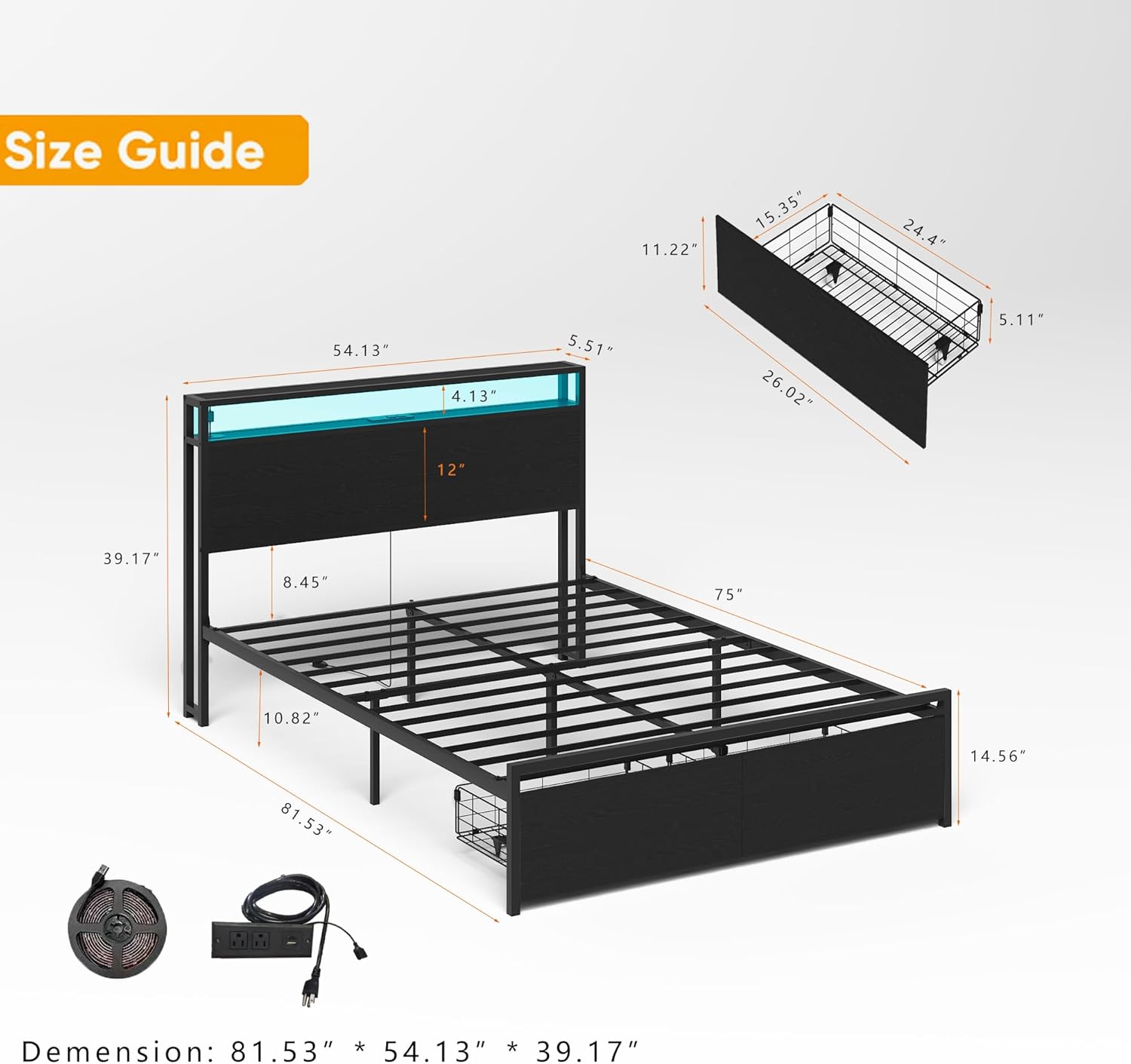
Image: Size Guide and Component Overview. This diagram illustrates the overall dimensions and key structural components of the bed frame, including the headboard, frame, and underbed storage baskets.
- Unpack and Organize: Carefully unpack all components and lay them out on a clean, soft surface to prevent scratches. Identify each part according to the parts list.
- Assemble the Headboard: Attach the headboard support bars to the main headboard panel. Ensure the charging station module is correctly oriented and secured.
- Assemble the Bed Frame: Connect the side rails to the headboard and footboard (if applicable) using the provided hardware. Do not fully tighten bolts until the entire frame is assembled.
- Install Bed Slats: Place the bed slats across the frame and secure them according to the instructions. Ensure even spacing for proper mattress support.
- Install Underbed Drawers: Assemble the two storage drawers. Insert the drawers into the designated slots under the bed frame. The special lock design helps keep them securely in place.
- Attach LED Light Strip: Carefully adhere the LED light strip into the channel on the headboard. Connect the LED strip to its power adapter.
- Final Tightening: Once all components are in place and aligned, fully tighten all bolts and screws.
Operating Instructions
LED Light System
The integrated RGB LED light system offers customizable ambient lighting for your bedroom. It is controlled via a mobile application.

Image: LED Light Features and App Control. This image highlights the various functions of the LED lighting, including over 60,000 colors, mic mode, music mode, timing function, and switch controller, all manageable via a mobile application.
- Power On/Off: Connect the LED light strip's power adapter to a wall outlet. Use the mobile app or the inline switch controller to turn the lights on or off.
- Mobile App Control: Download the designated mobile application (refer to your physical manual for QR code or app name). Pair your device with the LED system via Bluetooth.
- Color Selection: Within the app, choose from over 60,000 colors to match your mood or decor.
- Brightness Adjustment: Adjust the light intensity using the app's brightness control.
- Modes: Explore various modes such as flash mode, music mode (lights react to sound), and mic mode.
- Timing Function: Set schedules for the lights to turn on or off automatically.
Charging Station
The headboard features a convenient charging station to power your electronic devices.

Image: Charging Station Details. This close-up shows the integrated charging station with 1 USB port, 1 Type-C port (5V 2A), and 2 AC outlets (125V/12A), powered by a 7.9-foot power cord.
- Power Connection: Ensure the charging station's 7.9-foot power cord is securely plugged into a functional wall outlet.
- USB/Type-C Ports: Use the 1 USB (5V 2A) and 1 Type-C (5V 2A) ports to charge compatible devices such as smartphones, tablets, or other small electronics.
- AC Outlets: The 2 AC outlets (125V/12A) can be used for larger electronics or power adapters.
- Usage: Simply plug your devices into the appropriate ports or outlets.
Underbed Storage Drawers
The bed frame includes two spacious underbed storage drawers for organizing your belongings.

Image: Underbed Storage Drawers. This image displays the two spacious underbed drawers, designed with rolling wheels for easy access and a locking mechanism to keep them securely in place.
- Access: The drawers are equipped with rolling wheels for smooth opening and closing.
- Security: A special lock design ensures the drawers remain securely in place when not in use.
- Capacity: Ideal for storing bed sheets, off-season clothing, books, or other items.
Maintenance
- Cleaning: Wipe the metal and wooden surfaces with a soft, damp cloth. Avoid harsh chemicals or abrasive cleaners.
- Hardware Check: Periodically inspect all bolts and screws to ensure they remain tight. Re-tighten as needed to maintain stability.
- LED Lights: If the LED strip becomes dusty, gently wipe it with a dry, soft cloth. Do not use liquids directly on the LED strip or electrical components.
- Drawer Maintenance: Keep the drawer wheels free of debris to ensure smooth operation.
Troubleshooting
| Problem | Possible Cause | Solution |
|---|---|---|
| Bed frame is wobbly or unstable. | Loose hardware. Uneven floor. | Check and tighten all bolts and screws. Ensure the bed is on a level surface; use shims if necessary. |
| LED lights are not turning on. | Power connection issue. Faulty LED strip. App not connected. | Ensure the LED power adapter is securely plugged in. Check the connection between the LED strip and the adapter. Re-pair the mobile app if connection is lost. If still not working, contact customer support. |
| Charging station is not working. | Power cord unplugged. Device incompatibility. | Verify the charging station's power cord is fully plugged into a live outlet. Test with different devices and cables. |
| Drawers do not slide smoothly. | Debris in wheels/tracks. Overloaded drawer. | Clear any obstructions from the drawer wheels and tracks. Reduce the weight in the drawer. |
Specifications
| Feature | Detail |
|---|---|
| Size | Full |
| Product Dimensions (L x W x H) | 81.5" x 54.3" x 39.4" |
| Material | Metal |
| Color | Black |
| Special Feature | No Box Spring Needed |
| Included Components | Headboard, Slats, 2 Storage Drawers |
| Charging Station | 1 USB Port (5V 2A), 1 Type-C Port (5V 2A), 2 AC Outlets (125V/12A), 7.9FT Power Cord |
| LED Lights | RGB, App Control (60,000+ colors, brightness, flash mode, timing) |
| Assembly Required | Yes (Approx. 1 hour for 2 people) |
| Item Weight | 33 pounds |
| Model Number | FST00226-F2-AB1 |
Customer Support
For any questions, missing parts, or assistance with assembly or operation, please contact Bellemave customer support. Refer to your purchase documentation or the Bellemave official website for contact information.


