

Introduction
This manual provides detailed instructions for the assembly, operation, and maintenance of your XINLEI ML55A Mobile TV Stand. Please read these instructions carefully before installation and retain them for future reference. This mobile TV stand is designed to accommodate flat or curved televisions ranging from 21 to 60 inches, with a maximum weight capacity of 35 kg (77 lbs) for the TV bracket and 10 kg (22 lbs) for the accessory shelf. It features VESA compatibility from 100x100mm to 400x400mm, adjustable height, and lockable wheels for easy mobility and stability.
Safety Information
- Ensure all components are present and undamaged before assembly. Do not use if any parts are missing or defective.
- Do not exceed the maximum weight capacity of 35 kg (77 lbs) for the TV bracket and 10 kg (22 lbs) for the shelf. Overloading can cause instability and potential injury.
- Verify your TV's VESA pattern (distance between mounting holes) is within the supported range (100x100mm to 400x400mm).
- Always lock the wheels when the stand is in a stationary position to prevent accidental movement.
- Keep children and pets away from the TV stand during assembly and when moving it.
- Distribute weight evenly on the shelf to maintain balance.
- If you have any doubts about the installation or safety, consult a qualified professional.
Package Contents
Please check that all parts are included in your package. If any parts are missing or damaged, please contact customer support.
- Main Support Pole
- Base with Wheels (4x lockable casters)
- TV Mounting Bracket (VESA compatible)
- Adjustable Media Shelf
- Hardware Kit (screws, washers, spacers for TV mounting and assembly)
- Assembly Tools (e.g., Allen wrench, spanner)
Setup Instructions
Follow these steps to assemble your XINLEI ML55A Mobile TV Stand.
Step 1: Attach Wheels to Base
Secure the four lockable wheels to the base frame using the provided bolts and wrench. Ensure they are tightened securely.

Image: The mobile TV stand features 360-degree rotating wheels for flexible movement between rooms.
Step 2: Assemble the Main Pole and Base
Connect the main support pole to the assembled base. Use the appropriate screws and ensure a stable connection. The pole provides the vertical support for the TV and shelf.
Step 3: Install the Adjustable Media Shelf
Attach the media shelf to the main pole at your desired height. The shelf is designed to hold up to 10 kg (22 lbs) and can be adjusted to different positions. Ensure it is level and securely fastened.

Image: The XINLEI ML55A features an extra-large, adjustable, and reinforced media shelf with a 10 kg load capacity, compared to smaller, less robust alternatives.

Image: The adjustable storage shelf can be positioned at various heights along the main pole, offering flexibility for media devices.
Step 4: Attach TV Mounting Brackets to TV
Identify the correct screws, washers, and spacers from the hardware kit that fit your TV's VESA mounting holes. Attach the vertical mounting brackets to the back of your television. Ensure they are securely fastened and aligned.
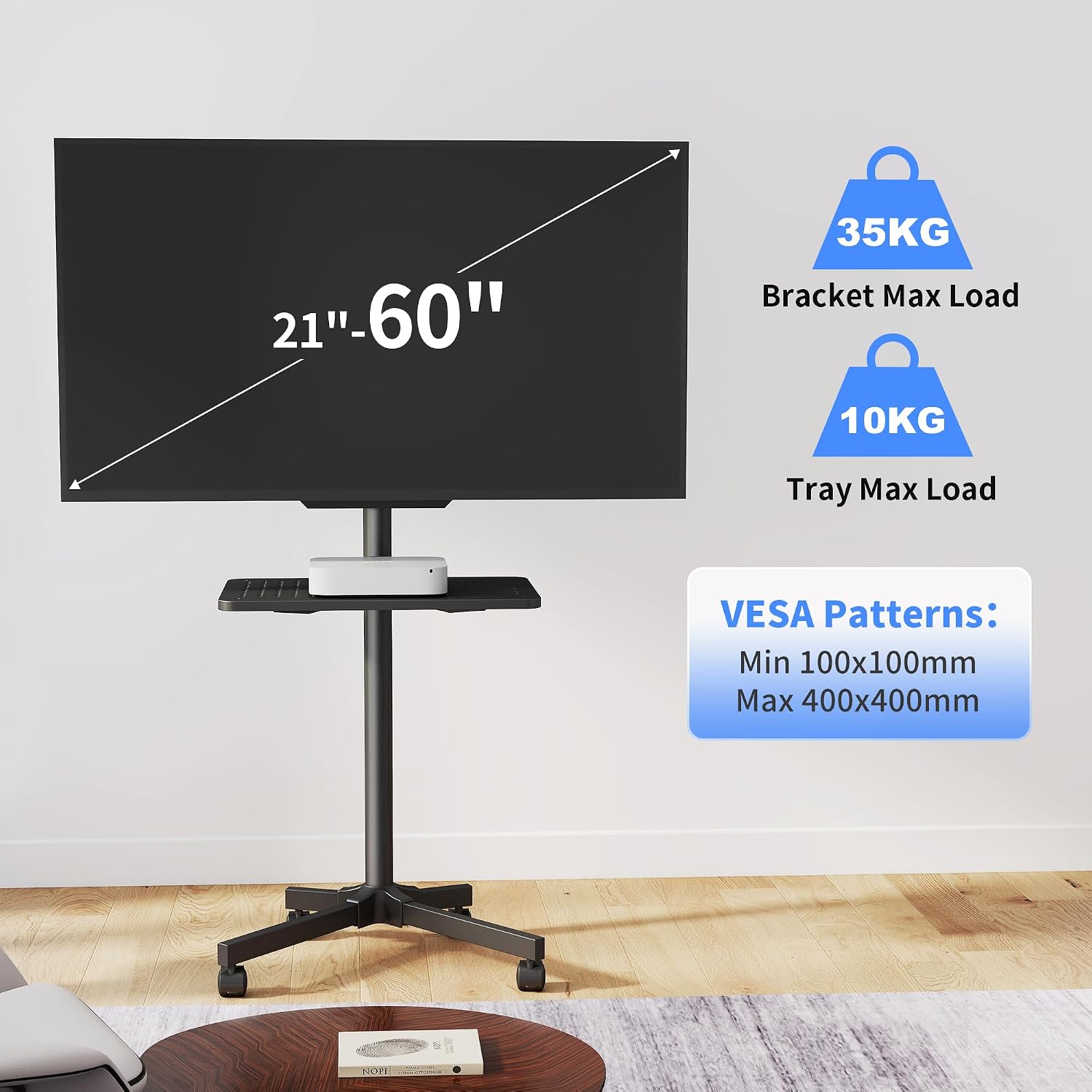
Image: This illustration confirms the stand's compatibility with 21-60 inch TVs, a maximum TV load of 35 kg, a tray load of 10 kg, and VESA patterns from 100x100mm to 400x400mm.
Step 5: Mount TV to Stand
Carefully lift your TV and hook the attached brackets onto the main TV bracket assembly on the stand. Secure the TV using the safety screws or quick-release mechanism to prevent accidental dislodgement. Ensure the TV is level and stable.
The stand supports a tilt range of 3° upwards and 12° downwards for optimal viewing angles.

Image: The TV stand allows for vertical tilt adjustment, with a range of 3 degrees up and 12 degrees down, to achieve an optimal viewing angle and reduce glare.
Operating Instructions
Moving the TV Stand
To move the TV stand, unlock all four wheels by flipping their locking levers. Gently push or pull the stand to its desired location. Avoid sudden movements or pushing over uneven surfaces.
Securing the TV Stand
Once the TV stand is in its desired position, engage the locking levers on all four wheels to prevent unintended movement. Ensure the stand is stable before leaving it unattended.
Adjusting TV Height and Tilt
The TV mounting bracket allows for height adjustments along the main pole. Loosen the securing mechanism, adjust the TV to the desired height, and re-tighten securely. The TV can also be tilted 3° upwards or 12° downwards to optimize viewing angles. Adjust the tilt by loosening the tilt knobs, setting the angle, and re-tightening.
Using the Media Shelf
The adjustable media shelf can hold various devices such as laptops, streaming boxes, or gaming consoles. Ensure the weight on the shelf does not exceed 10 kg (22 lbs) and is distributed evenly.

Image: The mobile TV stand is suitable for various environments, including business meetings, allowing for presentations and easy relocation.
Maintenance
- Cleaning: Wipe the stand with a soft, dry cloth. Avoid abrasive cleaners or solvents that could damage the finish.
- Regular Checks: Periodically check all screws and bolts to ensure they remain tight. Re-tighten if necessary.
- Wheel Functionality: Keep the wheels free of debris to ensure smooth movement. Lubricate if needed.
Troubleshooting
| Problem | Possible Cause | Solution |
|---|---|---|
| Stand is unstable or wobbles. | Loose connections; uneven weight distribution; overloaded. | Check and tighten all screws and bolts. Ensure TV and shelf weight are within limits and evenly distributed. |
| Wheels do not roll smoothly. | Wheels are locked; debris in wheels; damaged wheels. | Unlock all wheels. Clean any debris from the casters. If damaged, contact support for replacements. |
| TV cannot be mounted. | Incorrect VESA pattern; wrong screws used. | Verify your TV's VESA pattern matches the stand's compatibility (100x100mm to 400x400mm). Use the correct screws and spacers from the hardware kit. |
| Shelf slides down. | Shelf not tightened properly; overloaded shelf. | Ensure the shelf's securing mechanism is fully tightened. Do not exceed the 10 kg (22 lbs) weight limit for the shelf. |
Specifications
- Model Number: HU-XI-52
- Brand: XINLEI
- Compatible TV Sizes: 21 - 60 inches
- Maximum TV Load Capacity: 35 kg (77 lbs)
- Maximum Shelf Load Capacity: 10 kg (22 lbs)
- VESA Compatibility: 100x100mm, 200x100mm, 200x200mm, 300x200mm, 300x300mm, 400x200mm, 400x300mm, 400x400mm
- Tilt Angle: +3° (up) to -12° (down)
- Mount Type: Floor Stand with Lockable Wheels
- Material: Steel (frame), Plastic/Rubber (wheels), Wood/Particle Board/Metal (shelf)
- Color: Black
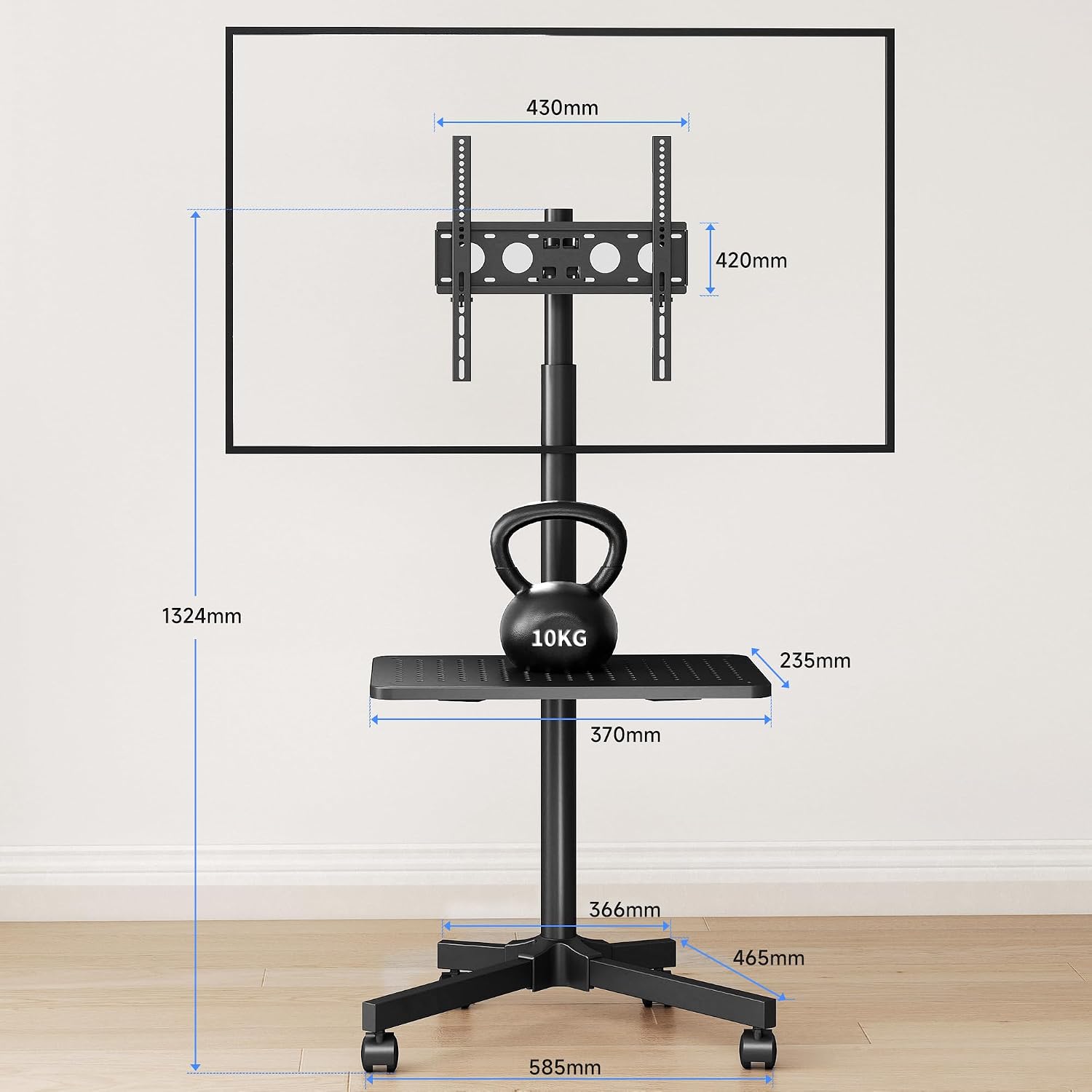
Image: Technical drawing illustrating the key dimensions of the XINLEI ML55A mobile TV stand for reference.
Warranty and Support
XINLEI products are manufactured with quality and durability in mind. For warranty information or technical support, please refer to the warranty card included with your purchase or contact XINLEI customer service directly. Please have your model number (HU-XI-52) and purchase details ready when contacting support.
For further assistance, visit the official XINLEI website or contact your retailer.

