
1. Product Overview
The WITSECTECH 4G LTE Solar Security Camera is a wireless outdoor surveillance device designed for areas without Wi-Fi access. It operates on a 4G cellular network and is powered by a 15,000mAh rechargeable battery, continuously charged by a 6W high-efficiency solar panel. Key features include 2K HD color night vision, PIR motion detection, two-way audio communication, and local storage via SD card or cloud storage options.

Image 1.1: Overview of the WITSECTECH 4G LTE Solar Security Camera, showing its solar panel and remote viewing capability on a smartphone.
Package Contents:
- Camera body
- Solar charging panel
- Mounting accessories
- USB charging cable
- User manual
- SIM card (with initial data)

Image 1.2: The camera and solar panel along with included accessories in the product packaging.
2. Setup and Installation
2.1 Initial Preparation
- Charge the Camera: Fully charge the camera's 15,000mAh battery using the provided USB cable before the first use.
- Insert SIM Card: The camera requires a 4G LTE SIM card (compatible with AT&T and T-Mobile in the US). Insert the activated SIM card into the designated slot.
- Insert Micro SD Card: For local video storage, insert a Micro SD card (up to 128GB, not included) into the camera's SD card slot.
- Download the App: Download and install the "UBox" application on your smartphone.
2.2 Physical Installation
The camera is designed for outdoor wall mounting. Ensure the chosen location has adequate 4G cellular signal and receives direct sunlight for optimal solar charging.
- Mount the Bracket: Securely attach the universal mounting bracket to a wall or suitable surface using the provided screws.
- Attach Solar Panel: Connect the solar panel to the camera using the extension cable. Position the solar panel to maximize sun exposure throughout the day.
- Mount the Camera: Attach the camera to the mounted bracket. Adjust the camera's angle for the desired viewing area.

Image 2.1: Component diagram of the camera, including solar panels, antenna, battery compartment, white lights, infrared lights, microphone, lens, photosensitive sensor, and PIR sensor.
2.3 App Connection Steps
Follow these steps to connect your camera to the UBox app:
- Turn on the camera. Wait for the blue indicator light to appear.
- Open the UBox app on your smartphone.
- Scan the QR code located on the camera to initiate the pairing process.
- Follow the on-screen prompts in the app to complete the connection.
Video 2.2: Official seller video demonstrating the installation and app connection steps for the solar security camera.
3. Operating Instructions
3.1 UBox App Functions
The UBox app provides full control over your camera's features:
- Live View: Access real-time video feed from the camera.
- Two-Way Audio: Use the built-in speaker and microphone to communicate through the camera.
- Playback: Review recorded videos stored on the SD card or cloud.
- Settings: Adjust camera parameters such as motion detection sensitivity, recording modes, and night vision options.
- Pan/Tilt Control: Remotely adjust the camera's viewing angle (Pan 355°, Tilt 100°).

Image 3.1: The camera supports two-way audio communication and allows multiple users to view the live feed simultaneously.
3.2 Motion Detection (PIR)
The camera features Passive Infrared (PIR) detection to identify human body movement. When motion is detected, the camera can:
- Send instant notifications to your smartphone via the UBox app.
- Automatically trigger recording.
- Activate floodlights and alarms in night vision mode.

Image 3.2: The camera's PIR intelligent detection system provides automatic lighting, smart alerts, and real-time message pushes upon detecting activity.
3.3 Night Vision Modes
The camera offers two night vision modes:
- Infrared Night Vision: Provides clear black and white images in dark environments.
- Full Color Night Vision: When motion is detected at night, the camera's floodlights activate to provide a full-color image.
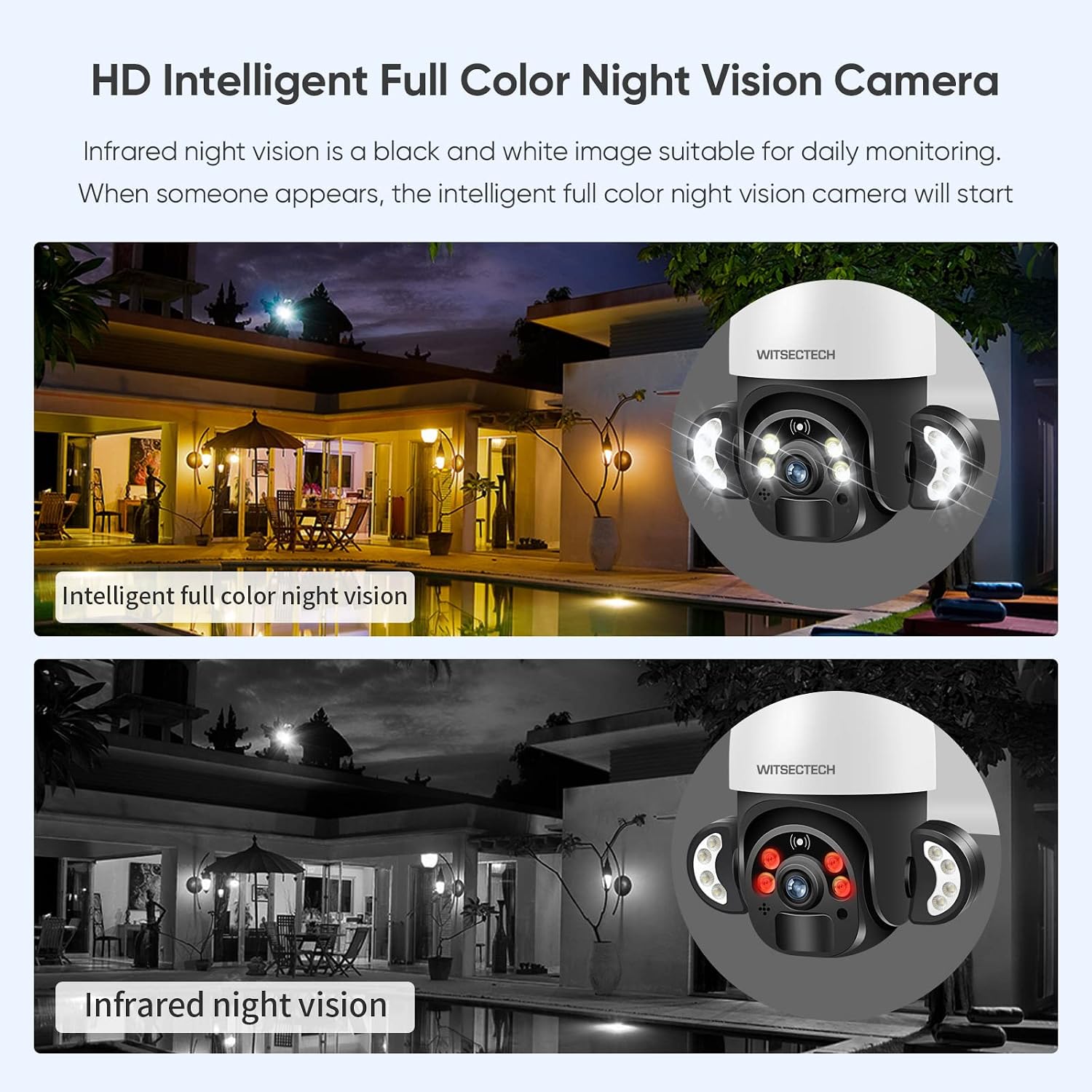
Image 3.3: The camera offers both intelligent full-color night vision and standard infrared night vision for versatile monitoring.
3.4 Recording Modes
- Low Power Mode (Default): The camera records only when motion is detected, conserving battery life.
- 24/7 Full-Time Recording Mode: This mode allows continuous recording, ensuring no moments are missed. Note that this mode consumes battery power more rapidly.
4. Maintenance
To ensure optimal performance and longevity of your WITSECTECH 4G LTE Solar Security Camera, follow these maintenance guidelines:
- Solar Panel Cleaning: Regularly clean the surface of the solar panel to remove dust, dirt, and debris. A clean panel ensures maximum sunlight absorption and efficient battery charging. Use a soft, damp cloth.
- Lens Cleaning: Gently clean the camera lens with a soft, lint-free cloth to maintain clear image quality. Avoid abrasive materials that could scratch the lens.
- Battery Care: While the solar panel provides continuous charging, ensure the camera receives sufficient sunlight. If the camera is installed in a shaded area or during prolonged cloudy periods, occasional manual charging via the USB port may be necessary to maintain battery health.
- Firmware Updates: Check the UBox app periodically for any available firmware updates. Keeping the camera's firmware updated ensures access to the latest features and security enhancements.
- Environmental Protection: The camera has an IP66 waterproof rating, making it resistant to dust and water jets. However, avoid submerging the camera in water or exposing it to extreme pressure washing.

Image 4.1: The camera's IP66 waterproof rating ensures reliable operation in diverse weather conditions.
5. Troubleshooting
If you encounter issues with your WITSECTECH 4G LTE Solar Security Camera, refer to the following common problems and solutions:
| Problem | Possible Cause | Solution |
|---|---|---|
| Camera fails to connect or pair with the app. | Inactive SIM card, poor cellular signal, incorrect app pairing steps, camera not powered on. | Ensure the SIM card is activated and has data. Check cellular signal strength at the camera's location. Verify the camera is powered on and its indicator light is blue. Re-attempt the QR code scanning process in the UBox app. |
| "Red light is constantly on" and camera is unresponsive. | Configuration error, hardware issue. | Try resetting the camera (if a reset button is available, refer to the device diagram). Ensure the SIM card is correctly inserted and activated. If the issue persists, contact customer support. |
| Poor cellular service/signal. | Camera located in an area with weak 4G coverage. | Relocate the camera to an area with stronger 4G cellular signal. Test signal strength with a smartphone at the intended location before final installation. |
| Battery drains quickly. | Insufficient solar charging, 24/7 recording mode enabled, frequent motion triggers. | Ensure the solar panel receives direct sunlight for several hours daily. Consider switching to low power mode (motion-triggered recording). Adjust PIR sensitivity to reduce unnecessary recordings. |
| No video recording to SD card. | SD card not inserted, faulty SD card, SD card full, incorrect recording settings. | Ensure the SD card is correctly inserted. Format the SD card via the app. Check recording settings in the UBox app to confirm local storage is enabled. Replace the SD card if it is faulty. |
If your mobile phone connection fails more than 3 times, please contact customer support for assistance.
6. Specifications
| Feature | Detail |
|---|---|
| Brand | WITSECTECH |
| Model Number | B0B4D3SQNJ |
| Connectivity Technology | Wireless (4G LTE Cellular) |
| Recommended Use | Outdoor Security, Surveillance |
| Video Resolution | 2K (4MP Effective Still Resolution, 1920p Video Capture Resolution) |
| Night Vision | Color Night Vision, Infrared Night Vision |
| Special Features | 2-Way Audio, Local Recording, PIR Detection, PTZ Technology (Pan 355°, Tilt 100°), Automatic Lighting, Digital Zoom (4X) |
| Power Source | Solar Powered (6W solar panel), 15000mAh Rechargeable Battery |
| Water Resistance | IP66 Waterproof Rating |
| Storage Options | Micro SD Card (up to 128GB), Cloud Storage |
| Control Method | UBox App (Android/iOS) |
| Material | Acrylonitrile Butadiene Styrene (ABS) |
| Item Dimensions | 9 x 7 x 6 inches |
| Item Weight | 3.6 pounds |
7. Warranty and Support
7.1 Manufacturer's Warranty
The WITSECTECH 4G LTE Solar Security Camera comes with a manufacturer's warranty for 365 days from the date of purchase. This warranty covers defects in materials and workmanship under normal use.
7.2 Customer Support
For technical assistance, troubleshooting, or warranty claims, please contact WITSECTECH customer service. Contact information can typically be found on the product packaging or the official WITSECTECH website.

