
Introduction
Thank you for purchasing the LEKATO Guitar Multi-Effects Pedal. This compact and versatile unit is designed to provide a wide range of guitar and bass tones, featuring multiple amp models, IR cabinet simulations, and essential effects like delay, reverb, and chorus. With its built-in battery and various connectivity options, it's perfect for practice, recording, and live performance. Please read this manual carefully to fully understand the pedal's functions and ensure optimal performance.
Key Features
- 9 Amp Models & 8 IR Cabinet Models: Includes a variety of amp preamps and classic IR cabinet body models. Supports loading or deleting IR files.
- Third-Party IR File Support: Allows importing up to 8 third-party IR files using the included USB cable and "Cube-Suite" software from the official LEKATO website.
- Preset/Edit/Live Modes: Edit effect chains and save presets. Switch between 3 preset modes (Lead, Rhythm, Clean) or easily swap with custom presets in Live mode.
- Built-in Battery: Integrated battery provides 6-8 hours of operation after a 2-hour full charge. Supports simultaneous charging and operation.
- 3.5mm Headphone Output: Equipped with a 3.5mm headphone jack for clear listening and monitoring, ideal for quiet practice without disturbing others.
- PC/Phone Recording & Bluetooth: Supports music playback via Bluetooth for accompaniment. Record directly to PC or mobile phone using the included cable.
- 1-Year Warranty: Enjoy a 1-year warranty from the date of purchase. Contact support for any quality issues or exchanges.
Controls and Functions
The LEKATO Multi-Effects Pedal features intuitive controls for easy tone shaping. Refer to the diagram below for a visual guide to each knob and footswitch.

Figure 1: Top and Rear Panel Controls Overview
Top Panel Controls:
- 1. TYPE Knob: Selects different amp models.
- 2. GAIN Knob: Adjusts the distortion/overdrive gain.
- 3. TONE Knob: Controls the brightness of the tone.
- 4. MOD Knob: Adjusts the PHASER/CHORUS effect.
- 5. TIME Knob: Controls the delay time.
- 6. F.BACK Knob: Adjusts the delay feedback ratio.
- 7. MIX Knob: Controls the dry/wet ratio of the delay effect.
- 8. REVERB Knob: Adjusts the dry/wet ratio of the reverb effect.
- 9. IR CAB Knob: Selects different IR cabinet simulations.
- 10. VOLUME Knob: Controls the overall output volume.
- 11. Bluetooth Indicator: Lights up when Bluetooth is connected.
- 12. Charging Indicator: Lights up during charging.
- 13. C Footswitch: Multi-function footswitch.
- 14. B Footswitch: Multi-function footswitch.
- 15. A Footswitch: Multi-function footswitch.
- 16. Input/Output Jacks: Standard 1/4" input and output for guitar/bass and amplifier/mixer connection.
Rear Panel Ports:
- IN Jack: 1/4" input for your instrument.
- OUT Jack: 1/4" output to your amplifier or audio interface.
- USB-C Port: For charging and connecting to PC for IR loading/recording.
- 3.5mm Headphone Jack: For private monitoring.
- 3.5mm Phone Recording Jack: For connecting to a mobile phone for recording.
Setup
Follow these steps to connect your LEKATO Multi-Effects Pedal:
- Connect your guitar or bass to the IN jack on the pedal using a standard 1/4" instrument cable.
- Connect the OUT jack of the pedal to your amplifier, mixer, or audio interface using another 1/4" instrument cable.
- For silent practice, connect headphones to the 3.5mm Headphone Jack.
- To charge the pedal, connect the included USB-C cable to the USB-C Port and a USB power adapter (not included) or a computer.
- For mobile phone recording, use the provided cable to connect the 3.5mm Phone Recording Jack to your phone's audio input.

Figure 2: Typical Connection Scenarios
Operating Modes
The pedal offers different operating modes for various performance and editing needs.
Preset Mode:
In Preset Mode, you can switch between three pre-configured presets (Lead, Rhythm, Clean) or your own saved presets. This mode is convenient for quick tone changes during performance.
Live Mode:
Live Mode allows you to edit your effect chain and save presets directly. You can partially edit previous preset effects and save them again. To switch between Live Mode and Preset Mode, simultaneously press and hold footswitches B and C.

Figure 3: Switching Between Live and Preset Modes
Tuner Mode:
To activate the built-in tuner, press and hold footswitches B and C simultaneously until the display changes to tuner mode. Strum a single string to see its pitch on the display. Press any footswitch to exit tuner mode.

Figure 4: Tuner Functionality
Battery and Charging
The LEKATO Multi-Effects Pedal features a built-in rechargeable battery for portable use.
- A full charge takes approximately 2 hours.
- Once fully charged, the pedal can operate for 6-8 hours.
- The pedal supports simultaneous charging and operation, allowing you to play while it charges.
- Use the provided USB-C cable to charge the device via a USB power adapter or computer USB port.

Figure 5: Battery Life Indication
Connectivity
Bluetooth Audio Input:
The pedal supports Bluetooth connectivity for playing music accompaniment from your smartphone or tablet. This is useful for practicing along with backing tracks.
- Turn on the pedal.
- Activate Bluetooth on your mobile device.
- Search for "CUBE BABY" (or similar device name) in your device's Bluetooth settings and connect.
- Once connected, the Bluetooth indicator on the pedal will light up.

Figure 6: Bluetooth Pairing Process
3.5mm Headphone Output:
Connect any standard 3.5mm headphones to the dedicated headphone jack for private practice sessions. This allows you to monitor your sound clearly without disturbing others.
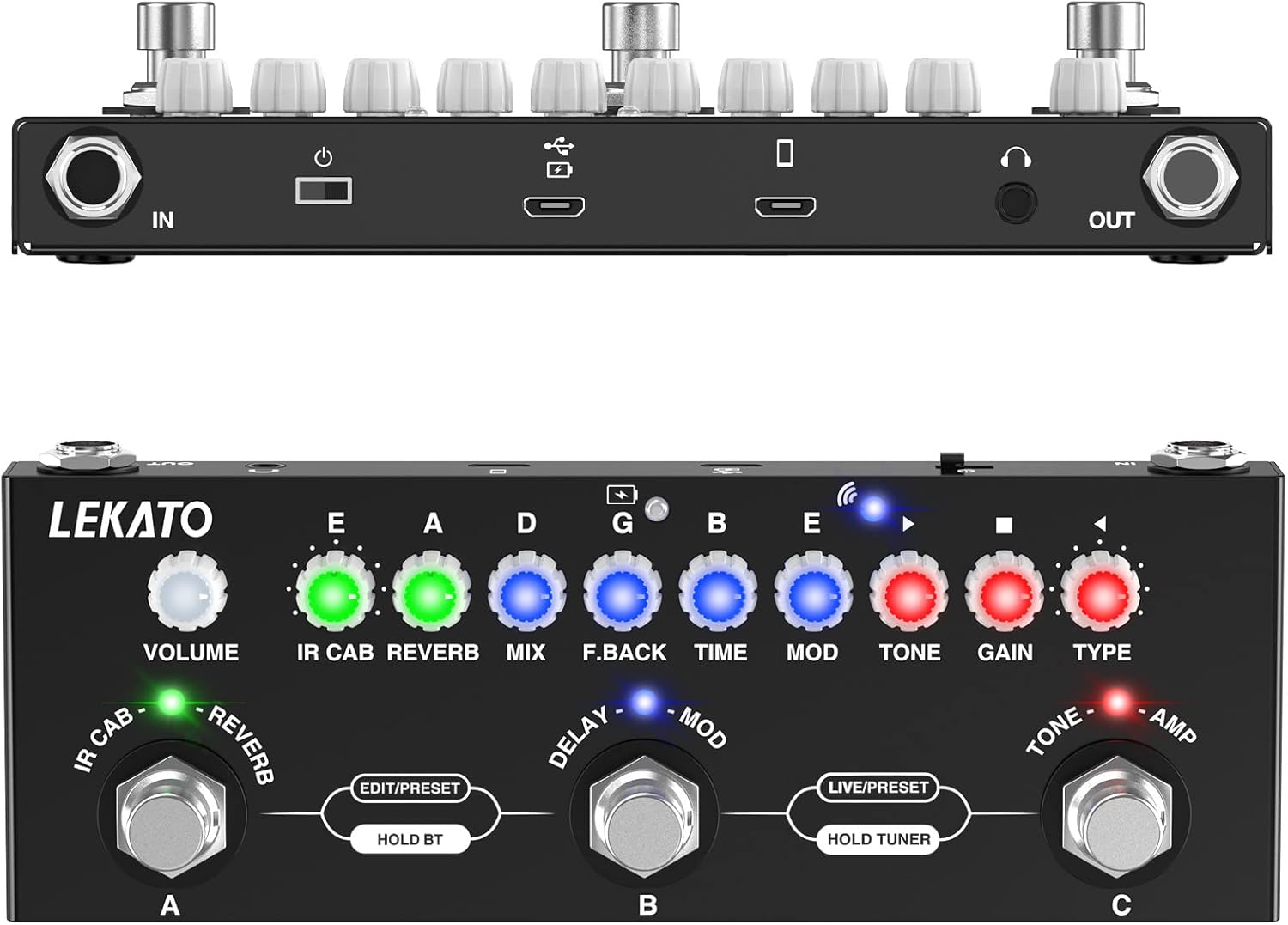
Figure 7: Using the Headphone Output
PC/Phone Recording:
The pedal supports direct recording to your computer or mobile phone. Use the appropriate cables provided (USB-C for PC, 3.5mm audio cable for phone) and recording software.

Figure 8: Recording to a Mobile Phone
Troubleshooting
If you encounter any issues with your LEKATO Multi-Effects Pedal, please refer to the following common problems and solutions:
| Problem | Possible Cause | Solution |
|---|---|---|
| No Sound Output | Incorrect cable connections; Volume knob set too low; Pedal not powered on; Amplifier issues. | Check all cable connections (input/output). Ensure the pedal is powered on and charged. Increase the VOLUME knob. Verify your amplifier is working correctly. |
| Poor Sound Quality / Noise | Interference from other devices; Faulty cables; High GAIN settings; Low battery. | Try moving the pedal away from other electronic devices. Replace cables. Reduce GAIN settings. Charge the battery fully. |
| Bluetooth Not Connecting | Pedal not in pairing mode; Device Bluetooth off; Interference. | Ensure the pedal is on. Turn your device's Bluetooth off and on again. Try pairing in a different location. |
| Pedal Not Responding | Low battery; Firmware issue. | Charge the pedal. If the issue persists, try a factory reset (refer to advanced settings in the full manual, if available) or contact support. |
Specifications
Detailed technical specifications for the LEKATO Multi-Effects Pedal:
| Feature | Detail |
|---|---|
| Model Number | SWL-M01421N |
| Color | Black |
| Signal Format | Digital |
| Power Source | USB Cable, Battery |
| Product Dimensions | 17.5 cm (Length) x 6.5 cm (Width) x 4 cm (Height) |
| Audio Output Effects | Delay, Reverb |
| Style | Overdrive |
| First Available Date | June 17, 2022 |
Package Contents
The following items are included in your LEKATO Multi-Effects Pedal package:

Figure 9: Items Included in the Box
- 1x LEKATO Guitar Multi-Effects Pedal
- 1x Mobile Phone Recording and Auxiliary Audio Cable
- 1x Type-C Charging Cable
- 1x User Manual
Warranty and Support
Your LEKATO Multi-Effects Pedal comes with a 1-year warranty from the date of purchase. This warranty covers manufacturing defects and quality-related issues.
If you encounter any problems or have questions regarding your product, please do not hesitate to contact LEKATO customer support. For quality issues, product exchange may be possible.
For the latest software updates (e.g., "Cube-Suite" for IR loading) and additional support resources, please visit the official LEKATO website.