1. Introduction and Safety Information
This manual provides essential information for the safe and effective operation of your H.KOENIG UP680 PowerClean+ cordless stick vacuum cleaner. Please read all instructions carefully before use and retain this manual for future reference.
Important Safety Instructions
- Always disconnect the appliance from the charger before cleaning or performing maintenance.
- Do not use the vacuum cleaner to pick up water or wet substances.
- Do not vacuum hot ashes, burning cigarettes, or sharp objects.
- Keep hair, loose clothing, fingers, and all parts of the body away from openings and moving parts.
- Use only the original charger and battery provided by H.Koenig.
- Do not operate the vacuum cleaner if it is damaged or malfunctioning. Contact customer support.
- This appliance is intended for household use only.
2. Product Overview and Package Contents
Familiarize yourself with the components of your H.KOENIG UP680 vacuum cleaner.

Image 2.1: The H.KOENIG UP680 cordless stick vacuum cleaner shown with two BTY680 rechargeable batteries, highlighting its modular design.
Package Contents
- Main Motor Unit (Handheld Vacuum)
- Aluminum Extension Tube
- Motorized Floor Brush
- BTY680 Rechargeable Lithium Battery (22.2V)
- Wall-Mounted Charging Base
- Charger Adapter
- Round Brush Attachment
- Crevice Tool Attachment
- Soft Furniture Brush Attachment
- User Manual
3. Setup and Charging
3.1 Assembly
- Attach the Extension Tube: Insert the aluminum extension tube into the main motor unit until it clicks securely into place.
- Attach the Floor Brush: Connect the motorized floor brush to the other end of the extension tube, ensuring it locks firmly.
- Insert the Battery: Slide the BTY680 rechargeable battery into the designated slot on the main motor unit until it clicks.
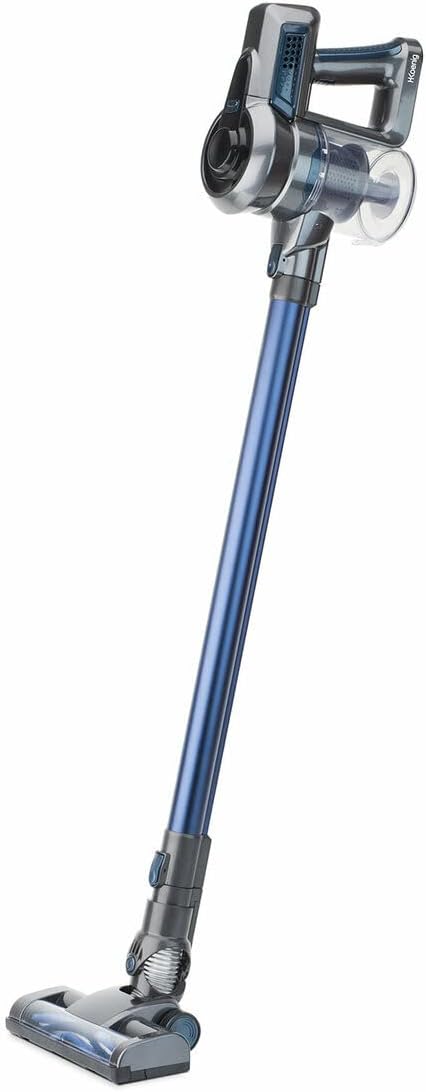
Image 3.1: The H.KOENIG UP680 vacuum cleaner fully assembled in its stick configuration, ready for use.
3.2 Charging the Battery
Before first use, fully charge the battery. A full charge takes approximately 4 hours.
- Mount the Charging Base: Secure the wall-mounted charging base in a convenient location using appropriate fasteners (not included).
- Connect Charger: Plug the charger adapter into the charging base and then into a power outlet.
- Place Vacuum on Base: Place the vacuum cleaner onto the charging base. Ensure the charging indicator light illuminates, indicating that charging has begun.

Image 3.2: A detailed view of the main motor unit, showing the battery compartment and ergonomic handle. This unit houses the power button and suction controls.
4. Operating Instructions
4.1 Powering On/Off and Suction Modes
- Power On: Press the power button located on the main motor unit to start the vacuum cleaner.
- Adjust Suction: The UP680 features two suction speeds. Press the speed selection button to toggle between standard and maximum suction modes.
- Power Off: Press the power button again to turn off the vacuum cleaner.
4.2 Using as a Stick Vacuum
For cleaning floors, carpets, and larger areas, use the vacuum in its stick configuration with the motorized floor brush.
- Ensure the extension tube and floor brush are securely attached.
- Move the vacuum cleaner across the surface to be cleaned. The motorized brush helps agitate dirt for effective removal.
4.3 Using as a Handheld Vacuum
To convert to a handheld vacuum, detach the extension tube and floor brush from the main motor unit.

Image 4.1: The H.KOENIG UP680 vacuum cleaner being used in handheld mode, demonstrating its versatility for cleaning smaller areas or elevated surfaces.
4.4 Using Accessories
Attach the desired accessory directly to the main motor unit for handheld cleaning, or to the extension tube for extended reach.
- Round Brush: Ideal for dusting delicate surfaces, shelves, and upholstery.
- Crevice Tool: Perfect for reaching tight corners, gaps, and edges.
- Soft Furniture Brush: Designed for cleaning fabric surfaces and upholstery without damage.
5. Maintenance
Regular maintenance ensures optimal performance and extends the lifespan of your vacuum cleaner.
5.1 Emptying the Dustbin
Empty the 0.8L dustbin regularly, preferably after each use, to maintain strong suction.
- Ensure the vacuum cleaner is turned off.
- Locate the dustbin release button on the main motor unit.
- Press the button to detach the dustbin.
- Open the dustbin lid and empty contents into a waste bin.
- Reattach the dustbin securely to the main motor unit.
5.2 Cleaning Filters
The filters should be cleaned periodically to prevent clogging and maintain suction power.
- Remove the dustbin as described above.
- Carefully remove the filters from inside the dustbin.
- Tap the filters gently over a waste bin to remove loose dust.
- If heavily soiled, rinse the filters under cold running water. Ensure they are completely dry before reinserting.
- Reassemble the filters and dustbin.
5.3 Brush Roll Maintenance
Periodically check the motorized floor brush for tangled hair or debris.
- Turn off the vacuum cleaner and detach the floor brush.
- Use scissors or a brush to carefully remove any hair or fibers wrapped around the brush roll.
- Ensure the brush roll spins freely before reattaching.
6. Troubleshooting
Refer to this section for solutions to common issues you may encounter.
| Problem | Possible Cause | Solution |
|---|---|---|
| Vacuum does not turn on. | Battery is not charged or not properly inserted. | Ensure battery is fully charged and correctly inserted. |
| Low suction power. | Dustbin is full, filters are clogged, or blockage in the tube/brush. | Empty dustbin, clean filters, check for and remove blockages. |
| Motorized brush not spinning. | Brush roll is tangled or blocked. | Clean the brush roll, removing any hair or debris. |
| Short operating time. | Battery not fully charged or battery degradation. | Ensure battery is fully charged. If issue persists, battery may need replacement. |
7. Technical Specifications
| Feature | Specification |
|---|---|
| Model | UP680 |
| Battery Model | BTY680 |
| Battery Type | Lithium-ion |
| Voltage | 22.2 V |
| Power | 100 W |
| Autonomy | Up to 35 minutes (depending on speed setting) |
| Charging Time | Approximately 4 hours |
| Dustbin Capacity | 0.8 L |
| Number of Speeds | 2 |
| Special Features | Cordless, Compact, Lightweight, 2-in-1 (Stick & Handheld) |
8. Warranty and Customer Support
Warranty Information
Your H.KOENIG UP680 vacuum cleaner is covered by a manufacturer's warranty. Please refer to the warranty card included in your product packaging for specific terms and conditions, including the warranty period and coverage details. Keep your proof of purchase for any warranty claims.
Customer Support
For technical assistance, spare parts, or any questions regarding your H.KOENIG UP680 vacuum cleaner, please contact H.Koenig customer service. Contact details can typically be found on the H.Koenig official website or on your product packaging.


