
Introduction
The BLACK+DECKER AP3560 Air Purifier is designed to provide clean and healthy indoor air by effectively removing airborne particles and odors. Featuring a HEPA 13 filter, activated carbon filter, and UV-C light, this unit is suitable for large rooms up to 60m2. It includes a real-time PM2.5 air quality display, multiple fan speeds, and convenient functions like an 8-hour timer and sleep mode for optimal air purification.

Image: The BLACK+DECKER AP3560 Air Purifier, a sleek white unit with a digital display on the front.
Safety Information
Please read all instructions carefully before operating the air purifier. Keep this manual for future reference.
- Ensure the power supply voltage matches the rating label on the appliance.
- Do not operate the appliance with a damaged cord or plug.
- Keep the air inlet and outlet clear of obstructions.
- Do not immerse the appliance in water or other liquids.
- Unplug the air purifier before cleaning or performing any maintenance.
- This appliance is for indoor use only.
- Keep out of reach of children. The child lock feature can be used to prevent accidental operation.
Product Overview
Components
The BLACK+DECKER AP3560 Air Purifier consists of the main unit, a multi-layer filter system, and a control panel.
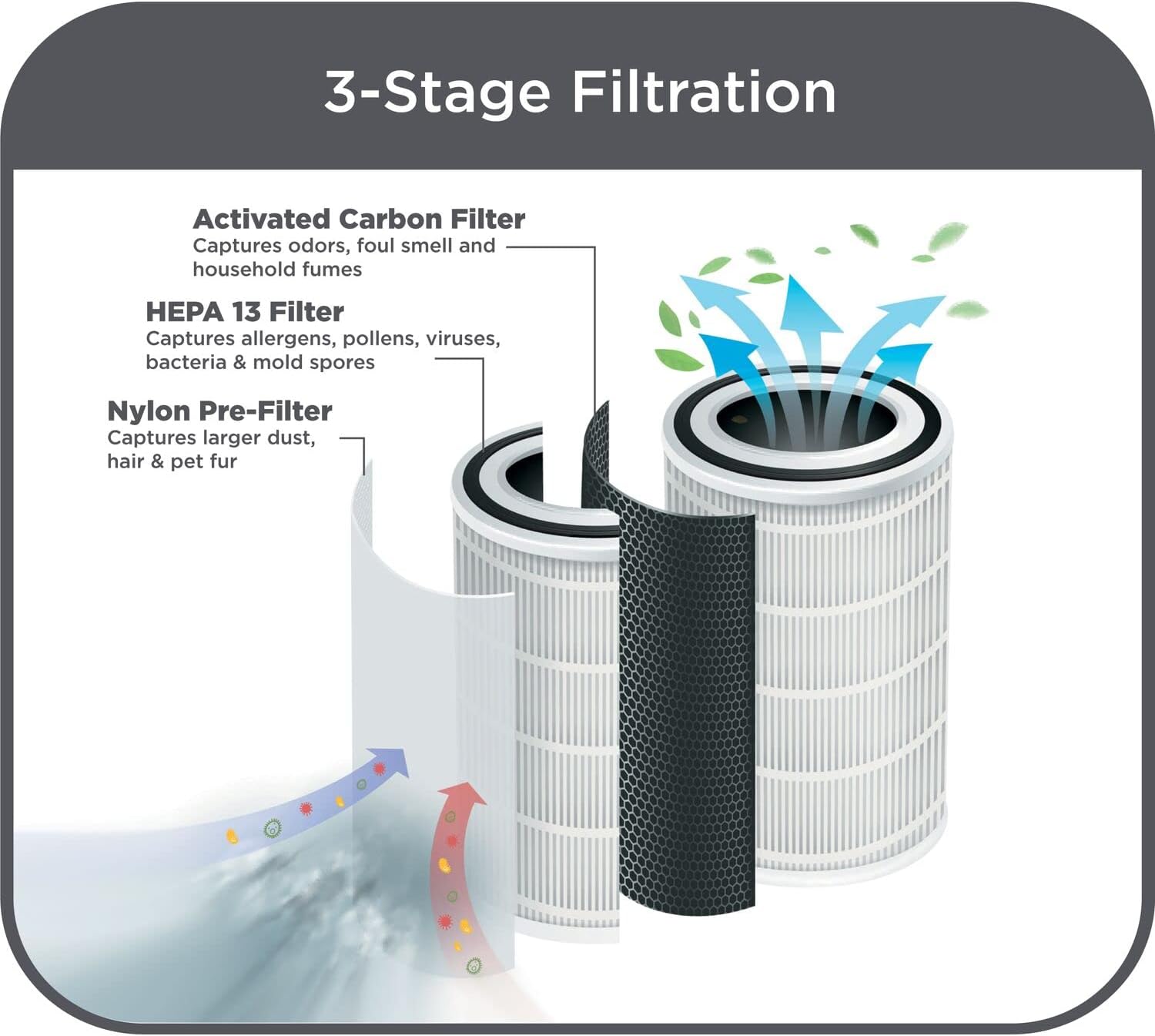
Image: Diagram illustrating the 3-stage filtration system, including Nylon Pre-Filter, HEPA 13 Filter, and Activated Carbon Filter.
- Nylon Pre-Filter: Captures larger dust particles, hair, and pet fur.
- HEPA 13 Filter: Captures allergens, pollens, viruses, bacteria, and mold spores.
- Activated Carbon Filter: Captures odors, foul smell, and household fumes.
Control Panel and Features
The intuitive LED display and touch controls allow for easy operation and monitoring of air quality.

Image: Icons representing the various functions of the air purifier's control panel, including PM2.5 indicator, speed and auto mode, ionizer control, sleep and lock mode, HEPA filter reset, pre-filter reset, UV-C sterilization, 8 hours timer, night light, digital LED display, quiet operation, and CADR up to 60m2.
- PM2.5 Display & Air Quality Scale: Provides real-time indoor air quality indication with a color ring.
- Speed & Auto Mode: Adjusts fan speed manually or automatically based on air quality.
- Ionizer Control: Releases negative ions into the air.
- Sleep & Lock Mode: Reduces noise for quiet operation and inactivates controls.
- HEPA Filter Reset: Indicator for filter replacement.
- Pre-Filter Reset: Reminder for pre-filter cleaning.
- UV-C Sterilization: Inactivates airborne pathogens.
- 8 Hours Timer: Sets desired operation time.
- Night Light: Provides minimal dim light.
Setup
1. Unpacking
Carefully remove the air purifier from its packaging. Retain packaging materials for future storage or transport.
2. Filter Installation
Before first use, ensure all protective packaging is removed from the filters inside the unit.
- Open the filter compartment cover, typically located on the side or back of the unit.
- Remove the combined filter cartridge.
- Remove any plastic bags or protective wrapping from the filter.
- Insert the filter back into the unit, ensuring it is seated correctly.
- Close the filter compartment cover securely.

Image: A hand demonstrating the proper way to insert or remove the air filter from the side compartment of the air purifier.
3. Placement
Place the air purifier on a firm, level surface. For optimal performance, ensure there is adequate space around the unit for air circulation (e.g., at least 20 cm from walls or furniture).

Image: The air purifier with blue arrows indicating 360-degree air intake and clean air output from the top, demonstrating effective air circulation.
4. Power Connection
Plug the power cord into a suitable electrical outlet. The unit will enter standby mode.
Operating Instructions
Familiarize yourself with the control panel for easy operation.

Image: A finger pressing a button on the top control panel of the air purifier, highlighting the user interface.
1. Power On/Off
Press the Power button (usually indicated by a power symbol) to turn the unit on or off.
2. Fan Speed Adjustment
Press the Speed button to cycle through the 4 available fan speeds (low, medium, high, turbo).
3. Auto Mode
Activate Auto Mode for the air purifier to automatically adjust fan speed based on real-time air quality readings.
4. Timer Function
Press the Timer button to set the operation time for 2, 4, 6, or 8 hours. The unit will automatically turn off after the set time.
5. Sleep Mode
Press the Sleep Mode button to enter a quiet operation mode (less than 22dB). The display lights may dim or turn off.
6. Child Lock
Activate the Child Lock function to prevent accidental changes to settings. Refer to the specific button on your control panel, often a long press on the sleep mode button or a dedicated lock icon.
7. Ionizer Function
Press the Ionizer button to activate the ionizer, which releases negative ions to help purify the air.
8. UV-C Light
Press the UV-C button to turn on the short-wave UV-C light for inactivating airborne pathogens.
9. Air Quality Display
The PM2.5 display shows the current particulate matter level in the air. The color ring around the display indicates air quality:
- Blue: Good air quality (<35 PM2.5)
- Purple: Moderate air quality (36-115 PM2.5)
- Red: Not Healthy air quality (>115 PM2.5)

Image: A visual representation of the PM2.5 display showing different air quality levels (Good, Moderate, Not Healthy) indicated by numerical values and corresponding color rings (blue, purple, red).
Maintenance
Regular maintenance ensures optimal performance and extends the life of your air purifier.
1. Filter Replacement
The HEPA 13 + Activated Carbon filter has an optimum life of approximately 2160 hours. The unit features a filter reset reminder to indicate when replacement is needed.
- Unplug the air purifier from the power outlet.
- Open the filter compartment.
- Remove the old filter and dispose of it properly.
- Insert a new, genuine BLACK+DECKER replacement filter.
- Close the filter compartment securely.
- Plug in the unit and press the Filter Reset button (or follow specific instructions in the manual for your model) to reset the filter life indicator.
Note: Replacement filters are sold separately. Please refer to the product's official website or authorized retailers for purchasing genuine replacement filters.
2. Pre-Filter Cleaning
The pre-filter should be cleaned periodically to maintain efficiency. The unit has a filter indicator to remind you to clean the clogged pre-filter.
- Unplug the air purifier.
- Open the filter compartment and carefully remove the pre-filter (Nylon Pre-Filter).
- Use a soft brush or vacuum cleaner to remove dust and debris from the pre-filter.
- Do not wash the HEPA or Activated Carbon filters with water.
- Reinstall the clean pre-filter and close the compartment.
3. General Cleaning
Wipe the exterior of the air purifier with a soft, damp cloth. Do not use abrasive cleaners or solvents.
Troubleshooting
If you encounter issues, refer to the following common problems and solutions:
| Problem | Possible Cause | Solution |
|---|---|---|
| Unit does not turn on. | Not plugged in; Power outage; Damaged power cord; Unit in standby. | Ensure plug is securely in outlet; Check circuit breaker; Inspect cord for damage; Press power button to turn on. |
| Airflow is weak or noisy. | Clogged pre-filter; Filter needs replacement; Air inlet/outlet blocked. | Clean the pre-filter; Replace the HEPA filter; Ensure no obstructions around the unit. |
| Air quality reading is consistently high. | High indoor pollution; Sensor dirty; Unit not running long enough. | Ensure proper ventilation; Clean the PM2.5 sensor (refer to manual for location); Allow unit to run for an extended period. |
| Filter reset indicator remains on after replacement. | Filter reset not performed correctly. | Follow the filter reset procedure precisely (e.g., long press filter reset button). |
| Error code (e.g., E5) displayed. | Internal malfunction or sensor issue. | Unplug the unit for 5 minutes, then plug back in. If error persists, contact customer support. |
If the problem persists after trying these solutions, please contact BLACK+DECKER customer support.
Specifications
| Feature | Detail |
|---|---|
| Brand | BLACK+DECKER |
| Model Number | AP3560-B5 |
| Color | White |
| Product Dimensions (L x W x H) | 35 x 34.6 x 67.4 cm |
| Item Weight | 8.4 Kilograms |
| Power / Wattage | 55 watts |
| Noise Level | <22 dB (Sleep Mode) |
| CADR (Clean Air Delivery Rate) | 470 m3/h |
| Recommended Room Size | Up to 60 m2 |
| Filter Type | HEPA 13 + Activated Carbon + Nylon Pre-Filter |
| Filter Life | Approx. 2160 hours |
| Additional Features | PM2.5 Display, UV-C Light, Ionizer, Auto Mode, 8-Hour Timer, Night Light, Child Lock |

Image: Diagram showing the dimensions of the BLACK+DECKER AP3560 Air Purifier: 35cm (width), 34.6cm (depth), and 67.4cm (height).
Warranty and Support
BLACK+DECKER prioritizes customer satisfaction. For warranty information, technical support, or to purchase replacement parts, please visit the official BLACK+DECKER website or contact their customer service department. Keep your purchase receipt as proof of purchase.
You can find more information and support at the BLACK+DECKER Store on Amazon.


