
1. Introduction
The STRONG SRT 7030 is a compact and efficient HDTV receiver designed for receiving free digital TV and radio programs via satellite. It offers a range of features including HDMI and SCART connectivity, a clear display, and PVR capabilities through software updates, allowing you to enjoy a rich multimedia experience.
Package Contents
Please check the box for the following items:
- STRONG SRT 7030 Satellite Receiver
- Remote Control
- 2 x AAA Batteries
- Power Adapter

Figure 1: Front view of the STRONG SRT 7030 receiver. This image displays the compact design of the receiver, featuring a digital display on the front panel and the STRONG brand logo.
2. Setup and Connections
Before connecting your receiver, ensure all devices are powered off. Follow these steps to connect your STRONG SRT 7030 to your television and satellite dish.
Connecting to Your TV
- HDMI Connection (Recommended): For the best picture and sound quality, connect an HDMI cable from the HDMI OUT port on the receiver to an available HDMI IN port on your television.
- SCART Connection: If your TV does not have an HDMI port, connect a SCART cable from the TV SCART port on the receiver to the SCART IN port on your television.
Connecting to Your Satellite Dish
- Connect the coaxial cable from your satellite dish (LNB) to the SAT IN port on the back of the receiver.
- The receiver supports SatCR, allowing connection of up to 8 receivers to a single SatCR LNB.
Audio Connections
- S/PDIF Coaxial: For digital audio output to an amplifier or home theater system, connect a coaxial audio cable to the S/PDIF COAXIAL port.
- Audio L/R: For analog audio output, connect RCA cables to the Audio L/R ports.
Power Connection
- Connect the provided power adapter to the 12V === 1.5A input on the receiver, then plug the adapter into a wall outlet.
USB Connection
- The receiver features two USB ports for media playback and software updates. Connect a USB storage device as needed.

Figure 2: Rear panel connections of the STRONG SRT 7030 receiver. This image illustrates the various input and output ports, including SAT IN, HDMI, TV SCART, S/PDIF Coaxial, Audio L/R, and the power input.
3. Operating Instructions
This section provides an overview of the main functions and how to use your receiver with the remote control.
Remote Control Overview
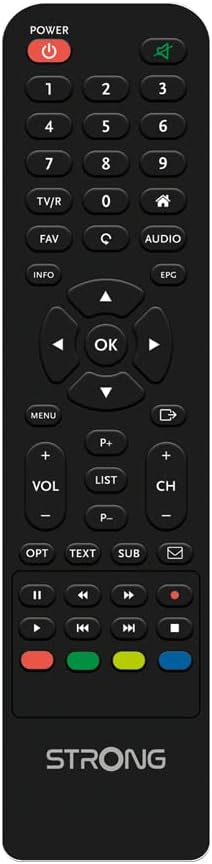
Figure 3: Remote control for the STRONG SRT 7030 receiver. This image shows the layout of the remote control buttons, including power, channel, volume, navigation, and special function keys.
Basic Functions
- Power On/Off: Press the POWER button on the remote control to turn the receiver on or off.
- Channel Navigation: Use the CH+ / CH- buttons to change channels. You can also enter channel numbers directly using the numeric keypad.
- Volume Control: Use the VOL+ / VOL- buttons to adjust the volume.
- Menu Access: Press the MENU button to access the main menu for settings and features. Use the arrow keys and OK button to navigate.
Advanced Features
- Electronic Program Guide (EPG): Press the EPG button to view the 7-day program schedule. You can book programs directly from the EPG for recording.
- Recording and Timeshift: The receiver supports recording of TV programs and Timeshift functionality. Connect a USB storage device to enable these features. Use the Record and Timeshift buttons on the remote.
- Timer Functions: Set up to 8 programmable timers for recording or switching channels at specific times.
- Media Playback: Play back various media files from a connected USB memory stick.
- Parental Control: Activate parental control to restrict access to certain channels or programs.
- Multi-language OSD: The On-Screen Display (OSD) menu is available in multiple languages for user convenience.
- Energy Saving Mode: The receiver can switch to standby mode after a user-definable time to conserve energy.
4. Maintenance
Proper maintenance ensures the longevity and optimal performance of your STRONG SRT 7030 receiver.
- Cleaning: Use a soft, dry cloth to clean the exterior of the receiver. Do not use liquid cleaners or abrasive materials.
- Ventilation: Ensure the receiver has adequate ventilation. Do not block the ventilation openings.
- Environment: Avoid placing the receiver in direct sunlight, near heat sources, or in areas with high humidity or dust.
- Power Off: If the receiver will not be used for an extended period, disconnect it from the power outlet.
5. Troubleshooting
If you encounter issues with your receiver, please refer to the following common problems and solutions before seeking professional assistance.
| Problem | Possible Cause | Solution |
|---|---|---|
| No picture or sound |
|
|
| No signal / "No Signal" message |
|
|
| Remote control not working |
|
|
| PVR recording not working |
|
|
6. Specifications
Technical specifications for the STRONG SRT 7030 digital HD satellite receiver.
| Brand | STRONG |
| Model | SRT 7030 (SAT FTA HD) |
| Tuner Technology | DVB S2 |
| Compatible Devices | TV |
| Memory Storage Capacity | 64 GB (for PVR via USB) |
| Image Format | 16:9 |
| Audio Output Mode | Surround |
| Supported Audio Formats | Dolby Digital, DTS |
| Voltage | 12 Volt (DC) |
| Total USB Ports | 2 |
| Connection Type | HDMI, SCART, S/PDIF Coaxial, Audio L/R, SAT IN |
| Dimensions (L x W x H) | 18.7 x 11.9 x 8.9 cm |
| Weight | 610 g |
7. Warranty and Support
For detailed warranty information and customer support, please refer to the warranty card included with your product or visit the official STRONG website. Keep your purchase receipt as proof of purchase for warranty claims.


