
1. Introduction
Thank you for choosing the SLuB 15000mAh 65W Portable Charger. This external battery pack is designed to provide reliable and fast charging for a wide range of devices, including laptops, smartphones, and tablets. With its high capacity, multiple output ports, and advanced safety features, it is an ideal companion for travel, business, and daily use. Please read this manual thoroughly before using the product to ensure proper operation and to maximize its lifespan.
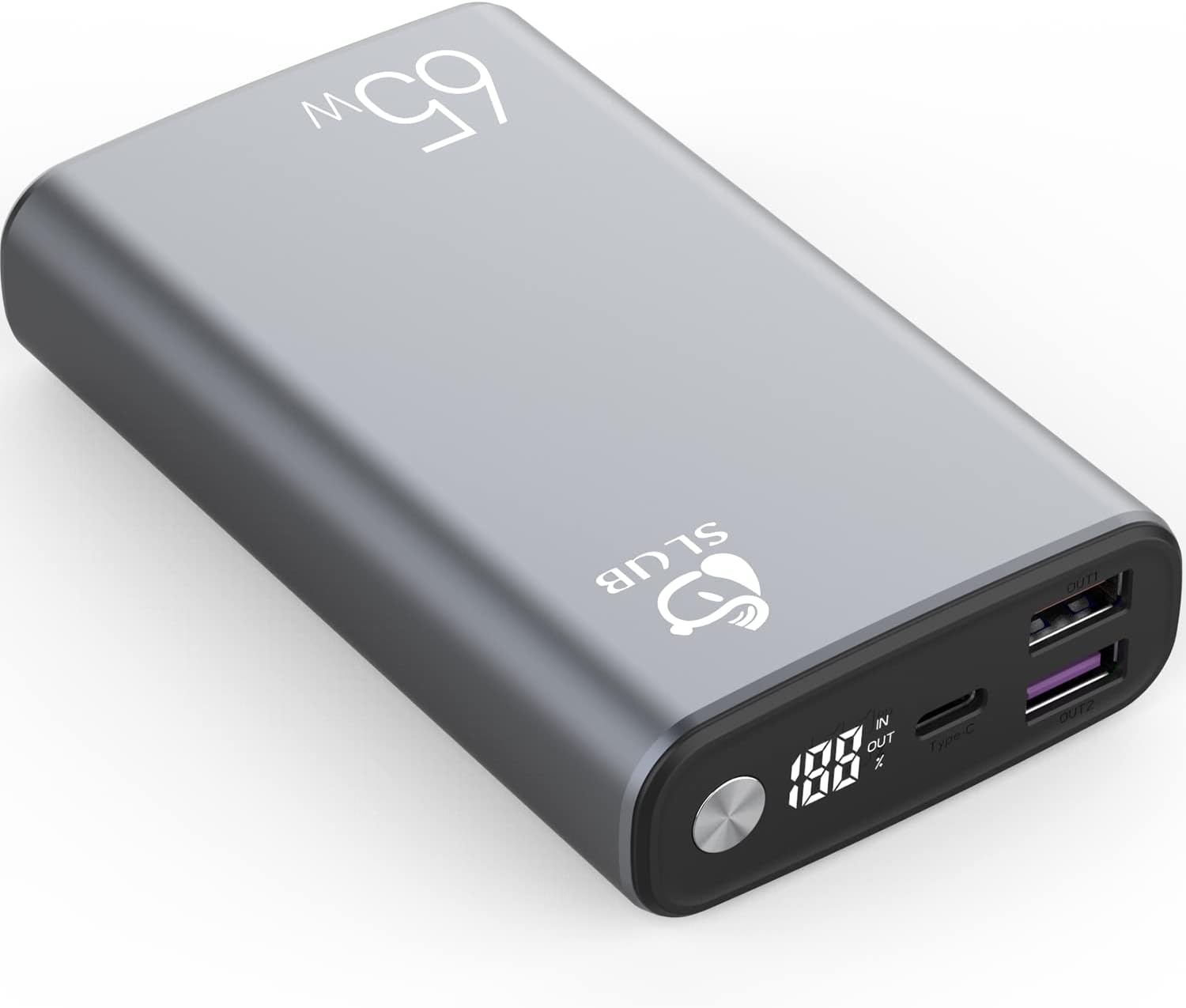
Figure 1: SLuB 15000mAh Portable Charger. This image displays the sleek, grey metallic design of the power bank with its digital display and port configuration.
2. Important Safety Information
To prevent injury or damage to your device, please observe the following safety precautions:
- Do not expose the power bank to extreme temperatures (above 60°C/140°F or below 0°C/32°F), direct sunlight, or fire.
- Do not immerse the power bank in water or other liquids.
- Avoid dropping, hitting, or disassembling the device. Unauthorized repairs can void the warranty and pose safety risks.
- Keep out of reach of children.
- Use only certified charging cables and adapters.
- If the power bank swells, emits smoke, or shows any other abnormal behavior, discontinue use immediately and contact customer support.
- Do not use the power bank in a confined, unventilated space.
- Dispose of the power bank according to local regulations for electronic waste.
3. Package Contents
Please check the package for the following items:
- SLuB 15000mAh 65W Portable Charger
- USB-C to USB-C Charging Cable
- User Manual

Figure 2: Package Contents. This image illustrates the items typically included in the product box: the power bank, a USB-C charging cable, and the instruction manual.
4. Product Overview
Familiarize yourself with the components of your SLuB portable charger:

Figure 3: Port Configuration. This image highlights the Type-C (65W MAX), USB-A1 (18W MAX), and USB-A2 (22.5W MAX) ports, along with the digital display. Note: The image displays a 10000mAh model; the product described is 15000mAh.
- USB-C Port (IN/OUT): Supports Power Delivery (PD) 3.0 for up to 65W fast charging, both for charging the power bank and charging compatible devices.
- USB-A Ports (OUT1 & OUT2): Two standard USB-A output ports for charging various devices. OUT1 supports up to 18W, and OUT2 supports up to 22.5W.
- Digital LED Display: Shows the remaining battery percentage (0-100%) and charging status.
- Power Button: Activates the digital display and initiates charging.
5. Setup: Charging the Power Bank
Before first use, fully charge your SLuB portable charger. For optimal charging speed, use a 65W PD compatible wall charger (not included) with the provided USB-C cable.
- Connect the supplied USB-C to USB-C cable to the USB-C port on the power bank.
- Connect the other end of the USB-C cable to a compatible USB-C wall charger.
- The digital LED display will illuminate, showing the charging progress as a percentage.
- The power bank is fully charged when the display shows "100%".
A full charge can take approximately 2 hours with a 65W PD charger.

Figure 4: Power Bank Charging. This image shows the power bank being charged via its USB-C port, with the digital display indicating battery level. Note: The image displays a 10000mAh model; the product described is 15000mAh.
6. Operating Instructions: Charging Your Devices
The SLuB portable charger can charge up to three devices simultaneously.
- Check Battery Level: Press the power button once to view the current battery percentage on the digital display.
- Connect Device:
- For USB-C devices (laptops, some smartphones/tablets): Use a USB-C to USB-C cable and connect it to the power bank's USB-C port and your device.
- For USB-A devices (most smartphones, tablets, smartwatches): Use a USB-A to device-specific cable and connect it to either USB-A OUT1 or OUT2 port and your device.
- Initiate Charging: Charging should begin automatically. If not, press the power button once. The digital display will show "OUT" indicating active output.
- Disconnect: Once your device is charged, disconnect the cable. The power bank will automatically turn off after a period of inactivity.

Figure 5: Simultaneous Charging. This image demonstrates the power bank charging a laptop, a smartphone, and another device concurrently using its multiple output ports. Note: The image displays a 10000mAh model; the product described is 15000mAh.
Compatibility
The SLuB portable charger is widely compatible with various fast charging protocols, including PD, QC, PPS, SCP, and VOOC. This ensures efficient charging for:
- Laptops: MacBook, Dell XPS, HP Spectre, Lenovo ThinkPad, etc.
- Smartphones: iPhone (15/14/13/12 series), Samsung Galaxy (S/Note series), Huawei, Xiaomi, Google Pixel, etc.
- Tablets: iPad Pro/Air/Mini, Samsung Galaxy Tab, etc.
- Other devices: Smartwatches, headphones, game consoles, and more.

Figure 6: Device Compatibility. This chart illustrates the wide range of devices compatible with the power bank, including various laptops, tablets, and mobile phones from brands like Apple, Huawei, and Xiaomi. Note: The image displays a 10000mAh model; the product described is 15000mAh.
7. Maintenance
- Cleaning: Use a soft, dry cloth to clean the surface of the power bank. Do not use harsh chemicals or abrasive materials.
- Storage: Store the power bank in a cool, dry place away from direct sunlight and extreme temperatures. For long-term storage, charge the power bank to about 50-75% every 3 months to maintain battery health.
- Avoid Over-Discharge: Do not allow the power bank to completely drain for extended periods, as this can reduce battery lifespan.

Figure 7: Easy to Carry and Store. This image shows the compact power bank fitting easily into a bag alongside other devices, highlighting its portability for travel.
8. Troubleshooting
| Problem | Possible Cause | Solution |
|---|---|---|
| Power bank not charging |
|
|
| Device not charging from power bank |
|
|
| Slow charging |
|
|
| Digital display not working |
|
|
9. Specifications
| Feature | Detail |
|---|---|
| Model Number | T108LF |
| Battery Capacity | 15000mAh |
| USB-C Input/Output | PD 3.0, up to 65W Max |
| USB-A1 Output | Up to 18W Max |
| USB-A2 Output | Up to 22.5W Max |
| Total Output | 65W Max (shared across ports) |
| Dimensions | 6.89 x 3.54 x 1.3 inches (17.5 x 9 x 3.3 cm) |
| Weight | 14.1 ounces (400 grams) |
| Special Features | LCD Digital Power Display, Multiple Safety Protections, Fast Charging |

Figure 8: Product Dimensions. This image provides a visual representation of the power bank's physical measurements.
10. Warranty and Customer Support
SLuB products are designed and manufactured to the highest quality standards. For information regarding warranty coverage, please refer to the warranty card included with your purchase or visit the official SLuB website.
If you encounter any issues or have questions about your SLuB 15000mAh 65W Portable Charger, please contact our customer support team. Provide your model number (T108LF) and a detailed description of the issue for faster service.
Contact Information:
- Website: SLuB Official Store on Amazon (for general inquiries and product information)
- Email: Refer to your product packaging or warranty card for specific support email.