
1. Introduction
This manual provides essential information for the safe and efficient operation of your Genmitsu PROVerXL 6050 Plus CNC Machine. Please read this manual thoroughly before assembly, operation, or maintenance. Keep this manual for future reference.
The PROVerXL 6050 Plus is a versatile 3-axis CNC router designed for carving, engraving, and milling various materials including metal, wood, acrylic, and MDF. It features a large working area of 600 x 500 x 115mm (23.62" x 19.69" x 4.53"), a 300W spindle motor, and a robust all-metal frame.

Figure 1.1: Genmitsu PROVerXL 6050 Plus CNC Machine with examples of carved guitar body, stand, and gear.
2. Safety Information
WARNING: Always follow basic safety precautions to reduce the risk of fire, electric shock, and personal injury.
- Read all instructions before operating the machine.
- Wear appropriate personal protective equipment (PPE), including safety glasses, hearing protection, and dust masks.
- Ensure the work area is well-ventilated and clear of obstructions.
- Keep hands and loose clothing away from moving parts.
- Always disconnect power before performing maintenance or making adjustments.
- Do not operate the machine if any parts are damaged or missing.
- Familiarize yourself with the emergency stop button location and function.
3. Package Contents
Upon unpacking, verify that all components listed below are present and undamaged.
- Genmitsu CNC-Machine PROVerXL 6050 Plus (main frame with pre-assembled X, Y, Z axes)
- 3 Axis CNC Engraver
- MDF Carving Spoil Boards
- GRBL Control Box
- NEMA23 Stepper Motors (with manual jog wheels)
- Emergency Stop Button
- Motor Speed Control
- Reset, Pause, and Resume Buttons
- Power Supply
- Necessary cables and connectors
- Tool kit for assembly
- Extra 65mm spindle holder

Figure 3.1: Exploded view showing the pre-assembled X, Y, Z axes and other main components.
4. Assembly and Setup
The PROVerXL 6050 Plus features a pre-assembled core system to simplify setup. Follow these general steps for assembly and initial setup. Refer to the detailed assembly guide provided separately for specific instructions.
- Unpack Components: Carefully remove all parts from the packaging and verify against the package contents list.
- Mount the Frame: Secure the main frame to a stable workbench. The machine's robust design ensures stability during operation.
- Install Spoil Boards: Place the MDF spoil boards onto the integrated T-track grid extrusions. These are designed for easy replacement and compatibility with various clamp sets.
- Connect Electronics: Connect the stepper motors, spindle, and control box using the provided cables. Ensure all connections are secure.
- Power On and Test: Connect the power supply and perform initial power-on tests as per the detailed guide.
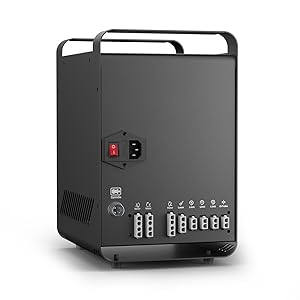
Figure 4.1: The GRBL control box, central to machine operation.


Figure 4.2: Limit switches and the emergency stop button for safe operation.
5. Operation
The PROVerXL 6050 Plus operates using GRBL control. It features manual jog wheels for precise positioning and dedicated buttons for emergency stop, motor speed control, reset, pause, and resume.
5.1 Basic Controls
- Manual Jog Wheels: Use these wheels on the NEMA23 stepper motors to fine-tune the position of the spindle or stock material.
- Emergency Stop: Press this button immediately in case of any malfunction or unsafe condition.
- Motor Speed Control: Adjust the spindle motor speed using the dedicated knob on the control box.
- Reset, Pause, Resume: These buttons allow for control over the carving process, enabling you to stop and restart operations as needed.

Figure 5.1: Control panel featuring speed adjustment and operation buttons.
5.2 Remote Control (Optional)
The machine supports remote control via an APP and a Wireless Control Kit, which are sold separately. This allows for convenient monitoring and control of your carving projects from a mobile device.

Figure 5.2: Remote control functionality via a mobile application (kit sold separately).
5.3 Spindle Holders
The PROVerXL 6050 Plus includes an extra 65mm spindle holder for future upgrades, in addition to the standard 52mm holder for the included 300W spindle. This allows compatibility with various spindle sizes, including 69mm trimmers.

Figure 5.3: Available spindle holder sizes: Φ52mm for spindle motor/laser, Φ65mm trimmer, and Φ69mm trimmer.
6. Maintenance
Regular maintenance ensures the longevity and optimal performance of your CNC machine.
- Cleaning: Regularly clean dust and debris from the machine, especially from linear rails, lead screws, and motors. Use compressed air or a soft brush.
- Lubrication: Periodically lubricate linear rails and lead screws as recommended in the detailed maintenance guide.
- Spoil Board Replacement: The MDF spoil boards are designed for easy maintenance and replacement. Replace them when they become excessively worn or damaged to maintain carving accuracy.
- Check Connections: Periodically inspect all electrical connections for tightness and signs of wear.
7. Troubleshooting
This section provides solutions to common issues. For more complex problems, contact customer support.
| Problem | Possible Cause | Solution |
|---|---|---|
| Machine not powering on | Power cable disconnected, faulty power supply, emergency stop engaged. | Check power connections, ensure emergency stop is disengaged, test power supply. |
| Motors not moving | Loose motor connections, software error, limit switch triggered. | Verify motor cable connections, check GRBL software status, inspect limit switches. |
| Inaccurate carving | Worn spoil board, loose tool, incorrect G-code, mechanical play. | Replace spoil board, tighten tool, verify G-code, check for loose components. |
8. Specifications
| Feature | Detail |
|---|---|
| Model Name | PROVerXL 6050 Plus |
| Working Area | 600 x 500 x 115mm (23.62" x 19.69" x 4.53") |
| Accuracy | ±0.05mm |
| Spindle Motor | 300W (standard), supports upgrades |
| Spindle Holders | Φ52mm (standard), Φ65mm (extra included), Φ69mm (compatible) |
| Control System | GRBL Control |
| Stepper Motors | NEMA23, 3.1N-100mm, Max Running Speed 2000mm/min |
| Linear Rails | Dual HG-15 Linear Rails (X-axis), Single Y-axis (T10 Lead Screw) |
| Table Type | Integrated T-Slot Hybrid Table with MDF Spoil Boards |
| Frame Material | All-metal aluminum |
| Item Weight | 127.6 pounds |
| Date First Available | June 16, 2022 |

Figure 8.1: Dimensions of the working area and accuracy of the PROVerXL 6050 Plus.

Figure 8.2: NEMA23 stepper motor with 3.1N-100mm torque and 2000mm/min max running speed.

Figure 8.3: Enhanced Z-axis stability and the integrated T-slot hybrid table design.
9. Warranty and Support
Genmitsu products are backed by a manufacturer's warranty. For specific warranty terms and conditions, please refer to the documentation included with your purchase or visit the official Genmitsu website.
Customer Support: If you encounter any issues or have questions regarding your PROVerXL 6050 Plus CNC Machine, please contact Genmitsu customer support. They are available to assist with technical queries, troubleshooting, and parts replacement.
- Online Resources: Visit the Genmitsu Store on Amazon for additional product information and accessories.
- Contact Information: Refer to your product packaging or the official Genmitsu website for the most current customer service contact details.


