
Introduction
This manual provides detailed instructions for the safe and efficient operation, maintenance, and troubleshooting of your MAX Tapener HT-R45C Plant Tying Machine. Please read this manual thoroughly before using the device to ensure proper handling and to maximize its lifespan.
Product Overview
The MAX Tapener HT-R45C is a high-efficiency plant tying tool designed for various gardening applications, including nurseries, vineyards, orchards, and home gardens. It significantly reduces the effort required for tying plants.
Key Features
- Binds plant stems up to 45 mm in diameter.
- Reduces tying effort by 50% compared to conventional models.
- Approximately 20% lighter than previous models for improved handling.
- Features a reinforced hinge in the tape magazine for enhanced durability.
- Includes a built-in stapler pusher to prevent loss during field use.
- Designed for use with SMALL roll tie tape (sold separately).

Figure 1: MAX Tapener HT-R45C Plant Tying Machine, showing its overall design with the tape magazine and tying mechanism.
Setup
1. Loading Tie Tape
- Open the tape magazine cover.
- Insert a SMALL roll of tie tape into the magazine, ensuring the tape unwinds correctly.
- Pull the end of the tape through the guide slot.
- Close the tape magazine cover securely.

Figure 2: Detailed view of the tape magazine on the MAX Tapener HT-R45C, where the tie tape is loaded.
2. Loading Staples
- Locate the staple pusher mechanism.
- Insert a strip of compatible staples into the staple channel.
- Push the staples forward until they are seated correctly.
- Ensure the staple pusher is engaged.
Operating Instructions
- Positioning: Hold the Tapener with one hand and position the plant stem and support (e.g., stake, wire) within the jaws of the tool.
- First Squeeze (Tape Engagement): Gently squeeze the handle. This action will stretch the tie tape between the jaws, wrapping it around the plant stem and support.
- Second Squeeze (Stapling and Cutting): Squeeze the handle fully and firmly. This action will staple the tape together and cut it, completing the tie.
- Release: Release the handle to prepare for the next tie.
Note: For optimal performance, ensure the tape and staples are correctly loaded and the plant material fits within the 45 mm jaw capacity.
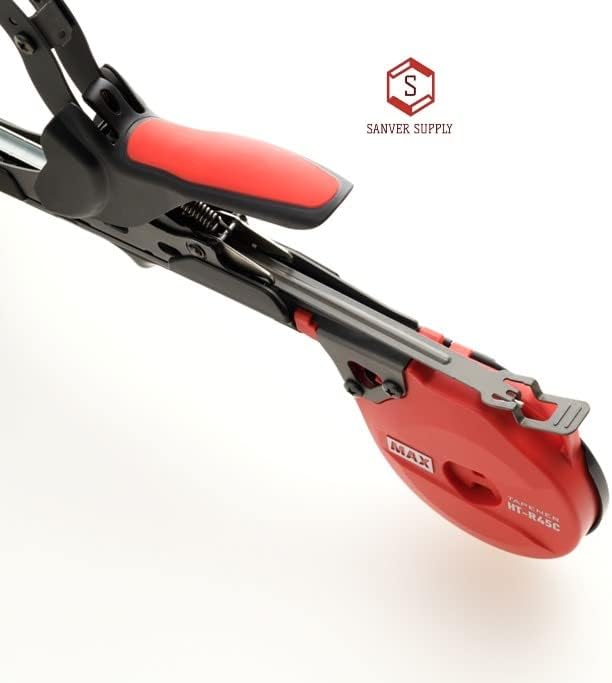
Figure 3: View of the MAX Tapener HT-R45C handle and the mechanism that engages the tape and staples during operation.
Maintenance
Cleaning
Regularly clean the jaws and cutting blade of the Tapener to prevent sap and debris buildup. Use a damp cloth and, if necessary, a mild cleaning solution. Ensure the tool is dry before storage.
Jam Clearing
In case of a staple or tape jam, use the included jam clearing tool to carefully remove any obstructions. Refer to the diagram below for the location of the jam clearing tool.
Note: The jam clearing tool is built-in to prevent loss.
Troubleshooting
| Problem | Possible Cause | Solution |
|---|---|---|
| Tape not feeding | Tape incorrectly loaded; tape roll empty; tape jammed. | Re-load tape correctly; replace tape roll; clear any tape jams. |
| Staples not firing | Staples incorrectly loaded; staple magazine empty; staples jammed. | Re-load staples correctly; replace staples; clear any staple jams using the clearing tool. |
| Tape not cutting | Blade dull or obstructed. | Clean the cutting blade; replace the blade if dull (spare blades sold separately). |
| Difficulty squeezing handle | Debris in mechanism; lack of lubrication. | Clean the tool thoroughly; apply a small amount of light machine oil to moving parts. |
Specifications
- Model: HT-R45C
- Brand: MAX
- Maximum Tying Diameter: 45 mm
- Compatible Tape: SMALL roll tie tape (sold separately)
- Product Dimensions: 15.25 x 5.5 x 1.5 inches
- Manufacturer: MAX
- ASIN: B0B4991Q8K
Warranty and Support
For warranty information and customer support, please refer to the documentation provided with your purchase or visit the official MAX website. Keep your purchase receipt for warranty claims.
