
Introduction
The AZLA SednaEarfit MAX Standard earbud tips are designed to enhance the comfort, fit, and acoustic performance of your wireless headphones. Crafted from premium medical-grade silicone, these tips provide a secure seal, improved noise cancellation, and optimal sound delivery. This manual provides instructions for proper installation, usage, and maintenance to ensure the best experience with your earbud tips.
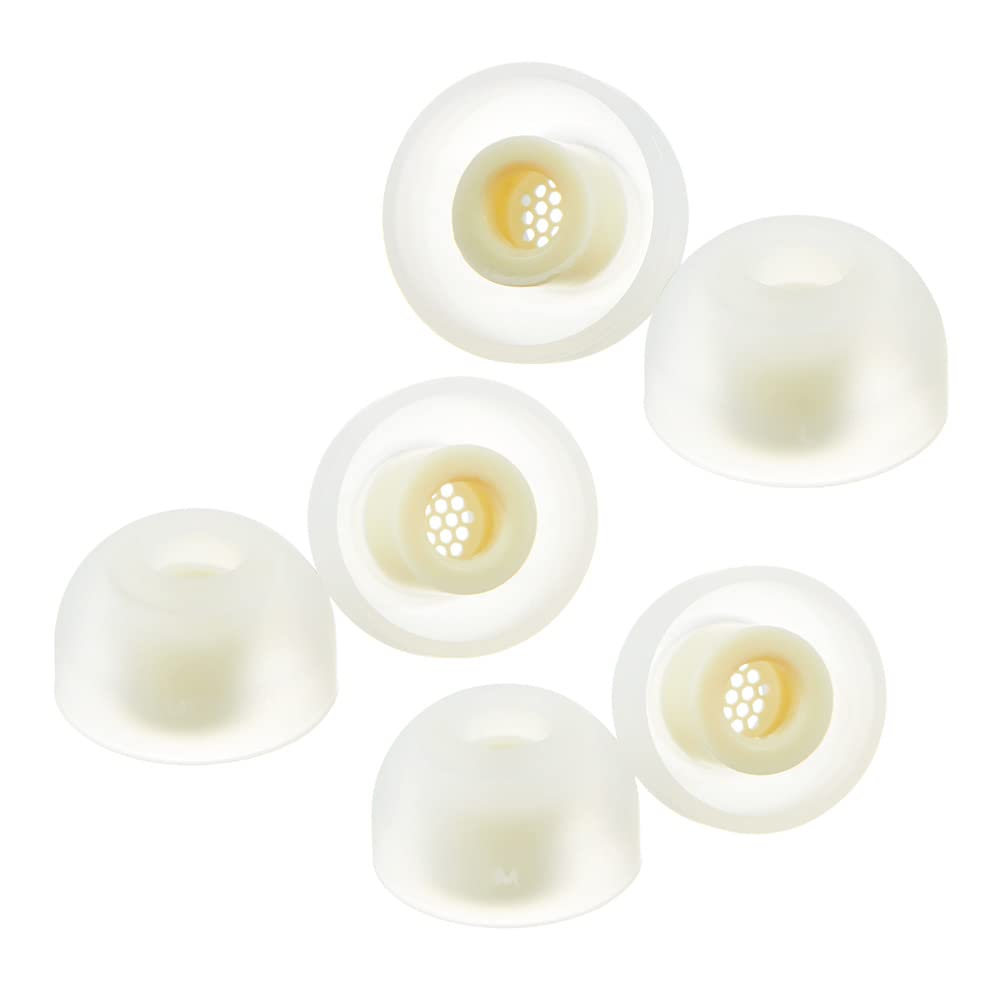
Image: AZLA SednaEarfit MAX Standard earbud tips, showing the translucent silicone design.
Compatibility
AZLA SednaEarfit MAX Standard earbud tips are designed for wide compatibility with various wireless headphone models.
Compatible Headphone Models:
- Sony WF-1000XM5, LinkBuds S, WF-1000XM4, WF-1000XM3, INZONE Buds, WF-XB700, WF-H800
- Samsung Galaxy Buds 2 Pro
- Beats Powerbeats Pro
- JLab Epic Air Sport, Epic Air ANC
- Sennheiser Momentum True Wireless 4, MTW3, MTW 1, MTW 2, CX True Wireless, CX400BT, CX PLUS TW
- Shure Earbuds, E3c
- ANKER Liberty 3 Pro, A40, Life Dot 2 ANC
- Audio-Technica CKR7TW, SPORT7TW, ATH-SQ1TW, ATH-TWX9
- AKG N400
- Britz BR-TWS202
- Bang & Olufsen E8 SPORT, EQ, E8
- Bowers & Wilkins Pi7, Pi7 S2, Pi5
- BGVP Q2S
- Denon Perl Pro
- Harman Kardon Fly TWS
- Jabra Elite 85T
- Jaybird Run
- JBL WAVE100, Streak
- Master & Dynamic MW08, MW07
- Noble Audio Falcon, Fokus Pro, Noble Fokus Prestige
- Nuheara IQBuds2 MAX
- Philips TAT4556
- Sudio TOLV
- Saramonic BH60
- Urbanears Alby
- Yamaha TW-E7B, TW-E3C, TW-E3B
An adapter is included for earbuds with thinner nozzles to ensure a universal fit.
Features and Design
- Premium Medical Silicone: Constructed from high-quality medical-grade silicone for safety and comfort.
- Tapered Structure: Designed to become thinner inside the ear canal, reducing pressure and maximizing noise cancellation without causing discomfort.
- Enhanced Noise Cancellation: The secure fit provided by these eartips significantly improves the active noise-canceling performance of your headphones.
- Dust Protection: Features a hexagonal silicone filter to prevent dust and debris from entering your ears and the earbud's nozzle, maintaining sound quality.
- Secure and Comfortable Fit: Engineered to remain securely in place during various activities, offering both stability and comfort.
- Improved Audio Performance: Maintains and enhances the superior sound and audio performance of your earbuds.

Image: Close-up view of the hexagonal silicone filter for dust protection.
Setup and Installation
- Select the Correct Size: The AZLA SednaEarfit MAX Standard tips come in various sizes (SS, S, MS, M, ML, L). It is crucial to select the size that provides the best seal and comfort for your ear canal. Experiment with different sizes to find your optimal fit. A proper seal is essential for effective noise cancellation and sound quality.
- Remove Existing Tips: Gently twist and pull off the existing earbud tips from your wireless headphones.
- Attach AZLA SednaEarfit MAX Tips: Align the opening of the AZLA SednaEarfit MAX tip with the nozzle of your earbud. Push the tip onto the nozzle firmly until it is securely seated. Ensure the tip is fully attached and not loose.
- Use Adapter (if necessary): If your earbud has a thinner nozzle, use the provided adapter before attaching the earbud tip. Place the adapter onto the earbud nozzle first, then attach the SednaEarfit MAX tip over the adapter.
- Test Fit: Insert the earbuds into your ears and check for a comfortable and secure fit. Perform a seal test if your headphones offer this feature (e.g., Sony WF-1000XM5 app). Adjust the tips or try a different size if the seal is not optimal or if there is discomfort.

Image: Size chart illustrating the dimensions of different SednaEarfit MAX tips and comparison with other earbud tips.

Image: A set of AZLA SednaEarfit MAX earbud tips, including the optional adapters for thinner nozzles.
Operating and Usage
Once installed, the AZLA SednaEarfit MAX earbud tips operate passively to improve your listening experience.
- Optimal Seal: Ensure the earbud tips form a complete seal within your ear canal. This seal is crucial for maximizing passive noise isolation and allowing your earbud's active noise cancellation (ANC) features to perform effectively.
- Comfort: The medical-grade silicone and tapered design are intended for extended comfortable wear. If you experience discomfort, re-evaluate your chosen tip size or adjust the earbud's position.
- Sound Quality: A proper fit ensures that sound is directed efficiently into your ear, leading to improved bass response and overall audio clarity.
Maintenance
Regular cleaning of your earbud tips will maintain hygiene and performance.
- Remove from Earbuds: Gently detach the earbud tips from your headphones.
- Clean with Water: Rinse the silicone tips under lukewarm water.
- Gentle Cleaning: Use a mild, non-abrasive soap if necessary. Gently rub the tips with your fingers to remove any earwax or debris. Pay attention to the hexagonal filter inside the tip.
- Rinse Thoroughly: Ensure all soap residue is rinsed off.
- Dry Completely: Allow the earbud tips to air dry completely before reattaching them to your headphones. Do not use heat to dry them, as this may damage the silicone.
- Inspect Regularly: Periodically inspect the tips for any signs of wear, tear, or damage. Replace them if they appear compromised to maintain optimal performance and hygiene.
Troubleshooting
| Problem | Possible Cause | Solution |
|---|---|---|
| Poor Noise Cancellation / Sound Leakage | Incorrect tip size; improper seal; earbud not inserted correctly. | Try a larger tip size to achieve a better seal. Ensure the earbud is inserted snugly into your ear canal. Re-adjust the earbud's position. |
| Discomfort or Pain | Tip size is too large; earbud inserted too deeply or at an awkward angle. | Try a smaller tip size. Adjust the earbud's position for a more comfortable fit. The tapered design should minimize pressure. |
| Earbud Tips Fall Out Easily | Incorrect tip size (too small); improper insertion; oily ear canal. | Try a larger tip size for a more secure grip. Ensure the earbud is inserted correctly. Clean your ears before use if excessive oil is an issue. |
| Muffled Sound Quality | Earwax or debris blocking the tip's filter or earbud nozzle. | Clean the earbud tips thoroughly, paying attention to the hexagonal filter. Ensure the earbud nozzle itself is clear of obstructions. |
| Tips Not Attaching Securely to Earbuds | Tip not fully pushed onto the nozzle; adapter needed for thin nozzles. | Ensure the tip is firmly pushed onto the earbud nozzle. If your earbud has a thin nozzle, use the provided adapter. |
Specifications
| Feature | Detail |
|---|---|
| Model Number | AZL-MAX-SET-L |
| Material | Medical Silicone |
| Color | White (translucent) |
| Item Weight | 0.352 ounces |
| Package Dimensions | 3.74 x 2.8 x 0.75 inches |
| Manufacturer | AZLA Inc. |
| Compatible Devices | Earphones |
Warranty and Support
Specific warranty information for the AZLA SednaEarfit MAX Standard earbud tips is not provided in this document. For details regarding warranty coverage, returns, or technical support, please refer to the official AZLA website or contact the retailer where the product was purchased.
You can visit the official AZLA Store for more information: AZLA Official Store.
