
Introduction
This manual provides detailed instructions for the OLEVS 2872 Leather Chronograph Watch. Please read this manual thoroughly to understand the watch's functions and ensure proper use and maintenance. Keep this manual for future reference.
Product Overview
The OLEVS 2872 is an analog quartz chronograph watch featuring a leather strap, luminous hands, and 30M water resistance. It includes three sub-dials for chronograph functions and a date display.

Image: Front view of the OLEVS 2872 Leather Chronograph Watch, showcasing its gold-toned case, black dial, and brown leather strap.

Image: The OLEVS 2872 watch worn on a person's wrist, demonstrating its fit and appearance.
Setup
Initial Time and Date Setting
- Pull Crown Out: Gently pull the crown (the knob on the side of the watch) out to position 2. This is typically the furthest position.
- Set Time: Rotate the crown to adjust the hour and minute hands to the correct time. Ensure you account for AM/PM if the watch has a 24-hour indicator or if setting the date.
- Set Date: Pull the crown out to position 1 (the first click). Rotate the crown to adjust the date. If the date changes when setting the time, you may need to advance the time past midnight to set the correct date.
- Push Crown In: Once the time and date are set, push the crown back into its normal operating position (position 0) to start the watch.

Image: Diagram illustrating the crown positions for adjusting the calendar (position 1) and time (position 2).
Operating Instructions
Chronograph Function
The OLEVS 2872 features a multi-function chronograph with three sub-dials:
- 60-Minute Chronograph: Measures elapsed minutes.
- 1/10 Second Sub-dial: Measures tenths of a second.
- 60-Second Chronograph: Measures elapsed seconds.
- Start/Stop: Press the top pusher (Button A) to start the chronograph. Press it again to stop the chronograph.
- Reset: While the chronograph is stopped, press the bottom pusher (Button B) to reset all chronograph hands to zero.
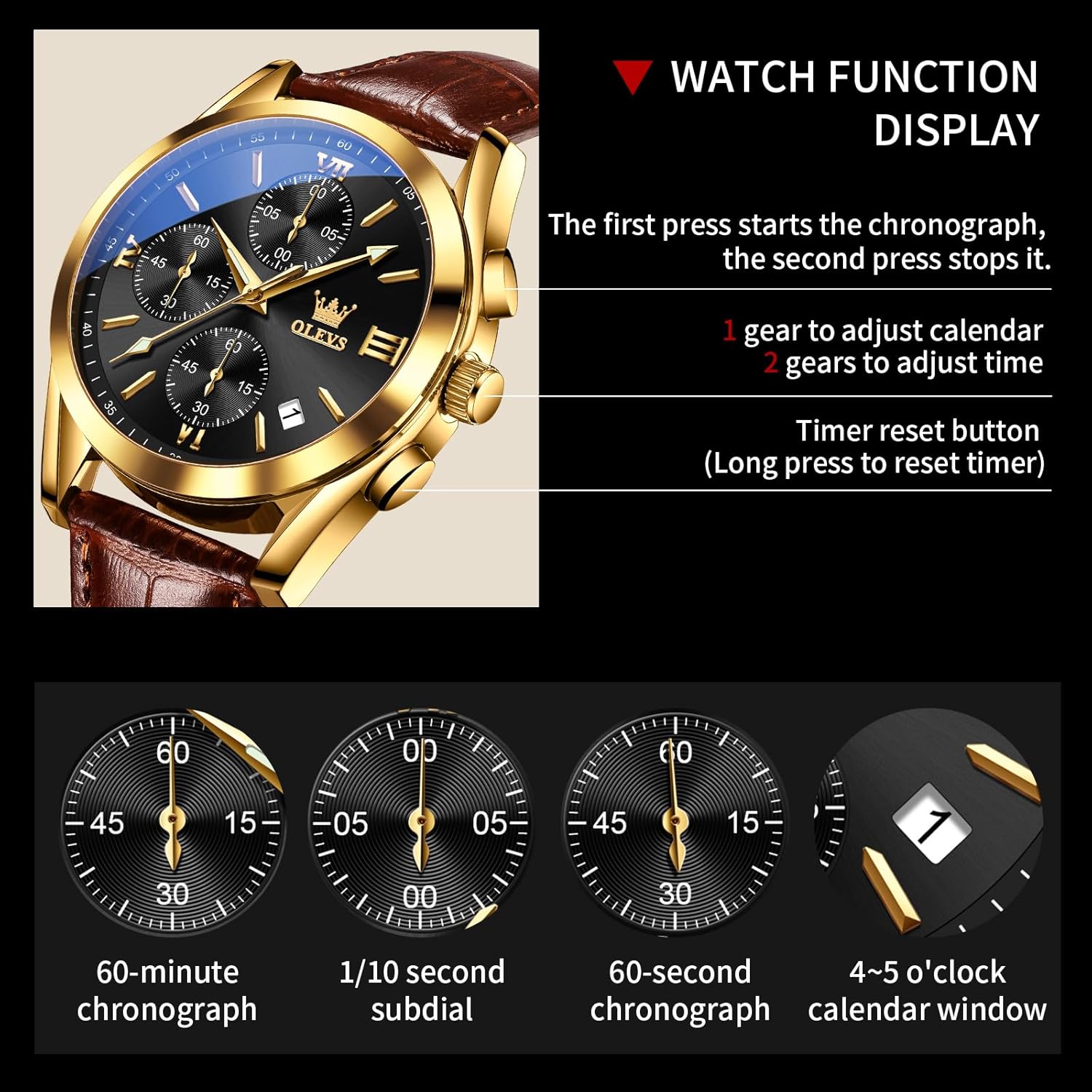
Image: Close-up of the watch dial highlighting the 60-minute, 1/10 second, and 60-second chronograph sub-dials, along with the date window.
Video: Watch Function Display
Video: A demonstration of the OLEVS 2872 watch's functions, including setting the time and date, and operating the chronograph. This video provides a visual guide to the watch's features.
Maintenance
Water Resistance
The watch is 30M (3 ATM) water-resistant. This means it is suitable for daily use, such as hand washing, rain, or accidental splashes. It is not suitable for showering, bathing, swimming, snorkeling, or any water sports involving submersion or high-pressure water.

Image: Visual representation of the watch's 30M water resistance, suitable for splashes but not submersion.
Cleaning
Wipe the watch case and strap with a soft, dry cloth. For the leather strap, avoid excessive moisture and harsh chemicals to prevent damage.
Luminous Hands
The luminous hands require exposure to light to glow in the dark. For optimal night visibility, expose the watch to a light source for approximately 30 seconds.

Image: A collage highlighting key features: 30M waterproof, high-quality mineral glass, genuine leather band, and luminous hands glowing in the dark.
Battery Replacement
The watch uses one LR44 battery. When the watch stops or the timekeeping becomes erratic, it may be time to replace the battery. It is recommended to have the battery replaced by a professional watch technician to ensure proper sealing and water resistance.
Troubleshooting
- Watch Not Running: Check if the crown is pushed all the way in. If it is, the battery may need replacement.
- Incorrect Time/Date: Refer to the "Initial Time and Date Setting" section to re-adjust.
- Chronograph Hands Not Resetting to Zero: This may indicate a need for chronograph calibration. Consult a professional watch technician.
- Condensation Inside Watch: This indicates a breach in water resistance. Avoid further contact with water and seek professional repair immediately.
Specifications
| Feature | Specification |
|---|---|
| Brand | OLEVS |
| Model Number | 2872 (KY-S-G2872PZ-CGH) |
| Movement | Analog Quartz |
| Case Diameter | 1.57 inches (40 mm) |
| Case Thickness | 0.47 inches (12 mm) |
| Strap Material | Leather |
| Water Resistance | 30M (3 ATM) |
| Glass Material | Scratch-resistant Mineral Glass |
| Special Features | Chronograph, Luminous Hands, Date Display |
| Battery Type | 1 x LR44 (included) |
| Weight | 3.53 ounces (55 grams) |

Image: A visual diagram detailing the dimensions of the OLEVS 2872 watch, including case diameter, thickness, and strap length.
Warranty and Support
For any issues or inquiries regarding this product, please contact the seller directly. They will provide assistance and guidance for troubleshooting or warranty claims.


