
ANCEL LD700
ANCEL LD700 Diagnostic Scan Tool User Manual
Model: LD700
Introduction
The ANCEL LD700 is an advanced all-systems diagnostic scan tool specifically designed for Land Rover and Jaguar vehicles. It provides comprehensive diagnostic capabilities across all available control modules, allowing users to quickly identify and resolve vehicle issues. This manual provides detailed instructions for setting up, operating, maintaining, and troubleshooting your device.
Key features include OE-level full system diagnostics, over 14 professional reset functions, powerful OBDII functions, a user-friendly interface, and lifetime free updates.

Figure 1: ANCEL LD700 Diagnostic Scan Tool
The ANCEL LD700 diagnostic scan tool features a compact design with a clear display and intuitive button layout for ease of use.
Setup
1. Package Contents
Ensure all components are present:
- ANCEL LD700 Main Unit
- OBDII Diagnostic Cable
- USB Cable (for updates)
- User Manual (this document)

Figure 2: ANCEL LD700 Physical Components and Dimensions
The device includes the main unit, an OBDII diagnostic cable for vehicle connection, and a USB cable for computer connectivity and software updates. The unit measures approximately 10.24 x 7.48 x 1.97 inches.
2. Initial Setup and Connection
- Locate the vehicle's OBDII port (typically under the dashboard).
- Connect the diagnostic cable from the LD700 to the vehicle's OBDII port. The device will power on automatically.
- Select your preferred language from the 'Tool Setup' menu. The device supports 12 languages including English, French, German, Spanish, and Italian.
3. Software Update
To ensure optimal performance and access to the latest vehicle data, it is recommended to update the device software regularly. Updates are free for life.
- Visit the official ANCEL website: www.anceltech.com.
- Navigate to the 'Download' section and select the LD700 model.
- Download the latest upgrade software to your computer.
- Connect the LD700 to your computer using the provided USB cable.
- Run the update tool on your computer and follow the on-screen instructions to complete the update. Ensure the device remains connected and powered during the entire process.
Video 1: How to download the latest version for LD700
This video demonstrates the step-by-step process of downloading and installing the latest software updates for your ANCEL LD700 diagnostic tool from the official website.
Operating Instructions
1. General Navigation
The LD700 features a 2.8-inch full-color LCD display and flexible keypads for easy navigation. Use the arrow keys to move between options and the 'OK' button to confirm selections. 'ESC' returns to the previous screen.
2. OE-Level Full System Diagnostics for JLR
The LD700 provides in-depth diagnostics for almost all available systems and modules in Land Rover and Jaguar vehicles. This allows for quick identification of problems across various systems.
- Engine System: Detects faults, clears engine lights, and helps with emissions tests.
- Transmission System: Troubleshoots transmission-related fault codes.
- ABS (Anti-lock Braking System): Reads and clears ABS codes, performs live data streams for critical ABS systems.
- SRS (Airbag System): Retrieves, reads, and clears SRS system issues.
- TPMS (Tire Pressure Monitoring System): Monitors tire conditions and performs resets after tire or sensor replacement.
- Other Systems: Includes Fuel System, EPB, Headlight, Chassis, ESP, DPF, and more.

Figure 3: All-System Diagnosis for JLR Group Vehicles
The diagnostic tool supports comprehensive scanning of various vehicle systems, including Engine, Transmission, ABS, TPMS, Fuel System, SRS, EPB, Headlight, Chassis, ESP, and DPF.
3. Professional Reset Functions for JLR
The LD700 supports over 14 popular reset functions to assist with common maintenance tasks:
- Oil Reset: Resets the oil service light after an oil change.
- Throttle Adaptation: Re-learns and adapts throttle sensor position after cleaning or repair.
- Battery Registration/BMS Reset: Registers new batteries and clears fault codes from the dashboard.
- EPB Reset: Performs maintenance of electronic parking brake systems, including brake pad reset.
- Steering Angle Reset (SAS Calibration): Calibrates the steering angle sensor to clear fault memories.
- ABS Bleeding: Bleeds the brake system when ABS contains air.
- DPF Regeneration/Reset: Manages Diesel Particulate Filter functions.
- Injector Coding: Writes new injector codes to the ECU after replacement.
- Transmission Adaptation: Allows the automatic transmission to learn and adapt to driving patterns.

Figure 4: Multiple Advanced Reset Functions for JLR
The device offers a wide array of reset functions, including Battery Registration, Oil Reset, EGR Reset, Transmission Adaptation, DPF Regeneration, Injector Coding, TPMS Reset, Throttle Position Learning, EPB Reset, Steering Angle Reset, and ABS Bleed.
4. Powerful OBDII Functions
The LD700 provides essential OBDII functions for all OBDII compliant vehicles (after 1996 for US, European, and Asian vehicles):
- Read Codes: Retrieves current, permanent, and pending diagnostic trouble codes (DTCs).
- Erase Codes: Clears DTCs and turns off the Check Engine Light (CEL).
- Live Data Stream: Displays real-time vehicle sensor data in text and graphic format.
- I/M Readiness Monitor: Provides a quick 5-second check of the car's engine status for emissions tests.
- EVAP System Test: Performs a leak test for the vehicle's EVAP system.
- Retrieve VIN: Automatically identifies vehicle information such as make, year, and model.
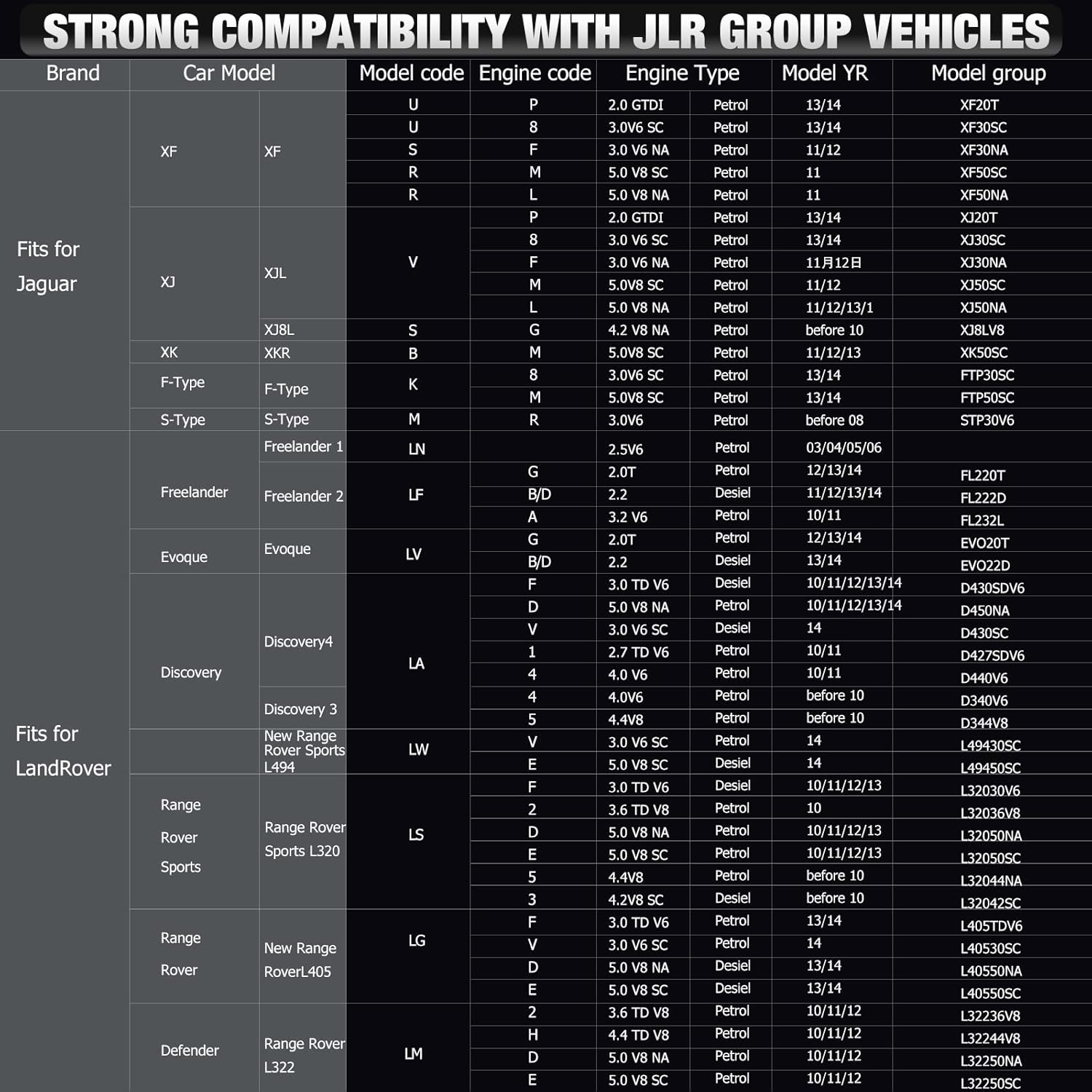
Figure 5: Powerful OBD Functions
The device supports core OBDII functions such as reading and erasing codes, viewing data streams, I/M readiness monitoring, EVAP system tests, and VIN retrieval.
Maintenance
1. Lifetime Free Updates
The ANCEL LD700 comes with lifetime free software updates, ensuring your device always has the latest vehicle coverage and diagnostic capabilities. Refer to the 'Setup' section for detailed update instructions.
2. Online Feedback
If you encounter any issues that cannot be resolved during the diagnostic process, you can report them directly to ANCEL's technical team using the feedback feature on the device.
Video 2: ANCEL OBD scanner Feedback Function operation video
This video illustrates how to use the feedback function on your ANCEL OBD scanner to report issues directly to the technical support team, facilitating quicker resolution.
Troubleshooting
The LD700 is designed to help diagnose and clear various vehicle issues. Here are common scenarios and how the tool assists:
- Check Engine Light (CEL) On: Use 'Read Codes' to identify the fault, then 'Erase Codes' after repairs to turn off the CEL.
- 'Service Required' Message: After an oil change, use the 'Oil Reset' function to clear this message.
- Battery Replacement: After replacing the car battery, use the 'Battery Registration' or 'BMS Reset' function to ensure the vehicle's battery management system is updated.
- Electronic Parking Brake Issues: Use 'EPB Reset' for maintenance or to clear related fault codes.

Figure 6: User-Friendly Design showing DTC and I/M Readiness
The intuitive interface allows for easy reading of Diagnostic Trouble Codes (DTCs) and quick monitoring of I/M Readiness status, aiding in efficient troubleshooting.
Specifications
| Feature | Description |
|---|---|
| Model | LD700 |
| Display | 2.8'' Full-Color LCD |
| Display Resolution | 320x240 pixels |
| Item Weight | 15.5 ounces |
| Product Dimensions | 10.24 x 7.48 x 1.97 inches |
| Supported Languages | 12 (English, French, German, Spanish, Italian, Russian, Portuguese, Finnish, Polish, Danish, Swedish, Norwegian) |
| Updates | Lifetime Free Update |
Warranty Information
The ANCEL LD700 comes with lifetime free software updates, ensuring continuous support and functionality for your diagnostic tool. For specific warranty details, please refer to the product's purchase documentation or contact ANCEL support directly.
Support
For technical assistance or any inquiries regarding your ANCEL LD700, please utilize the following resources:
- Official User Manual (PDF): A detailed PDF version of the user manual is available for download at https://manuals.plus/m/a086310523b26a09b5ed0a4a1bca696f230c2016f94d5ad9764f532503db1935.
- Online Feedback: Use the device's built-in feedback function to report issues directly to the technical team (refer to 'Maintenance' section).
- Email Support: Contact ANCEL technical support via email at support@anceltech.com.
Video 3: How to contact technical support for LD700
This video provides guidance on how to reach out to ANCEL's technical support for any assistance with your LD700 diagnostic tool.
Related documentsLD700


Ask a question about this manual
Ask about setup, troubleshooting, compatibility, parts, safety, or missing instructions. Manuals+ will review the question and use this page’s manual context to help answer it.