
1. Introduction
Thank you for purchasing the SMSL AO100 Bluetooth 5.0 Class D Power Amplifier. This manual provides detailed instructions for the proper setup, operation, and maintenance of your device. Please read this manual thoroughly before use to ensure optimal performance and safety.
The SMSL AO100 is a compact and powerful amplifier designed to deliver high-quality audio. It features Bluetooth 5.0 for wireless streaming, RCA inputs, and a subwoofer pre-output, making it suitable for various audio setups, including 2.1 channel systems.
2. Safety Instructions
- Do not expose this unit to rain or moisture.
- Do not place objects filled with liquids, such as vases, on the unit.
- Do not block any ventilation openings. Install in accordance with the manufacturer's instructions.
- Do not install near any heat sources such as radiators, heat registers, stoves, or other apparatus (including amplifiers) that produce heat.
- Protect the power cord from being walked on or pinched, particularly at plugs, convenience receptacles, and the point where they exit from the unit.
- Only use attachments/accessories specified by the manufacturer.
- Unplug this unit during lightning storms or when unused for long periods of time.
- Refer all servicing to qualified service personnel. Servicing is required when the unit has been damaged in any way, such as power-supply cord or plug is damaged, liquid has been spilled or objects have fallen into the unit, the unit has been exposed to rain or moisture, does not operate normally, or has been dropped.
3. Product Overview
The SMSL AO100 is designed for versatility and high-fidelity audio reproduction. Below are the key components and features of the amplifier.
3.1 Front Panel

Figure 3.1: Front view of the SMSL AO100 amplifier with its remote control.
The front panel features a digital display, a multi-function knob, and a remote control window. The display shows the current volume level, input source, and EQ settings.
3.2 Rear Panel
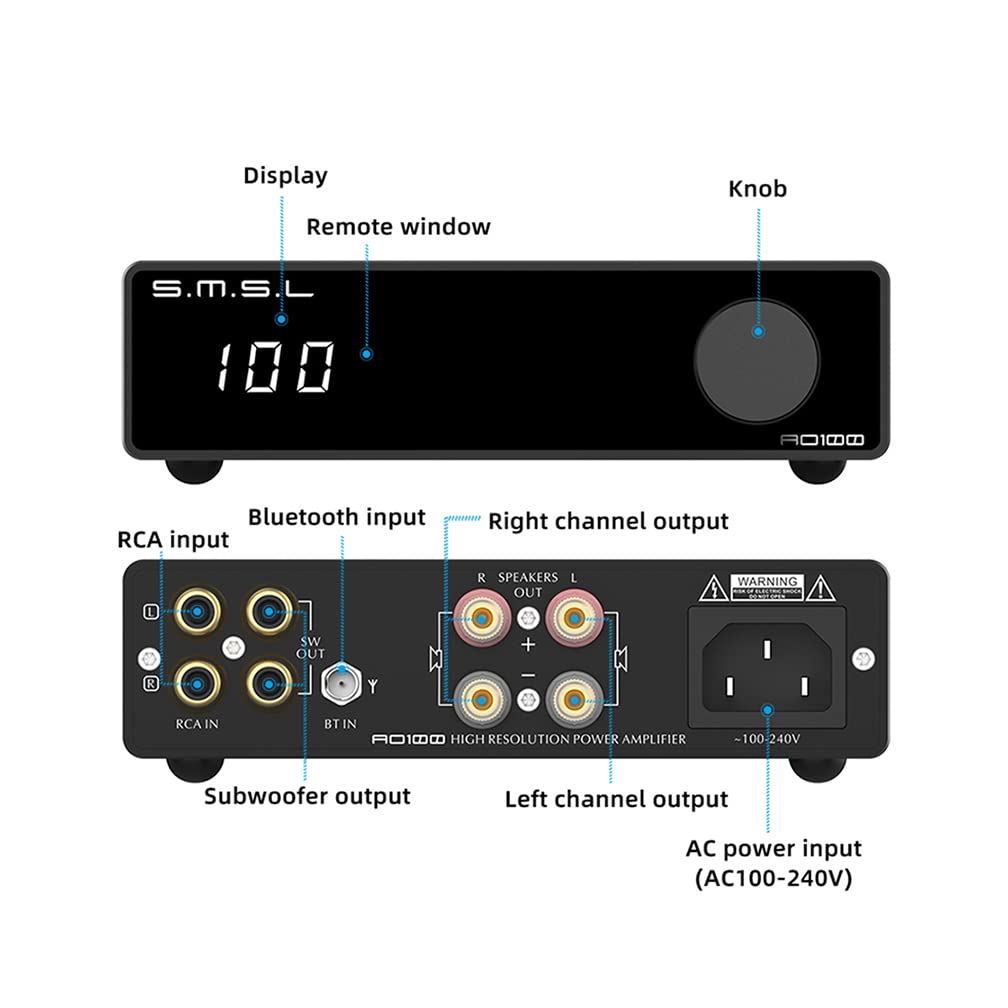
Figure 3.2: Rear panel connections of the SMSL AO100, showing RCA inputs, Bluetooth input, subwoofer output, speaker outputs, and AC power input.
The rear panel provides all necessary audio input and output connections, including RCA inputs, a Bluetooth antenna port, a subwoofer pre-output, and speaker terminals for left and right channels. The AC power input is also located here.
3.3 Key Features
- Powerful Performance: Delivers 2x70W at 4 Ohms for rich and dynamic sound.
- Versatile Connectivity: Bluetooth 5.0 for wireless streaming and RCA input for wired sources.
- Subwoofer Pre-output: Allows easy integration with a 2.1 audio system.
- Enhanced Sound Control: Features bass and treble control, multiple EQ sound modes, and simulated surround sound effects.
- Convenient Remote Control: Full-function remote for input selection, volume, EQ adjustments, and more.
- Compact and Stylish Design: Small footprint with a sleek design, glossy glass front panel, and metallic knob.
- Infineon MA12070 Power Amp Chip: Utilizes German Infineon's Class D power amplifier chip for high quality and efficiency.
- Built-in AC Adapter: Integrated power supply for a cleaner setup.

Figure 3.3: The SMSL AO100 integrated into a desktop audio setup, showcasing its compact size and features.
4. Setup Guide
4.1 Unpacking
Carefully remove the amplifier and all accessories from the packaging. Ensure all components are present:
- SMSL AO100 Amplifier
- Remote Control
- Power Cable
- Bluetooth Antenna
- User Manual (this document)
4.2 Connecting Speakers
Connect your passive speakers to the speaker terminals on the rear panel. Ensure correct polarity (+ to + and - to -) for both left and right channels. Use high-quality speaker cables for optimal sound.

Figure 4.1: Detail of the RCA and Subwoofer output ports.
4.3 Connecting Audio Sources
RCA Input: Connect your audio source (e.g., CD player, DAC, TV) to the RCA IN ports on the rear panel using RCA cables.
Bluetooth Input: Screw the provided Bluetooth antenna onto the BT IN connector on the rear panel. Ensure it is securely fastened for best signal reception.

Figure 4.2: The SMSL AO100 receiving audio wirelessly via Bluetooth from a smartphone.
4.4 Connecting a Subwoofer (Optional)
If you wish to use a 2.1 audio system, connect your active subwoofer to the SW OUT port on the rear panel using an RCA cable.
4.5 Power Connection
Connect the power cable to the AC power input on the rear panel, then plug the other end into a suitable wall outlet (AC100-240V).

Figure 4.3: The built-in AC adapter of the SMSL AO100, offering a compact solution compared to external power bricks.
5. Operating Instructions
5.1 Power On/Off
Press the multi-function knob on the front panel or the power button on the remote control to turn the unit on or off.
5.2 Volume Control
Rotate the multi-function knob clockwise to increase volume and counter-clockwise to decrease volume. Volume can also be adjusted using the VOL+/- buttons on the remote control.
5.3 Input Selection
Press the input selection button on the remote control or short press the multi-function knob to cycle through available inputs (RCA, Bluetooth).
5.4 Bluetooth Pairing
When Bluetooth input is selected, the display will indicate pairing mode. On your device (smartphone, tablet, etc.), search for "SMSL AO100" in the Bluetooth settings and select it to pair. Once paired, the display will show a stable Bluetooth connection indicator.
5.5 Sound Adjustments (EQ, Bass, Treble)
Use the remote control to access and adjust sound settings:
- EQ Modes: Cycle through preset EQ modes (e.g., Flat, Rock, Pop, Classical) to optimize sound for different genres.
- Bass/Treble Control: Adjust bass and treble levels to customize the sound to your preference.
- Simulated Surround Sound: Activate or deactivate simulated surround sound effects for an immersive listening experience.
6. Maintenance
To ensure the longevity and optimal performance of your SMSL AO100 amplifier, follow these maintenance guidelines:
- Cleaning: Use a soft, dry cloth to wipe the exterior of the unit. Do not use liquid cleaners, aerosols, or abrasive chemicals, as they may damage the finish.
- Ventilation: Ensure that the ventilation openings are not blocked. Proper airflow is crucial to prevent overheating.
- Storage: If storing the unit for an extended period, unplug it from the power outlet and store it in a cool, dry place away from direct sunlight and extreme temperatures.
- Protective Film: A protective film is applied to the screen to prevent scratches during shipping. This film can be carefully removed by the user.
7. Troubleshooting
If you encounter any issues with your SMSL AO100, please refer to the following common problems and solutions:
| Problem | Possible Cause | Solution |
|---|---|---|
| No power | Power cable not connected; Power outlet faulty | Ensure power cable is securely connected. Try a different power outlet. |
| No sound | Incorrect input selected; Speakers not connected; Volume too low; Audio source issue | Select the correct input. Check speaker connections and polarity. Increase volume. Verify audio source is playing correctly. |
| Bluetooth not connecting | Not in pairing mode; Device too far; Interference | Ensure Bluetooth input is selected and unit is in pairing mode. Move device closer to the amplifier. Reduce interference from other wireless devices. |
| Distorted sound | Volume too high; Poor cable connection; Source audio quality | Reduce volume. Check all cable connections. Ensure audio source is of good quality. |
If the problem persists after trying these solutions, please contact customer support for further assistance.
8. Specifications
The following table lists the technical specifications for the SMSL AO100 amplifier:

Figure 8.1: Visual representation of SMSL AO100 dimensions and a summary of its specifications.
| Feature | Detail |
|---|---|
| Model | SMSL AO100 |
| Output Power | 70W x 2 (4Ω) |
| Frequency Response | 20Hz - 40KHz |
| Bass or Treble Gain | -14dB - +14dB |
| THD+N | 0.004% |
| Channel Separation | 109dB (1KHz) |
| Input Sensitivity | 400mVrms |
| SNR | 104dB |
| Maximum Input Voltage (Low Gain) | 2Vrms |
| Maximum Input Voltage (High Gain) | 1.2Vrms |
| Power Consumption | 36W |
| Standby Power | <0.5W |
| Dimensions (WxDxH) | 150 x 128 x 39mm |
| Weight | 560g / 1.23lbs |
| Number of Channels | 2 |

Figure 8.2: Performance graphs illustrating the ultra-low distortion (THD+N) and high Signal-to-Noise Ratio (SNR) of the SMSL AO100.
9. Support and Warranty
For technical support, troubleshooting beyond this manual, or warranty inquiries, please contact your retailer or the manufacturer directly. Keep your purchase receipt as proof of purchase for warranty claims.
AOSHIDA Audio Technology Company was formally established in 2014, specializing in the supply and production of audio products. They are agents for various brands including SMSL.


