
Offgridtec 1-01-013705
Offgridtec IC-48/5000/80/60 Combi Inverter Charger User Manual
Model: IC-48/5000/80/60 (Part No. 1-01-013705)
Brand: Offgridtec
1. Introduction
This manual provides essential information for the safe and efficient operation of your Offgridtec IC-48/5000/80/60 Combi Inverter Charger. This device integrates a pure sine wave inverter, an MPPT solar charge controller, and a battery charger into one compact unit. Please read this manual thoroughly before installation and operation.
The Offgridtec IC-48/5000/80/60 is designed for off-grid solar power systems, providing reliable power conversion and battery management. It is suitable for various applications requiring stable AC power from a DC battery bank, with integrated solar charging capabilities.
2. Safety Information
WARNING: This unit contains high voltage. Installation and maintenance should only be performed by qualified personnel.
- Ensure all connections are secure and correct before powering on the unit.
- Do not disassemble the unit. There are no user-serviceable parts inside.
- Install the unit in a well-ventilated area, away from flammable materials and direct sunlight.
- Wear appropriate personal protective equipment (PPE) during installation and maintenance.
- Disconnect all power sources (AC, DC, PV) before performing any wiring or maintenance.
3. Product Overview
The Offgridtec IC-48/5000/80/60 Combi unit combines three essential functions for off-grid power systems:
- Pure Sine Wave Inverter: Converts 48V DC battery power to 230V AC power for household appliances.
- MPPT Solar Charge Controller: Maximizes power harvest from solar panels to charge the battery bank.
- Battery Charger: Charges the battery bank from an AC utility or generator source.
3.1 Front Panel and Display
The front panel features an LCD display and control buttons for monitoring system status and configuring settings.
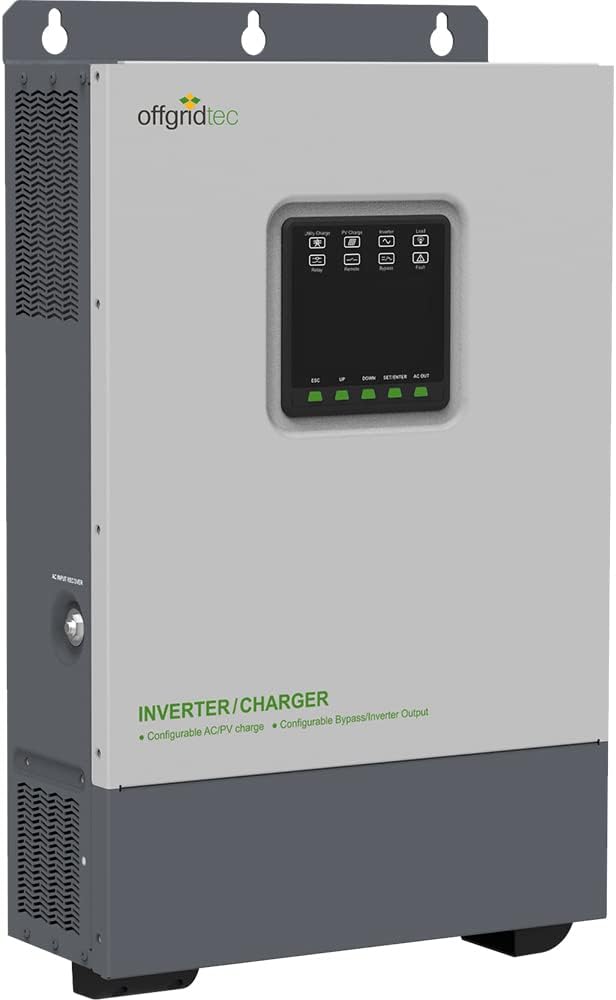
Figure 3.1: Front view of the Offgridtec IC-48/5000/80/60 Combi Inverter Charger, showing the display and control buttons.
The display provides real-time information such as input voltage, output voltage, battery status, and charging current. The buttons allow navigation through menus and adjustment of parameters.
3.2 Side and Rear Connections
The unit features various connection points for AC input/output, DC input from batteries, and PV input from solar panels.

Figure 3.2: Angled view of the Offgridtec IC-48/5000/80/60 Combi Inverter Charger, highlighting the side connections for AC input and output.

Figure 3.3: Another angled view of the Offgridtec IC-48/5000/80/60 Combi Inverter Charger, showing the other side with ventilation and mounting points.

Figure 3.4: Rear view of the Offgridtec IC-48/5000/80/60 Combi Inverter Charger, detailing the AC input/output, DC input, and communication ports.
Ensure proper wiring and polarity for all connections to prevent damage to the unit or connected devices.
4. Setup and Installation
4.1 Unpacking and Inspection
Upon receiving the unit, carefully unpack it and inspect for any shipping damage. Report any damage to your dealer immediately.
4.2 Mounting the Unit
Mount the inverter charger vertically on a solid surface, ensuring adequate clearance for ventilation. The unit weighs 19 kg, so ensure the mounting surface can support this weight.

Figure 4.1: Side view of the Offgridtec IC-48/5000/80/60 Combi Inverter Charger, indicating the location of the ON/OFF switch.
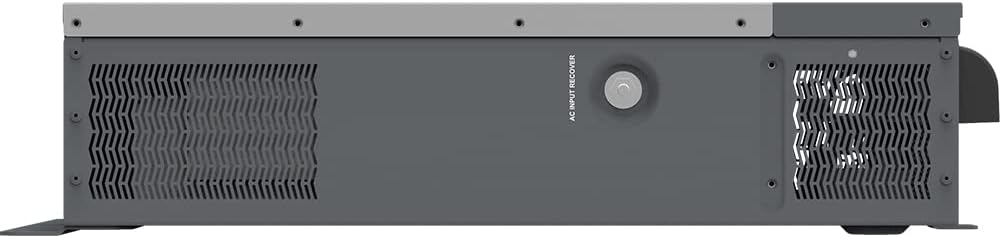
Figure 4.2: Other side view of the Offgridtec IC-48/5000/80/60 Combi Inverter Charger, showing the AC input recover button.
4.3 Wiring Connections
Follow these steps for wiring:
- Battery Connection: Connect the 48V DC battery bank to the DC input terminals. Ensure correct polarity. The unit supports a battery voltage range of 43.2-64 V/DC.
- AC Input Connection: Connect the AC utility grid or generator (176-246 V/AC, 40-65Hz) to the AC input terminals.
- AC Output Connection: Connect your AC loads to the AC output terminals. The inverter provides 220V-230V AC output.
- PV Input Connection: Connect your solar panels to the PV input terminals. Ensure the open circuit voltage (Voc) of your solar array does not exceed 500V (at min. operating temp) or 440V (at 25°C ambient temp). The maximum PV input power is 4000W.
- Grounding: Connect the unit to a reliable earth ground.
CAUTION: Incorrect wiring can cause severe damage to the unit and pose a safety hazard. Consult a qualified electrician if unsure.
5. Operating Instructions
5.1 Powering On/Off
To power on the unit, ensure all connections are secure, then switch the main DC breaker to ON, followed by the AC input breaker (if applicable), and finally the unit's ON/OFF switch.
To power off, reverse the sequence: unit's ON/OFF switch, then AC input breaker, then DC breaker.
5.2 Display and Settings
Use the UP/DOWN buttons to navigate through the display menus. The ENTER button confirms selections, and ESC exits menus.
Key settings include:
- Output Priority: Configure whether the unit prioritizes solar, utility, or battery power for loads.
- Charging Source Priority: Set the preferred charging source (solar, utility, or both).
- Battery Type: Select the battery type (e.g., Flooded, AGM, LiFePO4) to ensure correct charging parameters.
- Charging Current: Adjust the maximum AC charging current (up to 60A).
5.3 Operating Modes
The unit can operate in various modes:
- Utility Priority Mode: AC loads are primarily powered by the utility grid. Solar power charges batteries.
- Solar Priority Mode: AC loads are primarily powered by solar and battery. Utility acts as a backup.
- Battery Priority Mode: AC loads are primarily powered by battery. Utility acts as a backup.
6. Maintenance
Regular maintenance ensures the longevity and optimal performance of your Offgridtec IC-48/5000/80/60 Combi Inverter Charger.
- Cleaning: Periodically clean the exterior of the unit and ensure ventilation openings are free from dust and debris. Use a dry, soft cloth.
- Connection Check: Annually inspect all wiring connections for tightness and corrosion. Re-tighten if necessary.
- Battery Inspection: Regularly check your battery bank for proper voltage, electrolyte levels (for flooded batteries), and terminal corrosion.
- Environmental Check: Ensure the operating environment remains within specified temperature limits (-20°C to +50°C) and humidity (< 95% N.C.).
WARNING: Disconnect all power sources before performing any maintenance.
7. Troubleshooting
This section provides solutions to common issues you might encounter.
| Problem | Possible Cause | Solution |
|---|---|---|
| No power output from inverter | Battery voltage too low; Overload; Unit is off; Loose connections. | Check battery voltage and charge if necessary; Reduce load; Turn unit on; Check and tighten all connections. |
| Batteries not charging from PV | PV input voltage too low/high; Shaded panels; Faulty PV connection; MPPT controller error. | Check PV array voltage; Clear shading; Inspect PV wiring; Consult error codes on display. |
| Batteries not charging from AC | AC input not present; AC input voltage out of range; Charger setting incorrect. | Verify AC utility/generator supply; Check AC input voltage; Adjust charger settings. |
| Unit displays error code | Internal fault; Over-temperature; Short circuit; Overload. | Refer to the specific error code in the full manual (if available); Allow unit to cool; Check for short circuits in wiring; Reduce load. |
If the problem persists after attempting these solutions, please contact Offgridtec customer support.
8. Specifications
| Parameter | Value |
|---|---|
| Model | IC-48/5000/80/60 |
| Battery Voltage | 48 V/DC |
| Battery Input Voltage Range | 43.2-64 V/DC |
| Continuous Output Power (Inverter) | 5000 W |
| Peak Power (3s) | 8000 W |
| Output Voltage Range | 220 V -6% ~ +3% / 230 V -10% ~ +3% |
| Output Frequency | 50/60 ±0.2 Hz |
| Output Waveform | Pure Sine Wave |
| Max. Efficiency | 91 % |
| Transfer Time (Grid to Inverter) | 10 ms |
| Transfer Time (Inverter to Grid) | 15 ms |
| Max. Open Circuit PV Voltage | 500 V (at min. operating temp), 440 V (at 25°C) |
| Max. PV Input Power | 4000 W |
| Max. PV Charge Current | 80 A |
| Tracking Efficiency (MPPT) | > 99.5 % |
| AC Input Voltage Range | 176-246 V/AC (default) |
| AC Input Frequency | 40-65 Hz |
| Max. AC Charge Current | 60 A |
| Protection Class | IP30 |
| Operating Temperature | -20 °C to +50 °C |
| Dimensions | 642.5 x 381.6 x 149 mm |
| Weight | 19 kg |
9. Warranty and Support
Offgridtec products are designed for durability and performance. For warranty information, please refer to the warranty card included with your product or visit the official Offgridtec website.
For technical support, troubleshooting assistance beyond this manual, or spare parts inquiries, please contact Offgridtec customer service:
- Website: www.offgridtec.com
- Email: Refer to website for contact details.
- Phone: Refer to website for contact details.
Please have your model number (IC-48/5000/80/60) and serial number ready when contacting support.
Ask a question about this manual
Ask about setup, troubleshooting, compatibility, parts, safety, or missing instructions. Manuals+ will review the question and use this page’s manual context to help answer it.