
Introduction
Thank you for choosing the Hoover HF300 HF322TP 011 Cordless Vacuum Cleaner. This manual provides essential information for the safe and efficient use, maintenance, and troubleshooting of your appliance. Please read it thoroughly before first use and keep it for future reference.
The Hoover HF300 HF322TP 011 is a versatile, bagless cordless vacuum cleaner designed for effective cleaning across various surfaces, offering convenience and powerful performance.
Important Safety Instructions
Always follow basic safety precautions when using electrical appliances to reduce the risk of fire, electric shock, or injury.
- Ensure the appliance is fully assembled before use.
- Do not use the vacuum cleaner to pick up liquids, burning or smoking objects, or sharp items.
- Keep hair, loose clothing, fingers, and all parts of the body away from openings and moving parts.
- Use only as described in this manual. Use only manufacturer's recommended attachments.
- Do not handle the charger or appliance with wet hands.
- Store the appliance indoors in a dry place.
Product Overview
The Hoover HF300 HF322TP 011 is a lightweight and powerful cordless stick vacuum cleaner. Key features include:
- Cordless Design: Provides freedom of movement without being tethered to an outlet.
- Anti-Tangle Brush: Designed to prevent hair and pet fur from wrapping around the brush roll.
- Mini Turbo Brush: Ideal for cleaning pet hair from upholstery and fabric surfaces.
- LED Lights: Integrated LED strip on the floor nozzle and a light on the handle enhance visibility in dark areas.
- Quick Charge: Battery recharges in approximately 2.5 hours.
- Long Runtime: Up to 40 minutes of continuous operation.
- Versatile Cleaning: Suitable for carpets, hard floors, and parquet.
- Compact and Maneuverable: Easy to handle and store, with flexible movement for cleaning around obstacles.

Figure 1: Hoover HF300 HF322TP 011 Cordless Vacuum Cleaner with accessories.
Setup and Initial Use
1. Assembly
Your Hoover HF300 HF322TP 011 comes with several components that require assembly before first use.
- Attach the Main Body to the Extension Tube: Align the main unit (containing the motor and dustbin) with the extension tube and push firmly until it clicks into place.
- Attach the Floor Nozzle: Connect the motorized floor nozzle to the other end of the extension tube, ensuring it locks securely.
- Install Wall Mount (Optional): Use the provided wall mount to store and charge your vacuum. Choose a suitable location near a power outlet and secure the mount to the wall using the included screws and anchors.

Figure 2: Fully assembled cordless vacuum cleaner.
2. Charging the Battery
Before first use, fully charge the battery. The battery is integrated into the main unit.
- Connect the charger to a power outlet.
- Plug the charger into the charging port on the main unit.
- The charging indicator lights will illuminate, showing the charging status. A full charge takes approximately 2.5 hours.
- Once fully charged, disconnect the charger.

Figure 3: Connecting the vacuum cleaner to its charger.
Operating Instructions
1. Power On/Off and Suction Modes
The vacuum cleaner features two power levels for different cleaning needs.
- To turn on, press the power button located on the handle. The vacuum will start in standard mode.
- Press the mode selection button to switch between standard and maximum suction power.
- To turn off, press the power button again.
2. Cleaning Different Surfaces
The universal brush is designed for effective cleaning on various floor types.
- Hard Floors and Parquet: Use standard mode for daily cleaning. The soft bristles protect delicate surfaces.
- Carpets and Rugs: Switch to maximum power mode for deeper cleaning. The motorized brush agitates carpet fibers to lift embedded dirt.

Figure 4: Vacuum cleaner in use on a carpeted surface.
3. Using Attachments
The Hoover HF300 HF322TP 011 includes several attachments for specialized cleaning tasks:
- Mini Turbo Brush: Attach this directly to the main unit or the extension tube for effective removal of pet hair and stubborn dirt from upholstery, stairs, and car interiors.
- 2-in-1 Dusting Brush and Crevice Tool: Use the dusting brush for delicate surfaces like shelves and blinds. Extend it to a crevice tool for narrow gaps and corners.
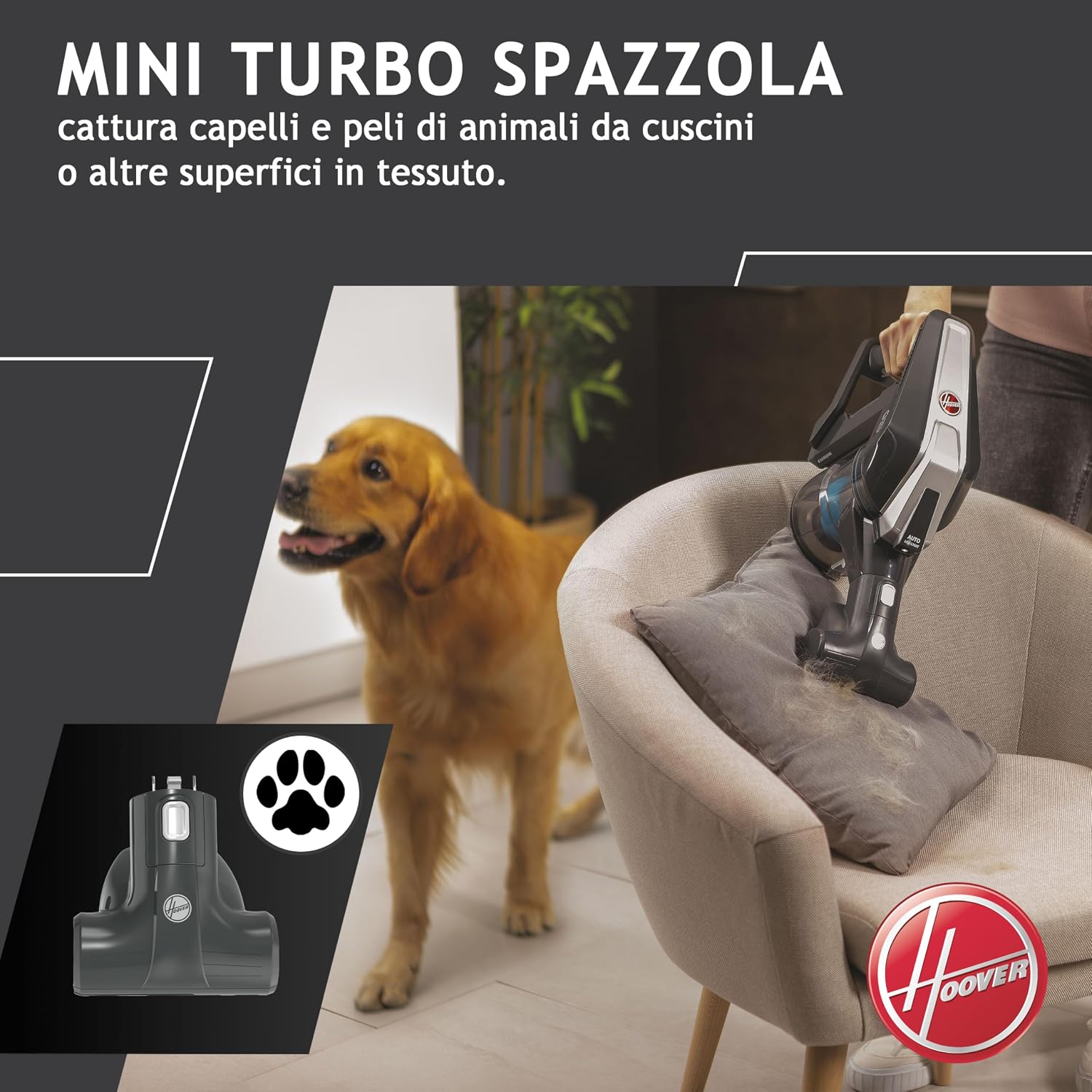
Figure 5: Using the Mini Turbo Brush attachment for upholstery cleaning.
4. Maneuverability and Visibility
The vacuum's design allows for easy navigation and enhanced visibility.
- The flexible joint allows the vacuum to recline from 90 to 180 degrees, making it easy to clean under furniture and around obstacles.
- Front LED lights on the floor nozzle illuminate dust and debris, ensuring no spot is missed, even in dimly lit areas. An additional LED light on the handle provides extra visibility.

Figure 6: LED lights on the floor nozzle for improved visibility.

Figure 7: Demonstrating the flexible movement for cleaning under furniture.
5. Self-Standing Feature
The HF300 can stand upright independently during cleaning breaks. For long-term storage or when not in use, it is recommended to secure it on its wall mount.

Figure 8: The vacuum cleaner standing upright during a pause in cleaning.
Maintenance
Regular maintenance ensures optimal performance and extends the life of your vacuum cleaner.
1. Emptying the Dustbin
Empty the dustbin after each use or when the MAX fill line is reached.
- Press the dustbin release button to detach it from the main unit.
- Hold the dustbin over a trash can.
- Press the dustbin flap release button to open the bottom and empty the contents.
- Close the flap and reattach the dustbin to the main unit.

Figure 9: Illustration of emptying the vacuum cleaner's dustbin.
2. Cleaning the Filter
The cyclonic filter system requires periodic cleaning to maintain suction power. Clean the filter regularly, especially if you notice a decrease in performance.
- Remove the dustbin as described above.
- Twist and pull out the filter assembly from the dustbin.
- Tap the filter gently over a trash can to remove loose dust.
- If heavily soiled, rinse the filter under cold running water. Ensure it is completely dry before reassembling.
- Reinsert the dry filter assembly into the dustbin and reattach the dustbin to the main unit.

Figure 10: Steps for cleaning the vacuum cleaner's filter.
3. Cleaning the Brush Roll
The Anti-Twist™ brush roll is designed to minimize hair tangles, but occasional cleaning may still be necessary.
- Ensure the vacuum is turned off and disconnected from the charger.
- Flip the floor nozzle over.
- Use a coin or screwdriver to unlock the brush roll cover.
- Remove the brush roll.
- Remove any tangled hair or debris from the brush roll and its housing.
- Reinsert the brush roll and secure the cover.

Figure 11: Guide for cleaning the brush roll to remove tangled hair.
Troubleshooting
If you encounter issues with your Hoover HF300 HF322TP 011, refer to the following common problems and solutions:
| Problem | Possible Cause | Solution |
|---|---|---|
| Vacuum does not turn on | Battery is not charged; Power button not pressed correctly. | Charge the battery fully; Ensure the power button is pressed firmly. |
| Low suction power | Dustbin is full; Filter is clogged; Brush roll is obstructed. | Empty the dustbin; Clean the filter; Clear any obstructions from the brush roll. |
| Brush roll not spinning | Obstruction in the brush roll; Brush roll cover not secured. | Remove any obstructions; Ensure the brush roll cover is locked. |
| Short battery runtime | Battery not fully charged; Using maximum power mode continuously. | Ensure battery is fully charged; Use standard mode for longer runtime. |
If the problem persists after attempting these solutions, please contact customer support.
Specifications
- Brand: Hoover
- Model Name: HF322TP 011
- Model Number: 39400986
- Power: 240 Watts
- Voltage: 22 Volts
- Dustbin Capacity: 0.7 Liters
- Battery Type: Lithium-ion
- Battery Runtime: Up to 40 minutes
- Battery Charge Time: 2.5 hours
- Power Levels: 2
- Filter Type: Disc
- Weight: 3.3 Kilograms
- Dimensions (LxWxH): 28L x 15l x 68H cm
- Special Features: Compact, Cordless, Bagless, Anti-Tangle Brush, Mini Turbo Brush, LED Lights
- Recommended Surfaces: Carpet, Hard Floor
- Included Components: Wall mount, Motorized floor nozzle, Pet hair nozzle, 2-in-1 brush and furniture tool
Warranty Information
The Hoover HF300 HF322TP 011 Cordless Vacuum Cleaner comes with a 2-year manufacturer's warranty. This warranty covers defects in materials and workmanship under normal use. Please retain your proof of purchase for warranty claims. The warranty does not cover damage caused by misuse, neglect, unauthorized modification, or normal wear and tear.
For detailed terms and conditions, please refer to the warranty card included in your product packaging or visit the official Hoover website.
Customer Support
If you have any questions, require technical assistance, or need to make a warranty claim, please contact Hoover customer support.
- Online Support: Visit the official Hoover website for FAQs, troubleshooting guides, and contact forms.
- Phone Support: Refer to your product packaging or the Hoover website for regional contact numbers.
When contacting support, please have your product model number (HF322TP 011) and serial number (39400986) ready, along with your proof of purchase.


