
1. Introduction
Thank you for choosing the YMOO M5 RT5320 Wireless Lavalier Microphone. This device is designed to provide high-quality audio recording for various applications, including live streaming, video recording, and online meetings. Featuring 2.4GHz wireless transmission, noise reduction technology, and broad compatibility, the M5 offers a convenient and reliable audio solution.
This manual provides detailed instructions on how to set up, operate, and maintain your microphone system. Please read it carefully before use to ensure optimal performance and longevity of your device.
2. Package Contents
Verify that all items are present in your package:
- 1 x YMOO M5 Microphone (Transmitter)
- 1 x YMOO M5 Receiver
- 1 x Type-C to Lightning Adapter
- 1 x Type-C to USB Adapter
- 1 x User Manual

Image: Contents of the YMOO M5 Wireless Microphone package, showing the microphone, receiver, Type-C to Lightning adapter, and Type-C to USB adapter.
3. Components Overview
The YMOO M5 system consists of a microphone (transmitter) and a receiver, along with various adapters for broad compatibility.
- Microphone (Transmitter): This is the clip-on unit that captures audio. It features a multi-function button for power and mute, and an integrated battery.
- Receiver: This unit plugs into your recording device (smartphone, tablet, PC). It receives the wireless audio signal from the microphone. It includes a Type-C connector and a USB-C charging port for pass-through charging.
- Adapters: The Type-C to Lightning adapter allows connection to iOS devices. The Type-C to USB adapter allows connection to computers and other devices with standard USB-A ports.

Image: A detailed view of the YMOO M5 wireless microphone (transmitter), receiver, and the included Type-C to Lightning and Type-C to USB adapters.
4. Setup Instructions
The YMOO M5 microphone system is designed for plug-and-play operation, requiring no additional applications or Bluetooth pairing for the microphone itself.
- Connect the Receiver: Plug the receiver directly into your recording device's charging port.
- For devices with a Type-C port (Android phones, PCs): Plug the receiver directly.
- For devices with a Lightning port (iPhones, iPads): Attach the Type-C to Lightning adapter to the receiver, then plug it into your device.
- For devices with a USB-A port (PCs, Laptops): Attach the Type-C to USB adapter to the receiver, then plug it into your device.
- Power On the Microphone: Press and hold the multi-function button on the microphone (transmitter) for more than 2 seconds until the blue light flashes.
- Automatic Pairing: The microphone and receiver will automatically pair within 2 seconds. The blue light on both units will remain solid once connected.
- Start Recording: Once paired, open your preferred recording application on your device and begin recording. The microphone will be recognized as an external audio input.

Image: Visual guide demonstrating the three steps for setting up the YMOO M5 microphone: Plug the receiver into the device, press the microphone's power button to pair, and then start recording.
5. Operating Instructions
5.1 Mute Function
To mute the microphone during recording, simply click the multi-function button on the microphone. The indicator light will turn purple, indicating that the microphone is muted. Click the button again to unmute.
5.2 Noise Reduction
The YMOO M5 features an integrated noise reduction chip with a signal-to-noise ratio of 64.5dB. This technology helps to filter out ambient noise, providing clearer audio even in noisy environments.
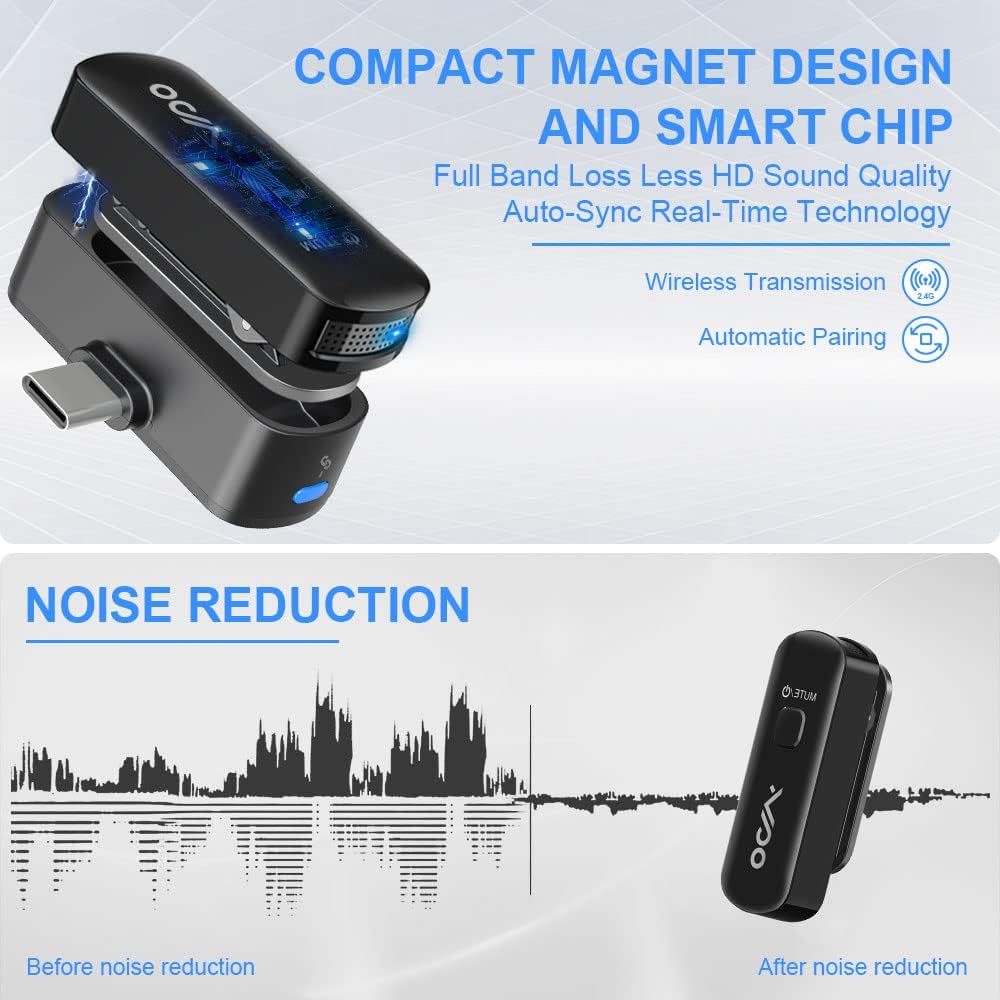
Image: A graph illustrating the effect of noise reduction, showing a comparison of audio waveforms before and after noise reduction, with the YMOO M5 microphone.
5.3 HD Recording
The microphone supports 48K/16-bit high-definition recording format with an audio bandwidth of up to 20kHz, ensuring detailed and high-fidelity sound capture.

Image: A smartphone displaying a video recording interface, with the YMOO M5 microphone and receiver connected, highlighting its HD recording capabilities.
5.4 Battery Life and Charging
The microphone has a built-in battery that provides up to 10 hours of continuous operation on a full charge. When the battery is low, the red indicator light will flash.
The receiver features a USB-C charging port. This port can be used to charge the microphone's battery (when the microphone is connected to the receiver) or to provide pass-through charging to your connected mobile device (iPhone or Android phone) while the microphone system is in use.

Image: An illustration of the YMOO M5 microphone with a clock icon indicating its 10-hour battery life.
6. Device Compatibility
The YMOO M5 microphone system offers broad compatibility with various devices:
- iOS Devices: Compatible with iPhones and iPads running iOS version 13 to 15.2 (using the Type-C to Lightning adapter).
- Android Devices: Compatible with smartphones running Android 6.0 and above (using the Type-C receiver directly).
- Computers: Compatible with PCs and laptops (using the Type-C to USB adapter).
Note: The YMOO M5 uses 2.4GHz wireless transmission and does not support Bluetooth connections. It is generally not recommended for use with professional cameras that may require specific audio input protocols.

Image: A visual representation of the YMOO M5 microphone's compatibility with various devices, including iPhones, Android smartphones, laptops, and tablets.
7. Technical Specifications
| Feature | Specification |
|---|---|
| Model Number | RT5320 |
| Wireless Technology | 2.4 GHz |
| Transmission Distance | Up to 70 meters (230 feet) barrier-free |
| Latency | Less than 0.005 seconds |
| Recording Format | 48K/16-bit High Definition |
| Audio Bandwidth | Up to 20 kHz |
| Signal-to-Noise Ratio (SNR) | 64.5 dB |
| Battery Life | Up to 10 hours (microphone) |
| Microphone Weight | 7 grams |
| Material | Plastic |
| Power Source | Battery Powered (1 Lithium-polymer battery included) |
| Color | Black |
8. Troubleshooting
- No Sound/Microphone Not Detected:
- Ensure the receiver is fully plugged into your device's port.
- Verify that the correct adapter (Lightning or USB-A) is securely attached if needed.
- Confirm both the microphone and receiver are powered on and the blue indicator lights are solid, indicating a successful connection.
- In some recording applications, you may need to manually select the external microphone as the audio input source.
- If using an Android device, double-click the LED light button on the receiver to ensure it is in receiving mode.
- Poor Audio Quality/Interference:
- Ensure the microphone is clipped close to the sound source (e.g., your lapel).
- Check for strong electromagnetic interference sources nearby (e.g., Wi-Fi routers, other 2.4GHz devices).
- Ensure you are within the recommended operating range (up to 70 meters barrier-free). Obstacles can reduce range.
- Confirm the microphone battery is sufficiently charged.
- Microphone Not Charging:
- Ensure the microphone is correctly seated in the receiver's charging slot.
- Connect a USB-C charging cable to the receiver's USB-C port and a power source.
- Check if the charging cable and power source are functional.
- Device Not Charging (Pass-through):
- Ensure the receiver is firmly connected to your mobile device.
- Connect a USB-C charging cable to the receiver's USB-C port and a power source.
- Verify that the charging cable and power source are functional.
9. Maintenance and Care
- Cleaning: Use a soft, dry cloth to clean the microphone and receiver. Do not use liquid cleaners or solvents.
- Storage: Store the device in a cool, dry place away from direct sunlight and extreme temperatures.
- Battery Care: To prolong battery life, avoid fully discharging the microphone frequently. Charge it regularly, even if not in use for extended periods.
- Handling: Handle the microphone and receiver with care. Avoid dropping or subjecting them to strong impacts.
10. Warranty and Support
Specific warranty information for the YMOO M5 RT5320 Wireless Lavalier Microphone is not provided in the product details. For warranty claims, technical support, or further assistance, please contact your retailer or the manufacturer directly through their official support channels.
Information regarding spare parts availability and guaranteed software updates is also not available in the provided product details.

