
unibono YP-7116
unibono YP-7116 4-in-1 Dog Grooming Clippers Kit Instruction Manual
Model: YP-7116
Introduction
The unibono YP-7116 4-in-1 Dog Grooming Clippers Kit is designed to provide a comfortable and precise trimming experience for your pets. This versatile kit includes multiple interchangeable heads and guide combs to cater to various grooming needs, from full body trimming to delicate areas like paws, ears, and eyes, as well as nail grinding. Its low-noise operation and waterproof design ensure ease of use and maintenance.
What's in the Box
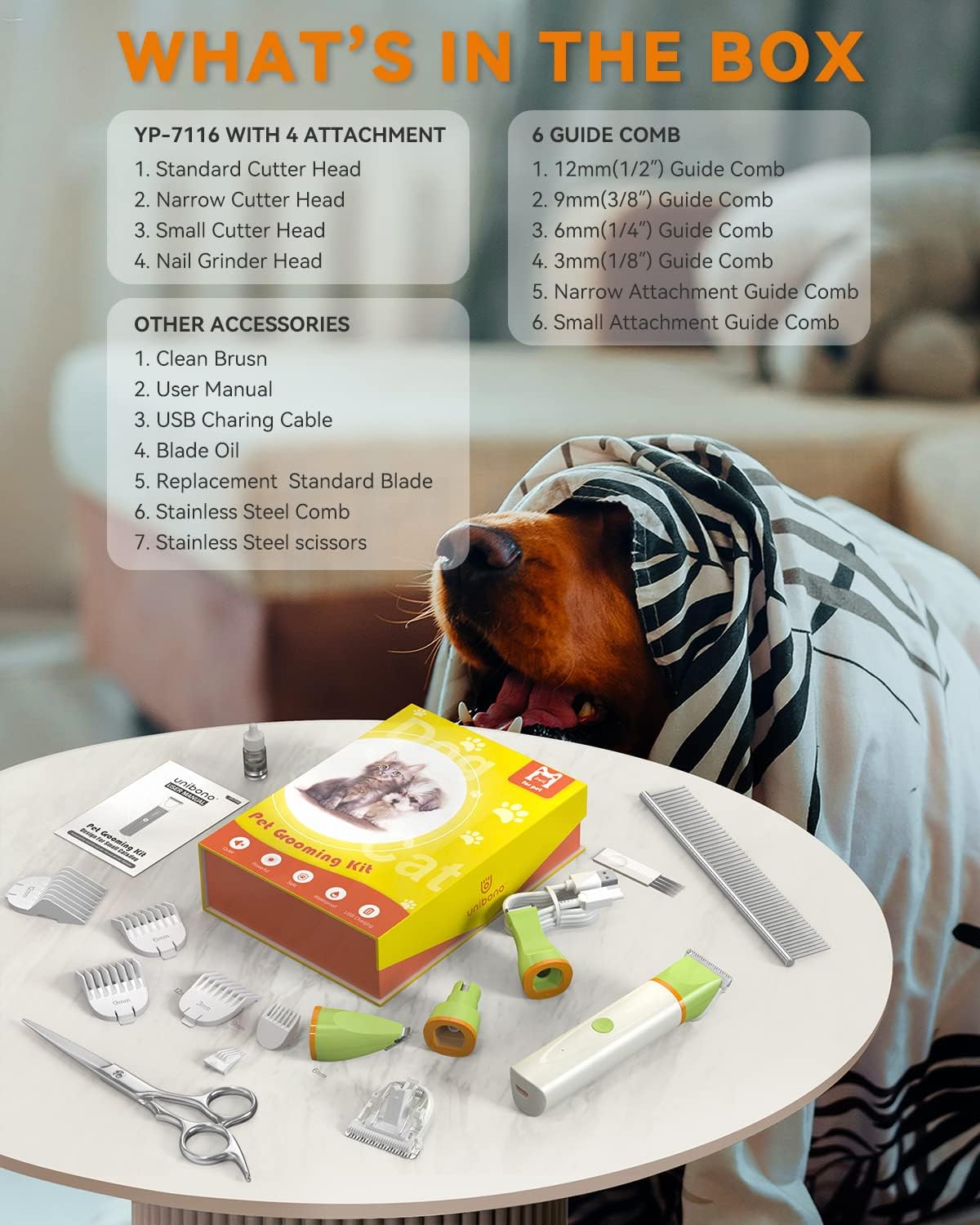
Image: All components included in the unibono YP-7116 Dog Grooming Kit, neatly arranged in its packaging.
- Dog grooming kit (7116)
- Standard Cutter Head
- Narrow Cutter Head
- Small (Details) Cutter Head
- Nail Grinder Head
- 4 Standard Attachment Guide Combs (3mm, 6mm, 9mm, 12mm)
- 1 Narrow Attachment Guide Comb
- 1 Small (Details) Attachment Guide Comb
- USB Charging Cable
- Cleaning Brush
- Replacement Standard Blade
- Stainless Steel Comb
- Stainless Steel Scissors
- User Manual
Setup
Charging the Device
Before first use, fully charge the clippers using the provided USB charging cable. A full charge takes approximately 90 minutes. The device can be used cordless or corded.
Attaching and Removing Cutter Heads

Image: Illustration showing how to remove a cutter head by pulling it upwards from the main body of the clippers.
To remove a cutter head, gently pull it upwards from the main body of the clippers. To attach a new head, align it with the device's connector and push down until it clicks securely into place. The kit includes a Standard Cutter Head, Narrow Cutter Head, Small (Details) Cutter Head, and Nail Grinder Head.
Attaching and Removing Guide Combs

Image: Illustration demonstrating the removal of a guide comb by lifting it off the cutter head.
Select the appropriate guide comb for your desired hair length. To attach, slide the comb onto the cutter head until it locks. To remove, gently lift the comb off the head. The kit provides various sizes for different trimming lengths.
Video: How to Install Blades & Combs
Video: A detailed guide on how to correctly install and remove the various blades and guide combs for the 4-in-1 dog clippers.
Operating Instructions
For best results, it is recommended to bathe and dry your pet thoroughly before grooming.
Using the Standard Cutter Head

Image: The standard cutter head, ideal for general body hair trimming on pets.
Attach the Standard Cutter Head and a suitable guide comb. Use this head for trimming larger areas of your pet's body, moving the clippers in the direction of hair growth.
Using the Narrow Cutter Head

Image: The narrow cutter head, designed for precise trimming around sensitive areas like the face, ears, and legs.
Switch to the Narrow Cutter Head for trimming around the face, ears, and legs. Its smaller size allows for greater precision in these delicate areas.
Using the Small (Details) Cutter Head

Image: The small cutter head being used to trim hair around a dog's paw, highlighting its precision for detailed work.
For very small and intricate areas such as paw pads, hips, and the canthus (corner of the eye), use the Small (Details) Cutter Head. This head is designed for maximum control and safety in these sensitive spots.
Using the Nail Grinder Head

Image: The nail grinder head, used to gently smooth a dog's nails to prevent scratching.
Replace the trimming head with the Nail Grinder Head. Gently introduce your pet's nail to the grinder, smoothing the edges to prevent sharp points and reduce the risk of scratching. Work slowly and observe your pet's comfort level.
Video: Electric Pet Trimmer Demonstration
Video: A demonstration of the electric pet trimmer in action, showcasing its quiet operation and effectiveness on various parts of a pet's body.
Video: LED Light Dog Paw Trimmer in Use
Video: A demonstration of the LED light dog paw trimmer, highlighting its utility for precise trimming in hard-to-see areas.
Maintenance
Cleaning the Clippers

Image: The clippers being rinsed under running water, demonstrating its IPX7 waterproof feature for easy cleaning.
The clippers feature an IPX7 waterproof design, allowing for direct rinsing under water for convenient cleaning. After each use, remove the cutter head and use the provided cleaning brush to remove any trapped hair. Rinse the head and the device body under running water. Ensure the charging port is securely covered before rinsing.
Oiling the Blades
After cleaning and drying, apply a small amount of lubricating oil (pet-safe, if available, or the provided oil) to the blades to maintain their sharpness and smooth operation. This helps prevent rust and extends the life of the blades.
Troubleshooting
- Clippers not turning on: Ensure the device is fully charged. If using corded, check the power connection.
- Reduced cutting performance: Clean the blades thoroughly to remove any hair buildup. Apply lubricating oil to the blades. If performance does not improve, consider replacing the blade.
- Excessive noise or vibration: Clean and oil the blades. Ensure the cutter head is properly attached.
- Pet discomfort during grooming: Ensure blades are clean and sharp to prevent pulling hair. Introduce grooming gradually and use positive reinforcement. The low-noise design is intended to minimize stress.
Specifications
| Feature | Detail |
|---|---|
| Model Number | YP-7116 |
| Brand | unibono |
| Power Source | Battery Powered |
| Battery Type | Lithium-Ion |
| Charging Time | 90 minutes |
| Blade Material | Titanium Ceramic |
| Noise Level | Approximately 55dB |
| Waterproof Rating | IPX7 (Whole body washable) |
| Product Dimensions | 21.7 x 15.9 x 5.6 cm; 472 g |
Warranty and Support
For warranty information, technical support, or any inquiries regarding your unibono YP-7116 Dog Grooming Clippers Kit, please contact our customer service team.
Email: aftersales@unibono.com
Please refer to your purchase documentation for specific warranty terms and conditions.
Related documentsYP-7116


Ask a question about this manual
Ask about setup, troubleshooting, compatibility, parts, safety, or missing instructions. Manuals+ will review the question and use this page’s manual context to help answer it.