
TVON TVON-TVSTAND
TVON TV Stand with Casters - Instruction Manual
Model: TVON-TVSTAND
1. Introduction
Thank you for purchasing the TVON TV Stand with Casters. This manual provides essential information for the safe and efficient assembly, operation, and maintenance of your new TV stand. Please read these instructions carefully before assembly and retain them for future reference.

Image 1.1: The TVON TV Stand in a typical setup, showcasing its design and functionality.
Safety Precautions
- Ensure all parts are present and undamaged before assembly. Do not use if any parts are missing or defective.
- Follow the assembly instructions precisely. Incorrect assembly can lead to instability and potential injury.
- Do not exceed the maximum load capacity for the TV (40 kg) or the shelf (5 kg).
- Always ensure the casters are locked when the stand is in a stationary position to prevent accidental movement.
- Keep children and pets away from the stand during assembly and when moving it.
2. Package Contents
Your TVON TV Stand package includes all necessary parts and hardware for assembly. Please refer to the detailed parts list and diagrams in the included physical instruction manual to identify each component.
3. Setup and Assembly
Assembly of the TVON TV Stand is designed to be straightforward. For detailed, step-by-step instructions with part numbers and diagrams, please consult the physical instruction manual provided with your product.
TV Compatibility
- Screen Size: Supports most TVs and monitors from 23 to 55 inches.
- VESA Compatibility: The VESA mounting pattern (distance between screw holes on the back of the TV) is compatible from 100x100 mm to 400x400 mm.
- Load Capacity: The main body supports up to 40 kg. The accessory shelf supports up to 5 kg.

Image 3.1: Visual guide for TV compatibility, including screen size, VESA patterns, and weight limits.
Assembly Options: High-Type and Low-Type
The stand features a modular support column that allows for two main assembly configurations:
- High-Type Stand: Utilizes all sections of the support column for a taller setup, ideal for standing or higher viewing positions.
- Low-Type Stand: By removing the middle section of the support column, the stand can be configured as a low-type stand, suitable for viewing while seated on the floor or for placement under beds/tables.

Image 3.2: High-type stand configuration.

Image 3.3: Low-type stand configuration.
4. Operating Instructions
Height Adjustment
The TV mounting rack offers 3-stage height adjustment. This allows you to position your television at an optimal viewing height. Refer to the manual for specific adjustment points.

Image 4.1: Height adjustment mechanism.
Tilt Adjustment
The TV mounting bracket can be tilted to achieve a better viewing angle. It supports an upward tilt of up to 5° and a downward tilt of up to 2°.

Image 4.2: Tilt adjustment range.
Adjustable Shelf
The included shelf is freely adjustable along the support column, allowing you to position AV equipment such as game consoles, recorders, or HDDs at your preferred height.

Image 4.3: Adjustable shelf for media devices.
Mobility and Stability
The stand is equipped with 360° rotating casters for easy movement. The front wheels feature foot-operated stoppers to securely fix the stand in place, preventing accidental movement.

Image 4.4: Caster wheel with locking mechanism.
Cable Management
The stand incorporates a cable management feature at the back of the support column. This helps to organize and conceal cables, contributing to a tidy and organized viewing area.

Image 4.5: Cable management clip.
5. Maintenance
To ensure the longevity and proper functioning of your TVON TV Stand, follow these maintenance guidelines:
- Cleaning: Wipe the stand with a soft, dry cloth. For stubborn dirt, use a slightly damp cloth with mild soap, then dry thoroughly. Avoid abrasive cleaners or solvents.
- Hardware Check: Periodically check all screws and bolts to ensure they are tight. Re-tighten if necessary to maintain stability.
- Caster Care: Keep the caster wheels free of dust and debris to ensure smooth movement.
- Load Capacity: Do not place items exceeding the specified weight limits on the TV mount or the shelf.
6. Troubleshooting
If you encounter any issues with your TVON TV Stand, refer to the following common solutions:
- Stand is unstable: Ensure all assembly screws are securely tightened. Verify that the TV weight does not exceed the maximum load capacity. Place the stand on a flat, level surface.
- Casters do not roll smoothly: Check for debris or hair caught in the wheels. Clean the casters thoroughly. Ensure the caster locks are disengaged for movement.
- TV cannot be tilted or adjusted: Ensure all adjustment knobs or screws are loosened before attempting to adjust, and tightened securely afterward.
- Missing parts: If you find any parts missing upon unboxing, please contact customer support with your purchase details.
7. Specifications
| Brand | TVON |
| Model Number | TVON-TVSTAND |
| Compatible Devices | Televisions, Monitors |
| Screen Size Compatibility | 23 - 55 inches |
| VESA Compatibility | 100x100 mm to 400x400 mm |
| Main Body Load Capacity | 40 kg |
| Shelf Load Capacity | 5 kg |
| Material | Alloy Steel |
| Color | White |
| Assembly Method | Floor Mount |
| Movement Type | Tilting |
| Max Tilt Angle | Up 5°, Down 2° |
| Product Dimensions (High-Type) | 53.9 x 40.9 x 143.7 cm (L x W x H) |
| Product Weight | 6.11 kg |
| UPC | 747966797826 |
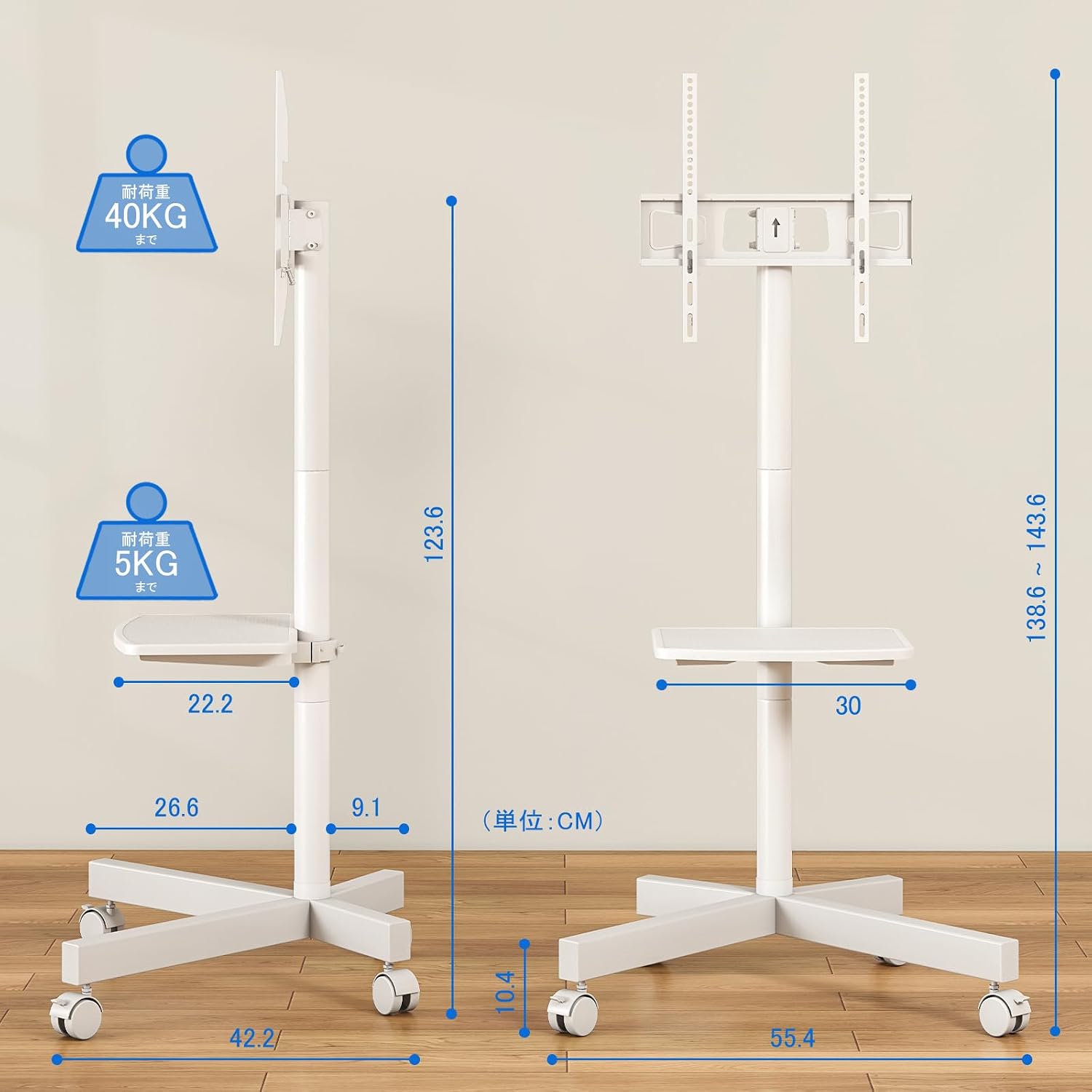
Image 7.1: Detailed dimensions of the TV stand.

Image 7.2: Low-profile base dimensions.
8. Warranty and Support
For warranty information or technical support, please refer to the contact details provided in your product packaging or visit the official TVON website. Please have your model number (TVON-TVSTAND) and purchase date available when contacting support.
Related documentsTVON-TVSTAND

Ask a question about this manual
Ask about setup, troubleshooting, compatibility, parts, safety, or missing instructions. Manuals+ will review the question and use this page’s manual context to help answer it.