
Introduction
Welcome to the official instruction manual for your Transformers Masterpiece MP-57 Skyfire figure. This highly detailed collectible converts between a powerful robot mode and an impressive Cybertronian jet mode. This manual provides essential information for assembly, transformation, and care to ensure you get the most out of your figure.
The MP-57 Skyfire figure is designed with intricate articulation and features, allowing for dynamic posing and display. It comes with various accessories to enhance its display options and recreate iconic scenes.
Setup and Unboxing
Carefully remove all components from the packaging. Inspect the figure and accessories for any damage. Ensure all parts listed below are present.
Package Contents:
- MP-57 Skyfire Figure (in chosen mode)
- Display Stand
- Blaster Weapon
- Alternate Face Plates
- Mini-figures (if included)
- Other accessories as shown in the image below.

Figure 1: All included accessories for MP-57 Skyfire.
Before proceeding, familiarize yourself with the figure's joints and articulation points. Handle with care to avoid accidental damage.
Operating: Transformation Instructions
The MP-57 Skyfire figure features a complex transformation sequence between its robot and jet modes. Always apply gentle, even pressure when moving parts. Refer to the images for visual guidance.
Transformation from Jet Mode to Robot Mode:
- Prepare Jet Mode: Ensure the figure is in its complete jet configuration. Remove any attached weapons or the display stand.
- Separate Fuselage: Carefully unclip and separate the front nosecone section from the main body.
- Extend Legs: Articulate the rear sections of the jet to form the robot's legs. Extend the feet and adjust the ankle joints for stability.
- Form Torso: Collapse and reconfigure the central fuselage to form the robot's chest and waist.
- Unfold Arms: Detach and unfold the wings and side panels to reveal the robot's arms. Extend the forearms and hands.
- Position Head: Rotate and position the robot head. You may swap face plates if desired.
- Final Adjustments: Ensure all panels are securely tabbed into place and the figure stands stably. Attach the blaster weapon to the robot's hand.

Figure 2: Skyfire in complete jet mode.

Figure 3: Skyfire in robot mode, ready for action.
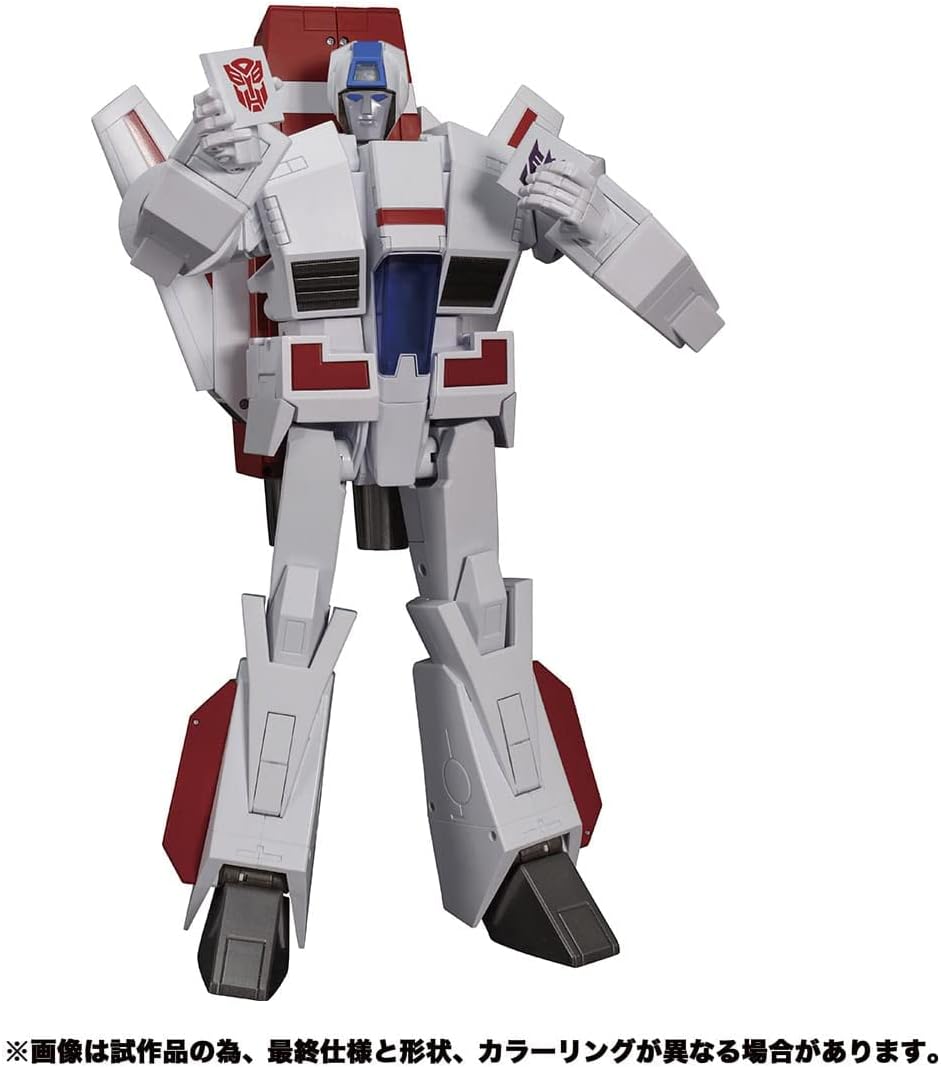
Figure 4: Skyfire in a neutral robot pose.
Transformation from Robot Mode to Jet Mode:
- Prepare Robot Mode: Remove any attached weapons. Ensure the robot is in a neutral standing pose.
- Retract Head and Arms: Carefully retract the robot head and fold the arms into their designated compartments within the torso.
- Collapse Torso: Reconfigure the chest and waist sections to form the central fuselage of the jet.
- Fold Legs: Collapse the legs and feet, aligning them to form the rear section of the jet.
- Attach Nosecone: Re-attach the front nosecone section, ensuring it clips securely into place.
- Extend Wings: Extend and lock the wings into their jet mode position.
- Final Adjustments: Ensure all panels are flush and securely tabbed, forming a cohesive jet mode. The blaster weapon can be stored or attached to the jet mode if applicable.

Figure 5: Skyfire in jet mode with weapon attached.
Intermediate Mode: The figure can also achieve an intermediate "Guardian" or "Gerwalk" mode, as shown below, by partially transforming. This mode allows for unique display options and interaction with smaller figures.

Figure 6: Skyfire in an intermediate mode.
For scale comparison, observe Skyfire alongside other Masterpiece figures in robot mode.

Figure 7: Scale comparison of MP-57 Skyfire with other figures.
Maintenance and Care
- Cleaning: Use a soft, dry cloth to gently wipe dust from the figure. For stubborn dirt, a slightly damp cloth can be used, but avoid excessive moisture. Do not use harsh chemicals or abrasive cleaners.
- Storage: Store the figure away from direct sunlight, extreme temperatures, and high humidity to prevent discoloration or material degradation. Keep it in a stable environment where it won't be easily knocked over.
- Handling: Always handle the figure by its main body parts. Avoid gripping small, delicate components or forcing joints.
- Joint Care: If joints become stiff, do not force them. Applying a very small amount of silicone shock oil (specifically designed for plastic) to the joint pin can help, but proceed with caution.
Troubleshooting
- Parts Not Aligning: If parts do not align correctly during transformation, gently retrace your steps. Ensure all previous steps were completed correctly and that no parts are obstructed. Do not force components into place.
- Loose Joints: Over time, some joints may become slightly loose. This is common with highly articulated figures. For minor looseness, clear nail polish or a specialized joint-tightening fluid can be applied sparingly to the joint pin, allowed to dry, and then reassembled.
- Missing or Damaged Parts: If you discover any missing or damaged parts upon unboxing, please contact customer support immediately.
Specifications
| Product Name: | Transformers Masterpiece MP-57 Cybertron Aviation Defense Skyfire |
| Model Number: | MP-57 (Item Model Number: F4090) |
| Brand: | Transformers (HASBRO) |
| Product Dimensions: | 6.38 x 19.37 x 16.18 inches |
| Item Weight: | 5.02 pounds |
| Recommended Age: | 0 - 12 years (Manufacturer Recommended) |
Warranty Information
This product is covered by the manufacturer's standard warranty against defects in materials and workmanship. Please retain your proof of purchase. For specific warranty terms and conditions, refer to the documentation included with your product or visit the official Hasbro website.
Customer Support
For further assistance, questions, or to report any issues with your Transformers Masterpiece MP-57 Skyfire figure, please contact Hasbro customer support. You can find contact information on the official Transformers brand website or through the retailer where you purchased the product.
Visit the official Transformers Store: Transformers Store on Amazon