
1. Introduction
Thank you for choosing the ANCEL SQ129 Rechargeable LED Work Light. This versatile and durable work light is designed to provide powerful illumination and convenient features for a wide range of applications. With its dual COB floodlights, flashlight spotlights, and integrated power bank, the SQ129 is an essential tool for automotive repair, outdoor activities, emergencies, and general home use. Please read this manual carefully before use to ensure proper operation and to maximize the product's lifespan.
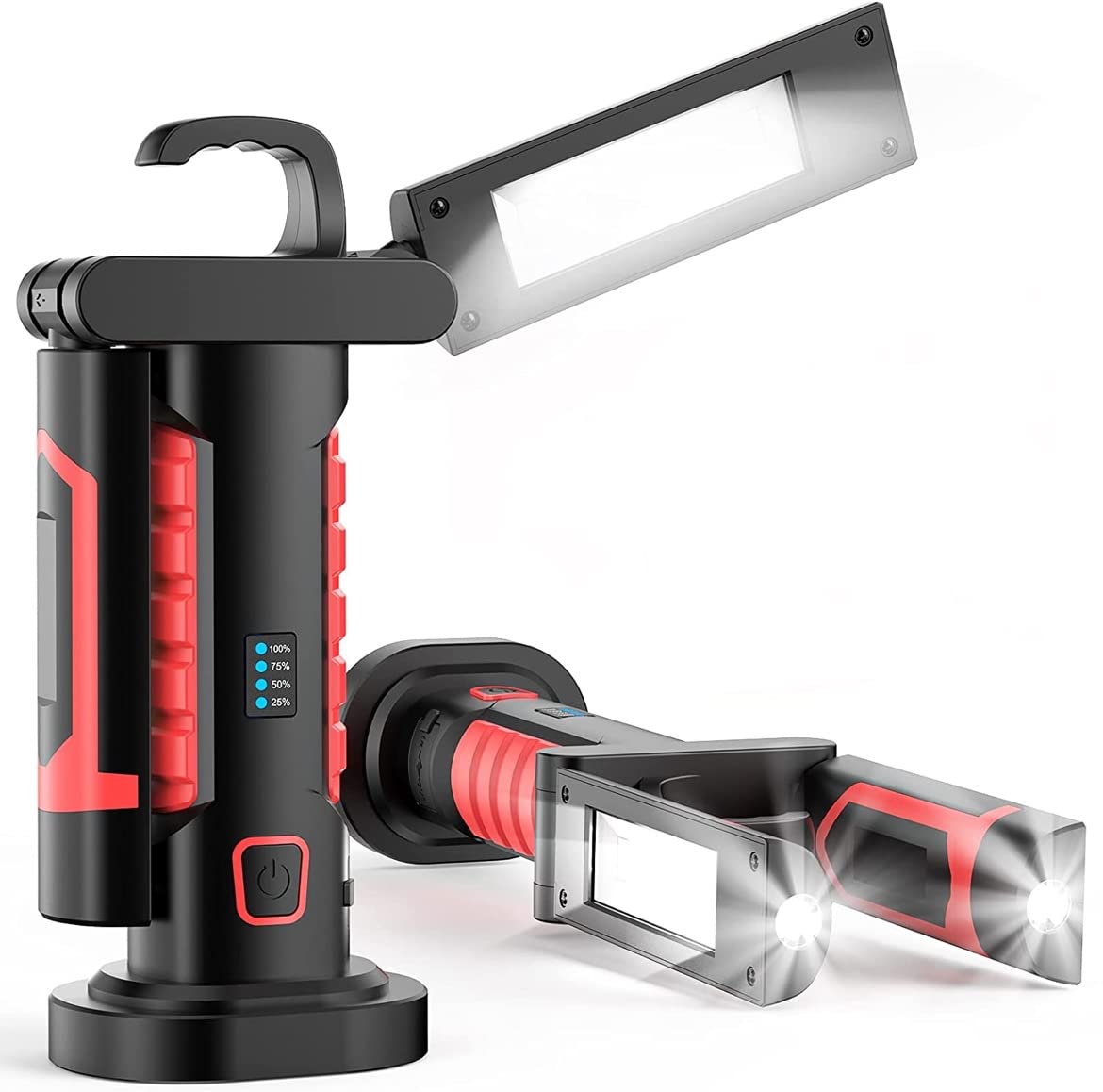
Image: The ANCEL SQ129 Work Light in its folded, compact state, showcasing its robust design.
2. Key Features
- Super Bright Worklights: Equipped with 2 COB floodlights offering a maximum brightness of 1200 lumens and 2 flashlight spotlights. The beam spread extends up to 0.125 miles, with both LEDs working independently or together for maximum illumination.
- Rechargeable & Power Bank: Features a large 4400 mAh battery, providing up to 15 hours of lighting. It can also function as a power bank to charge mobile phones, headphones, and other electronic devices via its Type-C interface.
- Multiple Lighting Modes: Manually adjustable modes include work light, flashlight, and SOS strobe. Brightness can be set to high or low. Ideal for outdoor, automotive repair, or security lighting.
- Various Installation Methods: Unique 360-degree rotating design for multi-angle lighting. The base is equipped with 4 powerful magnets for secure attachment to metal surfaces. A sturdy hook is also integrated for hanging, allowing for hands-free operation.
- High-End Construction: Built with a sturdy and thick outer structure, designed to withstand drops from up to 5 feet. IP44 waterproof rating ensures usability in rainy conditions. Excellent heat dissipation allows for prolonged use.
- Wide Range of Applications: Perfect for car repairing, emergency situations, camping, traveling, hiking, fishing, workshops, garages, power outages, home lighting, and working under the hood.

Image: The ANCEL SQ129 Work Light with its two main light panels extended, demonstrating its wide illumination capability.
3. Setup
3.1 Charging the Device
- Connect the provided USB Type-C charging cable to the charging port on the ANCEL SQ129.
- Connect the other end of the cable to a DC 5V/1.5A power source.
- During charging, the blue indicator lights will flash.
- A full charge typically takes approximately 3 hours. Once fully charged, all four blue indicator lights will remain solid.
3.2 Battery Indicator
The device features a four-level power display using blue LED indicators:
- 4 lights: 100% charge
- 3 lights: 75% charge
- 2 lights: 50% charge
- 1 light: 25% charge

Image: The ANCEL SQ129 Work Light connected via USB to charge a smartphone, demonstrating its power bank functionality.
4. Operating Instructions
4.1 Power and Lighting Modes
The ANCEL SQ129 offers multiple lighting modes accessible via the power button:
- Turn On/Off & Adjust COB Brightness: Briefly press the power button to turn on the device. The default mode is 2 COB cool white at 100% brightness. Subsequent brief presses will cycle through 2 COB cool white at 50% brightness, then right single COB on, then left single COB on, and finally off.
- Activate Flashlight/SOS Mode: When the light is on in any mode, press and hold the power button for approximately 3 seconds to switch to 2 XPE flashlight mode (100% brightness). Briefly pressing the button again will activate the 2 XPE SOS strobe mode.
4.2 Installation Methods
The versatile design of the SQ129 allows for various hands-free installation options:
- Magnetic Attachment: The base of the work light is equipped with 4 powerful magnets, allowing it to be securely attached to any metal surface, such as a car hood, metal shelving, or machinery.
- Hanging with Hook: The integrated hook at the top of the device can be used to hang the light from various fixtures, ropes, or branches.
- Tripod Mounting: The bottom of the lamp includes a tripod interface, allowing it to be mounted on a standard tripod for stable, elevated lighting.
- Adjustable Panels: The two main light panels can rotate 360 degrees, providing multi-angle illumination to direct light precisely where needed.

Image: A close-up of the ANCEL SQ129's base, highlighting the four powerful magnets for secure attachment to metal surfaces.
Video: An in-depth review and internal look at the ANCEL LED Work Light, demonstrating its features and build quality.
5. Maintenance and Safety
- Regular Charging: To maintain battery status during extended periods of non-use, charge your light at least every 3 months.
- Avoid Water Immersion: Do not immerse the light in water. While it has an IP44 waterproof rating, it is not designed for submersion.
- Temperature Control: Keep the device away from fire and high temperatures to prevent damage to internal components and battery.
- Handle with Care: Do not drop, knock, throw, or shake the device, as this may damage internal components.
- No Disassembly: Do not attempt to disassemble, modify, or repair the device yourself. Unauthorized modifications can void the warranty and pose safety risks.
- Battery Safety: If the battery becomes excessively hot, emits an odor, becomes dented, or exhibits abnormal deformation, discontinue use immediately and contact customer support.
- Eye Safety: Do not look directly at the LED light when it is on, as it may cause eye injury.
6. Troubleshooting
- Light Not Turning On: Ensure the battery is sufficiently charged. Refer to the "Charging the Device" section.
- Charging Issues: Verify that the USB Type-C cable is securely connected to both the light and the power source. Try a different cable or power adapter if necessary.
- Dim or Flickering Light: This usually indicates a low battery. Recharge the device fully.
- Power Bank Not Charging Devices: Ensure the external device is compatible with 5V/1.5A USB output. Check the connection between the work light and the device.
7. Specifications
| Feature | Specification |
|---|---|
| Model Number | SQ129 |
| Brand | ANCEL |
| Light Source Type | Light Emitting Diode (LED) |
| Light Output Maximum | 1200 Lumens |
| Power Source | Power Bank |
| Battery | 1 Lithium Polymer (4400mAh, 3.7V) |
| Wattage | 20 Watts |
| Light Source Wattage | 12 Watts |
| Color Temperature | 6500 Kelvin |
| Waterproof Rating | IP44 |
| Material | Aluminum |
| Mounting Type | Table Mount |
8. Warranty and Support
The ANCEL SQ129 Rechargeable LED Work Light comes with a manufacturer's warranty against defects in materials and workmanship. For specific warranty details, including duration and coverage, please refer to the product packaging or contact ANCEL customer support directly.
For technical assistance, troubleshooting, or any inquiries regarding your product, please contact ANCEL customer support:
- Website: www.anceltech.com
- Email: support@anceltech.com