
Introduction
This manual provides essential instructions for the safe and effective installation, operation, and maintenance of your Dekain replacement projector lamp for the Knoll Systems HDP-6000 projector. This lamp module is designed with an original Osram bulb, ensuring optimal performance and longevity.
For best results and to ensure the safety of your equipment, please read these instructions thoroughly before proceeding with installation or use.
Safety Information
- Always disconnect the projector from the power source before attempting any installation or maintenance.
- Allow the projector to cool down completely (at least 30 minutes) after use before handling the lamp. Hot lamps can cause severe burns.
- Do not touch the glass surface of the new lamp bulb directly with bare hands. Oils from your skin can reduce lamp life. Use gloves or a clean cloth if necessary.
- Handle the lamp module carefully to avoid damage.
- Dispose of old lamps according to local regulations. Lamps contain mercury and should not be discarded with regular household waste.
Setup and Installation
Follow these steps to replace the projector lamp:
- Power Off and Cool Down: Ensure the projector is completely shut down and unplugged from the power outlet. Allow it to cool for at least 30 minutes.
- Locate Lamp Compartment: Refer to your Knoll Systems HDP-6000 projector's user manual to locate the lamp compartment cover. This is typically secured by screws.
- Remove Old Lamp: Carefully unscrew and remove the lamp compartment cover. Disconnect any wiring harnesses if present. Gently pull out the old lamp module.
- Insert New Lamp: Align the new Dekain lamp module with the projector's lamp slot. Slide it in firmly until it is securely seated. Ensure the electrical connector is properly engaged.
- Secure Lamp: Re-attach any screws that hold the lamp module in place.
- Close Compartment: Replace the lamp compartment cover and secure it with its screws.
- Reset Lamp Timer: Plug the projector back into the power outlet and turn it on. Navigate to the projector's menu settings and locate the "Lamp Timer Reset" option. Reset the lamp timer to ensure accurate tracking of the new lamp's lifespan. Consult your projector's manual for specific instructions on resetting the lamp timer.

Image: The Dekain projector lamp module, designed for easy installation into compatible projectors. This image shows the complete lamp assembly, including the bulb and its protective housing.
Product Quality and Components
The Dekain projector lamp for Knoll Systems HDP-6000 is constructed with an original Osram bulb, ensuring high performance and reliability. The lamp module includes a durable housing designed for a precise fit within your projector.
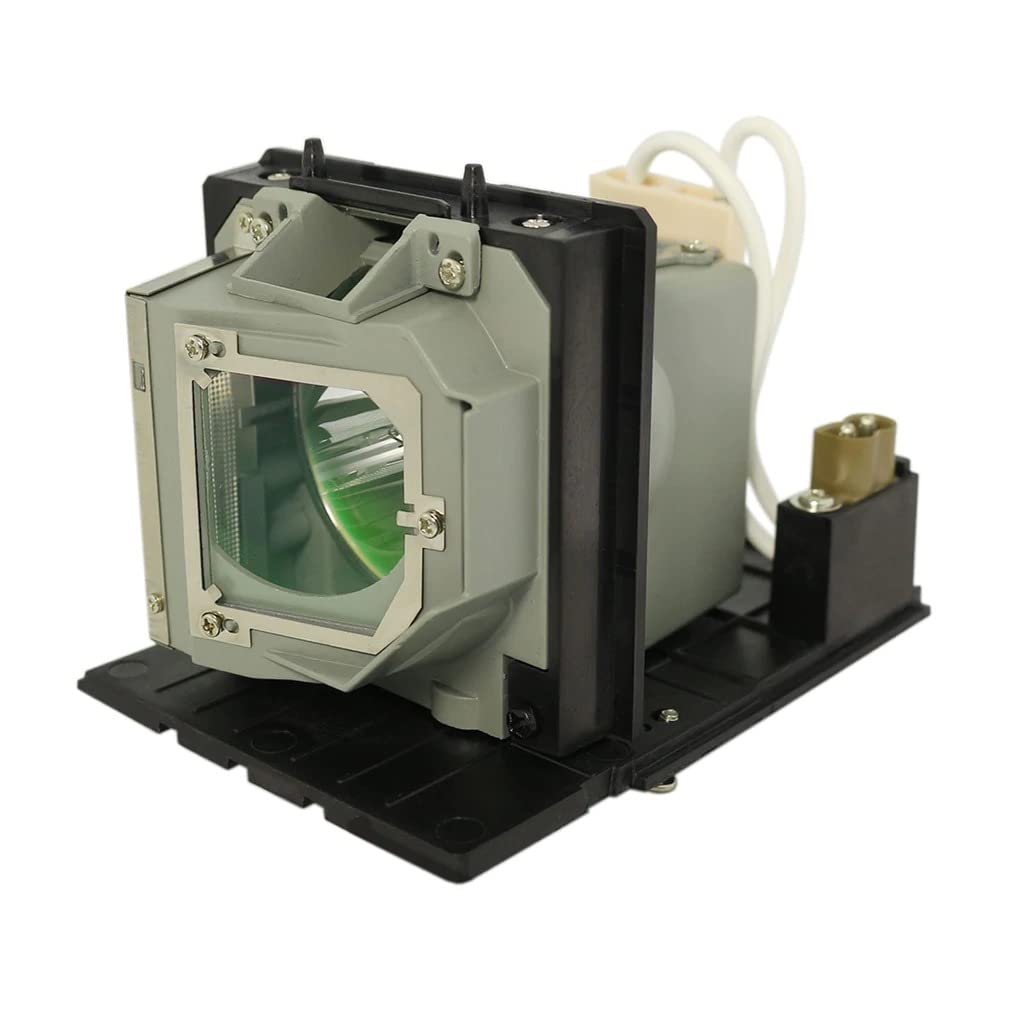
Image: A visual comparison illustrating the difference in image clarity and color vibrancy between a Dekain lamp utilizing an original OEM bulb (left) and a generic copy lamp (right). The left image displays a macaw with distinct features and rich colors, indicative of high-quality projection.
Operating Considerations
- Proper Shutdown: Always allow the projector to complete its cooling cycle before unplugging it or turning off the power. Abrupt shutdowns can significantly shorten lamp life.
- Ventilation: Ensure the projector has adequate ventilation. Blocked vents can lead to overheating and premature lamp failure.
- Avoid Frequent On/Off Cycles: Turning the projector on and off frequently can stress the lamp. Try to minimize unnecessary power cycles.
Maintenance
- Clean Air Filters: Regularly clean or replace the projector's air filters to maintain proper airflow and prevent dust buildup, which can cause overheating.
- Inspect Lamp Compartment: Periodically inspect the lamp compartment for dust accumulation and clean as necessary (with the projector unplugged and cooled).
Troubleshooting
| Problem | Possible Cause | Solution |
|---|---|---|
| Lamp does not turn on. | Lamp not properly seated; projector not receiving power; lamp timer not reset. | Ensure lamp is fully inserted and secured. Check power connections. Reset lamp timer in projector menu. |
| Dim or discolored image. | Lamp nearing end of life; projector settings incorrect. | Check lamp hours in projector menu. Adjust projector brightness/color settings. |
| Projector shuts down unexpectedly. | Overheating due to blocked vents or dirty filters; lamp failure. | Clean projector air filters. Ensure adequate ventilation. If problem persists, lamp may need replacement. |
Specifications
- Brand: Dekain
- Compatible Projector Model: Knoll Systems HDP-6000
- Bulb Type: Original Osram Bulb
- Wattage: 260 watts
- Manufacturer Reference: SP-LAMP-054
- ASIN: B0B3T2TWGY
- Parcel Dimensions: 15.24 x 15.24 x 12.7 cm
- Weight: 408.23 g
Warranty and Support
Dekain provides the following warranty for this projector lamp:
- Money Back Guarantee: 30 Days from the date of purchase.
- Free Replacement Warranty: 240 Days from the date of purchase.
For any inquiries or support, please contact Dekain customer service. Response time is typically within 12 hours.
Manufacturer: Dekain
Product ASIN: B0B3T2TWGY