
Introduction
This manual provides essential instructions for the safe and effective use of your XLAQ 14.4V Nickel-Metal Hydride (Ni-MH) replacement battery. This battery is designed for compatibility with various Samsung Navibot robotic vacuum cleaner models, including SR8840, SR8841, SR8843, SR8844, SR8845, SR8846, and SR8847. Please read this manual thoroughly before installation and use.
Safety Information
Important Safety Warnings:
- Do not attempt to disassemble or modify the battery pack.
- Replace only with the battery pack designated for this product.
- Do not crush, puncture, short-circuit, or dispose of in fire or water.
- Do not store above 60°C (140°F).
- Keep out of reach of children.
- If the battery leaks, avoid contact with skin and eyes. Rinse immediately with plenty of water and seek medical attention.
Setup and Installation
- Preparation: Ensure your Samsung Navibot is turned off and unplugged from its charging base.
- Locate Battery Compartment: Refer to your Navibot's original user manual to locate and open the battery compartment, typically on the underside of the robot.
- Remove Old Battery: Carefully disconnect the old battery's connector and remove it from the compartment.
- Insert New Battery: Place the new XLAQ 14.4V battery into the compartment, ensuring it fits securely.
- Connect Battery: Align the battery connector with the robot's port and firmly push to connect. Ensure the connection is secure.
- Close Compartment: Close the battery compartment cover and secure it according to your Navibot's design.
- Initial Charge: Place your Navibot on its charging base for a full initial charge (typically 12-16 hours for Ni-MH batteries) before first use.

Image 1: Top view of the XLAQ 14.4V Ni-MH battery, showing the label with specifications and the white connector.
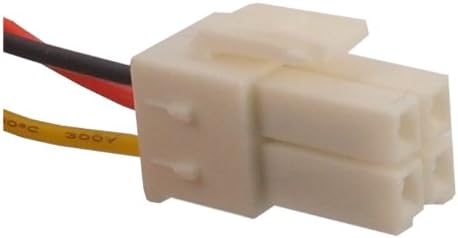
Image 2: Close-up view of the white 4-pin connector on the battery, highlighting the connection interface.
Operating Guidelines
- First Use: Fully charge the battery before its first use to optimize performance and lifespan.
- Regular Charging: Always return your Navibot to its charging base after each cleaning cycle.
- Deep Discharge: Avoid completely draining the battery frequently, as this can reduce its overall lifespan.
- Temperature: Operate and charge the battery within recommended temperature ranges (typically 0°C to 45°C or 32°F to 113°F) to prevent damage.
Maintenance
- Cleaning Contacts: Periodically clean the battery contacts on both the battery and the robot with a dry cloth to ensure good electrical connection.
- Storage: If storing the battery for an extended period, charge it to about 50% capacity and store it in a cool, dry place. Recharge it every 3-6 months to prevent deep discharge.
- Disposal: Dispose of old or damaged batteries responsibly according to local regulations. Do not dispose of in household waste.
Troubleshooting
If your Navibot is not operating correctly after battery installation, consider the following:
- Robot Not Turning On: Ensure the battery is fully charged and correctly installed. Check that the connector is firmly seated.
- Short Run Time: The battery may not be fully charged, or it might be nearing the end of its lifespan. Ensure proper charging cycles.
- Charging Issues: Verify that the charging base is powered and the robot is making proper contact with the charging terminals. Clean contacts if necessary.
- Error Codes: Refer to your Samsung Navibot's original manual for specific error codes displayed by the robot.
Specifications
| Feature | Specification |
|---|---|
| Battery Type | Nickel-Metal Hydride (Ni-MH) |
| Voltage | 14.4V |
| Capacity | 3000mAh |
| Dimensions | 135.03 x 44.51 x 45.77mm |
| Weight | 836g |
| Compatible Models | Samsung Navibot SR8840, SR8841, SR8843, SR8844, SR8845, SR8846, SR8847 |
Warranty and Support
This product comes with a 12-month warranty and a 14-day money-back guarantee. For any questions or support needs, please contact our customer service. We offer 24/7 email support to ensure your satisfaction.
When contacting support, please have your product model number and purchase details available.