
1. Important Safety Information
Before allowing a child to use this scooter, please read and understand all instructions and safety warnings. Failure to follow these instructions may result in serious injury.
- Age Recommendation: Suitable for children aged 3 years and older.
- Weight Limit: Do not exceed the maximum weight limit of 75 pounds (approximately 34 kg).
- Protective Gear: Always wear a helmet, knee pads, elbow pads, and wrist guards when riding.
- Supervision: Adult supervision is required at all times.
- Riding Surface: Ride on smooth, paved surfaces away from motor vehicles. Avoid uneven terrain, loose debris, water, and steep inclines.
- Braking: Always use the rear foot brake to slow down or stop. Practice braking in a safe area.
- Visibility: Do not ride at night or in low-light conditions. The scooter's light-up features are for visibility, not primary illumination.
- Pre-Ride Check: Before each use, ensure all clamps, fasteners, and wheels are securely attached and in good working order.
2. Package Contents
The package should contain the following items:
- 1 x Voyager Paw Patrol Marshall 2 Light Up Kick Scooter (main body and handlebar stem)
- 1 x Handlebar T-bar
- Instruction Manual
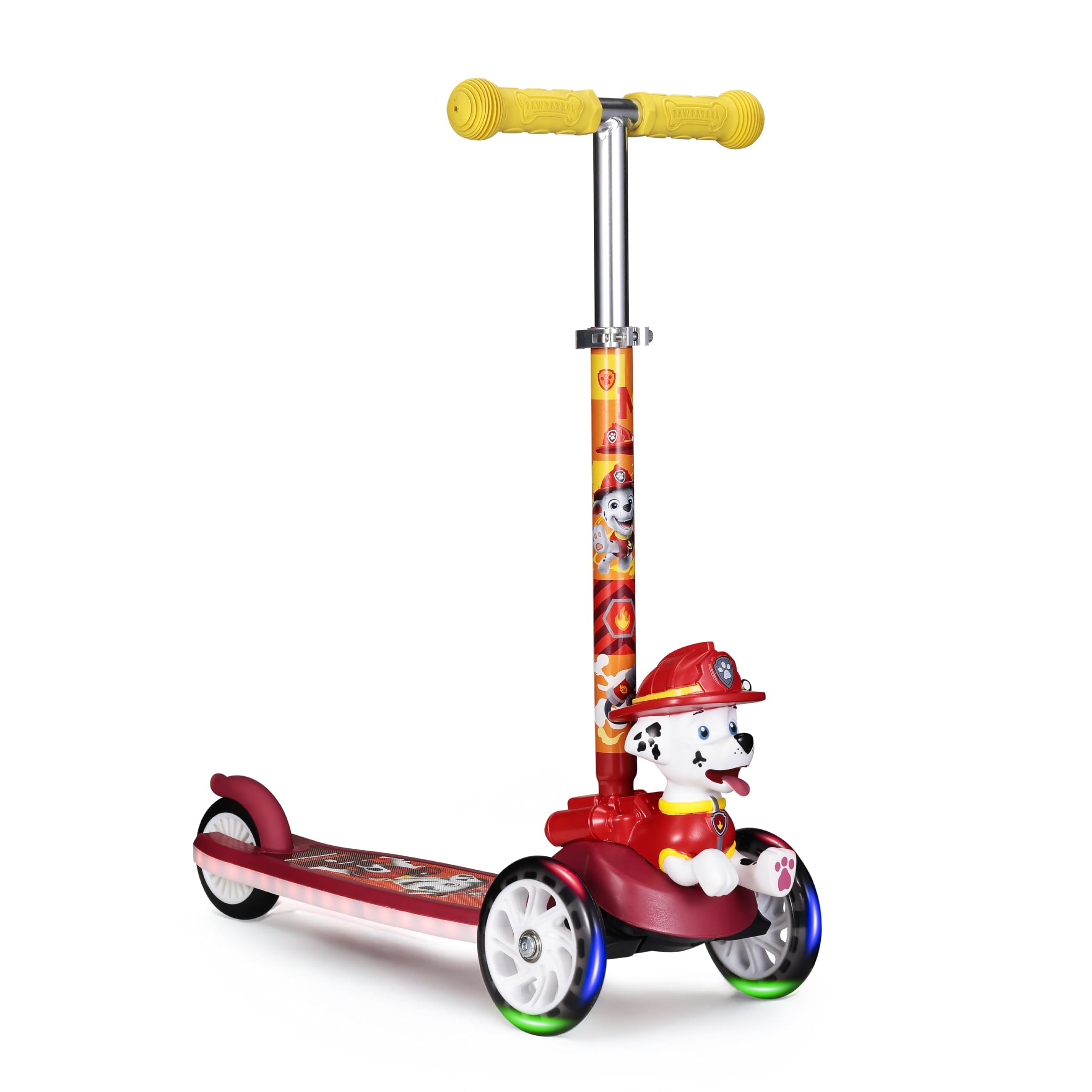
Figure 1: Voyager Paw Patrol Marshall 2 Light Up Kick Scooter, fully assembled.
3. Assembly Instructions
The Voyager Paw Patrol Marshall 2 Light Up Kick Scooter requires minimal assembly. Adult assembly is required.
- Unpack Components: Carefully remove all parts from the packaging. Ensure all components listed in Section 2 are present.
- Insert Handlebar: Locate the handlebar T-bar. Insert the T-bar into the opening at the top of the scooter's main stem until it clicks securely into place. Ensure the spring-loaded button on the T-bar engages with the hole in the stem.
- Adjust Handlebar Height: To adjust the handlebar height, open the quick-release clamp located on the stem. Press the adjustment button and slide the T-bar up or down to the desired height. Ensure the button locks into one of the adjustment holes. Close the quick-release clamp firmly to secure the handlebar.
- Final Check: Before first use, double-check that the handlebar is securely locked at the desired height and all wheels spin freely.

Figure 2: Illustration of adjustable handlebars, showing height adjustment mechanism.
4. Operating Instructions
This scooter is designed for ease of use and stability, featuring a self-balancing three-wheel design and tilt-to-turn steering.
- Starting: Place one foot on the extra-wide anti-slip deck. Use the other foot to push off the ground to gain momentum.
- Steering (Tilt-to-Turn): To turn, lean your body and the handlebars in the desired direction. The scooter's front wheels will pivot, allowing for smooth turns. This method helps develop balance and coordination.
- Braking: To slow down or stop, gently press your foot down on the rear foot brake located above the back wheel. Apply pressure gradually to avoid sudden stops.
- Light-Up Wheels and Deck: The scooter features integrated LED lights in the wheels and deck that activate with motion, providing an engaging visual experience during use. No batteries are required for the wheel lights as they are dynamo-powered.

Figure 3: Demonstrates the tilt-to-turn steering mechanism for easy maneuvering.

Figure 4: Detail of the light-up wheels, which activate with motion.
5. Maintenance
Regular maintenance ensures the longevity and safe operation of your scooter.
- Cleaning: Wipe the scooter with a damp cloth to remove dirt and dust. Avoid using harsh chemicals or abrasive cleaners. Do not hose down or immerse the scooter in water.
- Check Fasteners: Periodically check all screws, bolts, and clamps to ensure they are tight and secure. Loose parts can affect performance and safety.
- Wheel Inspection: Inspect wheels for wear and tear. Replace worn wheels to maintain optimal performance and safety. Ensure wheels spin freely and are free of debris.
- Storage: Store the scooter in a dry, cool place away from direct sunlight and moisture to prevent rust and material degradation.
6. Troubleshooting
If you encounter issues with your scooter, refer to the following common problems and solutions:
- Lights Not Working:
- Ensure the scooter is in motion; wheel lights are motion-activated.
- Check for any visible damage to the wiring or light components, especially for deck lights. If a loose connection is suspected (as reported by some users), professional inspection may be required.
- Scooter Not Steering Properly:
- Ensure the handlebars are securely fastened and not loose.
- Check for any obstructions around the steering mechanism or front wheels.
- Unusual Noises:
- Inspect wheels and bearings for debris or damage.
- Check all fasteners for tightness.
7. Specifications
| Brand | Voyager |
| Model Name | Paw Patrol Scooter for Kids (Marshall 2 Light Up Scooter) |
| Model Number | AST630371MV-RED-STK-1 |
| UPC | 021331036599 |
| Age Range | 3 years and up (Little Kid) |
| Weight Limit | 75 Pounds (approx. 34 kg) |
| Number of Wheels | 3 |
| Handlebar Type | Fixed (Adjustable Height) |
| Brake Style | Rear Braking |
| Wheel Size | 140 Millimetres |
| Item Weight | 3.22 kg |
| Frame Material | Aluminium |
| Special Features | Self-Balancing, Light-Up Wheels & Deck, Extra Wide Anti-Slip Deck, Tilt-to-Turn Steering, Ergonomic Grips |
8. Warranty Information
This Voyager scooter comes with a Limited Warranty. For specific details regarding warranty coverage, duration, and claims process, please refer to the warranty card included with your purchase or contact Voyager customer support.
Please retain your proof of purchase for warranty claims.
9. Customer Support
For further assistance, questions, or to report any issues not covered in this manual, please contact Voyager customer support. Contact information can typically be found on the product packaging or the official Voyager website.
Website: www.voyager.com (Note: This is a placeholder URL. Please refer to actual product documentation for correct contact details.)