1. Introduction
This user manual provides comprehensive instructions for the Generico XJ-697Ti Talking Watch. Designed for ease of use, this wristwatch is particularly beneficial for seniors, children, and individuals with visual impairments, offering clear spoken time announcements and an alarm function. Please read this manual thoroughly before using your watch to ensure proper operation and longevity.
2. Safety Information
- Do not attempt to open or repair the watch yourself. This may void the warranty and cause damage.
- Keep the watch away from extreme temperatures, direct sunlight, and strong magnetic fields.
- Avoid exposing the watch to harsh chemicals or solvents, which can damage the casing and strap.
- While the watch is water-resistant, it is not suitable for swimming or diving. Avoid prolonged exposure to water.
- Dispose of batteries responsibly according to local regulations.
3. Package Contents
Your Generico XJ-697Ti Talking Watch package should contain the following items:
- 1 x Generico XJ-697Ti Talking Watch
- 1 x User Manual (in Italian, but this document serves as the English version)
- 1 x Transparent PVC Gift Packaging
4. Product Overview
Familiarize yourself with the buttons and display of your Generico XJ-697Ti Talking Watch.

Figure 4.1: Front view of the Generico XJ-697Ti Talking Watch. The digital display shows "16:27" and "TALKING" text. Buttons are visible on both sides of the watch face, labeled "MODE", "HOUR", "MIN", and "TALK". The watch has a black strap and a silver-colored bezel.
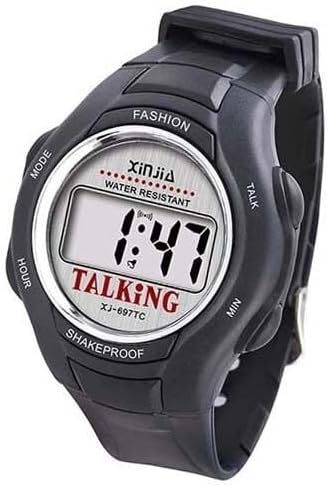
Figure 4.2: Another front view of the Generico XJ-697Ti Talking Watch, displaying "1:47" on its digital screen. This image highlights the watch's simple and functional design, with clearly marked buttons for mode, hour, minute, and talk functions.
The watch features a clear digital display and four main buttons for operation:
- MODE Button: Used to cycle through different modes (Time Setting, Alarm Setting).
- HOUR Button: Used to adjust the hour in setting modes.
- MIN Button: Used to adjust the minute in setting modes.
- TALK Button: Press to hear the current time spoken aloud.
5. Setup
5.1. Initial Time Setting
Upon first use or after battery replacement, you may need to set the current time.
- Press the MODE button repeatedly until the hour digits start flashing. This indicates you are in time setting mode.
- Press the HOUR button to adjust the hour. The watch operates on a 12-hour format with AM/PM indication.
- Press the MIN button to adjust the minutes.
- Once the correct time is set, press the MODE button again to confirm and exit the time setting mode. The display will stop flashing.
6. Operating Instructions
6.1. Announcing the Time
To hear the current time spoken aloud:
- Simply press the TALK button located on the side of the watch. The watch will announce the current time in Italian.
6.2. Setting the Alarm
The watch features an alarm function that can be used as a reminder for various activities, such as meal times or medication schedules.
- Press the MODE button repeatedly until the alarm icon (often a bell symbol) appears on the display, and the alarm hour digits start flashing.
- Press the HOUR button to set the desired alarm hour.
- Press the MIN button to set the desired alarm minutes.
- Press the MODE button again to confirm the alarm time. The alarm icon will remain on the display, indicating the alarm is set.
- To turn off the alarm, press the MODE button until the alarm icon disappears.
6.3. Water Resistance
The Generico XJ-697Ti Talking Watch is designed to be water-resistant. This means it can withstand splashes, rain, and brief immersion in water, such as during hand washing. However, it is not recommended for showering, swimming, or diving. Avoid pressing buttons while the watch is wet to prevent water ingress.
7. Maintenance
7.1. Cleaning Your Watch
To keep your watch in good condition:
- Wipe the watch regularly with a soft, dry cloth.
- For stubborn dirt, slightly dampen the cloth with water and mild soap, then wipe clean and dry thoroughly.
- Do not use abrasive cleaners or chemical solvents.
7.2. Battery Replacement
When the display dims or the voice function becomes unclear, it may be time to replace the battery. Battery replacement should ideally be performed by a qualified technician to ensure water resistance is maintained. Refer to the specifications section for battery type.
7.3. Storage
If you plan not to use the watch for an extended period, store it in a cool, dry place away from direct sunlight and extreme temperatures.
8. Troubleshooting
| Problem | Possible Cause | Solution |
|---|---|---|
| Watch does not speak or voice is unclear. | Low battery. | Replace the battery. |
| Display is dim or blank. | Low or dead battery. | Replace the battery. |
| Time is incorrect. | Time not set correctly or reset due to battery change. | Refer to Section 5.1 "Initial Time Setting" to reset the time. |
| Alarm does not sound. | Alarm not set or turned off. | Refer to Section 6.2 "Setting the Alarm" to ensure the alarm is correctly set and activated. |
9. Specifications
| Model: | XJ-697Ti |
| Brand: | Generico |
| Case Diameter: | 40 mm |
| Case Thickness: | 14.5 mm |
| Case Back Material: | Steel |
| Strap Material: | PVC |
| Item Shape: | Round |
| Water Resistance: | Water Resistant (Splashes, Rain) - Not for swimming/diving. |
| Voice Language: | Italian |
| Manufacturer Reference: | lac-697 |
| Country of Origin: | China |
10. Warranty and Support
Generico products are designed for quality and reliability. While specific warranty terms are not detailed in the provided information, the seller (dipashop) offers a 30-day return policy for refund or replacement through Amazon. For any issues or support inquiries, please contact the seller directly via your Amazon order details.
For general inquiries or assistance with product operation, please refer to the troubleshooting section of this manual or contact customer support through the platform where the product was purchased.


