
Ingco CDLI20011
INGCO CDLI20011 Cordless Drill/Screwdriver
Professional Battery Replacement Portable Industrial Use
Introduction
Thank you for choosing the INGCO CDLI20011 Cordless Drill/Screwdriver. This versatile tool is designed for a wide range of drilling and screwing tasks in various materials, including drywall, cement, concrete, marble, wood, metal, and plastic. Its robust design and wireless operation provide convenience and efficiency for both professional and industrial applications.
This manual provides essential information for the safe and effective operation, maintenance, and troubleshooting of your new tool. Please read it thoroughly before first use and keep it for future reference.
Safety Instructions
Always observe basic safety precautions to reduce the risk of fire, electric shock, and personal injury.
- Work Area Safety: Keep your work area clean and well-lit. Cluttered or dark areas invite accidents. Do not operate power tools in explosive atmospheres, such as in the presence of flammable liquids, gases, or dust.
- Electrical Safety: Avoid body contact with earthed or grounded surfaces such as pipes, radiators, ranges, and refrigerators. Do not expose power tools to rain or wet conditions.
- Personal Safety: Always wear eye protection. Use hearing protection when operating the tool for extended periods. Dress properly; avoid loose clothing or jewelry that can get caught in moving parts.
- Tool Use and Care: Do not force the power tool. Use the correct tool for your application. Disconnect the battery pack from the tool before making any adjustments, changing accessories, or storing power tools.
- Battery Pack Use and Care: Recharge only with the charger specified by the manufacturer. Do not disassemble the battery pack. Do not short-circuit the battery pack.
Components Overview
Familiarize yourself with the main components of your INGCO CDLI20011 Cordless Drill/Screwdriver:

Figure 1: Main components of the INGCO CDLI20011 Cordless Drill and its battery pack.
- Chuck: Holds drill bits and screwdriver bits securely.
- Torque Adjustment Ring: Allows selection of torque settings for screwing and drilling modes.
- Gear Selector: Switches between two mechanical speed gears (low speed/high torque and high speed/low torque).
- Forward/Reverse Switch: Controls the direction of rotation.
- Trigger Switch: Activates the drill and controls variable speed.
- Integrated Work Light: Illuminates the work area.
- Battery Pack: Provides power to the drill.
- Battery Power LED Indicator: Shows the remaining battery charge.
Setup
1. Battery Charging and Installation
Your drill comes with a 20V 1.5Ah Lithium Ion Battery. Ensure the battery is fully charged before first use.

Figure 2: Charging the 20V Lithium Ion Battery Pack.
- Connect the fast charger to a 220V-240V~50/60Hz power outlet.
- Slide the battery pack onto the charger. The LED indicator on the charger will show the charging status.
- Once fully charged, disconnect the battery from the charger.
- To install the battery, align the battery pack with the base of the drill and slide it in until it clicks securely into place.
- To remove the battery, press the release button(s) on the sides of the battery pack and slide it out.
2. Bit Installation
- Ensure the drill is switched off and the forward/reverse switch is in the center (locked) position to prevent accidental starting.
- Rotate the chuck counter-clockwise to open the jaws wide enough to insert your desired drill bit or screwdriver bit. The chuck capacity is 0.8-10mm.
- Insert the bit fully into the chuck.
- Rotate the chuck clockwise to tighten the jaws firmly around the bit. Ensure the bit is centered and secure.
Operating Instructions
1. Powering On/Off and Variable Speed Control
The drill is activated by pressing the trigger switch. The speed is variable, meaning the harder you press the trigger, the faster the drill will rotate.
- To start the drill, press the trigger switch.
- To increase speed, press the trigger further.
- To stop the drill, release the trigger switch.
2. Forward/Reverse Function
The forward/reverse switch controls the direction of rotation and also acts as a lock-off mechanism.
- For drilling or tightening screws, push the switch to the left (forward position).
- For loosening screws or removing bits from holes, push the switch to the right (reverse position).
- To lock the trigger and prevent accidental starting, place the switch in the center position.
3. Torque Adjustment and Gear Selection
The drill features 15+1 torque settings and two mechanical gears for optimal performance across different applications.

Figure 3: Drilling into wood with the INGCO Cordless Drill.
- Torque Adjustment Ring: Rotate the ring to select the desired torque setting (1-15) for screwing applications. Higher numbers provide more torque. The "drill" symbol setting bypasses the clutch for maximum torque during drilling.
- Gear Selector:
- Gear 1 (Low Speed, High Torque): Ideal for heavy-duty screwing and drilling large holes. No-load speed: 0-400/min.
- Gear 2 (High Speed, Low Torque): Suitable for fast drilling of smaller holes and light-duty screwing. No-load speed: 0-1500/min.
4. Integrated Work Light
The integrated LED work light illuminates the work surface for improved visibility in dimly lit areas.

Figure 4: The integrated LED work light illuminates the drilling area.
- The work light automatically activates when the trigger switch is pressed.
- It remains on as long as the trigger is pressed and turns off shortly after the trigger is released.
5. Drilling and Screwing Techniques

Figure 5: The drill is capable of various tasks, including drilling into metal and driving screws into wood.
- Drilling: Select the drill mode on the torque adjustment ring. Apply steady, even pressure. For hard materials, use a slower speed and appropriate drill bit.
- Screwing: Select an appropriate torque setting based on the screw size and material. Start with a lower torque setting and increase if the screw is not fully driven or if the clutch slips prematurely.
- Ergonomics: The compact and lightweight design with an overmolded rubber handle provides a comfortable grip, minimizing fatigue during extended use.
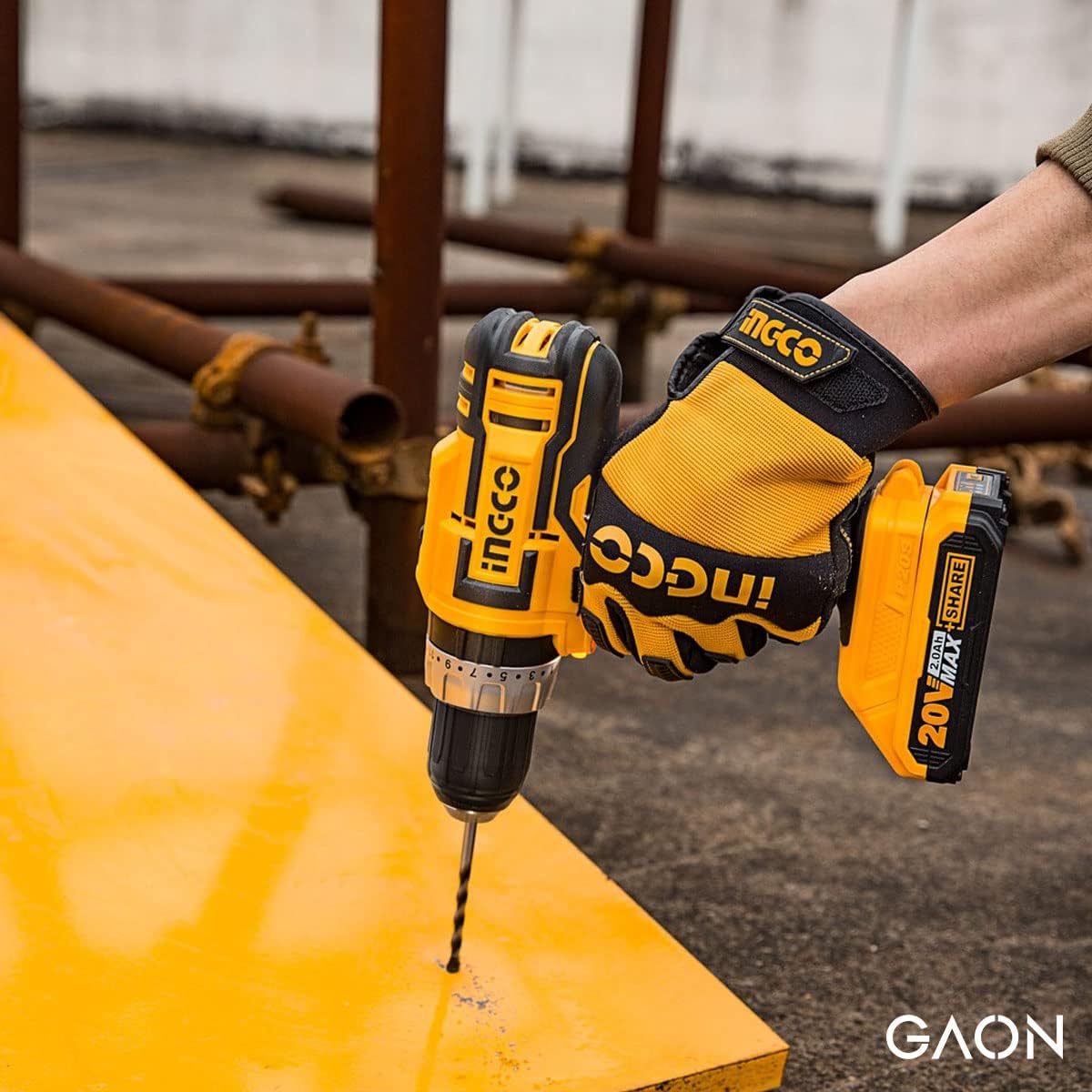
Figure 6: The ergonomic design ensures comfortable handling and reduced fatigue.
Maintenance
Regular maintenance ensures the longevity and optimal performance of your tool.
- Cleaning: Keep the ventilation openings of the tool clean to prevent overheating. Use a soft, damp cloth to clean the exterior. Do not use harsh chemicals or abrasive cleaners.
- Storage: Store the drill and battery pack in a cool, dry place, away from direct sunlight and moisture. Ensure the battery is partially charged before long-term storage.
- Battery Care: Do not store battery packs in locations where the temperature may reach or exceed 50°C (122°F). Do not incinerate the battery pack.
- Inspection: Periodically check the chuck for wear and ensure all screws are tight. If any parts are damaged, have them replaced by a qualified service technician.
Troubleshooting
Here are some common issues and their potential solutions:
| Problem | Possible Cause | Solution |
|---|---|---|
| Drill does not start. | Battery not charged or not properly installed. Forward/reverse switch in center (locked) position. | Charge battery and ensure it is securely installed. Move forward/reverse switch to either forward or reverse position. |
| Loss of power during operation. | Battery charge is low. Overload protection activated. | Recharge the battery. Reduce pressure on the tool or use a lower speed/higher torque setting. |
| Bit slips in chuck. | Chuck not tightened sufficiently. Bit shank is dirty or damaged. | Retighten chuck firmly. Clean or replace the bit. |
| Drill overheats. | Continuous heavy use. Blocked ventilation openings. | Allow the drill to cool down. Clear any debris from ventilation openings. |
Specifications
| Feature | Detail |
|---|---|
| Model Number | CDLI20011 |
| Voltage | 20V |
| No-load Speed (Gear 1) | 0-400/min |
| No-load Speed (Gear 2) | 0-1500/min |
| Max. Torque | 45NM |
| Chuck Capacity | 0.8-10mm |
| Torque Settings | 15+1 |
| Mechanical Gear | 2-Speed |
| Battery Type | Lithium Ion |
| Battery Capacity | 1.5Ah |
| Charging Volts | 220V-240V~50/60Hz |
| Item Weight | 1.8 Kilograms |
| Package Dimensions | 25.4 x 20.2 x 8.3 cm |
| Special Features | Variable Speed, Integrated Work Light, LED Battery Power Indicator |
Warranty and Support
INGCO products are manufactured to high-quality standards. For information regarding the manufacturer's warranty, please refer to the documentation included with your purchase or contact your retailer. Keep your purchase receipt as proof of purchase.
For technical support, spare parts, or service inquiries, please contact your local INGCO service center or the retailer from whom you purchased the product.
Related documentsCDLI20011


Ask a question about this manual
Ask about setup, troubleshooting, compatibility, parts, safety, or missing instructions. Manuals+ will review the question and use this page’s manual context to help answer it.