HCDZ Replacement Voice Remote Control User Manual
For Thomson LED 4K Smart Ultra HD Android TVs
1. Introduction
This manual provides instructions for the HCDZ Replacement Voice Remote Control. This remote is designed as a direct replacement for various Thomson LED 4K Smart Ultra HD Android TV models. It operates using infrared (IR) technology and requires no programming for immediate use.
2. Setup: Installing Batteries
- Open the Battery Compartment: Locate the battery compartment cover on the back of the remote control. Gently slide or press the latch to open the cover.
- Insert Batteries: Insert two (2) AAA batteries (not included) into the compartment. Ensure the positive (+) and negative (-) terminals of the batteries align correctly with the markings inside the compartment. Incorrect insertion can prevent the remote from functioning.
- Close the Battery Compartment: Replace the battery compartment cover, ensuring it clicks securely into place.

Image 1: Rear view of the HCDZ Replacement Remote Control with the battery compartment open, illustrating where to insert AAA batteries.
3. Operating the Remote Control
This HCDZ Replacement Voice Remote Control is designed to work immediately after battery installation, without the need for any programming. It functions as an infrared (IR) replacement.
- Point and Operate: Point the remote control directly towards your Thomson TV's IR sensor.
- Basic Functions: All standard functions such as Power, Volume, Channel, Menu navigation, and Smart TV features should be accessible.
- Voice Control: If your original TV remote supported voice control and this replacement remote has a microphone button, press and hold the microphone button to activate voice commands. Ensure your TV's settings are configured for voice input.
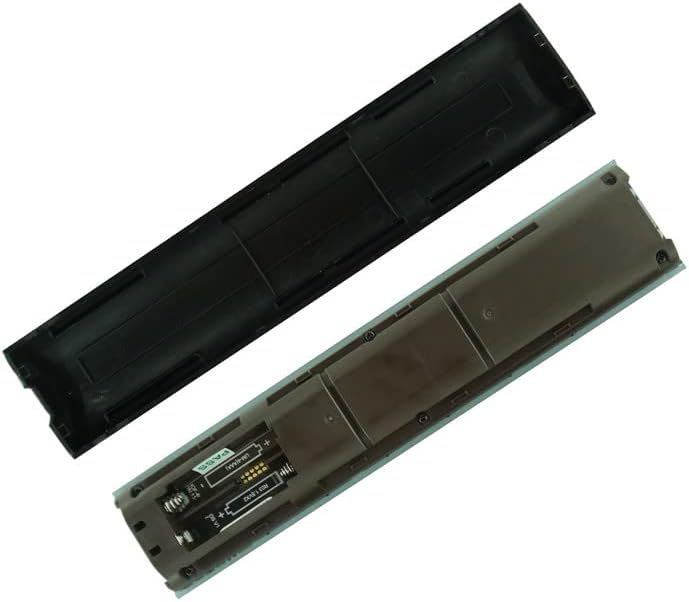
Image 2: Front view of the HCDZ Replacement Remote Control, showing the button layout for operation.
4. Maintenance and Care
- Battery Replacement: Replace both batteries when the remote's performance degrades or it stops responding. Always replace old batteries with new ones; do not mix old and new batteries.
- Storage: If the remote will not be used for an extended period, remove the batteries to prevent leakage and corrosion. Store the remote in a cool, dry place.
- Cleaning: Wipe the remote with a soft, dry cloth. Do not use liquid cleaners or abrasive materials.
- Environmental Conditions: Do not expose the remote to extreme heat, humidity, or direct sunlight, as this can cause malfunction or damage.
5. Troubleshooting
- Remote Not Responding:
Check if the batteries are inserted correctly with the correct polarity (+/-).
Replace old batteries with new AAA batteries.
Ensure there are no obstructions between the remote and the TV's IR sensor.
Verify that the remote is pointed directly at the TV.
- Voice Control Not Working:
Confirm that your specific Thomson TV model supports voice control and that the feature is enabled in the TV's settings.
Ensure you are pressing and holding the microphone button while speaking.
- Intermittent Functionality:
This could indicate low battery power. Replace the batteries.
Ensure the remote is not exposed to strong light sources that might interfere with the IR signal.
6. Specifications
| Feature | Detail |
|---|---|
| Brand | HCDZ |
| Connectivity Technology | Infrared (IR) |
| Compatible Devices | Television (Thomson LED 4K Smart Ultra HD Android TV models) |
| Special Feature | No programming needed, works out of package |
| Batteries Required | 2 AAA batteries (not included) |
| Max Number of Supported Devices | 1 |
7. Important Safety Information
- Do not disassemble or modify the remote control.
- Keep the remote control out of reach of small children to prevent accidental ingestion of batteries.
- Dispose of used batteries according to local regulations. Do not dispose of batteries in fire.


