
m-e Bell-510 RX
User Manual for Wireless Doorbell Receiver
Model: Bell-510 RX | Brand: m-e modern-electronics
1. Introduction
This manual provides comprehensive instructions for the setup, operation, and maintenance of your m-e Bell-510 RX Wireless Doorbell Receiver. Please read this manual carefully before using the device to ensure proper function and safety.
The Bell-510 RX is a durable and robust wireless doorbell receiver designed for versatile use, offering both stationary and mobile operation with its integrated rechargeable battery and foldable plug.
2. Safety Information
- Ensure the receiver is used with a compatible power outlet (230 Volts).
- Do not expose the device to water or excessive humidity.
- Do not attempt to open or repair the device yourself. Refer to qualified personnel for service.
- Keep the device away from direct sunlight and extreme temperatures.
- This device is intended for indoor use only.
3. Package Contents
Please check the package for the following items:
- 1 x m-e Bell-510 RX Wireless Doorbell Receiver
- 1 x User Manual (this document)
- (Note: Transmitter/doorbell button sold separately, if not part of a kit.)
4. Product Overview
Familiarize yourself with the components of your Bell-510 RX receiver:

Figure 4.1: Front View of Receiver. This image shows the Bell-510 RX receiver from the front, highlighting its central "m-e" logo and the illuminated ring, which is shown in blue. The side panel with control buttons is also visible.
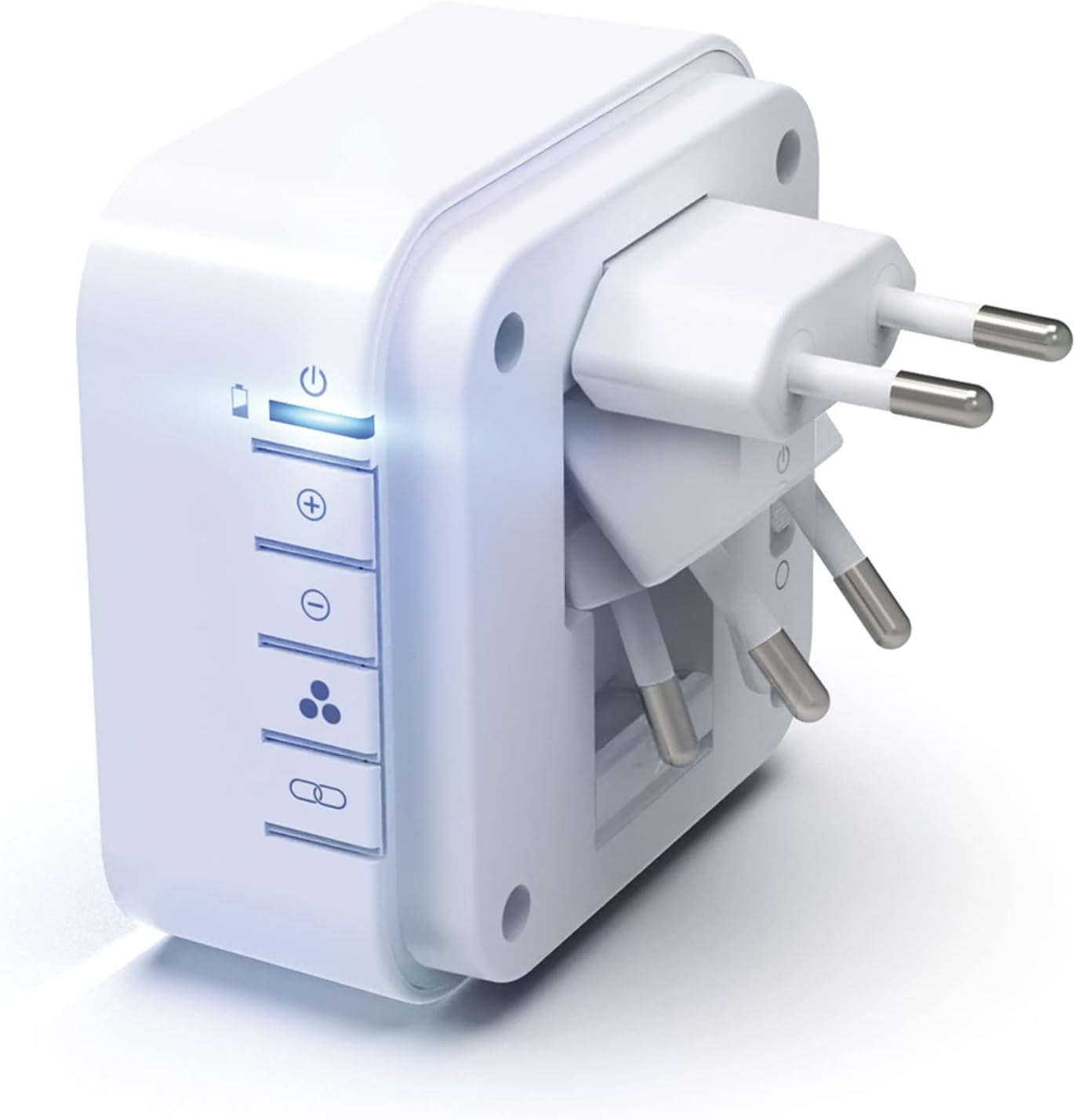
Figure 4.2: Foldable Plug. This image displays the rear of the Bell-510 RX receiver, clearly showing its integrated foldable Europlug. This design allows for compact storage and versatile placement, either plugged into an outlet or used as a stand for mobile operation.

Figure 4.3: Mobile and Stationary Use. This illustration demonstrates the flexibility of the Bell-510 RX receiver. The top part shows the receiver placed on a table next to a laptop, indicating its mobile use. The bottom part shows the receiver plugged directly into a wall outlet, illustrating its stationary use.
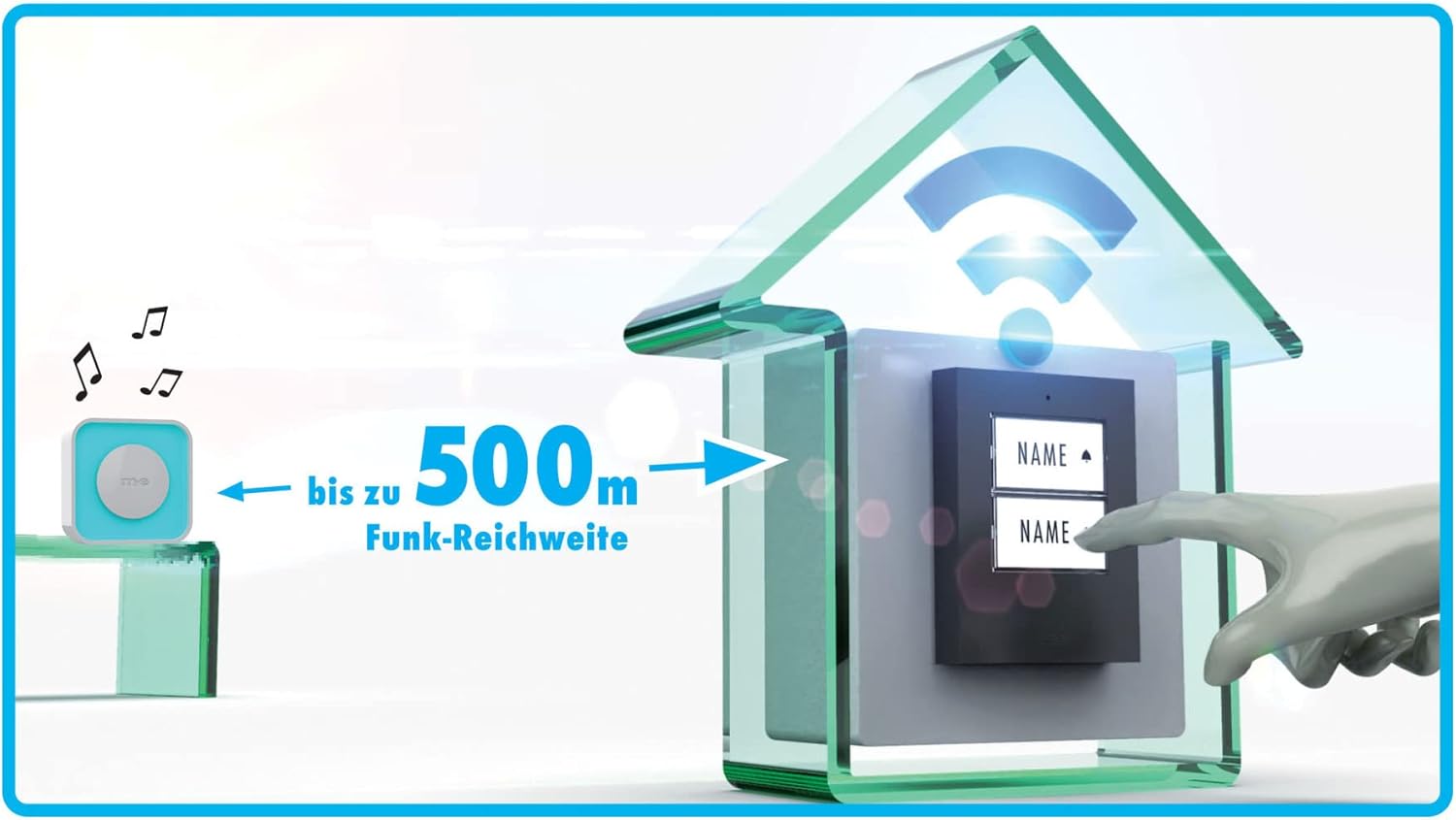
Figure 4.4: Wireless Range. This diagram visually represents the impressive wireless range of the Bell-510 RX system, showing a distance of "bis zu 500m" (up to 500 meters) between the doorbell button and the receiver in an open field environment.
Side Panel Controls:
- Power/Battery Indicator: Shows device status and battery level.
- Volume Up (+): Increases the sound volume.
- Volume Down (-): Decreases the sound volume.
- Function Selector: Toggles between Sound + Light, Sound Only, and Light Only modes.
- Pairing Button: Used to pair the receiver with a compatible doorbell transmitter.
5. Setup
5.1 Initial Charging
Before first use, fully charge the receiver's internal battery. Fold out the integrated plug and insert the receiver into a standard 230V wall outlet. The battery indicator light will show charging status. A full charge can last up to 4 weeks.
5.2 Pairing with a Transmitter
To pair your Bell-510 RX receiver with a compatible m-e doorbell transmitter (e.g., m-e Micro Funk-Konverter BELL-556 TX), follow these steps:
- Ensure both the receiver and transmitter are powered on and within close proximity.
- Press and hold the Pairing Button on the side of the Bell-510 RX receiver until the indicator light starts flashing.
- Within a few seconds, activate your doorbell transmitter (e.g., press the doorbell button).
- The receiver will emit a confirmation sound or light flash, indicating successful pairing.
- Test the connection by pressing the doorbell transmitter button again.
Note: The pairing process is typically automatic upon first activation if both devices are new and compatible.
6. Operating Instructions
6.1 Power On/Off
The receiver automatically powers on when plugged into an outlet or when the battery has sufficient charge for mobile use. To conserve battery, unplug the device or ensure it is in a low-power mode if available.
6.2 Adjusting Volume
Use the Volume Up (+) and Volume Down (-) buttons on the side panel to adjust the sound level of the doorbell chime. There are multiple volume levels available.
6.3 Selecting Chime and Light Color
The Bell-510 RX offers 16 selectable ringtones and 6 optical display colors. The selection of the chime is typically done on the transmitter unit, while the light color is controlled by the receiver.

Figure 6.1: Pink Light Display. This image shows the Bell-510 RX receiver with its illuminated ring glowing in a vibrant pink color, demonstrating one of the available optical display options.

Figure 6.2: Green Light Display. This image shows the Bell-510 RX receiver with its illuminated ring glowing in a bright green color, showcasing another optical display option.

Figure 6.3: Multiple Color Options. This image displays several Bell-510 RX receivers arranged vertically, each plugged into a power strip and illuminating in a different color (blue, red, green, teal, magenta, white, yellow), demonstrating the variety of 6 optical display colors available.
6.4 Function Selector (Sound/Light Modes)
Use the Function Selector button on the side panel to cycle through the following modes:
- Sound + Light: The receiver will chime and illuminate when the doorbell is pressed.
- Sound Only: The receiver will only chime when the doorbell is pressed, without illumination.
- Light Only: The receiver will only illuminate when the doorbell is pressed, without a chime. This mode is useful for quiet environments or for individuals with hearing impairments.
7. Maintenance
- Cleaning: Wipe the receiver with a soft, dry cloth. Do not use abrasive cleaners or solvents.
- Battery Care: To prolong battery life, avoid fully discharging the battery frequently. Recharge when the battery indicator shows low power.
- Storage: If storing the device for an extended period, ensure it is fully charged and store it in a cool, dry place.
8. Troubleshooting
| Problem | Possible Cause | Solution |
|---|---|---|
| Receiver does not chime/light up. |
|
|
| Sound is too low or too high. | Volume setting is incorrect. | Adjust volume using the (+) and (-) buttons. |
| Light display is not working. | Function selector set to "Sound Only" or "Off". | Change function selector to "Sound + Light" or "Light Only". |
| Short battery life. | Frequent use or aging battery. | Ensure full charge before mobile use. Consider replacing the unit if battery degradation is significant after warranty period. |
9. Specifications
| Feature | Detail |
|---|---|
| Model Number | Bell-510 RX |
| Brand | m-e modern-electronics |
| Power Supply | 230 Volts AC (via integrated foldable Europlug) |
| Battery Life (Mobile) | Up to 4 weeks on a full charge |
| Wireless Range | Up to 500 meters (open field) |
| Ringtones | 16 selectable melodies |
| Optical Display Colors | 6 selectable colors |
| Function Modes | Sound + Light, Sound Only, Light Only |
| Special Features | Foldable plug for mobile/stationary use, integrated repeater |
| Intended Use | Indoor electronic devices, small appliances, doorbell systems |
10. Warranty and Support
The m-e Bell-510 RX Wireless Doorbell Receiver comes with a 1-year spare parts availability guarantee from the manufacturer, m-e modern-electronics.
For technical support, warranty claims, or further inquiries, please contact your retailer or the manufacturer directly. Refer to the contact information provided with your purchase documentation.
Please retain your proof of purchase for warranty purposes.
Related documentsBell-510 RX


Ask a question about this manual
Ask about setup, troubleshooting, compatibility, parts, safety, or missing instructions. Manuals+ will review the question and use this page’s manual context to help answer it.