
Wolf Guard W4Q
Wolf Guard W4Q Wireless Home Alarm System User Manual
Model: W4Q
1. Introduction
The Wolf Guard W4Q is an advanced wireless home alarm system designed to provide comprehensive security for your property. It features dual connectivity with both Wi-Fi and 4G GSM networks, ensuring reliable communication and alerts. The system is fully controllable via the 'Smart Life' mobile application, allowing you to manage your security from anywhere in the world. It also integrates with smart home ecosystems like Amazon Alexa and Google Assistant for convenient voice control.

Figure 1.1: Wolf Guard W4Q Control Panel in a home environment.
2. Package Contents
Before beginning installation, please verify that all components listed below are present in your package:
- 1 x Wolf Guard W4Q Wi-Fi + 4G Control Panel
- 4 x Pet-Immune Infrared Motion Sensors
- 8 x Magnetic Door/Window Sensors
- 4 x Wireless Remote Controls
- 1 x Wireless Outdoor Siren (110 dB with anti-theft magnetic tamper)
- 1 x Mini Wired Indoor Siren (110 dB)
- 4 x RFID Cards
- 1 x Alarm System Sticker
- 2 x Power Adapters (1 for host, 1 for siren)

Figure 2.1: All components included in the Wolf Guard W4Q alarm system package.
3. Setup Guide
3.1 Control Panel Overview
Familiarize yourself with the main control panel's layout and ports.
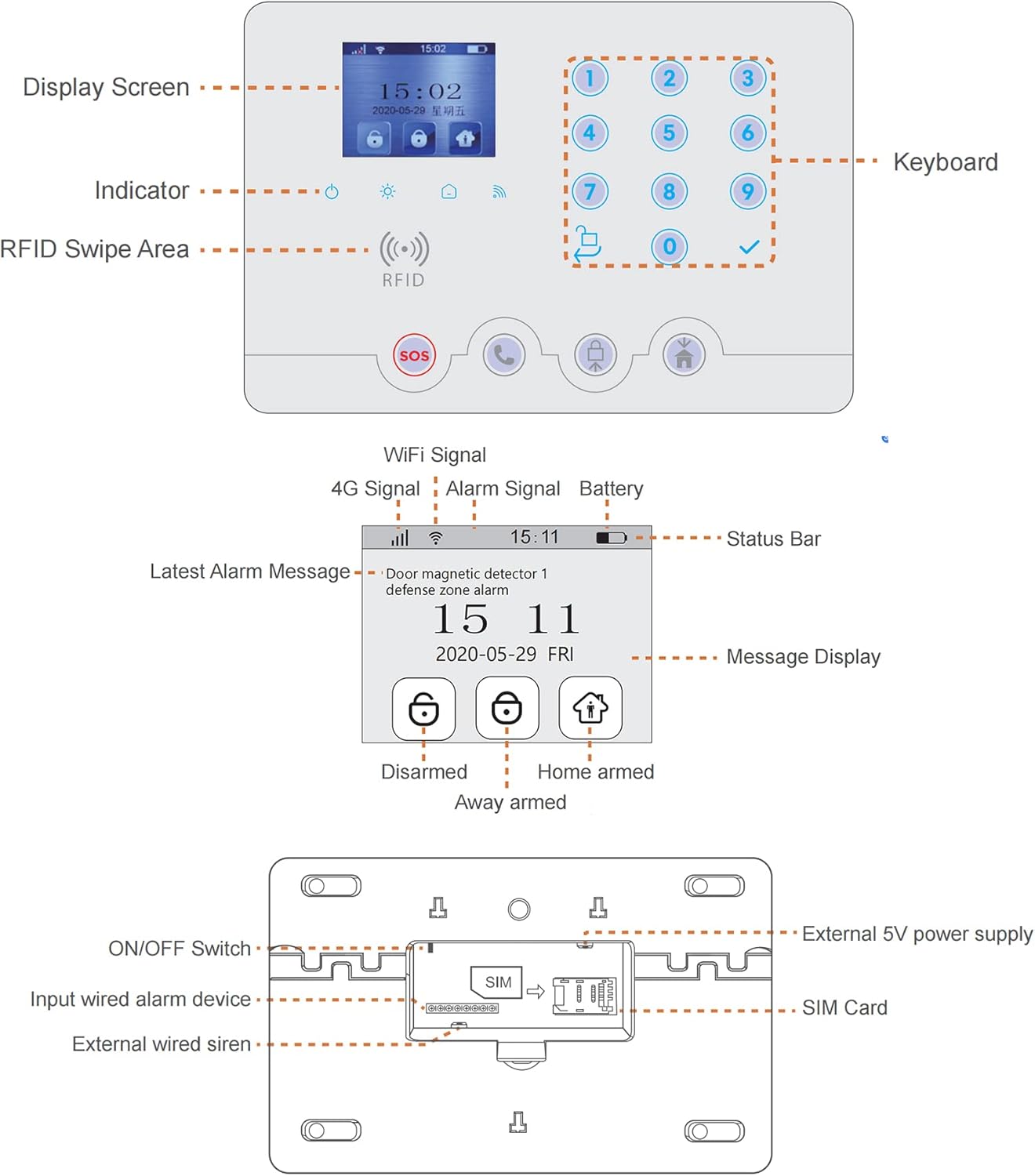
Figure 3.1: Wolf Guard W4Q Control Panel Diagram.
3.2 SIM Card Installation (Optional)
For 4G connectivity and SMS/call alerts, insert a 4G SIM card into the control panel. Ensure the panel is powered off before inserting or removing the SIM card.
- Locate the SIM card slot on the back of the control panel (refer to Figure 3.1).
- Ensure the control panel is switched OFF using the ON/OFF switch.
- Insert the 4G SIM card into the designated slot until it clicks into place.
- Switch the control panel ON. The system will attempt to detect the SIM card.
Note: Some users have reported issues with SIM card detection. Ensure your SIM card is active and does not require a PIN. If issues persist, contact customer support.
3.3 Power Connection
Connect the main power adapter to the control panel and plug it into a standard wall outlet. The system has an integrated backup battery that will activate in case of a power outage.
3.4 App Installation and Wi-Fi Connection
The Wolf Guard W4Q system is managed via the 'Smart Life' application.
- Download the 'Smart Life' app from your smartphone's app store (Android or iOS).
- Register for a new account or log in if you already have one.
- Follow the in-app instructions to add your Wolf Guard W4Q control panel. This typically involves putting the panel into pairing mode and connecting it to your home Wi-Fi network.
- Once connected, you will receive push notifications directly to your smartphone for system events.

Figure 3.2: Smart Life App Push Notification.
3.5 Sensor Installation
All sensors are pre-paired with the control panel for ease of installation.
3.5.1 Door/Window Sensors
These magnetic sensors detect when a door or window is opened.
- Mount the larger part of the sensor (transmitter) on the fixed frame of the door or window.
- Mount the smaller magnetic part on the moving part of the door or window.
- Ensure the two parts are aligned and within 10mm of each other when the door/window is closed.
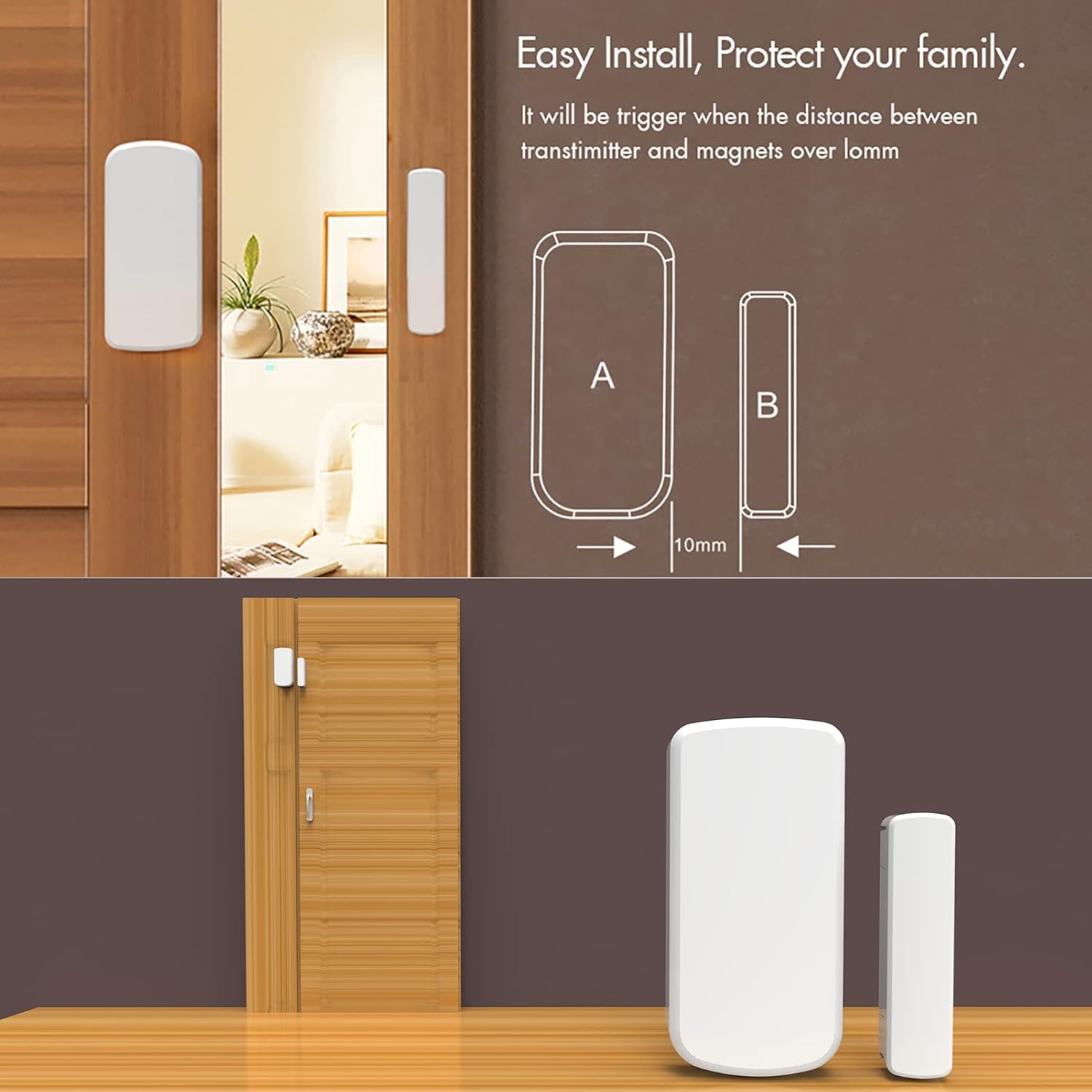
Figure 3.3: Door/Window Sensor Installation.
3.5.2 Motion Sensors (Pet-Immune)
These infrared sensors detect movement while being designed to ignore pets up to a certain weight, reducing false alarms.
- Install motion sensors in corners of rooms or areas where intruders are likely to pass.
- Mount them at a height of approximately 2.2-2.5 meters (7-8 feet) for optimal coverage.
- Avoid pointing them directly at heat sources, windows, or areas with strong air currents.
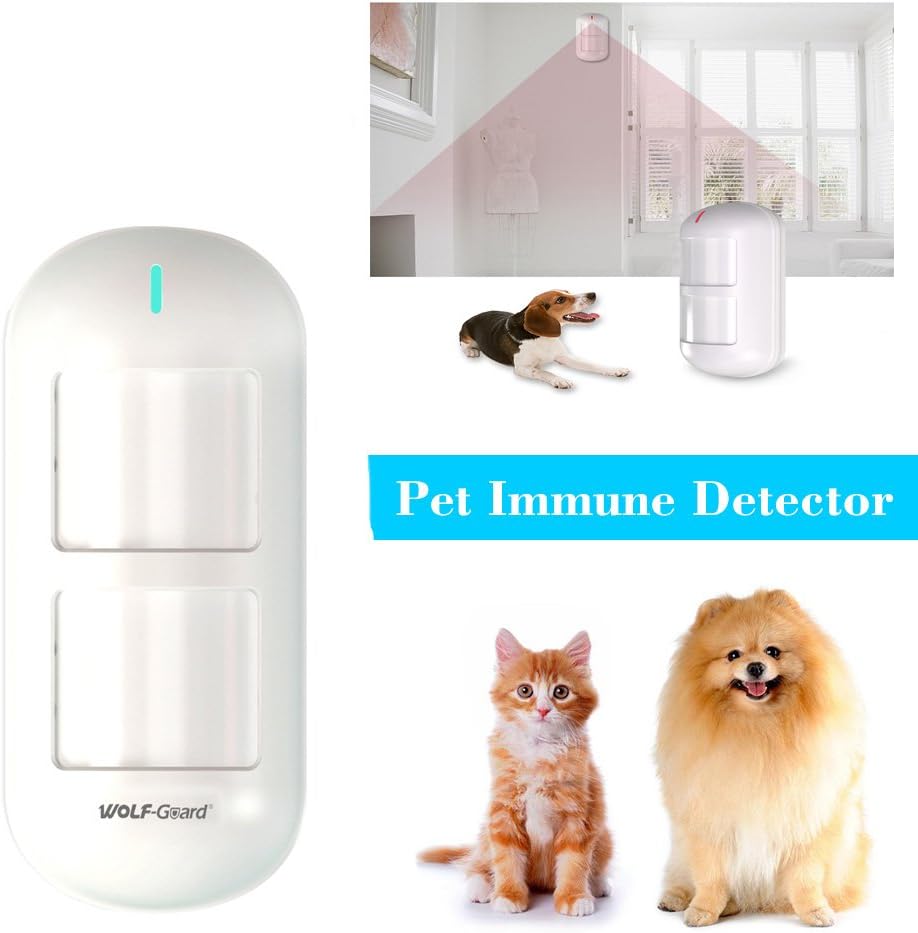
Figure 3.4: Pet-Immune Motion Detector.
3.6 Siren Installation
3.6.1 Wireless Outdoor Siren
The outdoor siren provides a loud deterrent (110 dB) and features an anti-tamper function.
- Mount the siren in a visible location outside your home, preferably high up to prevent tampering.
- Ensure it is within wireless range of the main control panel.
- Connect its dedicated power adapter.

Figure 3.5: Wireless Outdoor Siren.
3.6.2 Wired Indoor Siren
The mini wired indoor siren provides an additional audible alert inside your home.
- Connect the indoor siren to the designated wired siren port on the main control panel (refer to Figure 3.1).
- Place it in a central location within your home.
4. Operating the System
4.1 Arming and Disarming
The system can be armed or disarmed using multiple methods:
- Smart Life App: Use the app to fully arm (Away mode), partially arm (Home mode), or disarm the system from anywhere.
- Remote Controls: Press the lock button to arm, unlock button to disarm. There are also buttons for Home arm and SOS.
- RFID Cards: Swipe an RFID card over the RFID swipe area on the control panel to quickly arm or disarm.
- Control Panel Keypad: Enter your PIN and press the arm/disarm buttons on the keypad.
4.2 Zone Settings
The system supports various zone settings to customize protection:
- Access Zone: Typically for entry/exit points with a delay.
- Indoor Zone: For motion sensors inside the home, often bypassed in Home mode.
- Perimeter Zone: For door/window sensors, active in both Away and Home modes.
- 24-Hour Zone: Always active, such as for smoke detectors or emergency buttons.
- Doorbell Zone: Configures a sensor to act as a doorbell chime.
These settings can be configured via the Smart Life app.
4.3 Timed Arm/Disarm
You can schedule specific times for the system to arm or disarm automatically.
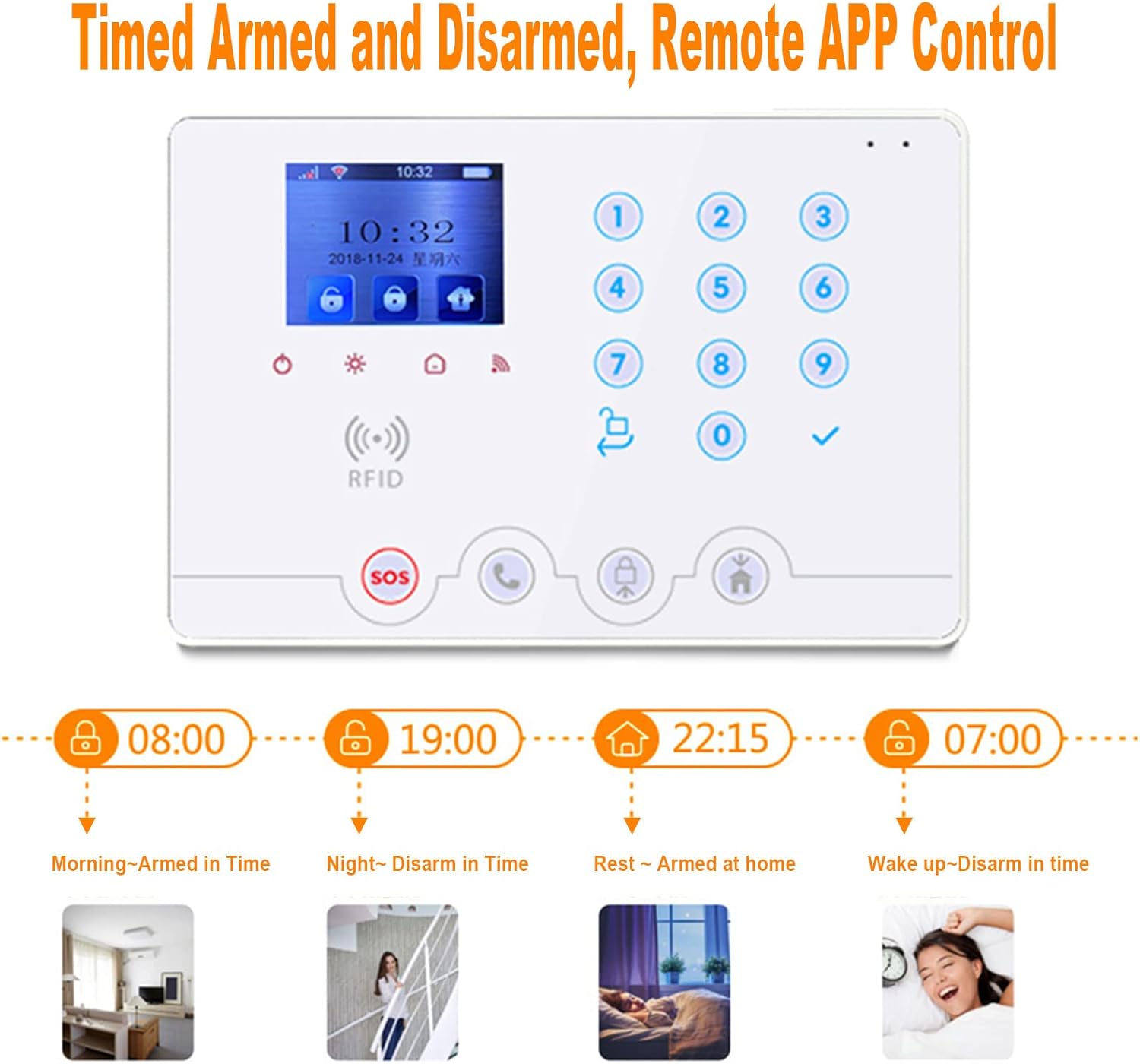
Figure 4.1: Timed Arm and Disarm Schedules.
4.4 Smart Home Integration
The Wolf Guard W4Q system is compatible with Amazon Alexa and Google Assistant, allowing for voice control of arming and disarming functions.

Figure 4.2: Voice Control with Amazon Alexa.
5. Maintenance
5.1 Battery Management
The main control panel and wireless siren are equipped with backup batteries. In case of a power outage, the system will continue to operate for several hours. You will receive SMS notifications for power loss and restoration if a SIM card is installed.
Wireless sensors (motion, door/window) are battery-powered. The system will alert you via the app when sensor batteries are low. Replace batteries promptly to ensure continuous protection. Motion sensors typically use CR2045 batteries, while door/window sensors may use different types (e.g., CR2032).
5.2 Cleaning
Wipe the control panel and sensors with a soft, dry cloth. Do not use abrasive cleaners or solvents, as these can damage the surfaces.
6. Troubleshooting
6.1 Common Issues and Solutions
| Problem | Possible Cause | Solution |
|---|---|---|
| SIM card not detected | SIM not inserted correctly; SIM requires PIN; SIM is inactive; incompatible SIM. | Ensure SIM is fully inserted. Disable PIN on SIM using a phone. Verify SIM is active. Try a different 4G SIM card. |
| No Wi-Fi connection | Incorrect Wi-Fi password; panel too far from router; Wi-Fi 6 router incompatibility. | Double-check Wi-Fi password. Move panel closer to router. Some users report issues with Wi-Fi 6 routers; try connecting to a Wi-Fi 5 (802.11ac) or 2.4GHz network if available. |
| Remote control not working | Low battery in remote; remote not paired correctly. | Replace remote battery. Re-pair the remote control with the main panel via the Smart Life app. |
| Sensor not triggering alarm | Sensor battery low; sensor out of range; improper installation; sensor zone disabled. | Replace sensor battery. Move sensor closer to the panel. Re-check installation (e.g., door/window sensor alignment). Ensure the sensor's zone is enabled and correctly configured in the app. |
| False alarms | Motion sensor placement; pet-immune sensor limitations; environmental factors. | Adjust motion sensor placement to avoid direct sunlight, drafts, or heat sources. Ensure pets are within the specified weight/height limits for pet immunity. |
| No French manual/App translation issues | Product documentation/app primarily in English/Italian. | Refer to this digital manual for English instructions. For app issues, check for app updates or contact Wolf Guard support for clarification. |
6.2 Anti-Dismantling Alarm Function
The control panel and outdoor siren are equipped with anti-tamper switches. If the device is forcibly removed from its mounting surface while armed, an alarm will be triggered.

Figure 6.1: Anti-Dismantling Alarm Function and Unclosed Door Reminders.
7. Specifications
| Feature | Detail |
|---|---|
| Model | W4Q |
| Connectivity Technology | Wi-Fi, 4G (GSM) |
| Control Method | Application (Smart Life), Remote Control, RFID, Keypad |
| Compatible Devices | Smartphone (Android, iOS), Amazon Alexa, Google Assistant |
| Power Source | Wireless (Main unit: AC adapter with Lithium metal backup battery) |
| Sound Level (Siren) | 110 dB (Outdoor Siren), 110 dB (Indoor Siren) |
| Material | ABS |
| Color | White |
| Product Dimensions (L x W x H) | 20 x 3.2 x 14 cm (Control Panel) |
| Product Weight | 2.43 kilograms (Total package) |
| Included Components | Control Panel, Sensors, Sirens, Remotes, RFID cards, Power Adapters |
8. Warranty and Support
Wolf Guard products are designed for reliability and performance. For warranty information, please refer to the documentation included with your purchase or contact the seller directly. For technical support, troubleshooting assistance, or inquiries regarding spare parts, please reach out to Wolf Guard customer service. Contact details are typically available on the official Wolf Guard website or through your purchase platform.
For common issues, please refer to the troubleshooting section of this manual. If you require further assistance, ensure you have your product model (W4Q) and purchase details ready when contacting support.
Ask a question about this manual
Ask about setup, troubleshooting, compatibility, parts, safety, or missing instructions. Manuals+ will review the question and use this page’s manual context to help answer it.