
1. Introduction
Thank you for choosing the Besvic Electricity Consumption Meter. This device is designed to help you monitor and manage the electricity consumption of your appliances, promoting energy saving and cost reduction. Please read this manual carefully before use to ensure proper operation and maximize the benefits of your meter.

Image: The Besvic Electricity Consumption Meter, showing its LCD screen and power plug design.
2. Product Features
- Multiple Monitoring Modes: Supports measurement of various parameters including time, wattage, cost, cumulative energy consumption, voltage, frequency, current, power factor, minimum power, maximum power, and electricity price.
- Real-time Monitoring: Records energy consumption and electricity cost of connected devices, aiding in energy and money saving.
- Overload Warning: Displays "OVERLOAD" when the connected device's current load exceeds 3680W, protecting both the device and the meter.
- Backlight and Memory Function: Built-in backup battery retains data during power outages. Backlight activates for 10 seconds with any button press for easy reading in the dark.
- Easy to Use: Simple button interface for mode selection, price setting, and data reset. Compact design for convenience.

Image: Visual representation of the 7 monitoring modes available on the device, including Electric Cost, KWh, Frequency, Power Factor, Power, Current, Voltage, Cumulative Time, and Max/Min Power.
3. Setup
- Unpacking: Carefully remove the Besvic Electricity Consumption Meter from its packaging.
- Initial Placement: Plug the meter directly into a standard wall outlet.
- Connecting Appliance: Plug the appliance you wish to monitor into the socket on the front of the Besvic meter.
- Power On: The device should power on automatically and display initial readings.

Image: The Besvic meter plugged into a wall socket, illustrating its wide application for monitoring various household appliances like refrigerators, washing machines, and microwaves.
4. Operating Instructions
4.1. Navigating Monitoring Modes
Press the "FVNC" (Function) button repeatedly to cycle through the 7 different monitoring modes:
- Time
- Wattage (Current Power)
- Cost
- Cumulative Energy Consumption (kWh)
- Voltage
- Frequency (Hz)
- Current (Amps)
- Power Factor
- Minimum Power
- Maximum Power
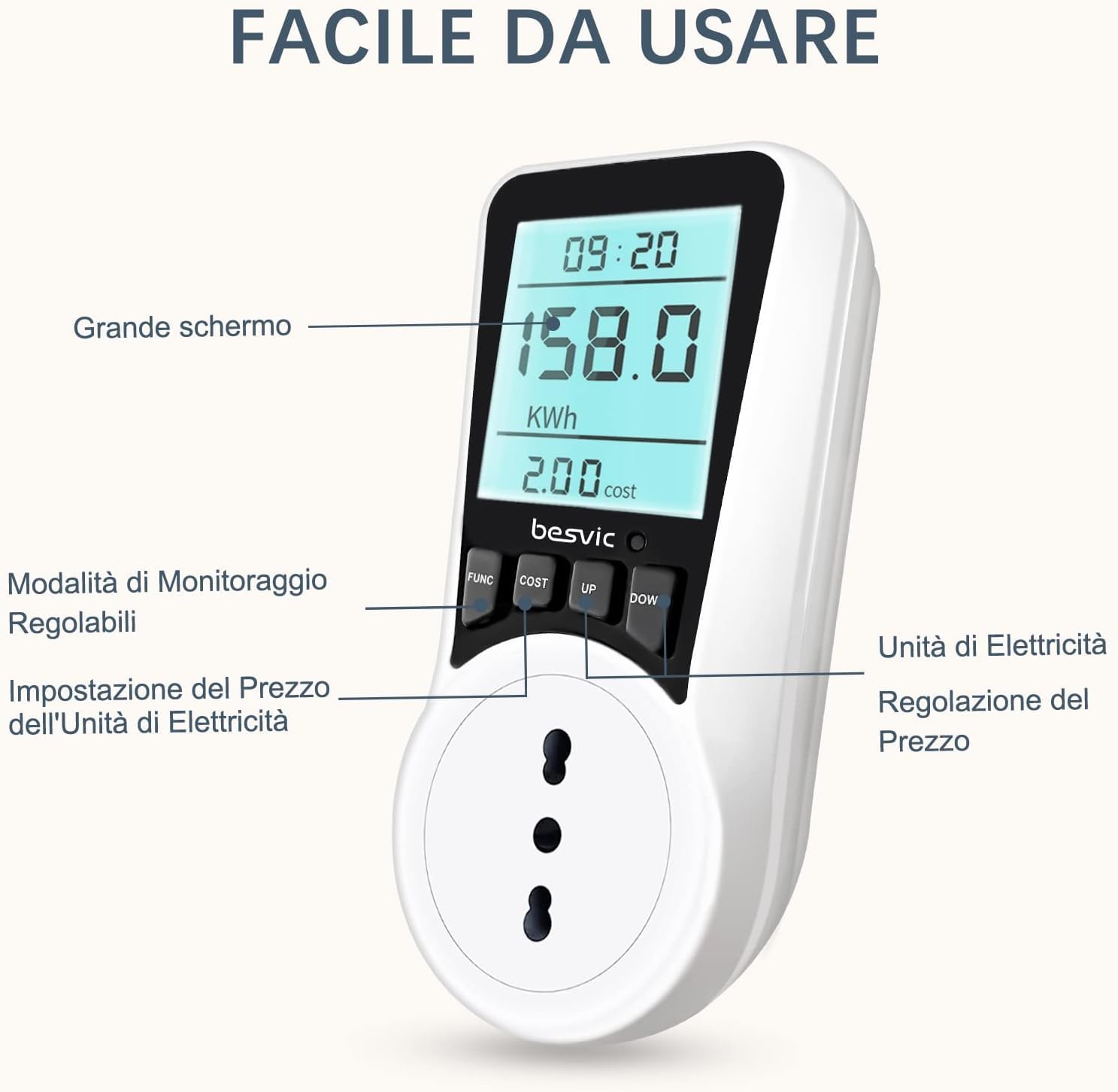
Image: A detailed view of the meter's interface, showing the "FUNC", "COST", "UP", and "DOWN" buttons, and the large LCD screen for easy operation.
4.2. Setting Electricity Price
- Press the "COST" button to enter the electricity price setting mode.
- Use the "UP" and "DOWN" buttons to adjust the unit price of electricity.
- Press "COST" again to confirm the setting and exit the price setting mode.
4.3. Resetting Data
To clear all settings and recorded data, press and hold the "RESET" button (usually a small recessed button, may require a pin or paperclip) until the display resets.
4.4. Backlight Function
The LCD screen features a backlight. Press any button to activate the backlight, which will remain on for approximately 10 seconds, improving readability in low-light conditions.
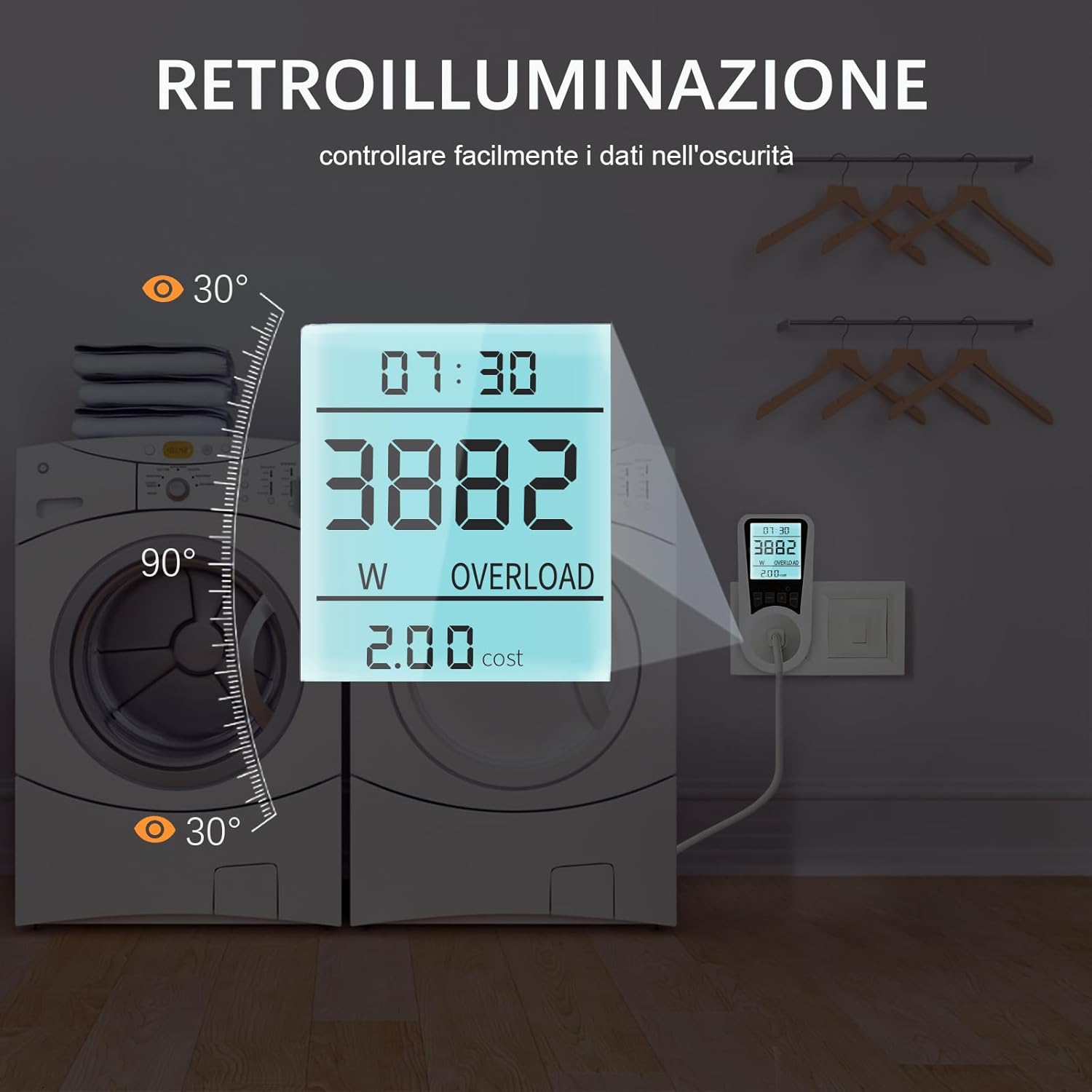
Image: The meter's screen glowing with its backlight feature, demonstrating improved visibility in dark environments.
5. Safety Features
5.1. Overload Warning
The meter is equipped with an overload protection feature. If the power consumption of the connected appliance exceeds 3680W, the display will show "OVERLOAD" to alert the user. This helps prevent damage to both the appliance and the meter.

Image: The meter's screen showing the "OVERLOAD" warning, indicating that the connected device's power consumption has exceeded the safe limit.
5.2. Memory Function
The built-in backup battery ensures that all recorded data (such as cumulative energy consumption and cost settings) is retained even if the meter is unplugged or in the event of a power interruption.

Image: The meter displaying data, with an icon suggesting data retention even when unplugged, illustrating the memory function.
6. Maintenance
- Cleaning: Wipe the meter with a soft, dry cloth. Do not use abrasive cleaners or immerse the device in water.
- Storage: Store the meter in a cool, dry place away from direct sunlight and extreme temperatures when not in use for extended periods.
- Battery: The internal backup battery is designed for long-term data retention and typically does not require user replacement.
7. Troubleshooting
| Problem | Possible Cause | Solution |
|---|---|---|
| Display is blank | No power to the outlet; Meter is not properly plugged in. | Check the wall outlet with another device. Ensure the meter is firmly plugged in. |
| "OVERLOAD" message displayed | Connected appliance exceeds the meter's maximum power rating (3680W). | Unplug the appliance immediately. Do not use the meter with appliances exceeding 3680W. |
| Readings seem inaccurate | Minor fluctuations are normal; Device might be faulty. | Ensure the appliance is operating normally. If significant discrepancies persist, contact customer support. |
| Buttons are unresponsive | Temporary software glitch; Device needs reset. | Unplug the meter for a few seconds, then plug it back in. If unresponsive, perform a hard reset using the "RESET" button. |
8. Specifications
- Installation Type: Plug-in
- Operating Voltage: 230VAC, 50Hz
- Max Current/Power: 16A / 3680W
- Operating Temperature: -10°C to +40°C
- Accuracy: ±2%
- Backup Battery: NiMH 3.6V, 20mAh
- Model Number: PMB05
- Product Dimensions: 6 x 8 x 14 cm (approximately 2.36 x 3.15 x 5.51 inches)
- Product Weight: 200 grams (approximately 0.44 lbs)

Image: A visual representation of the meter's ability to monitor various household appliances, emphasizing its utility in understanding energy consumption.
9. Warranty and Support
For warranty information or technical support, please refer to the product packaging or contact Besvic customer service through the retailer where you purchased the product. Keep your purchase receipt as proof of purchase.
Online Support: Visit the official Besvic website or the product page on Amazon.it for FAQs and additional resources.


