
1. Introduction
This manual provides essential instructions for the proper installation, operation, and maintenance of your EKWB EK-Quantum Surface P120M Radiator. Please read this manual thoroughly before proceeding with installation to ensure correct usage and to prevent potential damage.
Safety Information
Always ensure your system is powered off and disconnected from the mains electricity before performing any installation or maintenance procedures. Handle all components with care to prevent physical damage or injury. Use appropriate tools and follow all steps carefully.
2. Product Overview
The EK-Quantum Surface P120M is a high-performance water cooling radiator designed for optimal heat dissipation in PC systems. Its 44mm thickness provides a balanced approach to low noise operation and efficient cooling across various fan speeds.

Figure 2.1: The EK-Quantum Surface P120M Radiator, showcasing its compact design and G1/4" ports.
Key Features
- 44mm Thickness: Optimized for balanced performance, offering low noise and high cooling efficiency.
- Five G1/4" Threaded Ports: Provides versatile options for loop planning and connectivity.
- Dedicated Drain Port: A fifth G1/4" port facilitates easy draining and air bleeding of the cooling loop.
- Copper Tube Design: Sixteen 2mm-wide copper tubes ensure optimal coolant flow and heat transfer.
- 18 FPI Copper Fins: High-grade non-louvered copper fins balance thermal transfer with air resistance for effective cooling at various fan speeds.
- Push/Pull Configuration Support: Allows for maximum cooling performance with fan setups on both sides.
- EK-Matrix7 Compatibility: Seamless integration with EK-Quantum Reflection2 distro plates.
Included Components
The following items are included with your EK-Quantum Surface P120M Radiator:
- EK-Quantum Surface P series radiator
- 4x Phillips Slotted M4x30mm screws (for 25mm thick fans)
- 4x Phillips Slotted M4x5mm screws (for mounting the radiator directly to the case)
- 6mm steel Allen (Hex) key
- 9mm steel Allen (Hex) key
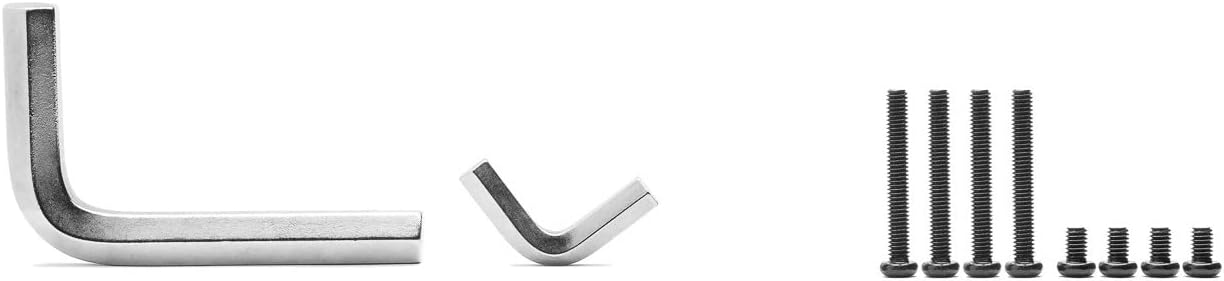
Figure 2.2: The set of M4 screws (30mm for fans, 5mm for case mounting) and 6mm/9mm Allen keys provided for radiator installation.
3. Specifications
Detailed technical specifications for the EKWB EK-Quantum Surface P120M Radiator:
| Specification | Value |
|---|---|
| Dimensions (L x W x H) | 165 x 130 x 44mm (6.5"L x 1.73"W x 5.12"H) |
| Weight | 0.85kg (1.87 pounds) |
| Fins Per Inch (FPI) | 18 |
| Port Threads | 5x G1/4" |
| Fan Compatibility | 120x120x25mm fan |
| Pressure Tested | 1bar |
| Materials | High-grade 99.9% copper fins, Copper H90 tubing, Brass H62 end tank chambers, Stainless Steel side plates, Extruded Aluminum Silver anodized end piece covers, Brass nickel-plated extenders and plugs |
| Model Number | 3831109839133 |

Figure 3.1: Detailed technical drawing illustrating the dimensions of the EK-Quantum Surface P120M Radiator in millimeters.
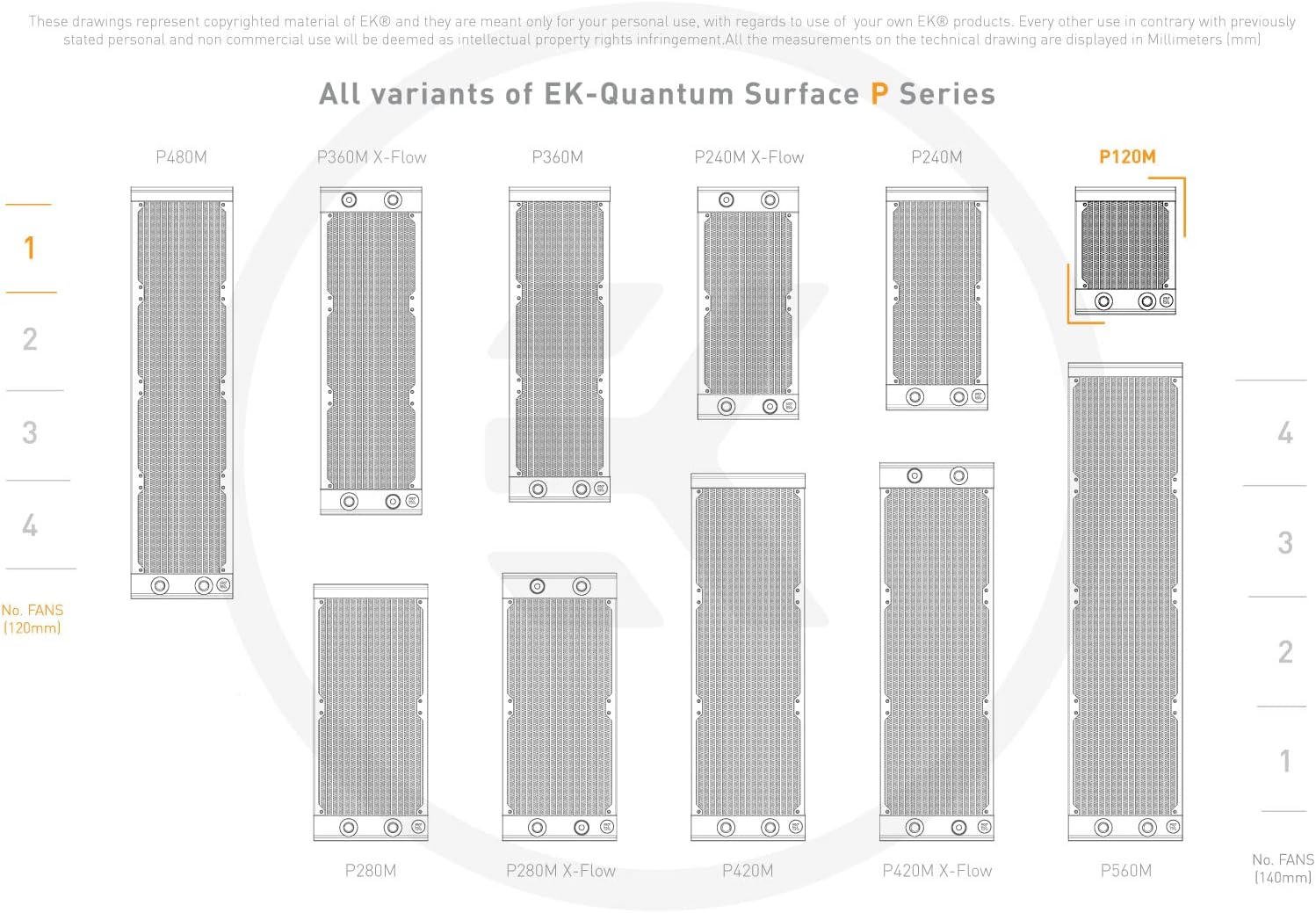
Figure 3.2: An overview of different EK-Quantum Surface P Series radiator sizes, with the P120M model highlighted for comparison.
4. Setup and Installation
4.1 Pre-Installation Check
- Carefully inspect the radiator for any signs of damage that may have occurred during shipping.
- Verify that all included components, as listed in Section 2.2, are present.
4.2 Mounting the Radiator
- Identify the desired mounting location within your PC case. Ensure adequate clearance for fans and tubing.
- Attach your 120x120x25mm fans to the radiator using the provided M4x30mm screws. For a Push/Pull configuration, mount fans on both sides of the radiator.
- Mount the assembled radiator and fan unit to your PC case using the provided M4x5mm screws. Do not overtighten screws to avoid damaging the radiator or case.
4.3 Connecting to the Cooling Loop
The EK-Quantum Surface P120M features five G1/4" threaded ports for connecting fittings and tubing. Plan your loop carefully to ensure optimal flow and accessibility.
- Install appropriate G1/4" fittings into the desired inlet and outlet ports.
- The fifth G1/4" port, typically located on the end tank, is specifically designed for draining the loop and assisting with air bleeding. Ensure this port remains accessible for future maintenance.
- Connect your tubing to the fittings, ensuring all connections are secure and watertight.

Figure 4.1: A detailed view of the G1/4 inch threaded connection ports on the radiator, essential for integrating into a custom liquid cooling loop.

Figure 4.2: Side profile of the radiator, highlighting the end tank design and additional G1/4 inch port for drainage.
5. Operation
Once the radiator is installed, the cooling loop is filled with coolant, and all air is bled from the system, the radiator will begin to passively dissipate heat from the circulating coolant. The effectiveness of heat dissipation is directly influenced by the airflow provided by the attached fans.
The 18 FPI (Fins Per Inch) fin density of the EK-Quantum Surface P120M is specifically optimized to achieve a balance between thermal transfer capabilities and air resistance. This design allows for effective cooling performance even at lower fan speeds, contributing to quieter overall system operation. For maximum cooling, ensure fans are operating at appropriate speeds and are not obstructed.

Figure 5.1: A close-up view of the radiator's copper fins, illustrating the 18 FPI density designed for efficient heat exchange.
6. Maintenance
Regular maintenance is crucial for ensuring the longevity, efficiency, and optimal performance of your liquid cooling system.
6.1 Cleaning
- Radiator Fins: Periodically inspect the radiator fins for dust buildup. Use compressed air to gently clear dust and debris from between the fins. Ensure the system is powered off before cleaning.
- Fans: Ensure that the attached fans are clean and free of any obstructions that could impede airflow.
6.2 Coolant Replacement and System Flush
- Follow your coolant manufacturer's recommendations for coolant replacement intervals.
- Utilize the dedicated G1/4" drain port on the radiator to facilitate easy and complete coolant draining.
- When replacing coolant or performing major system maintenance, consider flushing the entire cooling loop with distilled water or a specialized flushing agent to remove any accumulated residue or contaminants.
7. Troubleshooting
This section addresses common issues you might encounter with your EKWB EK-Quantum Surface P120M Radiator.
7.1 Poor Cooling Performance
- Fan Operation: Verify that all attached fans are spinning correctly and are not obstructed. Ensure they are connected to a power source and receiving appropriate voltage.
- Air in Loop: Trapped air in the cooling loop can significantly reduce performance. Thoroughly bleed the system by tilting the PC case and running the pump at varying speeds until all air bubbles are expelled.
- Dust Buildup: Excessive dust on the radiator fins can restrict airflow. Clean the fins and fans as described in Section 6.1.
- Coolant Flow: Ensure the pump is operating correctly and there are no blockages in the cooling loop (e.g., kinked tubing, clogged components).
7.2 Leaks
- Immediate Action: If a leak is detected, immediately power off your system and disconnect it from the mains electricity.
- Inspect Connections: Carefully inspect all fittings and connections for tightness. Ensure O-rings are properly seated and not damaged.
- Component Damage: Check for any visible cracks or damage to the radiator, tubing, or other components. If a component is found to be faulty, it must be replaced.
8. Warranty and Support
This EKWB product is covered by a manufacturer's warranty. For detailed information regarding warranty terms, conditions, and duration, please refer to the official EKWB website or the documentation provided with your purchase.
For technical support, troubleshooting assistance, or any other inquiries, please visit the official EKWB support portal or contact their customer service department. You can typically find support resources and contact information on the EKWB website: www.ekwb.com/support/


