Introduction
This manual provides essential information for the safe and effective operation of your Mackie Thump212XT 12-inch 1400W Enhanced Powered Loudspeaker. Please read this manual thoroughly before using the product to ensure proper setup, optimal performance, and to prevent damage.
Important Safety Information
Always follow basic safety precautions when using this product to reduce the risk of fire, electric shock, and injury. Keep this manual for future reference.
- Do not expose this appliance to rain or moisture.
- Do not use this apparatus near water.
- Clean only with a dry cloth.
- Do not block any ventilation openings. Install in accordance with the manufacturer's instructions.
- Do not install near any heat sources such as radiators, heat registers, stoves, or other apparatus (including amplifiers) that produce heat.
- Protect the power cord from being walked on or pinched, particularly at plugs, convenience receptacles, and the point where they exit from the apparatus.
- Only use attachments/accessories specified by the manufacturer.
- Unplug this apparatus during lightning storms or when unused for long periods of time.
- Refer all servicing to qualified service personnel. Servicing is required when the apparatus has been damaged in any way, such as power-supply cord or plug is damaged, liquid has been spilled or objects have fallen into the apparatus, the apparatus has been exposed to rain or moisture, does not operate normally, or has been dropped.
Proposition 65 Warning: This product contains chemicals known to the State of California to cause cancer and birth defects or other reproductive harm.
Product Overview
The Mackie Thump212XT is a 12-inch 1400W enhanced powered loudspeaker designed for various audio applications. It features a robust Class-D amplifier, versatile input/output options, and advanced digital sound processing (DSP) for optimized performance.

Figure 1: Front view of the Mackie Thump212XT Powered Loudspeaker.
Key Features:
- 1400W ultra-efficient Class-D amplifier.
- Frequency response: 47 Hz – 20kHz.
- Max SPL: 128 dB.
- Application-specific voicing modes (Music, Live, Club, Monitor, Flat).
- Outdoor mode for enhanced performance in open environments.
- Built-in Feedback Eliminator to prevent unwanted audio feedback.
- Music Ducking mode for automatic music volume reduction during announcements.
- Bluetooth connectivity for audio streaming, speaker linking, and control via the Thump Connect 2 app.
- Durable, lightweight construction with multiple handles for easy transport.
Included Components:
- Mackie Thump212XT Powered Loudspeaker
- Power Cable
- Thump Connect 2 app (downloadable)
- Note: 1/8'' input cable, XLR cables, and travel bag may vary depending on the seller.
Setup
1. Physical Placement and Mounting:
The Thump212XT can be used in various configurations:
- Floor Standing: Place the speaker directly on a stable, flat surface.
- Pole Mounting: Utilize the integrated pole mount at the bottom of the speaker for elevated placement on a standard speaker pole.
- Monitor Wedge: Position the speaker on its side for use as a floor monitor.
- Suspended Mounting: The speaker features integrated M10 fly points for professional suspension installations. Consult a qualified installer for this method.

Figure 2: Mackie Thump212XT configured as a floor monitor.

Figure 3: Mackie Thump212XT suspended using fly points.
2. Power Connection:
Connect the supplied power cable to the IEC power input on the rear panel of the speaker and then to a grounded AC power outlet. Ensure the power switch is in the OFF position before connecting power.
3. Audio Connections:
The Thump212XT offers two input channels with combination XLR/1/4" jacks, allowing connection of microphones, line-level instruments, or mixers. An additional 1/8" AUX input is available for connecting portable media players.

Figure 4: Rear panel showing input jacks and controls.
- XLR/1/4" Inputs (Channels 1 & 2): Use these for microphones, mixers, or other audio sources. Adjust the GAIN knob for each channel to achieve an optimal signal level.
- 1/8" AUX Input: Connect smartphones, tablets, or other devices for audio playback.
- XLR Output (THRU): This output allows you to send the mixed signal from the Thump212XT to another powered speaker or audio device.
4. Bluetooth Pairing:
The Thump212XT supports Bluetooth for audio streaming and speaker linking.
- Ensure Bluetooth is enabled on your audio device (e.g., smartphone, tablet).
- On the Thump212XT rear panel, press the BLUETOOTH PAIR button. The Bluetooth indicator will flash.
- Select "Thump212XT" from the list of available devices on your audio device.
- Once paired, the Bluetooth indicator on the speaker will glow solid.
- For stereo operation, you can link two Thump212XT speakers wirelessly via Bluetooth. Refer to the Thump Connect 2 app for detailed instructions on speaker linking.
Operating Instructions
1. Powering On/Off:
After all connections are made, turn on the Thump212XT using the power switch on the rear panel. Turn off the speaker when not in use.
2. Voicing Modes:
The Thump212XT features four application-specific voicing modes to optimize sound for different uses. Select the desired mode using the MODE button on the rear panel or via the Thump Connect 2 app.

Figure 5: Voicing Modes selection on the rear panel.
- MUSIC: Optimized for general music playback.
- LIVE: Suitable for live sound reinforcement with instruments and vocals.
- CLUB: Enhanced bass response for DJ applications and dance music.
- MONITOR: Tailored frequency response for use as a stage monitor.
- FLAT: Provides a neutral frequency response for custom equalization.
3. Special Features:
The Thump212XT includes several features to enhance your audio experience:
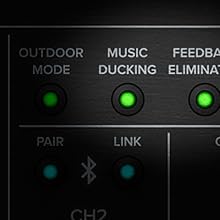
Figure 6: Controls for Outdoor Mode, Music Ducking, and Feedback Eliminator.
- Outdoor Mode: Activates a special EQ curve for improved sound projection and clarity in outdoor environments.
- Music Ducking: Automatically lowers the music volume when a signal is detected on the microphone inputs, making announcements clearer.
- Feedback Eliminator: Automatically detects and suppresses problematic frequencies that cause audio feedback.
4. Thump Connect 2 App:
Download the Thump Connect 2 app for iOS and Android devices to wirelessly control various functions of your Thump212XT loudspeaker, including:
- System EQ adjustments.
- Input levels and mutes.
- Voicing mode selection.
- Outdoor Mode, Music Ducking, and Feedback Eliminator activation.
- Speaker linking for stereo or zone setups.

Figure 7: Thump Connect 2 App for wireless control.
Maintenance
- Cleaning: Clean the exterior of the speaker with a dry, lint-free cloth. Avoid using abrasive cleaners or solvents.
- Storage: When not in use, store the speaker in a cool, dry place, away from direct sunlight and extreme temperatures. Consider using a protective cover (if available) to prevent dust and scratches.
- Inspection: Periodically inspect power cables and audio connections for any signs of wear or damage.
Troubleshooting
| Problem | Possible Cause | Solution |
|---|---|---|
| No sound output. | Power not connected, volume too low, incorrect input selected, faulty cable. | Check power connection and switch. Increase master volume and channel gain. Verify input source and cable integrity. |
| Distorted sound. | Input signal too high, speaker overloaded, incorrect EQ settings. | Reduce input gain. Lower master volume. Adjust EQ settings or select a different voicing mode. |
| Bluetooth pairing failure. | Speaker not in pairing mode, device too far, interference. | Ensure speaker is in pairing mode (flashing LED). Move device closer to speaker. Minimize other wireless devices. |
| Audio feedback. | Microphone too close to speaker, high gain settings. | Activate Feedback Eliminator. Reposition microphone. Reduce microphone gain. |
Specifications
| Feature | Detail |
|---|---|
| Speaker Type | Powered Loudspeaker |
| Woofer Diameter | 12 Inches (30.48 cm) |
| Amplifier Power | 1400 Watts (Peak) |
| Frequency Response | 47 Hz – 20 kHz |
| Max SPL | 128 dB |
| Connectivity | Bluetooth, XLR, 1/4" TRS, 1/8" Aux |
| Wireless Range (Bluetooth) | Up to 10 Meters (33 feet) |
| Control Method | On-board controls, Thump Connect 2 App |
| Dimensions (H x W x D) | 24.2 x 14.1 x 14 inches |
| Item Weight | 32.4 pounds |
| Material | Metal (grille), Durable Composite (cabinet) |
Warranty and Support
The Mackie Thump212XT is covered by a limited warranty. For specific warranty terms, registration, and technical support, please visit the official Mackie website or contact your authorized dealer. Keep your proof of purchase for warranty claims.
Online Support: www.mackie.com/support


