
Braun 71-S7200cc
Braun Series 7 Electric Shaver User Manual
Model: 71-S7200cc | Brand: Braun
Introduction
Welcome to the Braun Series 7 electric shaver user manual. This guide provides comprehensive instructions for the safe and effective use, maintenance, and troubleshooting of your new shaver. The Braun Series 7 is designed for a smooth and gentle shave, even in hard-to-reach areas, thanks to its 360° Flex head and AutoSense technology.

Image: The Braun Series 7 electric shaver, its SmartCare Center, and the precision trimmer attachment, showcasing the complete product package.
Safety Information
Before using your Braun Series 7 shaver, please read all safety warnings and instructions carefully. Keep this manual for future reference.
- Avoid contact with the shaver blades during operation to prevent cuts.
- Discontinue use if skin irritation occurs.
- Do not immerse the shaver in boiling or sterile water for cleaning.
- Do not allow the shaver to come into contact with conductive metal objects during charging to avoid the risk of electric shock.
- This appliance is suitable for cleaning under running water.
- Only use the power supply provided with the appliance.
Key Features
360° Flex Head
The shaver head pivots in all directions, easily adapting to the contours of your face and ensuring optimal skin contact for a very gentle shave, even in hard-to-reach areas like the neck and jawline.
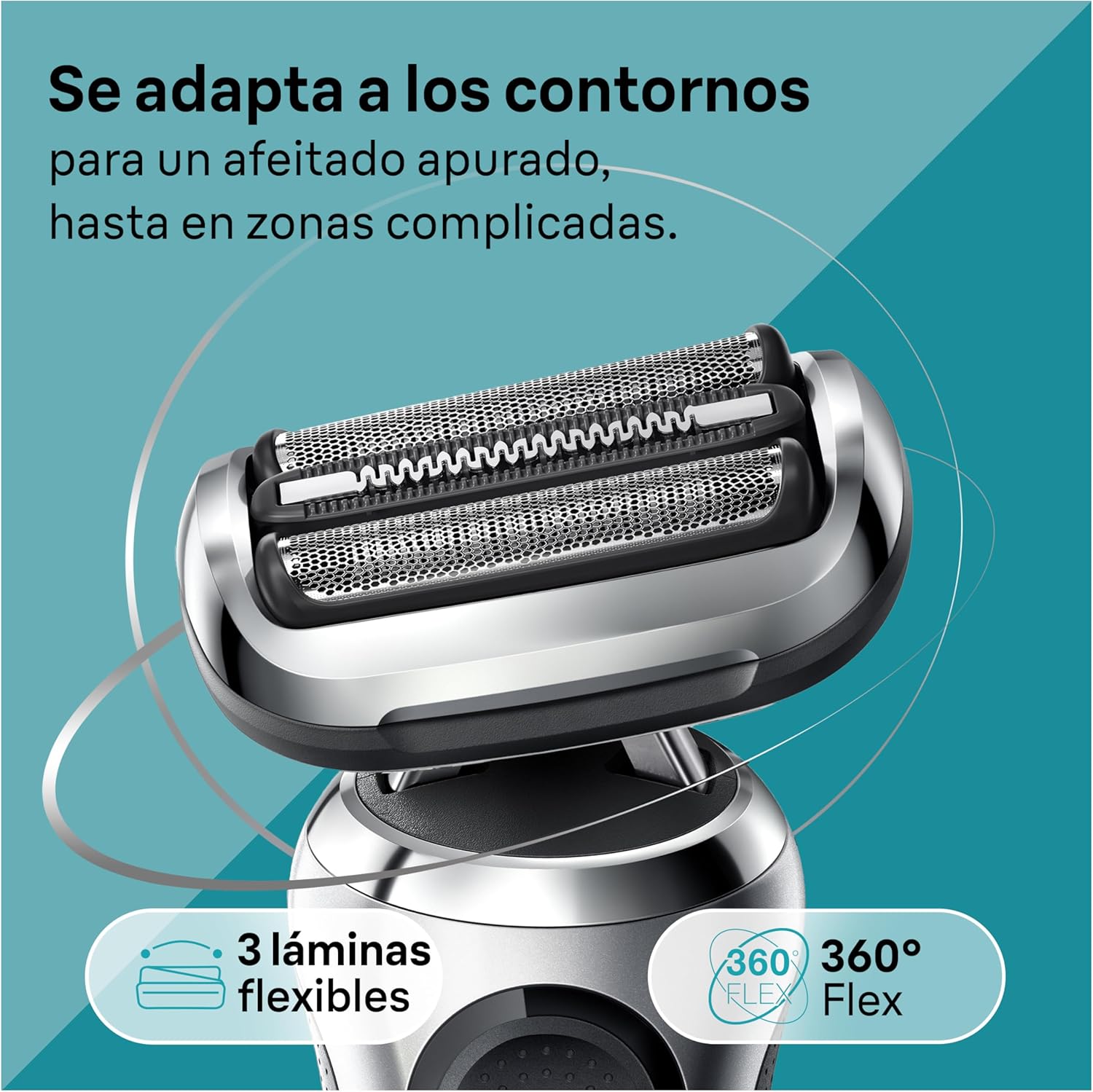
Image: A close-up view of the shaver head, highlighting its flexible design and three flexible blades for contour adaptation.
AutoSense Technology
This intelligent technology analyzes your beard density and adapts the shaver's power accordingly, capturing and cutting more hair with each stroke for an efficient shave, even on dense beards.

Image: A man using the shaver, with visual effects indicating how AutoSense technology detects and adjusts to beard thickness.
Wet & Dry Technology
The Braun Series 7 is 100% waterproof, allowing for versatile use. You can shave dry for convenience, or use it with foam, gel, or even in the shower for a refreshing and smooth experience.

Image: The shaver being rinsed under running water, highlighting its 100% waterproof design for easy cleaning and wet shaving.
EasyClick System
Transform your shaver for different grooming needs with the EasyClick system. Easily attach various accessories like the precision trimmer for mustache and sideburns, or a beard trimmer attachment (sold separately).

Image: The shaver shown with different EasyClick attachments, including a precision trimmer, demonstrating its versatility.
SmartCare Center
The included 4-in-1 SmartCare Center cleans, charges, lubricates, and dries your shaver at the touch of a button, ensuring optimal performance and hygiene every day.

Image: The shaver docked in the SmartCare Center, illustrating its automatic cleaning and charging capabilities.
Long-lasting Li-Ion Battery
The powerful Li-Ion battery provides up to 3 weeks of shaving (50 minutes of cordless shaving) on a full charge. A quick 5-minute charge is sufficient for one full shave.

Image: A hand holding the shaver, emphasizing its ergonomic design and ease of handling during use.
Setup and First Use
Charging the Shaver
- Ensure the shaver is dry before charging.
- Connect the smart plug to the shaver or the SmartCare Center.
- Plug the smart plug into an electrical outlet. The LED display will show the charging progress.
- A full charge takes approximately 1 hour and provides up to 50 minutes of shaving time. A 5-minute quick charge provides enough power for one shave.
Attaching EasyClick Accessories
To change the shaver head, simply pull off the existing head and click the desired EasyClick accessory into place. Ensure it clicks securely.

Image: A hand demonstrating the simple process of attaching an EasyClick accessory to the shaver body.
Operating Instructions
Shaving Techniques
For optimal results, hold the shaver at a right angle (90°) to your skin and stretch your skin with your free hand. Shave against the direction of beard growth.
- Dry Shaving: For a quick and convenient shave, use the shaver on dry skin.
- Wet Shaving: For a refreshing shave, use with shaving foam or gel. The shaver is also suitable for use in the shower.
Video: An official Braun video demonstrating the features and usage of the Braun Series 7 electric shaver, including its flexible head, AutoSense technology, and wet & dry capabilities.
Maintenance and Cleaning
Manual Cleaning
- After each use, switch off the shaver.
- Remove the shaver head.
- Rinse the shaver head and the shaver foil under hot running water until all residues are removed.
- You can also use the included cleaning brush to remove stubborn hair particles.
- Allow the shaver and head to air dry completely before reattaching or storing.
SmartCare Center Cleaning
For thorough cleaning, charging, and lubrication, use the SmartCare Center:
- Place the shaver head-down into the SmartCare Center.
- Press the start button on the SmartCare Center. It will automatically select the appropriate cleaning program.
- The cleaning process also lubricates the blades and dries the shaver, leaving it hygienic and ready for the next use.

Image: The shaver positioned within the SmartCare Center, ready for its automated cleaning cycle.
Replacing Shaver Parts
To maintain 100% shaving performance, replace the shaver head (foil and cutter block) every 18 months or when the replacement indicator lights up. Replacement parts are available from authorized Braun retailers.
Troubleshooting
| Problem | Possible Cause | Solution |
|---|---|---|
| Shaver does not turn on. | Battery is empty. | Charge the shaver. |
| Poor shaving performance. | Shaver head is worn or dirty. | Clean the shaver head or replace it. |
| Skin irritation after shaving. | Incorrect shaving technique or sensitive skin. | Ensure correct shaving angle (90°). Consider using shaving foam/gel. If irritation persists, consult a dermatologist. |
| SmartCare Center not cleaning. | Cleaning cartridge is empty or unit is not properly seated. | Replace the cleaning cartridge. Ensure shaver is correctly inserted into the SmartCare Center. |
Specifications
- Model: 71-S7200cc
- Brand: Braun
- Power Source: Battery Powered (Li-Ion)
- Battery Life: Up to 50 minutes
- Quick Charge: 5 minutes for one shave
- Waterproof: 100% (Wet & Dry use)
- Dimensions (L x W x H): 15.7 x 15.7 x 25.2 cm
- Weight: 930 grams
- Blade Material: Stainless Steel
- Included Components: Electric shaver, Precision trimmer attachment, SmartCare Center, Travel case, Smart plug charger, Cleaning brush.
Warranty and Support
Braun products are manufactured to the highest standards of quality, functionality, and design. Your Braun Series 7 shaver comes with a standard manufacturer's warranty. Please refer to the warranty card included in your product packaging for specific terms and conditions.
For further assistance, product registration, or to purchase replacement parts and accessories, please visit the official Braun website or contact Braun customer service.
Note: Product specifications and included accessories may vary by region.
Related Documents - 71-S7200cc
 |
Braun Series 9 FAQs: Shaver Differences, Cleaning, Maintenance, and More Frequently asked questions about the Braun Series 9 electric shaver, covering foil vs. rotary shavers, cleaning center usage, battery life, maintenance, and manufacturing. |
 |
Braun Series 8 Electric Shaver User Manual This user manual provides comprehensive instructions for the Braun Series 8 electric shaver. It covers setup, operation, charging, cleaning, maintenance, safety precautions, troubleshooting, and warranty information. Learn how to use your shaver for optimal performance and longevity. |
 |
Braun Series 7 (Type 5764) Electric Shaver User Manual Comprehensive user manual for the Braun Series 7 electric shaver (Type 5764), covering safety instructions, product features, parts, specifications, usage, maintenance, charging, disposal, and warranty information. |
 |
Braun Series 9 Pro 9470cc Electric Shaver User Manual Comprehensive user manual for the Braun Series 9 Pro 9470cc electric shaver, covering setup, usage, cleaning, maintenance, and warranty information. |
 |
Braun Series 3 Shaver User Manual Comprehensive user manual for the Braun Series 3 shaver, covering charging, shaving, cleaning, maintenance, and warranty information for models 301s, 300s, and 310s. |
 |
Braun Series 6 6020s Electric Razor User Manual | Features, Safety & Maintenance Comprehensive user manual for the Braun Series 6 6020s Electric Razor. Learn about its features, important safety instructions, usage, cleaning, maintenance, and warranty information. Includes detailed descriptions of all components and functions. |
Ask a question about this manual
Ask about setup, troubleshooting, compatibility, parts, safety, or missing instructions. Manuals+ will review the question and use this page’s manual context to help answer it.