
OUPES UPP-1800
OUPES 1800W Portable Power Station and 100W Solar Panels User Manual
Model: UPP-1800
1. Introduction
Thank you for choosing the OUPES 1800W Portable Power Station with 100W Solar Panels. This manual provides essential information for the safe and efficient operation, maintenance, and troubleshooting of your device. Please read this manual thoroughly before use and retain it for future reference.
The OUPES 1800W Portable Power Station is a versatile power solution designed for various applications, including home backup, camping, RV trips, and emergency situations. It features a 1488Wh LiFePO4 battery, an 1800W pure sine wave inverter, and multiple output ports to power a wide range of electronic devices and appliances.

Image 1.1: OUPES 1800W Portable Power Station with a folded solar panel.
2. Important Safety Instructions
To ensure safe operation and prolong the lifespan of your OUPES Power Station, please adhere to the following safety guidelines:
- Do not disassemble, repair, or modify the unit. Incorrect reassembly may cause fire or injury.
- Do not expose the unit to fire or extreme temperatures (above 60°C/140°F).
- Do not use or store the unit in a bathroom or in areas exposed to water or moisture.
- Keep the unit away from children and pets.
- Use only original or certified accessories.
- Ensure proper ventilation during use and charging to prevent overheating.
- Avoid dropping, heavy impacts, or strong vibrations.
- In case of fire, use a dry powder fire extinguisher.
- The unit contains a LiFePO4 battery. Dispose of it according to local regulations.
- The 120V Pure-sine wave inverter ensures no damage to sensitive electronic devices.
3. Package Contents
Verify that all items are present in your package:
- 1 x OUPES 1800W Portable Power Station
- 2 x OUPES 100W Solar Panels
- 1 x 200W AC Adapter
- 1 x Car Charging Cable (7909)
- 1 x User Manual (this document)
- 1 x Warranty Card
4. Product Overview
4.1. Power Station Components
The OUPES 1800W Power Station features a robust design with various input and output ports, along with an intuitive display.

Image 4.1: Front panel with ports and LCD display.
- AC Output Ports: 3 x 110V-120V/1800W (Peak 4000W) AC outlets for standard appliances.
- USB-C PD Outputs: 2 ports (one 60W, one 18W) for fast charging compatible devices.
- USB-A Ports: 2 ports (Quick Charge 3.0, 18W Max) for standard USB devices.
- Car Lighter Port: 1 x 12V/10A output for car accessories.
- DC 5521 Ports: 2 ports for DC-powered devices.
- LCD Display: Shows battery power level, available runtime, power consumption, and other status indicators.
- LED Flashlight: Integrated flashlight with weak, strong, and SOS modes.
4.2. 100W Solar Panel Overview
The included 100W solar panels are designed for efficient recharging of the power station using solar energy.
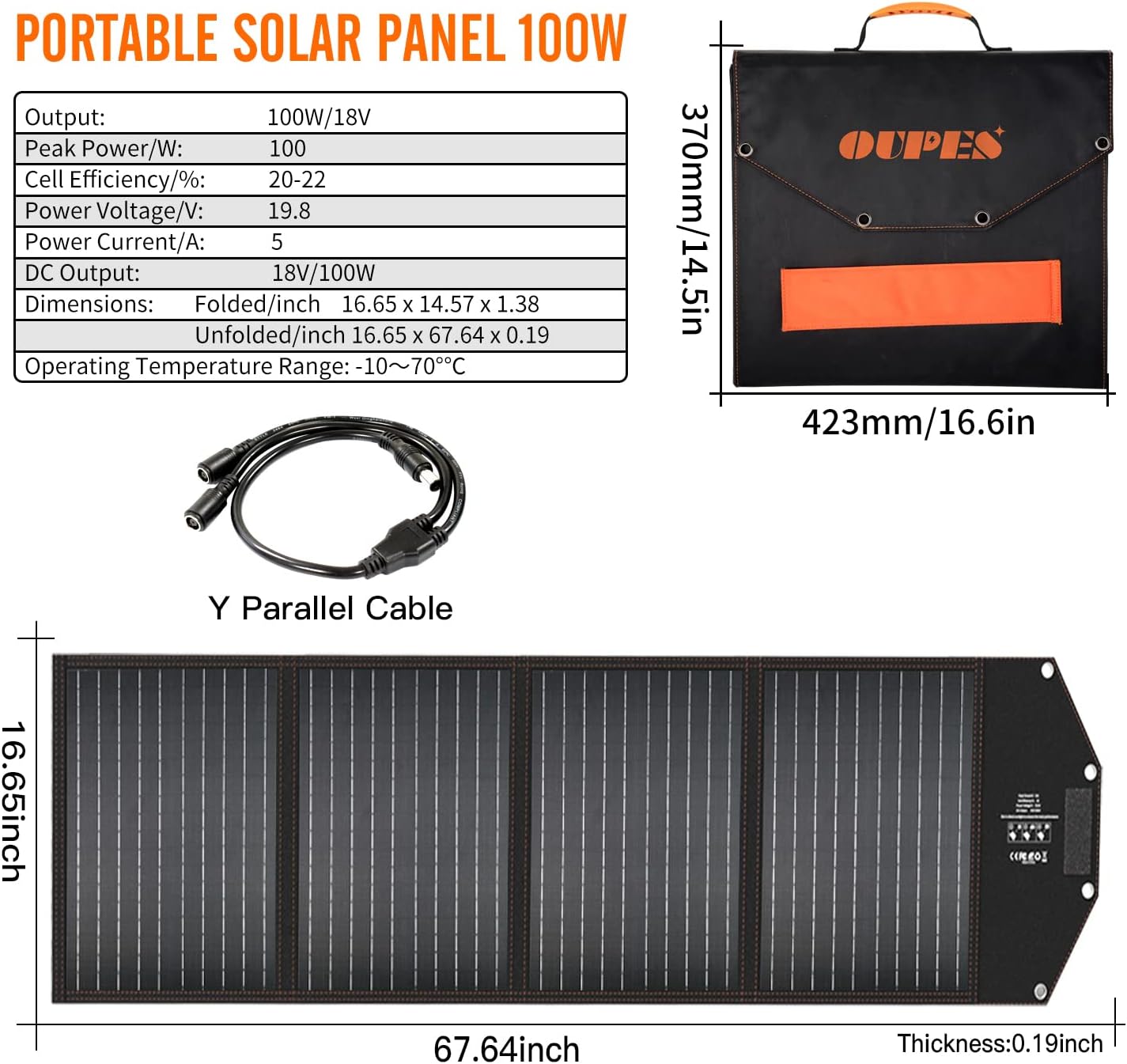
Image 4.2: OUPES 100W Portable Solar Panel and its specifications.
- Output: 100W/18V
- Cell Efficiency: 20-22% monocrystalline silicon cells.
- Dimensions (Folded): 16.65 x 14.57 x 1.38 inches
- Dimensions (Unfolded): 16.65 x 67.64 x 0.19 inches
- Operating Temperature Range: -10°C to 70°C
5. Setup
5.1. Initial Charge
Before first use, it is recommended to fully charge the power station. Use the provided AC adapter to charge the unit from a wall outlet. A full charge using the dual-wall AC outlet adapter takes approximately 4 hours.
5.2. Connecting Solar Panels
To charge the power station using solar energy:
- Unfold the OUPES 100W solar panels and place them in direct sunlight.
- Adjust the angle of the panels to maximize sun exposure.
- Connect the solar panels to the power station's solar input port using the appropriate cables. For multiple panels, a Y-parallel cable may be required (check package contents or purchase separately).

Image 5.1: OUPES Power Station connected to solar panels for charging.
6. Operating Instructions
6.1. Powering On/Off
Press and hold the main power button to turn the unit on or off. The LCD screen will illuminate upon activation.
6.2. Charging the Power Station
The OUPES 1800W Power Station can be recharged in multiple ways:
- AC Wall Outlet: Using the provided 200W AC adapter, a full charge takes approximately 4 hours.
- Car Charger: Charging via a car's 12V outlet takes approximately 15 hours.
- Solar Panels: Using two 100W solar panels (total 200W), charging time can vary from 7-8 hours depending on sunlight conditions. Using a 400W solar panel setup can reduce this to about 3.5 hours. Actual recharge time may vary based on weather, temperature, and panel angle/location.

Image 6.1: Various recharging methods and estimated times.
6.3. Using Output Ports
To use the output ports, ensure the power station is turned on. Activate the specific output section (AC, DC, USB) by pressing its corresponding button. The LCD will indicate active outputs.
- AC Outlets: Ideal for powering household appliances, tools, and electronics requiring 110-120V AC. The 1800W continuous output (4000W peak) supports most essential devices.
- USB Ports: Connect smartphones, tablets, laptops, and other USB-powered devices.
- DC/Car Port: Suitable for 12V DC devices like car refrigerators, air pumps, or other compatible accessories.

Image 6.2: Examples of devices powered by the OUPES Power Station in different environments.
6.4. LCD Display Information
The multifunction LCD provides real-time data:
- Battery Level: Current charge percentage.
- Input/Output Power: Real-time wattage for charging and discharging.
- Estimated Runtime/Recharge Time: Displays how long the unit can power connected devices or how long until fully charged.
- Error Indicators: Alerts for issues like overload or temperature warnings.
7. Maintenance
7.1. Cleaning
Wipe the unit with a dry, soft cloth. Do not use abrasive cleaners or immerse the unit in water.
7.2. Storage
If storing the power station for an extended period, charge it to approximately 50-80% every 3-6 months to maintain battery health. Store in a cool, dry place away from direct sunlight and extreme temperatures.
7.3. Battery Care
The LiFePO4 battery is designed for long life and stability. Avoid fully discharging the battery frequently, as this can reduce its overall lifespan.
8. Troubleshooting
If you encounter issues with your OUPES Power Station, refer to the following common problems and solutions:
| Problem | Possible Cause | Solution |
|---|---|---|
| Unit does not turn on | Battery is completely discharged; Power button not pressed long enough. | Charge the unit using the AC adapter. Press and hold the power button for 3-5 seconds. |
| No output from AC ports | AC output not activated; Overload protection triggered; Device power exceeds 1800W. | Press the AC output button. Reduce the load. Check device wattage. |
| Solar charging is slow or not working | Insufficient sunlight; Panels not angled correctly; Cables loose or damaged; Solar input port dirty. | Ensure direct sunlight and optimal panel angle. Check all connections. Clean ports. |
| Error code (e.g., E500) on LCD | Internal fault or specific system error. | Turn off the unit, wait a few minutes, then restart. If the error persists, contact OUPES support. |
9. Specifications
| Feature | Detail |
|---|---|
| Brand | OUPES |
| Model Name | UPP-1800 |
| Battery Type | LiFePO4 (Lithium Iron Phosphate) |
| Capacity | 1488Wh |
| AC Output | 1800W (Rated), 4000W (Peak), 110-120V AC |
| USB-C Output | 2 ports (60W PD, 18W) |
| USB-A Output | 2 ports (QC 3.0, 18W Max) |
| DC Output | 2 x DC 5521 ports |
| Car Lighter Output | 1 x 12V/10A |
| Recharge Time (AC) | Approx. 4 hours (with 200W AC adapter) |
| Recharge Time (Car) | Approx. 15 hours |
| Recharge Time (Solar) | Approx. 3.5 hours (with 400W solar input) |
| Item Weight | 56 Pounds |
| Product Dimensions | 15.16"L x 9.57"W x 13.39"H |
| Special Features | Automatic Shut Down, Automatic Voltage Regulation, Digital Display, Electric Start |
10. Warranty and Support
10.1. Warranty Information
The OUPES 1800W Portable Power Station comes with a 36-month warranty from the date of purchase. This warranty covers manufacturing defects and workmanship under normal use. Please retain your proof of purchase for warranty claims.
10.2. Customer Support
For technical assistance, troubleshooting beyond this manual, or warranty inquiries, please contact OUPES customer support through the official website or your purchase platform. Provide your model number (UPP-1800) and purchase details for faster service.
Related documentsUPP-1800


Ask a question about this manual
Ask about setup, troubleshooting, compatibility, parts, safety, or missing instructions. Manuals+ will review the question and use this page’s manual context to help answer it.