
Introduction
Thank you for choosing the MeterTo 3015 Battery Tester. This device is designed for analyzing the health status of 12V lead-acid batteries in cars and motorcycles, providing accurate measurements of cold cranking capability and aging extent. This manual provides essential information for the safe and effective operation, maintenance, and troubleshooting of your battery tester.
Safety Information
Please read all safety warnings and instructions carefully before using this product to prevent injury or damage to the device. Keep this manual for future reference.
- Always wear appropriate eye protection when working with batteries.
- Ensure proper ventilation in the work area to disperse any battery gases.
- Avoid contact with battery acid. If contact occurs, flush immediately with water and seek medical attention.
- Do not smoke or allow sparks or flames near the battery or tester.
- The tester is equipped with reverse polarity protection and overload protection. However, always ensure correct connection to avoid damage.
- Keep the device dry and clean. Do not expose it to rain or moisture.
- Do not attempt to disassemble or modify the tester. Refer all servicing to qualified personnel.
Product Overview
Key Features
- Analyzes 12V lead-acid batteries (30AH-200AH).
- Tests battery health, cold cranking capability, and aging extent.
- Provides clear conclusions: Good, OK, Attention, or Replace.
- Features reverse polarity protection, loose lead detection, and overload protection.
- Supports multiple battery standards: CCA, IEC, EN, DIN.
- Performs battery test, cranking test, and charging system test.
Package Contents
The MeterTo 3015 Battery Tester package typically includes:
- 1 x MeterTo 3015 Battery Tester Unit
- 1 x User Manual
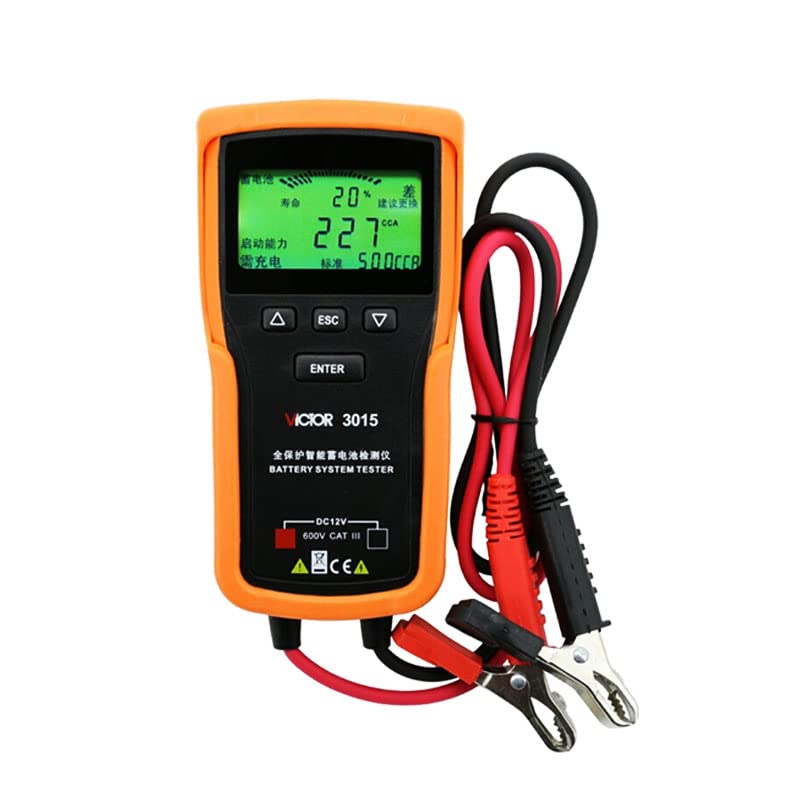
Figure 1: Front view of the MeterTo 3015 Battery Tester, showing the display, control buttons, and attached test leads.
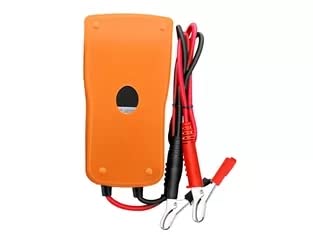
Figure 2: Back view of the MeterTo 3015 Battery Tester, illustrating the robust casing and the attached red and black test leads with alligator clips.
Setup
Before performing any tests, ensure the battery terminals are clean and free of corrosion. The tester draws power directly from the battery being tested.
- Prepare the Battery: Ensure the vehicle's ignition is off and all accessories are turned off. Clean the battery terminals if necessary.
- Connect the Tester:
- Connect the RED positive (+) clamp to the positive (+) terminal of the battery.
- Connect the BLACK negative (-) clamp to the negative (-) terminal of the battery.
The tester will power on automatically once correctly connected. If the display does not light up, check the connections and battery voltage.
Operating Instructions
The MeterTo 3015 offers various testing modes. Use the UP, DOWN, ESC, and ENTER buttons to navigate the menu and select options.
1. Battery Test
This test evaluates the overall health of the battery.
- From the main menu, select "Battery Test" and press ENTER.
- Select the battery type (e.g., "Regular Flooded", "AGM Flat Plate", "AGM Spiral", "GEL").
- Select the battery standard (e.g., "CCA", "IEC", "EN", "DIN") and input the rated value (e.g., 500 CCA).
- The tester will perform the analysis and display results including:
- Battery Voltage (V)
- Measured CCA/Standard Value
- Internal Resistance (mΩ)
- Battery Health Status (SOH)
- Overall Condition (Good, OK, Attention, Replace)
2. Cranking System Test (Engine Cranking Load Test)
This test assesses the vehicle's starting system, including the starter motor.
- From the main menu, select "Cranking Test" and press ENTER.
- Follow the on-screen prompts to start the engine.
- The tester will record the cranking voltage and time.
- Results will indicate the cranking voltage, cranking time, and a conclusion on the starter system's performance.
3. Charging System Test
This test evaluates the alternator and charging circuit performance.
- From the main menu, select "Charging Test" and press ENTER.
- Follow the on-screen prompts to start the engine and increase RPMs as instructed (e.g., to 2500 RPM for 5 seconds).
- The tester will measure the unloaded and loaded charging voltage, ripple voltage, and charging current.
- Results will provide a conclusion on the charging system's health (e.g., "Good", "Low Output", "High Output", "Diode Ripple").
Maintenance
- Cleaning: Wipe the tester with a soft, dry cloth. Do not use abrasive cleaners or solvents.
- Storage: Store the device in a cool, dry place away from direct sunlight and extreme temperatures.
- Cable Care: Inspect the test leads and clamps regularly for any signs of damage. Replace if necessary.
- The device does not require user calibration.
Troubleshooting
| Problem | Possible Cause | Solution |
|---|---|---|
| Tester does not power on. | Incorrect connection; Battery voltage too low; Damaged cables. | Ensure clamps are securely connected to the correct battery terminals. Check battery voltage (must be within 9-18V). Inspect cables for damage. |
| "Loose Lead" error message. | Poor connection to battery terminals. | Clean battery terminals and re-attach clamps firmly. |
| Inaccurate test results. | Incorrect battery type/standard selected; Battery not fully charged; Extreme temperatures. | Verify correct battery parameters in the tester settings. Ensure battery is adequately charged. Perform tests within the specified operating temperature range (-18℃ to 50℃). |
| "Reverse Polarity" warning. | Clamps connected to incorrect terminals. | Immediately disconnect and reconnect the RED clamp to positive (+) and BLACK clamp to negative (-). |
Specifications
| Model | VICTOR 3015 |
| Battery Type | Lead-acid battery |
| Battery Voltage | 12V |
| Voltage Range | DC 9-18V |
| Battery Capacity Range | 30AH ~ 200AH |
| CCA Range | 100 ~ 1700 CCA |
| IEC Range | 100 ~ 1000 IEC |
| EN Range | 100 ~ 1700 EN |
| DIN Range | 100 ~ 1000 DIN |
| Operating Temperature | -18℃ ~ 50℃ (0℉ ~ 122℉) |
| Testing Method | 4-wire Kelvin test connection |
| Cable Length | 700mm |
| Protection Features | Reverse Polarity Protection, Loose Lead Detection, Overload Protection |
Warranty and Support
For warranty information and technical support, please refer to the documentation provided with your purchase or contact MeterTo customer service directly. Ensure you have your product model and purchase details available when seeking support.
MeterTo is committed to providing quality instruments and tools. For any inquiries regarding product functionality or issues, please reach out to the official MeterTo support channels.