
Introduction
This manual provides essential instructions for the safe and efficient use of your HTC TWS6 Wireless Earbuds. Please read it thoroughly before using the product and retain it for future reference.
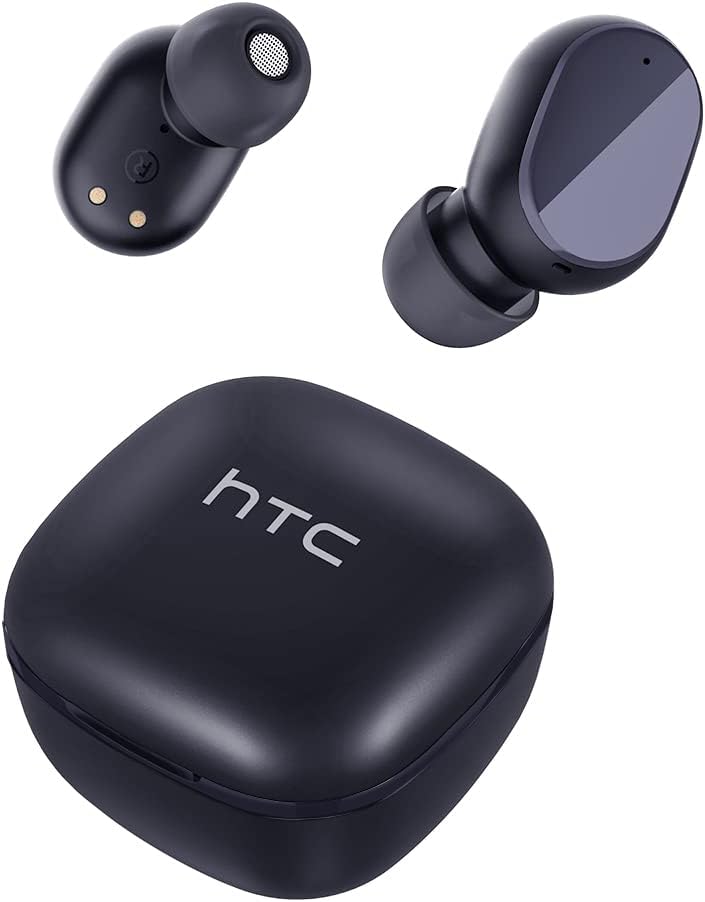
Image: The HTC TWS6 Wireless Earbuds, featuring two earbuds and their compact charging case, presented in a solid carbon black finish.
Package Contents
Ensure all items are present in the package:
- HTC TWS6 Wireless Earbuds (Left and Right)
- Charging Case
- USB-C Charging Cable
- Rubber Eartips (S/L sizes)
- Quick Start Guide (This manual serves as a comprehensive guide)

Image: All components included in the HTC TWS6 package: the earbuds in their charging case, a USB-C cable, two additional pairs of rubber eartips, and a quick start guide.
Setup
1. Charging the Earbuds and Case
Before first use, fully charge the earbuds and charging case.
- Place the earbuds into the charging case. Ensure they are correctly seated.
- Connect the USB-C charging cable to the charging port on the case and the other end to a USB power source (e.g., computer, wall adapter).
- The indicator light on the case will show charging status. A full charge typically takes approximately 5 hours for the case.

Image: An illustration detailing the battery life of the HTC TWS6 Earbuds: up to 5 hours of listening time on a single charge, up to 20 hours total with the charging case, and the case has a 300 mAh capacity.
2. Pairing with a Device
The earbuds utilize Bluetooth 5.3 for fast and stable connections.
- Open the charging case. The earbuds will automatically enter pairing mode.
- On your device (smartphone, tablet, etc.), enable Bluetooth.
- Search for available Bluetooth devices and select "HTC TWS6" from the list.
- Once connected, you will hear a confirmation tone, and the earbuds will be ready for use.

Image: Demonstrates the fast pairing capability and wide compatibility of the HTC TWS6 Earbuds, showing them connected to a smartphone playing music.
3. Wearing the Earbuds
Choose the correct eartip size for optimal comfort and sound quality. Gently insert the earbuds into your ears and rotate them slightly to secure a snug fit.
Operating Instructions
The HTC TWS6 earbuds feature smart touch controls on each earbud.

Image: A diagram illustrating the smart touch controls on the HTC TWS6 Earbuds, showing single tap for play/pause music and answer/end calls, triple tap for voice assistant, and long press for 2 seconds to reject a call.
Music Playback
- Play/Pause: Single tap on either earbud.
- Next Track: Double tap the right earbud.
- Previous Track: Double tap the left earbud.
- Volume Up: Triple tap the right earbud.
- Volume Down: Triple tap the left earbud.
Call Management
- Answer/End Call: Single tap on either earbud.
- Reject Call: Press and hold either earbud for 2 seconds.
Voice Assistant
- Activate Voice Assistant: Triple tap on either earbud (if not used for volume control).
Maintenance
Cleaning
Regularly clean your earbuds and charging case to ensure optimal performance and hygiene.
- Use a soft, dry, lint-free cloth to wipe the earbuds and case.
- Remove eartips and clean them with mild soap and water, then dry thoroughly before reattaching.
- Do not use abrasive cleaners or immerse the earbuds or case in water.
Water Resistance
The HTC TWS6 earbuds are IPX5 sweatproof, meaning they are resistant to splashes and sweat. They are not designed for submersion in water.

Image: The HTC TWS6 Earbuds and charging case are shown with water droplets, illustrating their IPX5 water and sweat resistance, which protects against light rain and sweat.
Storage
When not in use, store the earbuds in their charging case to protect them and keep them charged.
Troubleshooting
If you encounter issues, try the following solutions:
- Earbuds not pairing:
- Ensure earbuds are charged.
- Turn off and on Bluetooth on your device.
- Forget "HTC TWS6" from your device's Bluetooth list and try pairing again.
- Place earbuds back in the case, close it, wait a few seconds, then open it again to re-enter pairing mode.
- No sound from one earbud:
- Ensure both earbuds are charged.
- Try resetting the earbuds (refer to manufacturer's specific reset instructions if available, otherwise re-pair).
- Charging issues:
- Check the USB-C cable and power adapter. Try a different cable or adapter.
- Ensure the charging contacts on the earbuds and inside the case are clean and free of debris.
- Poor sound quality:
- Ensure earbuds are properly seated in your ears with the correct eartip size.
- Clean the earbud mesh to remove any wax or debris.
- Move closer to your connected device to avoid interference.
Specifications
| Feature | Detail |
|---|---|
| Model Name | TWS6 |
| Brand | HTC |
| Connectivity Technology | Wireless (Bluetooth) |
| Bluetooth Version | 5.3 |
| Water Resistance Level | IPX5 (Sweatproof) |
| Battery Life (Earbuds) | Up to 5 hours |
| Total Playtime (with Case) | Up to 22 hours |
| Charging Time (Case) | Approximately 5 hours |
| Control Type | Touch Control |
| Microphone | Built-in with ENC (Environmental Noise Cancellation) |
| Compatible Devices | iOS and Android Smartphones, Gaming Devices |
| Weight | 3.17 ounces |
| UPC | 734257974554 |
Warranty and Support
Your HTC TWS6 Wireless Earbuds come with a 360-day warranty extension. For any product-related inquiries, technical assistance, or warranty claims, please contact HTC customer support.
Customer Support:
- 7*24 Live Chat Support is available. Please refer to the official HTC website or your purchase platform for specific contact details.
- For online support, visit the HTC Store on Amazon.


