
JBL SRX918S
JBL SRX918S 2,500-watt 18-inch Powered Subwoofer User Manual
Model: SRX918S
1. Introduction
This manual provides essential information for the safe and efficient operation of your JBL SRX918S powered subwoofer. Please read this manual thoroughly before using the product to ensure proper setup and to understand its features and capabilities.
Key Features
- 2,500-watt Peak Power Output with 18-inch Driver
- Integrated Wi-Fi Connectivity for Remote Control
- JBL Software Suite for Comprehensive System Management
- Advanced Digital Signal Processing (DSP)
- On-board LCD for Direct Control and Configuration

Image 1.1: Front-side view of the JBL SRX918S Powered Subwoofer, showcasing its robust enclosure and front grille.
2. Important Safety Instructions
Always follow basic safety precautions when using this product to reduce the risk of fire, electric shock, and injury to persons. Failure to comply with these instructions may result in serious injury or damage to the product.
- Read these instructions thoroughly.
- Keep these instructions for future reference.
- Heed all warnings provided on the product and in this manual.
- Follow all operational and installation instructions.
- Do not use this apparatus near water or expose it to dripping or splashing.
- Clean only with a dry cloth.
- Do not block any ventilation openings. Install in accordance with the manufacturer’s instructions, ensuring adequate airflow.
- Do not install near any heat sources such as radiators, heat registers, stoves, or other apparatus (including amplifiers) that produce heat.
- Do not defeat the safety purpose of the polarized or grounding-type plug. A polarized plug has two blades with one wider than the other. A grounding-type plug has two blades and a third grounding prong. The wide blade or the third prong are provided for your safety. If the provided plug does not fit into your outlet, consult an electrician for replacement of the obsolete outlet.
- Protect the power cord from being walked on or pinched, particularly at plugs, convenience receptacles, and the point where they exit from the apparatus.
- Only use attachments/accessories specified by the manufacturer.
- Use only with the cart, stand, tripod, bracket, or table specified by the manufacturer, or sold with the apparatus. When a cart is used, use caution when moving the cart/apparatus combination to avoid injury from tip-over.
- Unplug this apparatus during lightning storms or when unused for long periods of time.
- Refer all servicing to qualified service personnel. Servicing is required when the apparatus has been damaged in any way, such as power-supply cord or plug is damaged, liquid has been spilled or objects have fallen into the apparatus, the apparatus has been exposed to rain or moisture, does not operate normally, or has been dropped.
3. Setup and Installation
3.1 Unpacking
Carefully unpack the JBL SRX918S subwoofer and inspect it for any signs of damage. Retain the original packaging for future transport or storage.
Included Components:
- JBL SRX918S Powered Subwoofer
- Wi-Fi module
- Power Cord
- User Manual and Warranty Information
- Additional Accessories (as applicable)
3.2 Placement
Optimal placement of the subwoofer is crucial for achieving the best sound performance. Consider the room acoustics and desired bass response. Generally, placing the subwoofer on a solid, level surface is recommended. For enhanced bass, corner placement can be effective, but may also lead to uneven frequency response. Experiment with different positions to find the ideal spot for your listening environment.
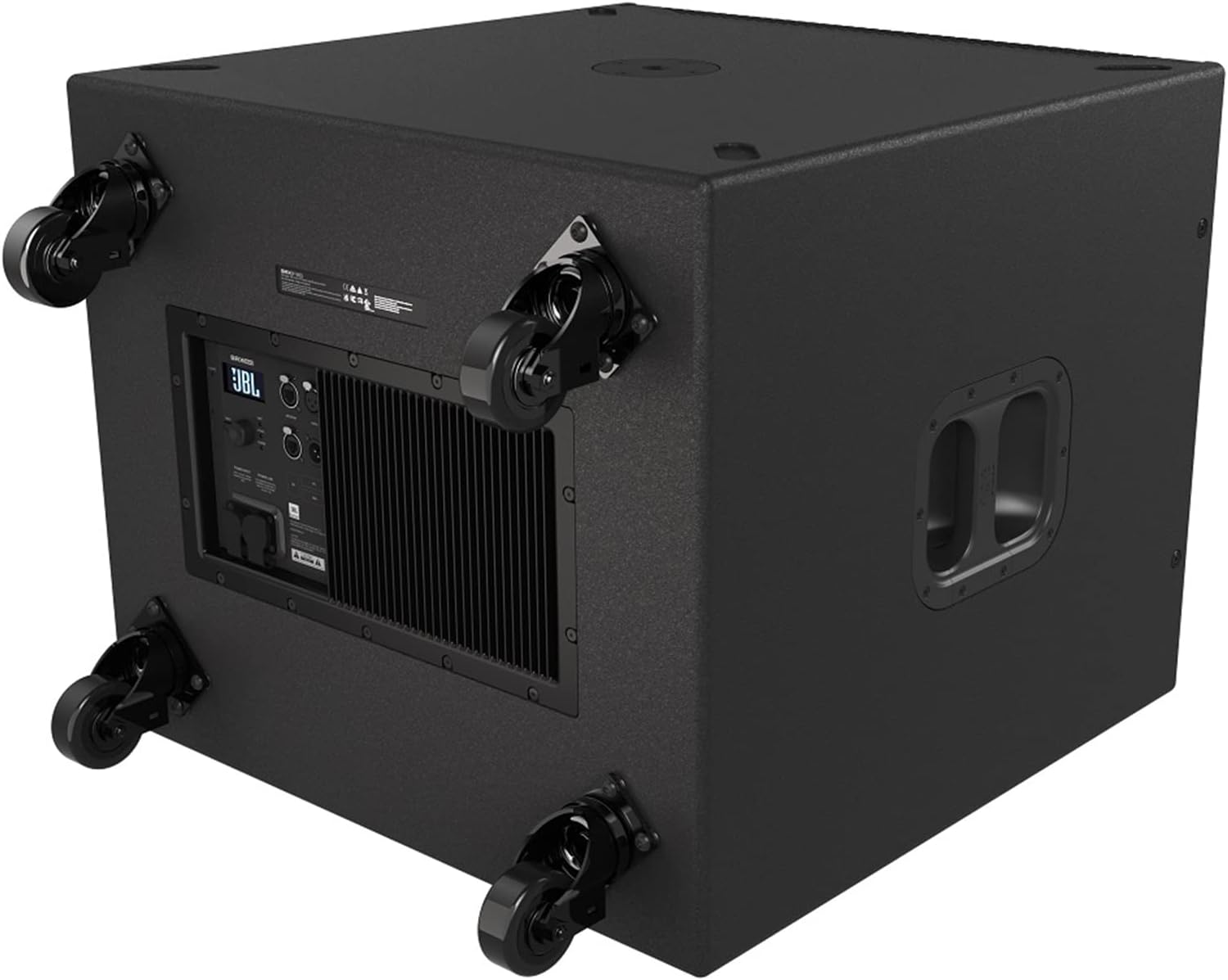
Image 3.1: Rear-bottom view of the JBL SRX918S, illustrating the attachment points for optional casters and the rear control panel.
3.3 Connections
Power Connection:
- Ensure the subwoofer's power switch is in the OFF position.
- Connect the supplied power cord securely to the AC inlet on the rear panel of the subwoofer.
- Plug the other end of the power cord into a grounded AC power outlet.
Audio Input Connection:
Connect your audio source (e.g., mixer, audio interface, or main speaker output) to the input connectors on the rear panel of the SRX918S. Use balanced XLR cables for optimal signal integrity and noise rejection.
Network Connection (Wi-Fi):
The SRX918S supports Wi-Fi connectivity for remote control via the JBL Software Suite. Refer to the "Operating" section for details on connecting to a Wi-Fi network and using the control application.
4. Operation
4.1 Powering On/Off
To Power On:
- Ensure all audio connections are secure and input levels are set appropriately.
- Flip the power switch on the rear panel to the ON position.
- The LCD display will illuminate, indicating the unit is active and ready for operation.
To Power Off:
- Reduce the input signal level to zero from your audio source.
- Flip the power switch on the rear panel to the OFF position.
4.2 Using the LCD Display and Controls
The rear-panel LCD provides direct access to various settings and parameters. Navigate through menus using the dedicated control buttons adjacent to the display. This allows for direct adjustment of DSP functions, input/output settings, and network configuration without requiring an external device.

Image 4.1: Detailed view of the SRX918S rear panel, highlighting the LCD screen, control buttons, and various input/output connections.
4.3 JBL Software Suite (App Control)
For advanced control and system integration, download the JBL Software Suite application. This application allows for remote management of multiple SRX900 series devices, offering comprehensive DSP control, system monitoring, and preset management via Wi-Fi.
- Ensure the SRX918S is connected to a Wi-Fi network (refer to the LCD menu for network setup instructions).
- Download and install the JBL Software Suite on your compatible device (Smartphone, Tablet, Desktop, Laptop).
- Launch the application and follow the on-screen instructions to discover and connect to your SRX918S subwoofer.
5. Maintenance
5.1 Cleaning
Regularly clean the exterior of the subwoofer with a soft, dry cloth. Do not use abrasive cleaners, solvents, or waxes, as these can damage the finish. Ensure ventilation grilles are free from dust and debris to maintain proper airflow and prevent overheating.
5.2 Storage
If storing the subwoofer for an extended period, power it off, disconnect all cables, and place it back in its original packaging if possible. Store in a cool, dry environment, away from direct sunlight, extreme temperatures, and excessive humidity.
6. Troubleshooting
This section addresses common issues you might encounter with your JBL SRX918S subwoofer. If the problem persists after following these steps, please contact customer support.
No Power:
- Check if the power cord is securely connected to both the subwoofer and a functional AC outlet.
- Verify that the AC outlet is supplying power by plugging in another device.
- Ensure the power switch on the subwoofer's rear panel is in the ON position.
No Sound Output:
- Confirm that the audio source is active and sending a signal.
- Check all audio cables for secure connections and any signs of damage.
- Verify the input level settings on the subwoofer's LCD or via the JBL Software Suite.
- Ensure the subwoofer is not muted or in standby mode.
Distorted Sound:
- Reduce the input signal level from your source and/or the subwoofer's input gain to prevent clipping.
- Check for damaged audio cables that might be introducing noise or signal degradation.
- Ensure the subwoofer is not overdriven; monitor the signal indicators on the LCD.
Wi-Fi Connectivity Issues:
- Ensure the Wi-Fi module is properly installed and enabled in the subwoofer's settings.
- Verify that the subwoofer is within effective range of your Wi-Fi router or access point.
- Check network settings on the subwoofer's LCD and your control device for correct configuration.
- Restart both the subwoofer and your Wi-Fi router to refresh network connections.
7. Specifications
| Feature | Detail |
|---|---|
| Model Name | SRX918S |
| Speaker Type | Powered Subwoofer |
| Subwoofer Diameter | 18 Inches |
| Amplifier Power Output | 2,500 Watts Peak (1100 Watts RMS) |
| Frequency Response | Down to 35 Hz |
| Connectivity Technology | Wi-Fi |
| Control Method | App, On-board LCD |
| Power Source | Corded Electric |
| Item Weight | 120.2 pounds (54.5 kg) |
| Product Dimensions (L x W x H) | 30.6 x 31.7 x 25.2 inches (77.7 x 80.5 x 64 cm) |
| Manufacturer | JBL |
8. Warranty Information
Limited Warranty:
JBL Professional products are warranted free from defects in material and workmanship for a period of five years from the date of original purchase. This warranty is valid only for the original purchaser and is not transferable. Proof of purchase is required for warranty service.
What is Covered:
- Defects in materials and workmanship under normal use.
What is Not Covered:
- Damage caused by accident, abuse, misuse, neglect, unauthorized modification, or improper installation.
- Damage occurring during shipment.
- Damage resulting from failure to follow instructions contained in this manual.
Warranty Service:
To obtain warranty service, contact your authorized JBL service agency or the dealer from whom you purchased the product. Do not return the product to the factory without prior authorization. Please have your proof of purchase readily available.
Protection Plans:
Extended protection plans may be available for purchase separately from your retailer. These plans offer additional coverage beyond the standard manufacturer's warranty. Please inquire with your retailer for details on available 2-Year and 3-Year protection plans.
9. Customer Support
For further assistance, technical support, or service inquiries, please visit the official JBL Professional website or contact your local JBL distributor. You can also visit the JBL Store on Amazon for product information and resources.
Related documentsSRX918S


Ask a question about this manual
Ask about setup, troubleshooting, compatibility, parts, safety, or missing instructions. Manuals+ will review the question and use this page’s manual context to help answer it.