
Important Safety Information
WARNING: Small parts may be generated. Not for children under 3 years.
Please ensure all packaging materials are safely discarded and keep small components away from young children to prevent choking hazards.
Introduction
This manual provides instructions for the Transformers Studio Series Voyager Class 98 Cheetor action figure. This collectible figure, inspired by the Transformers movie universe, features two iconic modes: robot and cheetah. It is designed for collectors and enthusiasts aged 8 and up.
Package Contents
Verify that all items listed below are present in your package:
- Cheetor Action Figure
- 2 Combinable Spear Accessories
- Removable Backdrop
- Instruction Sheet (this manual)
Setup and Initial Assembly
Carefully remove the Cheetor figure and its accessories from the packaging. No complex assembly is required for the figure itself. The accessories are designed to be attached to the figure.
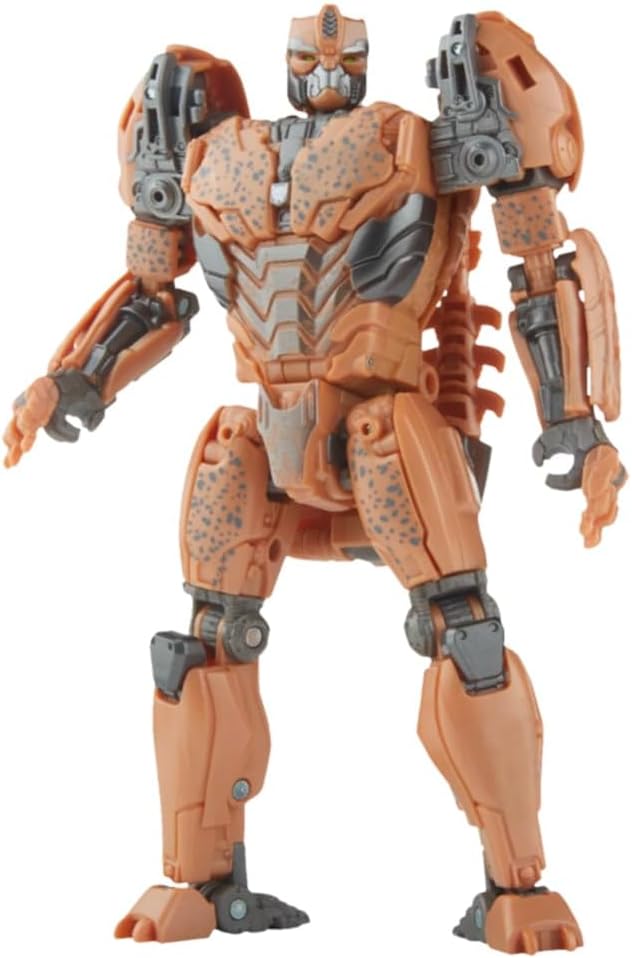
Image 1: Cheetor figure in its primary robot mode, standing upright. This is the default configuration upon unboxing.
Operating Instructions
Robot Mode
In robot mode, the Cheetor figure is highly articulated, allowing for various poses. Ensure all joints are securely connected after transformation.

Image 2: Cheetor in robot mode, posed dynamically while holding one of its spear accessories. The figure's articulation allows for a wide range of action poses.
Transformation to Cheetah Mode
The Cheetor figure converts from robot to cheetah mode in 24 steps. Refer to the detailed instruction sheet included in the package for a step-by-step guide. The transformation involves manipulating various panels, limbs, and joints to achieve the alternate form.
General Transformation Tips:
- Apply gentle, even pressure when moving parts.
- Ensure each step is completed before proceeding to the next to avoid damage.
- If a part feels stuck, re-examine the previous steps. Do not force components.
Cheetah Mode
Once transformed, the figure accurately represents Cheetor in its cheetah form. The figure maintains articulation in this mode for various animalistic poses.

Image 3: Cheetor figure in its alternate cheetah mode, standing on all fours. This mode showcases the detailed beast form.

Image 4: Cheetor in cheetah mode, depicted in a dynamic crouching pose, ready for action. This illustrates the posing capabilities in beast mode.
Accessory Usage
The two included spear accessories can be combined into a single weapon. They can be held by the figure in robot mode or attached to specific points in both robot and cheetah modes, as indicated in the detailed instruction sheet.
Displaying the Figure
The package includes a removable backdrop featuring the Peruvian Jungle Discovery scene. This backdrop can be used to enhance the display of your Cheetor figure in various poses and modes. Position the figure in front of the backdrop to recreate movie-inspired scenes.
Maintenance and Care
- Cleaning: Use a soft, dry cloth to gently wipe the figure. Avoid abrasive cleaners or solvents, as these can damage the paint and plastic.
- Storage: Store the figure away from direct sunlight and extreme temperatures to prevent discoloration or warping.
- Handling: Handle the figure by its main body parts rather than small, delicate components to avoid breakage.
Troubleshooting
- Stiff Joints: If a joint is stiff, gently work it back and forth. Do not apply excessive force.
- Loose Parts: If a part becomes loose, ensure it is correctly seated in its designated slot. For persistent looseness, contact customer support.
- Transformation Difficulty: Re-read the transformation steps carefully. Sometimes a small detail can be overlooked.
Specifications
| Feature | Detail |
|---|---|
| Product Dimensions | 3.19 x 6.25 x 9 inches |
| Item Weight | 5.6 ounces |
| ASIN | B0B3FC434L |
| Item Model Number | F7240 |
| Manufacturer Recommended Age | 8 years and up |
| Release Date | February 11, 2023 |
| Manufacturer | Hasbro |
Warranty and Support
For information regarding product warranty, returns, or technical support, please refer to the official Hasbro website or contact the retailer from whom the product was purchased. Keep your proof of purchase for any warranty claims.


