
1. Important Safety Instructions
Please read and understand all instructions before using this appliance. Failure to follow the warnings and instructions may result in electric shock, fire, and/or serious injury.
- Do not use the appliance in wet conditions or immerse it in water.
- Keep hair, loose clothing, fingers, and all parts of the body away from openings and moving parts.
- Do not pick up flammable or combustible liquids, such as gasoline, or use in areas where they may be present.
- Do not pick up anything that is burning or smoking, such as cigarettes, matches, or hot ashes.
- Use only the charger supplied by the manufacturer to recharge.
- Do not allow children to operate the vacuum cleaner. Supervise children and pets when the appliance is in use.
- Store the appliance indoors in a dry place.
- Always turn off the appliance before connecting or disconnecting the charger.
2. Product Overview
The BLACK+DECKER APB8200 Freestyle is a 7.2V portable battery-powered handheld vacuum cleaner designed for quick and easy daily cleaning tasks. Its lightweight, compact, and cordless design allows for versatile use in various areas, including home interiors and car interiors. The narrow design ensures greater reach in tight spaces.
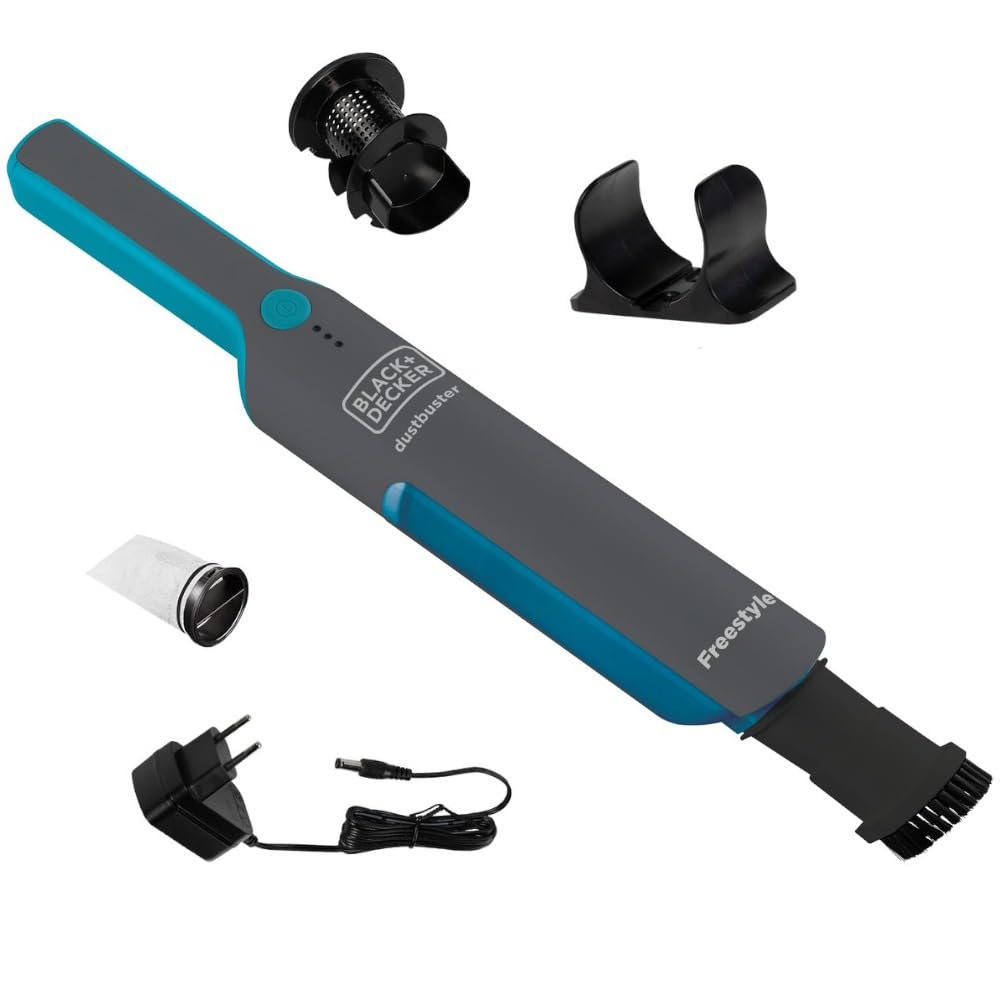
Image: The BLACK+DECKER APB8200 Freestyle handheld vacuum cleaner.
Components Included:
- APB8200 Handheld Vacuum Unit
- Brush Nozzle (integrated or attachable)
- Wall Mount
- Bivolt Charger
- Pre-filter
- Permanent Washable Filter

Image: The vacuum cleaner shown with its brush nozzle and collected debris.
3. Setup
Charging the Battery:
- Before first use, fully charge the vacuum cleaner for approximately 4 hours.
- Connect the charger to the charging port on the vacuum cleaner.
- Plug the bivolt charger into a suitable wall outlet. The battery indicator lights will illuminate to show charging status.
- Once fully charged, disconnect the charger.

Image: The vacuum cleaner connected to its charger.
Installing the Wall Mount:
The included wall mount provides a convenient storage and charging solution. Choose a suitable location near a power outlet. Secure the wall mount to the wall using appropriate screws and anchors (not included). Ensure the mount is stable before hanging the vacuum.
Attaching Accessories:
The vacuum comes with a brush nozzle. To attach, simply slide the nozzle onto the vacuum's suction opening until it clicks securely into place. This nozzle is effective for removing pet hair and dust from upholstery and curtains.
4. Operating Instructions
Powering On/Off:
Press the power button located on the top of the vacuum to turn it on. Press the button again to turn it off.
Using the Vacuum:
- For general cleaning, use the vacuum without any attachments for wider surfaces.
- Attach the brush nozzle for cleaning delicate surfaces, upholstery, curtains, or to dislodge stubborn dirt and pet hair.
- The narrow body and compact design allow access to tight spaces, such as between couch cushions or car seats.
- The vacuum provides approximately 18 minutes of runtime on a full charge.

Image: The vacuum cleaner being used to clean upholstery.
Battery Indicator:
The vacuum features LED indicator lights that show the remaining battery charge. Recharge the vacuum when the lights indicate a low battery level to maintain optimal performance.
5. Maintenance
Regular maintenance ensures optimal performance and extends the lifespan of your vacuum cleaner.
Emptying the Dustbin:
- Ensure the vacuum is turned off.
- Locate the dustbin release button or latch.
- Detach the dustbin from the main unit.
- Empty the collected debris into a waste bin.
Cleaning the Filter:
The APB8200 features a permanent, washable filter and a pre-filter. Clean them regularly to prevent loss of suction.
- After emptying the dustbin, remove the pre-filter and the permanent filter.
- Tap the filters gently to remove loose dust.
- Wash both filters under running water. Do not use hot water or detergents.
- Allow the filters to air dry completely before reassembling. Ensure they are 100% dry to prevent mold growth and damage to the vacuum.
- Reinsert the dry filters into the dustbin, then reattach the dustbin to the vacuum unit.

Image: The vacuum cleaner's components, including the dustbin and washable filter, disassembled for cleaning.
6. Troubleshooting
| Problem | Possible Cause | Solution |
|---|---|---|
| Low suction power | Dustbin is full; Filter is clogged; Battery is low. | Empty the dustbin; Clean or wash the filter; Recharge the battery. |
| Vacuum does not turn on | Battery is completely discharged; Power button not pressed correctly. | Charge the vacuum; Ensure the power button is fully pressed. |
| Vacuum not charging | Charger not properly connected; Faulty charger or outlet. | Ensure charger is securely plugged into vacuum and outlet; Try a different outlet; Contact customer support if charger is suspected faulty. |
| Short battery runtime | Battery not fully charged; Battery nearing end of life. | Ensure battery is fully charged before use; Battery capacity naturally decreases over time. |
7. Specifications
| Feature | Specification |
|---|---|
| Model Number | APB8200-BR |
| Brand | Black+Decker |
| Color | Black |
| Form Factor | Handheld |
| Battery Type | Lithium-Ion |
| Voltage | 7.2 Volts |
| Wattage | 7.2 Watts |
| Reservoir Capacity | 400 ml |
| Runtime | Approximately 18 minutes |
| Filter Type | Permanent Washable Filter |
| Surface Recommendation | Carpet, Hard Floor |
| Power Source | Battery Powered |
| Product Dimensions | 28 x 15 x 68 cm |
| Product Weight | 860 g |
8. Warranty and Support
This BLACK+DECKER product is covered by a manufacturer's warranty. Please refer to the warranty card included with your purchase for specific terms and conditions, including warranty period and coverage details.
For technical assistance, troubleshooting not covered in this manual, or to inquire about replacement parts, please contact BLACK+DECKER customer support. Contact information can typically be found on the product packaging, the official BLACK+DECKER website, or your purchase receipt.


