
1. Introduction
The MR CARTOOL C210 Plastic Welder Kit is an advanced tool designed for efficient and durable repair of plastic components found in various vehicles and industrial applications. This machine features a knob-type temperature adjustment, allowing precise control over the welding power from 15W to 80W. Its intuitive design ensures ease of operation, making it suitable for repairing broken plastics in cars, motorcycles, ATVs, lawnmowers, and boats.
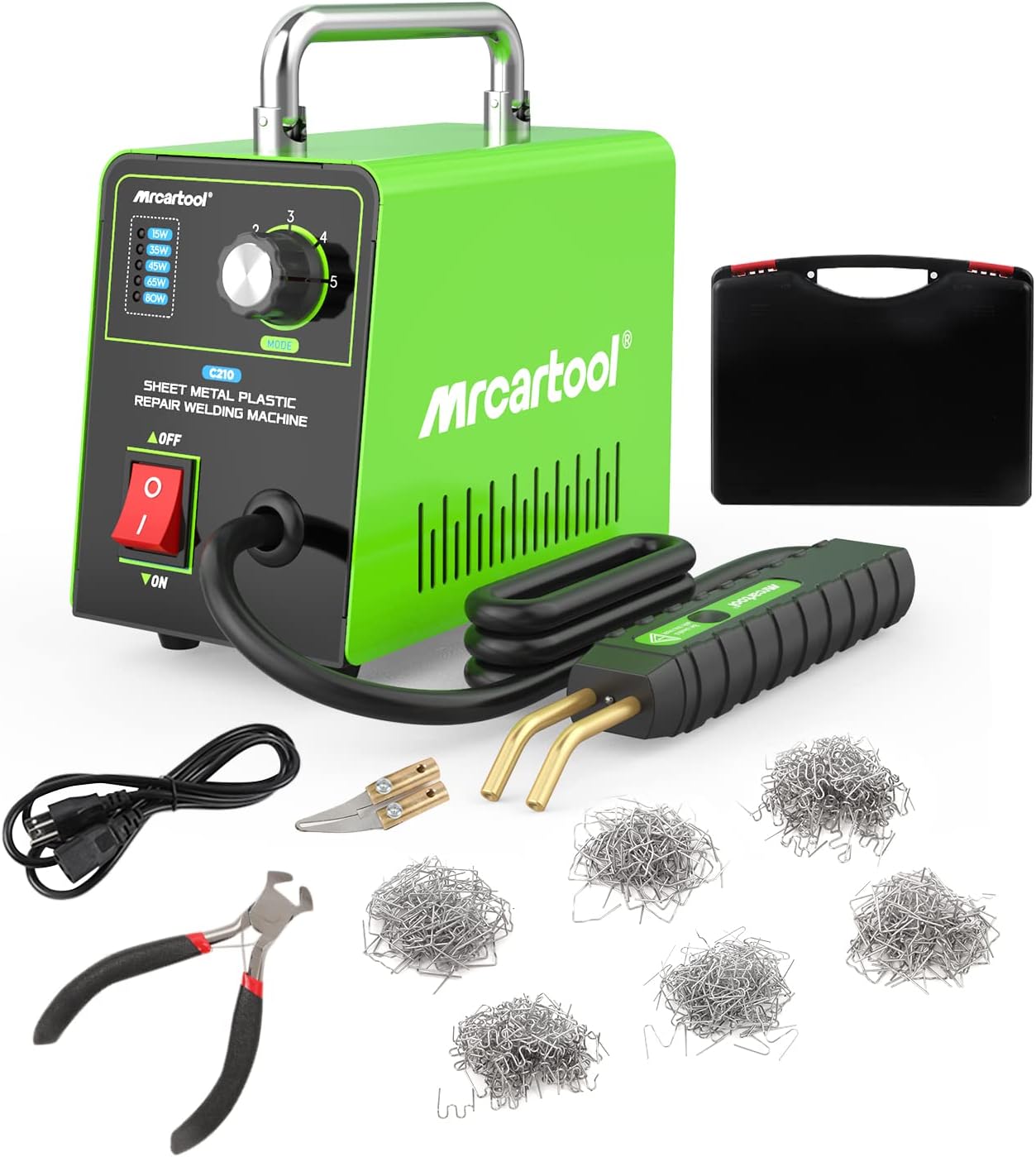
Figure 1.1: Complete MR CARTOOL C210 Plastic Welder Kit including the main unit, welding gun, power cord, cutting pliers, diagonal cutter, and various hot staples.
2. Product Features
- Wide Application: Specifically designed for automotive plastic body repair, compatible with 99% of vehicles including cars, motorcycles, boats, lawnmowers, and ATVs.
- Adjustable Power (5-Speed): Offers power selection from 15W to 80W to suit different repair needs. The maximum output power of 80W ensures rapid temperature increase within 1-2 seconds for quick completion of plastic part repairs.
- Plug and Play Operation: Includes 600 pieces of hot staples for various repair tasks. Simple insertion and one-button start for user-friendly operation.
- Integrated LED Light: Equipped with an LED light to facilitate work in dimly lit environments.

Figure 2.1: Illustration of the fast heating capability of the C210, reaching optimal temperature quickly for efficient repairs.
3. Package Contents
Verify that all items listed below are present in your package:
- Main Unit (MR CARTOOL C210 Plastic Welder)
- Welding Gun
- Power Cord
- Tool Box / Carrying Case
- User Manual
- Cutting Pliers
- Diagonal Cutter
- 600 PCS Hot Staples (various types: M-shaped, V-shaped, Flat, Wave in 0.6mm and 0.8mm diameters)

Figure 3.1: Visual representation of the complete package contents, including the main unit, accessories, and various staples.
4. Specifications
| Parameter | Value |
|---|---|
| Rated Voltage | AC 110V ± 10% |
| Rated Power | 80W |
| Output Voltage | 1.9-3.9V |
| Rated Current | 0.3A |
| Frequency | 50/60Hz |
| Applicable Staples Diameter | 0.6-0.8mm |
| Types of Staples | 6 Types |
| Product Weight | 2.3 kg |
| Product Size | 180x100x160mm |

Figure 4.1: Detailed product parameters and a diagram illustrating the main components of the C210 unit.
5. Safety Instructions
To ensure safe operation and prevent injury or damage, please read and adhere to the following safety guidelines:
- Always wear appropriate personal protective equipment (PPE), including safety glasses and heat-resistant gloves, when operating the plastic welder.
- Ensure the work area is well-ventilated to disperse any fumes produced during welding.
- Do not touch the hot staples or welding gun tips immediately after use, as they remain hot for a period. Allow them to cool down completely.
- Keep the device away from flammable materials and liquids.
- Do not operate the welder in wet or damp conditions.
- Unplug the device from the power outlet when not in use or before performing any maintenance.
- Keep children and unauthorized personnel away from the work area.
- Inspect the power cord and welding gun for any damage before each use. Do not use if damaged.
- Use only original MR CARTOOL accessories and staples with this device.
6. Setup
- Unpacking: Carefully remove all components from the packaging and verify against the "Package Contents" section.
- Placement: Place the main unit on a stable, flat, and heat-resistant surface. Ensure adequate ventilation around the unit.
- Connect Welding Gun: Insert the welding gun's connector firmly into the "Welding Gun Socket" on the front panel of the main unit.
- Connect Power Cord: Plug the power cord into the "Power Cord Socket" at the rear of the main unit, then plug the other end into a standard 110V AC power outlet.
- Power On: Flip the "Power Switch" to the 'ON' position. The power indicator light should illuminate.

Figure 6.1: Front view of the C210 main unit, showing the power switch, power adjustment knob, and welding gun connection point.

Figure 6.2: Rear view of the C210 main unit, highlighting the power cord socket.
7. Operating Instructions
7.1 Preparing for Welding
- Clean the Surface: Ensure the plastic surface to be repaired is clean, dry, and free of grease or debris.
- Select Staple: Choose the appropriate hot staple type (e.g., M-shaped, V-shaped, Flat, Wave) and diameter (0.6mm or 0.8mm) based on the crack or damage type and plastic thickness.
- Insert Staple: Carefully insert the chosen staple into the two electrodes of the welding gun. Ensure it is seated securely.
- Adjust Power: Turn the "Power Adjustment Knob" to select the desired power level (15W, 35W, 45W, 65W, or 80W). Start with a lower setting and increase if necessary, observing the plastic's reaction.
7.2 Welding Process
- Position Staple: Place the staple, held by the welding gun, directly over the crack or damaged area.
- Activate Heating: Press the trigger button on the welding gun. The staple will heat up rapidly.
- Embed Staple: Gently press the hot staple into the plastic until it is embedded below the surface. The plastic around the staple will melt and fuse.
- Release and Cool: Release the trigger button. Hold the staple in place for a few seconds to allow the plastic to cool and solidify around it.
- Repeat: Repeat the process along the length of the crack, spacing staples appropriately for strength.
- Trim Excess: Once the plastic has fully cooled and solidified, use the provided cutting pliers or diagonal cutter to trim off any protruding ends of the staples.

Figure 7.1: Step-by-step visual guide to the plastic welding process, from preparing the crack to embedding and trimming staples.
Note: The integrated LED light on the welding gun will illuminate when the trigger is pressed, providing visibility in dark working conditions.
8. Maintenance
Regular maintenance ensures the longevity and optimal performance of your MR CARTOOL C210 Plastic Welder Kit:
- Cleaning: After each use, ensure the device is unplugged and completely cooled. Wipe down the main unit and welding gun with a clean, dry cloth. Do not use abrasive cleaners or solvents.
- Electrode Care: Periodically inspect the welding gun electrodes for any residue or damage. Gently clean them if necessary, ensuring they are free from plastic buildup.
- Storage: Store the plastic welder kit in its original carrying case in a cool, dry place, away from direct sunlight and moisture.
- Cord Inspection: Regularly check the power cord and welding gun cable for cuts, fraying, or other damage. Replace if any damage is found.
9. Troubleshooting
| Problem | Possible Cause | Solution |
|---|---|---|
| Device does not power on. | Power cord not properly connected. Power outlet malfunction. Power switch is off. | Ensure power cord is securely plugged into the unit and a working outlet. Check the power switch is in the 'ON' position. |
| Staples do not heat up. | Welding gun not connected properly. Staple not correctly inserted. Power setting too low. Internal fault. | Verify the welding gun is firmly connected to the main unit. Ensure the staple is fully seated between the electrodes. Increase the power setting using the adjustment knob. If the issue persists, contact customer support. |
| Plastic is not melting or fusing properly. | Power setting too low. Incorrect staple type for plastic. Insufficient pressure applied. | Increase the power setting. Ensure the staple is appropriate for the plastic thickness and type. Apply firm, consistent pressure when embedding the staple. |
| Device overheats and shuts down. | Prolonged continuous use. Poor ventilation. | Allow the device to cool down for a period before resuming operation. Ensure the unit is placed in a well-ventilated area and vents are not blocked. |
10. Warranty and Support
MR CARTOOL provides a 24-month warranty for the C210 Plastic Welder Kit, ensuring your peace of mind and a satisfactory shopping experience.
For any issues, questions, or support needs, please do not hesitate to contact MR CARTOOL customer service. Our team is available 7 days a week, 24 hours a day, to provide prompt assistance and solutions.
You can typically find contact information on the official MR CARTOOL website or through your purchase platform. Please have your product model (C210) and purchase details ready when contacting support.