
Introduction
This manual provides instructions for the PerFascin KT1440 replacement remote control. This remote is designed to operate a wide range of televisions, digital TV boxes, and DVD players from various brands. Please read this manual carefully to ensure proper setup and operation of your new remote control.
Setup: Battery Installation
The PerFascin KT1440 remote control requires two AAA batteries (not included) for operation. Follow these steps to install the batteries:
- Locate the battery compartment on the back of the remote control.
- Press down on the latch and slide the battery cover downwards to open it.
- Insert two AAA batteries, ensuring the positive (+) and negative (-) terminals align correctly with the markings inside the compartment.
- Slide the battery cover back into place until it clicks securely.

Image: Back view of the KT1440 remote control with the battery cover removed, illustrating the correct placement for two AAA batteries.
Operating Instructions
The PerFascin KT1440 remote control uses infrared technology to communicate with your devices. Ensure there is a clear line of sight between the remote and the device's IR receiver. No programming is typically required for compatible devices; simply insert batteries and begin use.
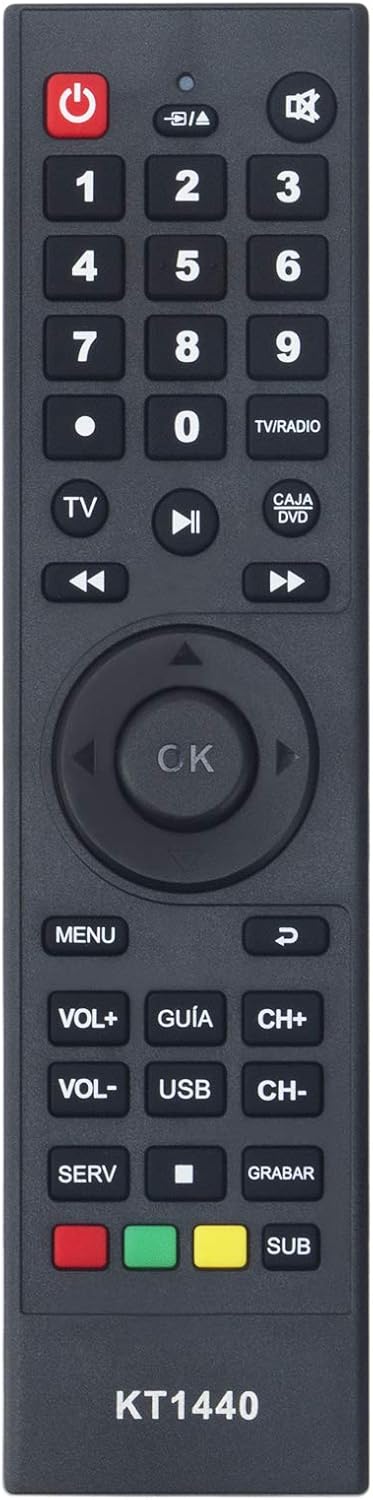
Image: Front view of the KT1440 remote control, displaying the button layout for various functions.
Key Functions:
- Power (●): Turns the device on or off.
- Number Buttons (0-9): Direct channel selection.
- TV/RADIO: Switches between TV and Radio modes (if supported by device).
- CAJA/DVD: Switches between Digital Box and DVD modes (if supported by device).
- TV: Selects TV input.
- Playback Controls (◀◀, ▶▶, ▶▶): Fast forward, rewind, play/pause for media playback.
- Navigation Pad (Up, Down, Left, Right, OK): Navigates menus and confirms selections.
- MENU: Accesses the device's main menu.
- VOL+ / VOL-: Adjusts volume up or down.
- CH+ / CH-: Changes channels up or down.
- GUÍA: Accesses the electronic program guide.
- USB: Selects USB input (if supported by device).
- SERV: Service button (function may vary by device).
- GRABAR: Record function (if supported by device).
- SUB: Subtitle function (if supported by device).
- Colored Buttons (Red, Green, Yellow, Blue): Context-sensitive functions, typically indicated on-screen by the device.
Compatible Devices
The PerFascin KT1440 remote control is compatible with a wide range of devices. Below is a detailed list:
Televisions (TVs):
- Haier 21' CRT
- Haier 29' CRT
- ATEC DTV
- Panda 21' CRT
- All KONKA Hybrid TVs
- All KONKA Analog TVs
- Atec Hybrid
- Parker 21' TV2195
- Parker 14' TV14F5
- Atec DTV
- Soyea DTV
Digital Set-Top Boxes (Cajas Decodificadoras):
- All KONKA boxes
- Mico DT46-N03
- Mico DT25-2080
- RealTv HMA1
- Haier HDMB-2000T/M
- Soyea SPD160
- Gelec SD-HL-215G
- Gelec HD-HL-1209
- All Runch boxes
DVD Players:
- Wentai 3031/3032
- AV Link LW 109A
Maintenance
To ensure the longevity and optimal performance of your remote control, follow these maintenance guidelines:
- Cleaning: Wipe the remote with a soft, dry cloth. For stubborn dirt, slightly dampen the cloth with water or a mild cleaning solution, then wipe dry immediately. Avoid using harsh chemicals or abrasive cleaners.
- Storage: Store the remote in a cool, dry place away from direct sunlight and extreme temperatures.
- Battery Care: If the remote will not be used for an extended period, remove the batteries to prevent leakage and potential damage.
- Avoid Drops: While made of durable ABS material, avoid dropping the remote to prevent internal damage.
Troubleshooting
If you experience issues with your PerFascin KT1440 remote control, try the following troubleshooting steps:
- Remote Not Responding:
- Check the batteries. Ensure they are inserted correctly with the correct polarity (+/-) and are not depleted. Replace with fresh AAA batteries if necessary.
- Ensure there is a clear line of sight between the remote's infrared emitter and the device's IR receiver. Obstructions can block the signal.
- Move closer to the device. The remote uses infrared technology, which requires proximity and direct line of sight.
- Limited Range:
- Ensure batteries are fresh. Low battery power can reduce the remote's effective range.
- Minimize interference from strong light sources (e.g., direct sunlight, fluorescent lights) that can interfere with IR signals.
- Specific Button Not Working:
- Some functions may be specific to certain device models. Verify if the function is supported by your device.
- Clean the remote control, especially around the buttons, to ensure no debris is obstructing button presses.
Specifications
| Model Number | KT1440 |
| Brand | PERFASCIN |
| Product Dimensions | 5.91 x 1.57 x 0.39 inches |
| Item Weight | 2.47 ounces |
| Batteries Required | 2 AAA batteries (not included) |
| Connectivity Technology | Infrared (IR) |
| Max Number of Supported Devices | 1 (operates one device at a time, switching between modes) |
| Special Feature | Ergonomic design |
| Materials | Durable and recyclable ABS material, soft rubber buttons |
Warranty and Support
PERFASCIN is committed to providing quality products and customer satisfaction. If you encounter any issues with your KT1440 remote control or require assistance, please contact our customer service team.
- Finding the Right Remote: If you are unsure if this remote is compatible with your specific device or need assistance finding a different replacement remote, please reach out to us.
- Product Malfunction: If the remote control you received does not function as expected, please contact customer service immediately for a satisfactory solution.
For support, please refer to the contact information provided with your purchase or on the PERFASCIN official website.