1. Introduction
Thank you for choosing the NOKLEAD Alarm Clock. This compact and stylish alarm clock is designed for convenience and reliability, featuring a durable metal shell, clear LED display, and multiple brightness settings. It is suitable for various environments including bedrooms, offices, and for travel. This manual provides detailed instructions on how to set up, operate, and maintain your alarm clock.

Image: The NOKLEAD Alarm Clock, its power adapter, and USB-C cable, illustrating the complete package.
2. Product Features
- Durable Metal Shell: Designed with a stylish metal shell that is anti-broken and durable, providing resilience against accidental falls.
- Compact and Portable: Space-saving dimensions (3.23" x 2.64" x 1.14") with large LED numbers, making it easy to carry for bedside tables, desks, or travel.
- Unique Snooze & Dimmer Button: Features an easy-to-operate silicone button on the bottom for snooze and brightness adjustment.
- Adjustable Brightness: Offers 4 brightness levels (Off/Dim/Medium/Bright) for optimal visibility and comfort, especially at night.
- Easy Setup & Time Format: Clear, understandable buttons for easy time and alarm setting, with switchable 12/24 hour display.
- Dual Power Source: Primarily powered by AC (5V adapter and cord included). Includes 2 built-in AAA backup batteries to memorize time and alarm settings during power outages.

Image: The NOKLEAD Alarm Clock showcasing its stylish metal shell, emphasizing its durability.
3. Package Contents
- NOKLEAD Alarm Clock (Model: 5245)
- 5V Power Adapter
- USB Power Cord
- 2 x AAA Backup Batteries (Built-in)
4. Setup Guide
4.1 Power Connection
- Connect the provided USB power cord to the Type-C charging port on the back of the alarm clock.
- Plug the other end of the USB power cord into the 5V power adapter.
- Insert the power adapter into a standard electrical outlet. The clock display will light up.
- The 2 built-in AAA batteries serve as backup power to retain time and alarm settings during a power outage. The screen will go blank in battery-only mode after 10 seconds of inactivity, but the alarm function remains active.

Image: A view of the alarm clock's bottom, illustrating the battery compartment and control buttons for setup.
4.2 Initial Time and Alarm Setting
Refer to the control buttons located on the bottom of the clock (as shown in the image above).
- Setting Time: Press the "Time Setting" button to enter time setting mode. Use the "+" and "-" buttons to adjust hours and minutes. Press "Time Setting" again to confirm and move to the next setting (e.g., 12/24H format).
- Setting Alarm: Press the "Alarm Setting" button to enter alarm setting mode. Use the "+" and "-" buttons to adjust the alarm time. Press "Alarm Setting" again to confirm.
- 12/24 Hour Format: While in time setting mode, you can switch between 12-hour (with AM/PM indicator) and 24-hour formats using the "Time Setting" button or the "+"/"-" buttons depending on the specific step.

Image: The alarm clock displaying both 12-hour and 24-hour time formats, highlighting its switchable feature.
Video: An official product video demonstrating the setup and basic operation of the NOKLEAD Metal Portable Alarm Clock, including time setting and brightness adjustment.
5. Operating Instructions
5.1 Brightness Adjustment
The alarm clock features 4 levels of display brightness: Off, Dim, Medium, and Bright. To adjust the brightness, gently push down on the silicone snooze/dimmer button located on the top surface of the clock. Each press cycles through the brightness levels.
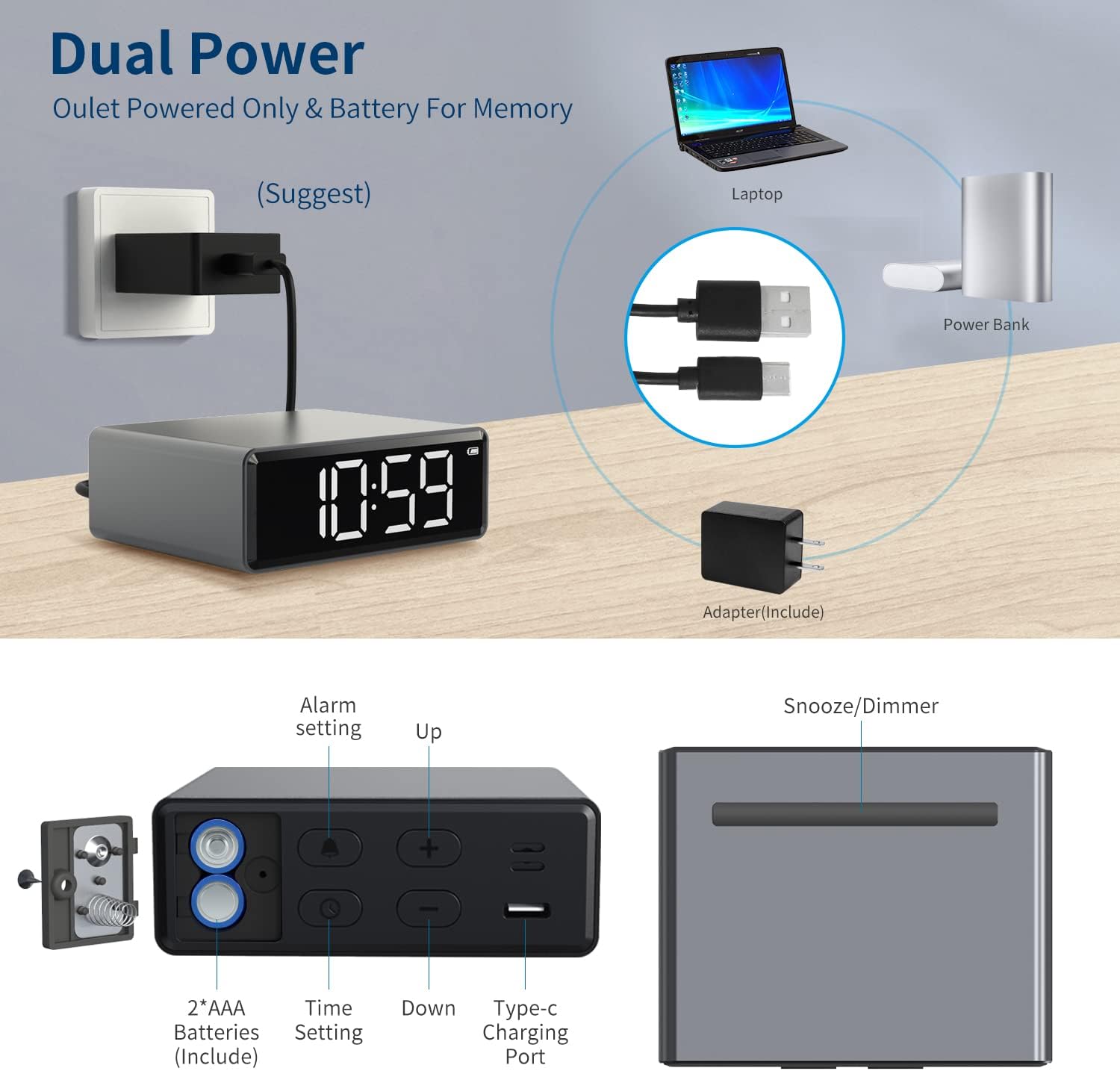
Image: The alarm clock demonstrating its four adjustable brightness levels: Off, Dim, Medium Light, and Bright Light.
5.2 Snooze Function
When the alarm sounds, press the silicone snooze button on the top of the clock to activate the snooze function. This will temporarily silence the alarm for 9 minutes, allowing for extra sleep before the alarm sounds again.

Image: The alarm clock displaying the snooze function, indicating a 9-minute snooze period.
5.3 Energy Saving Screen Mode (Battery Power)
When the alarm clock is operating solely on battery power (without AC connection), the screen light will automatically turn off after 10 seconds of no action to conserve energy. To wake up the screen, simply press any button.

Image: The alarm clock in energy-saving mode, with the screen off, demonstrating its intelligent power management when running on battery.
6. Maintenance
- Cleaning: Use a soft, dry cloth to clean the surface of the alarm clock. Avoid using abrasive cleaners or solvents, as they may damage the finish.
- Battery Replacement: While the AAA batteries are built-in for backup, if they need replacement over time, carefully open the battery compartment on the bottom of the clock and replace them with new AAA batteries, ensuring correct polarity.
- Storage: If storing the clock for an extended period, disconnect it from AC power and remove the backup batteries to prevent leakage.
7. Troubleshooting
- Display Not Lighting Up:
- Ensure the power adapter is securely plugged into both the clock and the electrical outlet.
- If on battery power, press any button to wake the screen from energy-saving mode.
- Alarm Not Sounding:
- Verify that the alarm time is correctly set and the alarm function is activated.
- Check if the volume is set to an audible level (if applicable, though this model doesn't specify volume control, it's a common troubleshooting step).
- Time Not Keeping Correctly:
- Ensure continuous AC power supply.
- Check the backup batteries. Although built-in, old or depleted batteries may affect time retention during power interruptions.
- Display Segments Missing or Fading:
- This may indicate a hardware issue. Please refer to the Warranty and Support section for assistance.
8. Specifications
| Attribute | Detail |
|---|---|
| Brand | NOKLEAD |
| Model Number | 5245 |
| Color | Space Gray |
| Display Type | Digital LED |
| Product Dimensions | 3.23" (Length) x 2.64" (Depth) x 1.14" (Height) |
| Power Source | Corded Electric (5V Adapter), Battery Powered (2x AAA backup) |
| Material | Metal |
| Item Weight | 8.1 ounces |
| Special Features | Adjustable Brightness, Alarm, Snooze, 12/24H Time Format |
9. Warranty and Support
The NOKLEAD Alarm Clock comes with an 18-month free after-sales support and warranty guarantee. For any problems or assistance, please contact our support team directly.
For further support, please visit the official NOKLEAD store on Amazon: NOKLEAD Store


