
Zeadio RDO-MSC-20D-X12
Zeadio Versatile Pouch Case Holder Instruction Manual
Model: RDO-MSC-20D-X12
Introduction
This manual provides comprehensive instructions for the Zeadio Versatile Pouch Case Holder (Model: RDO-MSC-20D-X12, also known as ZNC-D). This universal compatible pouch is designed to securely hold various small devices such as handheld radios, phones, and GPS units. It features a 3-in-1 design for versatile carrying options and is made from high-quality fabric for durability and convenience.
Product Features
- Brand: Zeadio. Model: ZNC-D. Pack of 12.
- Dimensions: 135mm*60mm*35mm. Weight: 75g per pouch.
- Adjustable strap length between 86cm (33.9") and 173cm (68.1").
- Constructed from high-quality, wear-resistant fabric.
- Designed for hands-free operation, offering safety and convenience.
- Ideal for outdoor activities and professional use.
- Compatible with most walkie-talkies and handheld two-way radios, including Motorola, Kenwood, Midland, Yaesu, and Icom.
Package Contents
Each package contains the following items:
- 12 x Zeadio ZNC-D Multi-Function Case

Image: A view of twelve Zeadio ZNC-D Multi-Function Cases, showcasing their design and quantity in the pack.
Setup
The Zeadio pouch is designed for quick and easy setup to accommodate various devices and carrying preferences.
Inserting Your Device
- Open the adjustable buckle on the front of the pouch.
- Carefully slide your device (e.g., two-way radio, phone, GPS) into the main compartment of the pouch. Ensure it fits snugly but without excessive force.
- Adjust the top strap and buckle to secure the device firmly in place. The pouch is designed to adapt to devices of various sizes within its dimensions (135mm x 60mm x 35mm).

Image: A visual guide illustrating the dimensions of the pouch and its adaptability to different radio sizes, from small to extra-extra-large.
Operating Instructions
The Zeadio pouch offers multiple carrying configurations for optimal comfort and accessibility.
Carrying Methods (3-in-1 Design)
- Chest Hanging: Attach the adjustable sling to the D-rings on the pouch and wear it around your neck or chest. This allows for quick access to your device.
- Shoulder Hanging: Adjust the sling to a longer length and wear it across your body, similar to a messenger bag.
- Waist/Belt Hanging: Utilize the belt loop on the back of the pouch to attach it directly to your belt or a waist strap.

Image: A diagram showing various ways to wear the pouch, including chest, shoulder, waist, and belt configurations, highlighting its versatility.

Image: Examples of the pouch being worn by individuals, illustrating how the adjustable strap fits different body types and carrying preferences.
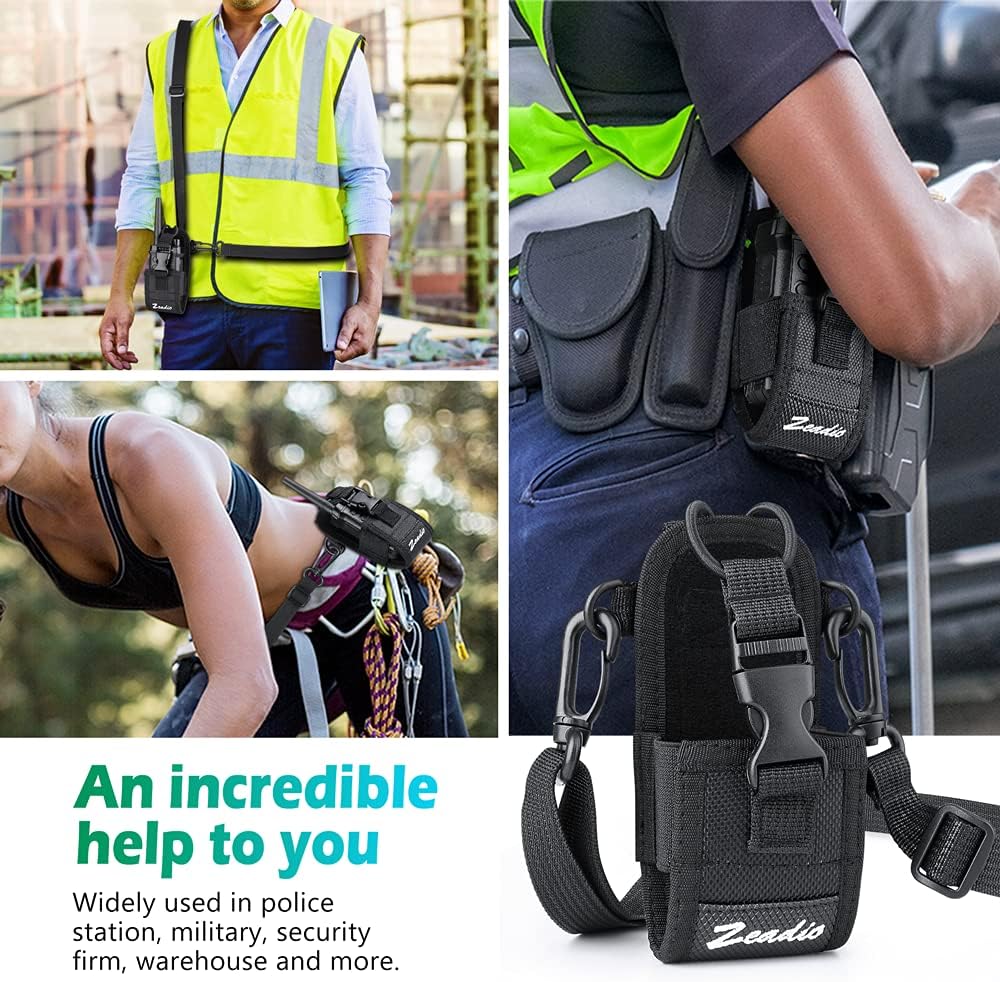
Image: A collage depicting the pouch in practical use across different scenarios, including construction, law enforcement, and outdoor activities, emphasizing its utility.
Maintenance
To ensure the longevity and performance of your Zeadio Versatile Pouch Case Holder, follow these maintenance guidelines:
- Cleaning: Wipe the pouch with a damp cloth to remove dirt and debris. For tougher stains, use a mild soap solution and rinse thoroughly. Allow to air dry completely before re-use. Do not machine wash or tumble dry.
- Storage: Store the pouch in a cool, dry place away from direct sunlight when not in use.
- Inspection: Periodically inspect the straps, buckles, and stitching for any signs of wear or damage. Address any issues promptly to prevent further deterioration.

Image: A detailed view of the pouch highlighting its material properties: waterproof, breathable, and wear-resistant, which contribute to its durability and ease of maintenance.
Troubleshooting
If you encounter any issues with your Zeadio Versatile Pouch, consider the following common solutions:
- Pouch appears damaged or broken: Inspect the specific area of concern. While the pouch is made from high-quality fabric, excessive force or sharp objects can cause damage. If a buckle or strap is broken, assess if it can be repaired or if replacement is necessary.
- Device does not fit securely: Ensure the adjustable buckle and strap are tightened appropriately for your device's dimensions. The pouch is designed to fit devices within 135mm x 60mm x 35mm. If your device exceeds these dimensions, it may not fit properly.
- Discomfort during wear: Adjust the length of the sling or try a different carrying method (chest, shoulder, waist, belt) to find the most comfortable position for your activity.
Specifications
| Attribute | Detail |
|---|---|
| Brand | Zeadio |
| Model Number | RDO-MSC-20D-X12 |
| Product Dimensions | 135mm x 60mm x 35mm (5.31 x 2.36 x 1.38 inches) |
| Item Weight | 75g (0.165 lbs) per pouch; Total 2.07 pounds for pack of 12 |
| Material | Fabric |
| Color | Black |
| Compatible Devices | Radio, GPS, Phone |
| Strap Length (Adjustable) | 86cm (33.9") to 173cm (68.1") |
| Country of Origin | China |
Warranty and Support
For any questions, concerns, or support regarding your Zeadio Versatile Pouch Case Holder, please contact Zeadio customer service. While specific warranty details are not provided in this manual, Zeadio is committed to customer satisfaction.
You can visit the official Zeadio store on Amazon for more information and contact options: Zeadio Store
Ask a question about this manual
Ask about setup, troubleshooting, compatibility, parts, safety, or missing instructions. Manuals+ will review the question and use this page’s manual context to help answer it.