
1. Introduction
This user manual provides comprehensive instructions for the safe and effective operation, maintenance, and troubleshooting of your KLARUS XT2CR Pro Tactical Flashlight. Please read this manual thoroughly before using the product to ensure optimal performance and longevity.
2. Safety Information
- Do not shine the flashlight directly into eyes.
- Keep out of reach of children.
- Use only recommended batteries and charging methods.
- Avoid disassembling the flashlight head or tail cap unless specified for maintenance.
- Ensure the USB-C port cover is securely closed when not charging, especially in wet conditions.
3. Package Contents
Your KLARUS XT2CR Pro package includes the following items:
- KLARUS XT2CR Pro Tactical Flashlight
- 18650 Li-ion Battery (3100mAh)
- USB-C Charging Cable
- Holster
- Lanyard
- Spare O-ring
- User Manual (this document)

Image: Contents of the KLARUS XT2CR Pro package, including the flashlight, holster, charging cable, lanyard, and spare O-ring.
4. Setup
4.1. Battery Installation
The KLARUS XT2CR Pro comes with a pre-installed 18650 Li-ion battery. Ensure the battery is inserted with the positive (+) end facing towards the flashlight head (LED end).
4.2. Charging the Battery
The flashlight features a convenient USB-C charging port. To charge:
- Locate the USB-C charging port on the side of the flashlight head.
- Gently lift the rubber cover to expose the port.
- Connect the provided USB-C cable to the flashlight and a USB power source (e.g., wall adapter, power bank, computer USB port).
- The indicator light next to the charging port will show charging status: Red for charging, Green for fully charged.
- Once charging is complete, securely close the rubber cover to maintain waterproof integrity.
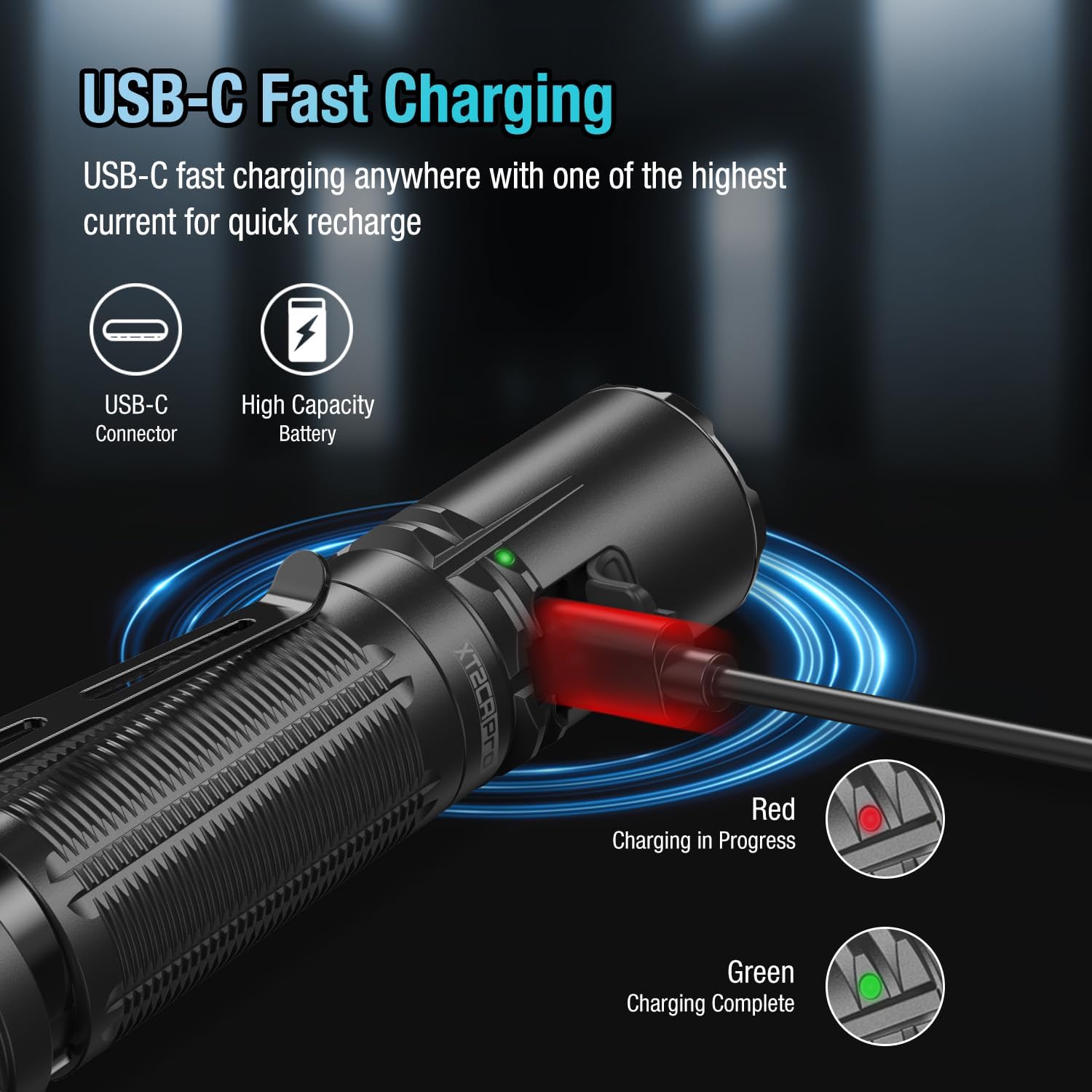
Image: The flashlight connected to a USB-C charging cable, showing the charging indicator light. Red indicates charging, green indicates fully charged.
Video: A comprehensive overview of the KLARUS XT2CR Pro Tactical Flashlight, demonstrating its features and functionality.
5. Operating Instructions
The XT2CR Pro features dual tail switches and a side switch for versatile operation.
5.1. Dual Tail Switches
- Main Switch (Large, Circular): Press for momentary ON/OFF. Fully press and click for constant ON/OFF. Always activates Turbo mode.
- Mode Switch (Smaller, Paddle-shaped): Provides instant access to Strobe (Tactical Setting) or Low (Outdoor Setting).
5.2. Side Switch
- When the flashlight is ON, press the side switch to cycle through brightness levels (Low > Medium > High > Turbo).
- Press and hold the side switch for 1 second to activate SOS mode.
5.3. Switching Operating Modes (Tactical/Outdoor)
The XT2CR Pro offers two programmable settings: Tactical and Outdoor. To switch between them:
- Ensure the flashlight is OFF.
- Press and hold the side switch until the indicator light flashes red and green.
- While the indicator is flashing, simultaneously press the main tail switch. The flashlight will switch to the other mode.

Image: Close-up of the dual tail switches, highlighting the main circular switch and the paddle-shaped mode switch for tactical and outdoor settings.
Video: Demonstrates the XT2CR Pro's operating modes and how to switch between them, including the instant turbo and strobe functions.
6. Maintenance
- Clean the flashlight body and lens with a soft, damp cloth.
- Lubricate O-rings regularly with silicone grease to maintain waterproof sealing.
- If the flashlight is not used for an extended period, remove the battery to prevent leakage.
- Store in a cool, dry place away from direct sunlight.

Image: The flashlight submerged in water, demonstrating its IPX8 waterproof rating, which supports adventures in any weather.
7. Troubleshooting
| Problem | Possible Cause | Solution |
|---|---|---|
| Flashlight not turning on | Low battery; Incorrect battery installation; Loose tail cap | Charge battery; Reinstall battery correctly; Tighten tail cap |
| Intermittent light | Dirty contacts; Loose components | Clean battery and flashlight contacts; Ensure all parts are tightened |
| Cannot switch modes | Incorrect operation sequence | Refer to "Switching Operating Modes" section (5.3) |
8. Specifications
| Feature | Detail |
|---|---|
| Brand | KLARUS |
| Model | XT2CR Pro |
| Max Output | 2100 Lumens |
| Beam Distance | 240 meters (262 yards) |
| Runtime | Up to 150 hours (Low mode) |
| LED Type | Cree XPH35 HD LED (6500K Color Light) |
| Material | Aluminum 6061-T6 with Mil-Spec HAIII Anodized Finish |
| Water Resistance | IPX8 (Submersible up to 2 meters) |
| Impact Resistance | 1 meter |
| Dimensions | 1.08 x 1.02 x 5.04 inches |
| Weight | 4.9 ounces (without battery) |
9. Warranty & Support
KLARUS offers a warranty for its products. For detailed warranty information and customer support, please visit the official KLARUS website or contact their customer service directly. Keep your purchase receipt as proof of purchase for warranty claims.
For further assistance, you may also refer to the KLARUS Brand Store on Amazon.


