
1. Introduction
This instruction manual provides detailed guidance for the installation, operation, and maintenance of your JENNOV 5MP PoE Outdoor Dome Security Camera System. Please read this manual thoroughly before use to ensure proper functionality and safety. This system is designed for reliable surveillance with high-resolution video, advanced detection features, and robust weather resistance.
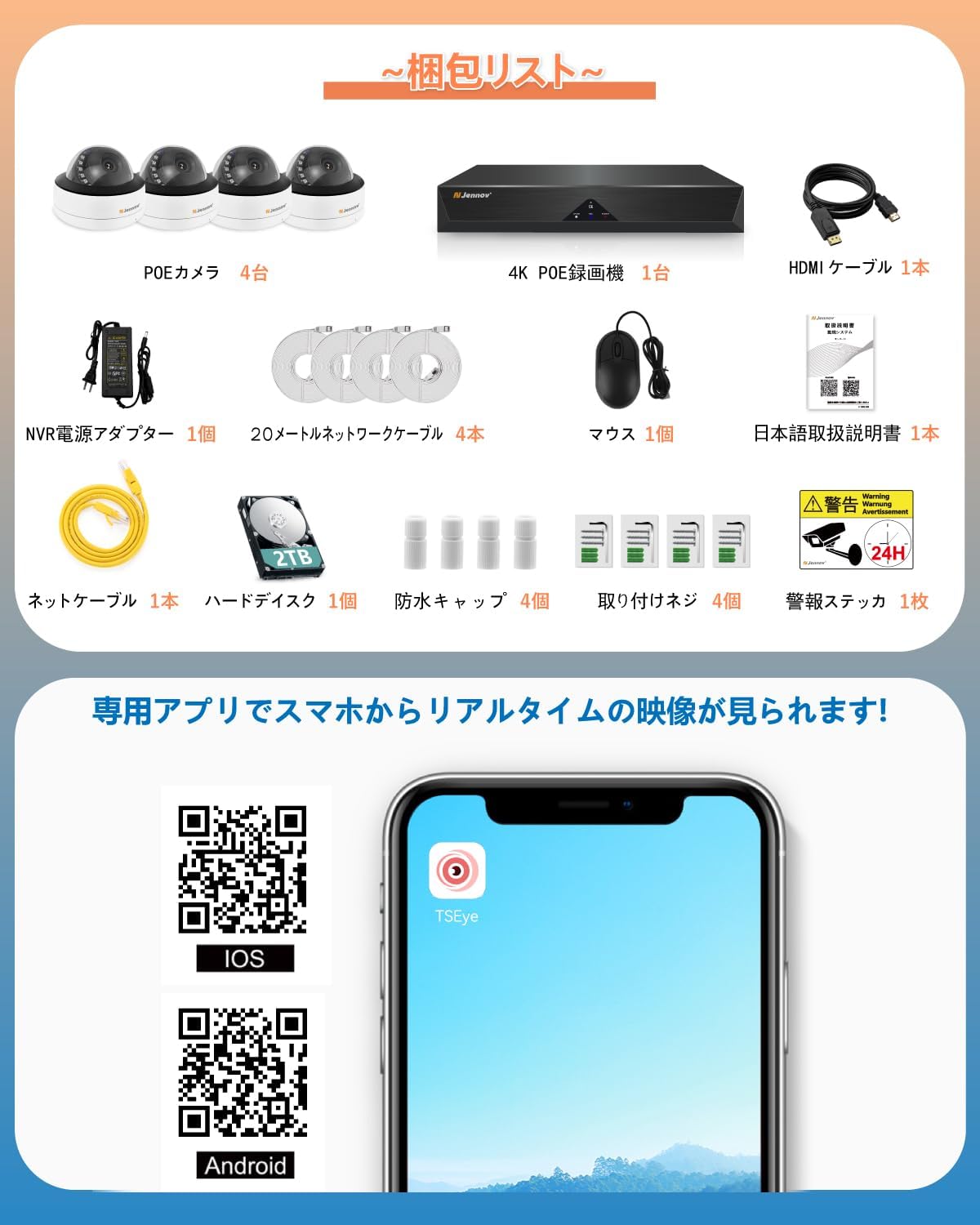
2. Package Contents
Verify that all items listed below are included in your package. If any items are missing or damaged, please contact customer support.
- 4 x PoE Dome Cameras (5MP)
- 1 x 4K PoE NVR (Network Video Recorder) with 2TB HDD pre-installed
- 1 x HDMI Cable
- 1 x NVR Power Adapter
- 4 x 20-meter Network Cables
- 1 x USB Mouse
- 1 x User Manual (Japanese)
- 1 x Network Cable (additional)
- 4 x Waterproof Caps
- 4 x Mounting Screws sets
- 1 x Security Sticker
3. Setup Instructions
Follow these steps to set up your JENNOV PoE security camera system.
3.1. Connect Cameras to NVR
- Connect each PoE dome camera to the PoE ports on the NVR using the provided network cables. The PoE technology supplies both power and data through a single cable.
- Ensure the waterproof caps are properly installed on the cable connections for outdoor cameras to prevent water ingress.

3.2. Connect NVR to Display and Power
- Connect the NVR to a monitor or TV using the HDMI cable for video output.
- Connect the USB mouse to one of the NVR's USB ports for navigation.
- Connect the NVR power adapter to the NVR and then to a power outlet.
- The system will power on automatically. Follow the on-screen instructions for initial setup.

3.3. Remote Access Setup (Smartphone/Tablet)
To access your camera system remotely, download the dedicated app (TSEye) on your smartphone or tablet.
- Scan the QR code provided in the manual or on the NVR's interface to download the app for iOS or Android.
- Register an account and add your NVR device by scanning its unique QR code.
- Ensure your NVR is connected to your home network via an Ethernet cable for internet access.
Download the TSEye app for iOS: https://qr19.cn/BvamKy
Download the TSEye app for Android: https://qr19.cn/C5qMot
4. Operating Instructions
4.1. Live View and Playback
- On Monitor: Use the USB mouse to navigate the NVR interface. Double-click a camera view to enlarge it, or use the layout options to view multiple cameras simultaneously.
- On App: Open the TSEye app, select your device, and tap on a camera to view its live feed. Use the playback function to review recorded footage.

4.2. AI Human Detection and Alerts
The system features AI human detection to minimize false alarms. When human motion is detected, the system can send instant alerts.
- Enable Alerts: Access the NVR settings or app settings to enable motion detection and configure alert notifications (e.g., app push notifications, email with snapshots).
- Detection Zones: Define specific areas within the camera's view where motion detection should be active to avoid unnecessary alerts.

4.3. Voice Recording
Each camera is equipped with a microphone for audio recording, providing additional context to video footage.
- Audio is recorded simultaneously with video.
- During live view or playback on the app or NVR, you can listen to the recorded audio.

4.4. Night Vision
The cameras provide clear surveillance even in low-light conditions with advanced night vision capabilities.
- The cameras automatically switch to infrared (IR) night vision mode in dark environments.
- Night vision range is up to 20 meters.

5. Features Overview
5.1. High-Resolution Video
The system utilizes 5-megapixel (5MP) cameras, providing a resolution of 2560x1920 pixels. This ensures clear and detailed images, allowing for identification of faces and license plates.
5.2. 2TB Hard Disk Drive (HDD)
The NVR comes with a pre-installed 2TB HDD, capable of storing approximately 20 days of continuous 24-hour recording from all four cameras. The system supports overwrite functionality, automatically deleting the oldest footage to make space for new recordings.

5.3. H.264+ Video Compression
The system employs H.264+ video compression technology, which efficiently compresses video files while maintaining high image quality. This optimizes storage space on the 2TB HDD and reduces bandwidth usage for remote viewing.

5.4. IP66 Waterproof and Durable Construction
The dome cameras are rated IP66 for waterproofing and dustproofing, making them suitable for outdoor installation. The camera bodies are constructed from aluminum alloy for enhanced durability and weather resistance.

5.5. Expandable System
The NVR supports up to 8 cameras, allowing for future expansion of your surveillance system if needed.

6. Maintenance
Regular maintenance ensures optimal performance and longevity of your security camera system.
- Clean Lenses: Periodically clean camera lenses with a soft, damp cloth to remove dust and smudges that may affect image clarity.
- Check Connections: Ensure all cable connections, especially outdoor ones, remain secure and free from corrosion.
- Software Updates: Check the manufacturer's website or app for any available firmware or software updates for the NVR and cameras.
- Review Recordings: Regularly review recorded footage to ensure the system is capturing events as expected and that storage is managed correctly.
7. Troubleshooting
If you encounter issues with your JENNOV security camera system, refer to the following common troubleshooting steps:
- No Video Display:
- Check power connections for both NVR and monitor.
- Ensure HDMI/VGA cable is securely connected.
- Verify the correct input source is selected on your monitor/TV.
- Camera Not Recording/Offline:
- Check the network cable connection between the camera and NVR.
- Ensure the NVR's PoE port is functioning. Try connecting the camera to a different port.
- Verify the camera is enabled in the NVR settings.
- No Remote Access:
- Ensure the NVR is connected to the internet via an Ethernet cable.
- Check your router's internet connection.
- Verify app settings and device registration.
- Poor Night Vision:
- Clean the camera lens and IR LEDs.
- Ensure there are no obstructions blocking the IR light.
For further assistance, please contact JENNOV customer support.
8. Specifications
| Feature | Specification |
|---|---|
| Brand | JENNOV |
| Model Number | AJS1-K4-S18WF55A-V8008-2 |
| Connectivity Technology | Wired (PoE) |
| Video Capture Resolution | 5MP (2560x1920) |
| Special Feature | Waterproof, AI Human Detection, Voice Recording |
| Memory Storage Capacity | 2 TB (HDD) |
| Compatible Devices | Smartphones, Tablets, TVs, Desktop PCs, Laptops |
| Operating System | Android, Windows, iOS |
| Night Vision Range | 20 meters |
| Focal Length Description | 3.6mm |
| Recording Mode | Schedule |
| USB Ports | 2 |
| Hardware Interface | HDMI, VGA |
| Field of View | 85 degrees |
| Power Type | DC |
| Product Dimensions | 20 x 12 x 22 cm |
9. Warranty and Support
JENNOV provides comprehensive customer support and warranty for your product.
- 12-Month Quality Warranty: The product comes with a 12-month quality warranty from the date of purchase.
- 30-Day Return/Exchange: Within 30 days of purchase, returns or exchanges are processed without requiring a specific reason.
- Free Technical Support: Lifetime technical support is provided. If you have any questions or encounter issues during setup or use, please contact our support team.
- Contact: For support, please reach out via email. Our team offers Japanese language support.

10. Important Safety Information
- Do not attempt to disassemble or modify the product.
- Use only the provided power adapter.
- Ensure proper ventilation for the NVR to prevent overheating.
- Keep the product away from extreme temperatures, humidity, and direct sunlight.
- Follow local regulations for surveillance camera installation and usage.
11. Product Video
Watch this short video demonstrating the JENNOV security camera system in action, capturing a delivery person.


