
1. Introduction
This manual provides essential information for the safe and efficient use of your ONN 32-Inch Class HD (720P) LED Smart TV, Model 100012589. Please read these instructions thoroughly before operating your television and retain them for future reference.

Image 1.1: The ONN 32-inch Smart TV displaying its Roku interface, alongside the included wall mount bracket. This image illustrates the product and its primary mounting accessory.
2. Important Safety Information
Observe the following safety precautions to prevent fire, electric shock, or injury:
- Do not expose the TV to rain or moisture.
- Do not open the TV casing; refer all servicing to qualified personnel.
- Ensure proper ventilation around the TV.
- Protect the power cord from being walked on or pinched.
- Unplug the TV during lightning storms or when unused for long periods.
- Keep the TV away from heat sources and direct sunlight.
3. What's in the Box
Upon unpacking, verify that all items are present:
- ONN 32-Inch Class HD (720P) LED Smart TV
- Wall Mount Bracket (TV stands are not included with this model)
- Remote Control (not explicitly listed but standard for TVs)
- Power Cable (not explicitly listed but standard for TVs)
4. Setup
4.1 Wall Mount Installation
This television is designed for wall mounting and does not include traditional TV stands. The rear panel features VESA 400x400 compatible screw holes for easy installation of the included wall mount.
- Carefully unpack the TV and the wall mount bracket.
- Identify a suitable wall location, ensuring it can support the weight of the TV and mount.
- Attach the wall mount bracket to the TV using the provided screws, aligning with the VESA mounting points on the TV's rear.
- Securely fasten the other part of the wall mount to the wall according to the wall mount's specific instructions.
- Carefully lift and attach the TV to the wall-mounted bracket.

Image 4.1: The rear panel of the ONN 32-inch Smart TV, highlighting the VESA mounting points for wall bracket attachment. This view is crucial for proper wall mount installation.
4.2 Connecting Power
After mounting, connect the power cable to the TV's power input and then to a standard electrical outlet.
4.3 Initial Power-On and Setup Wizard
Press the power button on the remote control or TV. Follow the on-screen instructions to complete the initial setup, including network connection, channel scanning, and account setup for streaming services.
5. Operating Your TV
5.1 Remote Control Functions
Use the provided remote control to navigate the TV's interface. Common buttons include Power, Volume Up/Down, Channel Up/Down, Home, Back, and directional arrows for menu navigation.
5.2 Navigating the Smart TV Interface
The ONN Smart TV features an intuitive interface for accessing various functions and applications. Use the directional buttons on your remote to move between options and the OK/Select button to confirm.
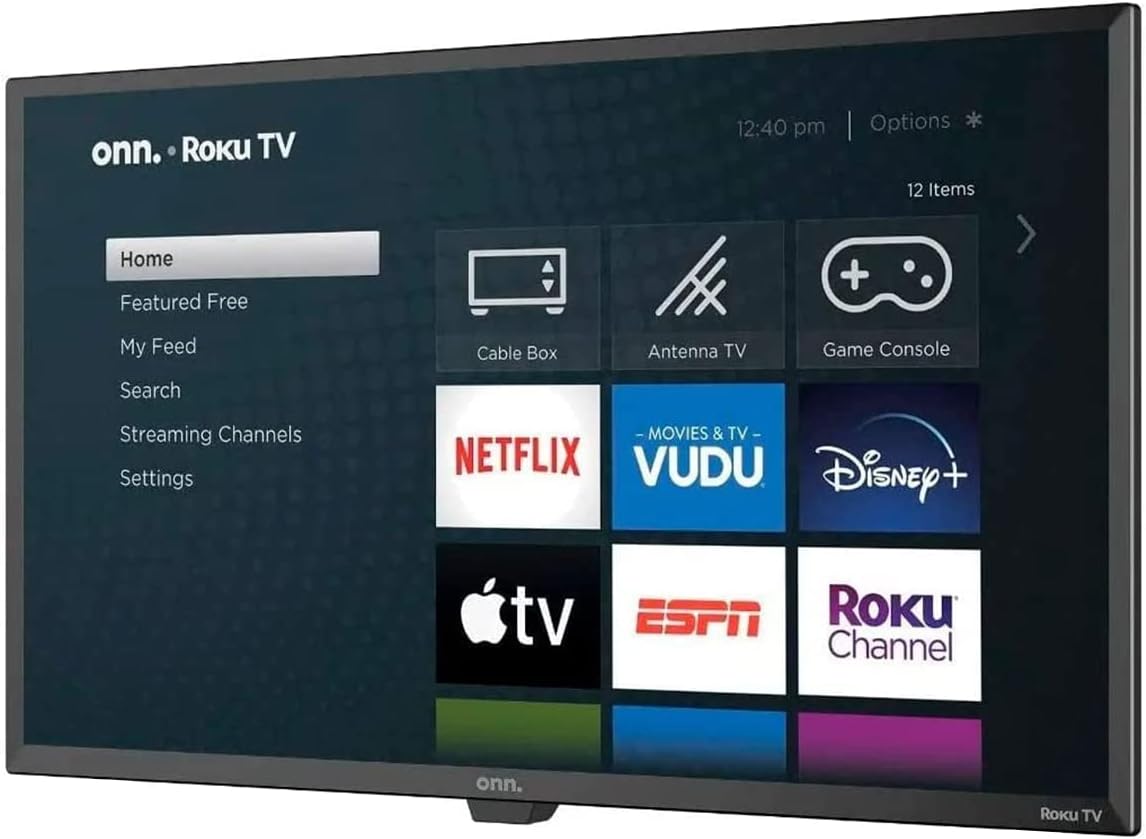
Image 5.1: The ONN Smart TV's home screen, showcasing the Roku operating system with various streaming application icons like Netflix, Disney+, and Apple TV. This illustrates the user interface for content selection.
5.3 Accessing Streaming Services
Your ONN Smart TV provides instant access to popular streaming services such as Netflix, YouTube, Disney+, and Apple TV. Select the desired app icon from the home screen to launch it. An active internet connection is required.
6. Connectivity
The TV offers various ports for connecting external devices:
- HDMI Ports: For connecting high-definition devices like Blu-ray players, game consoles, or cable/satellite boxes.
- USB Port: For connecting USB storage devices to play media files.
- Wi-Fi: Built-in wireless connectivity for internet access and streaming.
7. Smart Features and Voice Assistants
This Smart TV integrates with voice assistants for enhanced control:
- Alexa Compatibility: Control your TV using Amazon Alexa-enabled devices. You can issue commands to play movies, TV shows, adjust volume, and more.
- Google Assistant Compatibility: Use Google Assistant-enabled devices to control your TV, search for content, and manage playback.
Refer to the respective voice assistant's setup guide for pairing instructions with your ONN Smart TV.
8. Troubleshooting
If you encounter issues with your TV, consult the following common problems and solutions:
| Problem | Possible Solution |
|---|---|
| No Power | Ensure the power cable is securely connected to both the TV and a working electrical outlet. Try a different outlet. |
| No Picture, but Sound is Present | Check the input source. Ensure external devices are powered on and connected correctly via HDMI. |
| No Sound, but Picture is Present | Check the volume level and mute settings. Verify audio cables for external devices. |
| Cannot Connect to Wi-Fi | Ensure your Wi-Fi router is on and within range. Re-enter the Wi-Fi password. Restart the TV and router. |
| Remote Control Not Working | Replace the batteries. Ensure there are no obstructions between the remote and the TV's IR sensor. |
9. Specifications
| Feature | Detail |
|---|---|
| Model Number | 100012589 |
| Screen Size | 32 Inches |
| Display Technology | LED |
| Resolution | 720p (HD) |
| Aspect Ratio | 16:9 |
| Connectivity | HDMI, USB, Wi-Fi |
| Speaker Type | Built-in |
| Item Weight | 16.32 pounds |
| Voltage | 2.4E+2 Volts (AC) |
| Wattage | 100 watts |
| Supported Internet Services | Netflix, YouTube, Disney+, Apple TV |
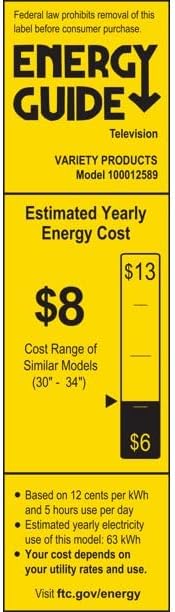
Image 9.1: The Energy Guide label for the ONN Model 100012589 television, indicating an estimated yearly energy cost of $8 based on 12 cents per kWh and 5 hours use per day.
10. Maintenance
10.1 Cleaning the Screen
Gently wipe the screen with a soft, lint-free cloth. For stubborn marks, lightly dampen the cloth with water or a specialized screen cleaner. Avoid harsh chemicals or abrasive materials.
10.2 Cleaning the Casing
Wipe the TV casing with a soft, dry cloth. Do not use liquid cleaners directly on the TV.
11. Warranty and Support
This product is offered as an Amazon Renewed item. Amazon Renewed products are professionally inspected and tested to work and look like new. If you are not satisfied with your purchase, renewed products are eligible for replacement or refund under the Amazon Renewed Guarantee.
For further assistance or support, please refer to the Amazon Renewed customer service channels.


